By the PrototypeVerdict Test Team · Tested: Oct 29, 2026 · Pricing checked: Oct 29, 2026
Our Bolt links are referral links: if you sign up through one, Bolt may reward us, at no extra cost to you. How we make money.
Vibe coding means describing an app in plain English and letting an AI app builder write and run the code for you. We pasted the same three beginner app ideas into Bolt, Lovable, Base44 and Softr on Oct 29, 2026, and logged how long each took, what broke and what it cost. This guide turns those logs into a start-to-finish path for someone who has never built anything. You don’t need to know how to code.
Quick verdict
Our verdict
| What you need | A browser and $0. All three of our test apps ran on Bolt’s free plan in one day |
| Time to a first working page | About 2 to 5 minutes for a one-page landing page in our tests (Bolt ~2–3 min, Lovable ~2 min 50 s, Base44 ~5 min) |
| Where to start | Bolt Free to try it for $0, Base44 for the fewest surprises, Lovable if you want to keep your code |
| What will trip you up | Logins and admin roles. Our client portal needed a fix or a manual step in two of three tools |
| What we didn’t test | Publishing an app, payments, custom domains and app-store mobile apps |
What is vibe coding (and what it isn’t)
The 30-second definition
You type what you want (“a landing page for a bookkeeping service with a contact form”), and an AI app builder writes the code, sets up a database if it needs one, and shows you a working preview. Then you keep chatting to change it. You judge the result by using it, not by reading the code. That’s the “vibe” part.
Vibe coding vs no-code vs hiring a developer
| Approach | How you build | What we saw |
|---|---|---|
| Vibe coding (AI app builder) | Chat in plain English; the AI writes real code | Bolt, Lovable and Base44 each built all three of our test apps from one prompt each, with 0–1 bug-fix messages per app |
| No-code with AI help | The AI sets up blocks, tables and pages inside a visual builder | Softr built a real database for every app, but on its Basic plan two of our three apps never fully worked. Softr is Not scored yet: our tests need Softr Pro (our Softr notes) |
| Chat AI (Claude, ChatGPT) | You ask a chat assistant for code or a small app | We couldn’t test Claude: its sign-up refused our test account. See building with Claude instead |
| Hiring a developer | Someone else builds it | Out of scope for our tests. Worth it for payments, sensitive data or anything regulated |
What skills you need (it isn’t coding)
No, not for the three apps we built. We never edited code by hand. But you will need to read error messages, copy them back to the AI, and occasionally click into a database screen. On Bolt, for example, we made ourselves the admin by changing one field (role = admin) in the Database tab, because the app had no button for it.
How hard is it? What our tests showed
Simple pages are easy, and logins are where it gets fiddly. Here’s how many bug-fix messages each tool needed across our three apps:
| Tool (plan tested) | Bug-fix messages across 3 apps | What went wrong |
|---|---|---|
| Base44 (Builder) | 0 | Paused once to ask permission before continuing; we typed “continue” |
| Lovable (Pro) | 1 | No way to become the first admin; a blank page after the email-confirmation link |
| Bolt (Free) | 1, plus one manual database edit | A login bug that cost about 84K tokens to fix; no built-in way to make an admin |
| Softr (Basic) | 5 follow-ups | Plan limits switched off its user groups; the client portal and invoice tracker never fully worked |
Source: our Oct 29, 2026 test logs. “Bug-fix message” means a message we had to send because something was broken.
Before you start: pick one tiny app
The “one screen, one action, one saved thing” rule
The beginners who post on r/vibecoding and r/nocode keep repeating the same advice, and our tests back it up: start with something that has one main screen, does one thing, and saves one kind of data. The smaller the first app, the fewer things can break, and the cheaper each fix is. On Bolt, our biggest app’s one fix cost more tokens than our entire landing page.
Three starter ideas we actually built
| Idea | Difficulty | Why |
|---|---|---|
| Landing page with a contact form (our Build 3) | Easiest | One page, one form. Worked first time in all three AI builders |
| Invoice tracker (our Build 2) | Medium | Several screens and rules (automatic “Overdue”), but no logins |
| Client portal with logins (our Build 1) | Hardest | Sign-up, two kinds of users (client and admin), file uploads and privacy rules |
More ideas, and what’s out of reach for now, are in what can you build with vibe coding.
Write a 5-line spec before you prompt
Before you open any tool, write down:
- Who uses it (just you, your clients, the public)
- Screens (home, form, dashboard)
- Data to save (contacts, invoices, files)
- Rules (only admins see everything; overdue after the due date)
- Done when (I can submit the form and see it saved after a refresh)
You can copy our tested prompts and adapt them.
Writing your first prompt
Anatomy of a good first prompt
This is our landing-page prompt, pasted word for word into every tool:
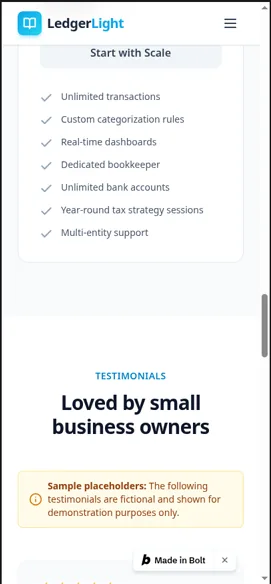
Build a one-page marketing landing page for a fictional bookkeeping service called “LedgerLight” for small businesses. Include a hero with headline and call-to-action button, three feature blocks, a three-tier pricing table ($49, $99, $199 per month), three testimonials clearly labeled as sample placeholders, an FAQ with five questions, and a contact form that saves submissions. Fast, modern, mobile-friendly.
It works because it names the audience, lists every section, gives exact numbers, and says what “done” looks like (a form that saves). Bolt, Lovable and Base44 all built it with 0 fix messages.
What to leave out of prompt #1
Leave out payments, fancy design requests and anything you’re unsure about. Add them one at a time later. If your app needs logins, say so in the first prompt, and say who the admin is (see below).
Follow-up prompts: one change per message
When something is wrong, describe one problem, what you expected, and what you saw. Lovable’s one fix in our test followed that pattern: it quoted the “Admins only” message on the page, said we had no way to become an admin, and asked for one named account to get the admin role plus an Admin link in the menu. It worked in one message. More real fix messages are in our prompt library, and the method is in how to write prompts for AI app builders.
Plan first when the change is big
Lovable has a Plan mode that writes a spec without changing code. In our test, one Plan-mode message cost 1 credit and changed nothing, and the build that followed took 1 message (1.5 credits). Bolt also documents a Plan mode that it says uses fewer tokens; we haven’t measured it.
Build your first app on a free plan (walkthrough)
Why we used Bolt Free
Bolt was the one tool we tested on its free plan: 1M tokens a month, with a cap of 300K a day (bolt.new/pricing, checked Oct 29, 2026). No card was needed, and its built-in Bolt Database handled data, logins and file storage without an outside account.
Step by step: a landing page on Bolt Free
- Sign up at Bolt (Bolt free plan) and start a new project.
- Paste the landing-page prompt above.
- Wait. Ours was working in about 2–3 minutes and used about 15K tokens, about 5% of a free day.
- Click through every section and submit the contact form. Ours saved the submission to a database table.
- Check it at phone width. Ours switched to a hamburger menu.
- Look for small bugs. Ours showed the literal text “\u2019” instead of an apostrophe (“we\u2019ll”). We left it, because our test rules only allow fix messages for broken features. A one-line message such as “Replace the literal \u2019 text with a normal apostrophe everywhere” should fix it, but we haven’t tried it.
Step up: the invoice tracker
Our invoice tracker used about 100K tokens on Bolt Free and worked with 0 fixes: clients, invoices with line items and automatic totals, Draft/Sent/Paid, automatic Overdue, and dashboard totals, all saved in a real database.
Where free runs out: the client portal
The client portal used about 185K tokens. After sign-up, login got stuck on the login screen: a 500 error caused by database security rules (row-level security) that referred to themselves. One message fixed it, but that fix alone used about 84K tokens, about 28% of a free day. We also had to set our own role to admin by hand in the Database tab.
All three apps together used the full 300K daily cap, which ran out exactly as the landing page finished. Bolt then showed: “You’re out of tokens. Switch to Pro.” A follow-up test we’d planned for that day had to wait. Bolt doesn’t publish the time its daily limit refills, so read how Bolt’s daily token limit works before you plan a long session.
The same apps on Lovable and Base44 (paid plans)
We ran the same prompts on Lovable Pro and Base44 Builder, not their free plans:
| App | Lovable (Pro) | Base44 (Builder) |
|---|---|---|
| Landing page | ~2 min 50 s, 0 fixes | ~5 min, 0 fixes |
| Invoice tracker | ~4 min, 0 fixes, but data saved in the browser only until asked | ~12.5 min, paused once for approval |
| Client portal | ~9 min, 1 fix (first admin), blank page after the email-confirm link | ~4.5 min, 0 fixes |
See our full Lovable review and the Base44 review (tested on Builder).
Can you do this on Lovable Free or Base44 Free?
From their pricing pages (not tested by us): Lovable Free gives 5 build credits a day, up to 30 a month. Base44 Free gives 25 message credits a month and up to 5 apps.
Our estimate: our landing page used 1.5 Lovable credits on Pro, so it should fit in one free day, but the client portal used all 5 daily credits plus 1 more, so it probably wouldn’t. Our three Base44 apps used about 8.75 message credits, under Free’s 25, but the invoice tracker alone used about 5.45. These are inferences from paid-plan tests, not free-plan tests. Details are in how to build an app with AI for free.
Publish it
We didn’t publish any test app, so this part comes from each tool’s docs, not our tests. Bolt says every plan, including Free, can publish to a free bolt.host address, and the Publish button itself doesn’t use tokens (Bolt FAQ). Lovable’s docs say its Publish dialog puts your app on a free lovable.app address and doesn’t use credits (Lovable docs). Base44 apps go live when you click Publish (Base44 docs). Full steps and checks: how to publish your AI-built app.
Common beginner mistakes (we made some of them)
Assuming your data is saved
Lovable’s invoice tracker passed our “still there after a refresh” check, but the data lived only in the browser (localStorage). Open it on another device and it’s empty. Lovable itself suggested “Add online invoice storage.” Ask for a database in your first prompt.
Forgetting the first admin
If your app has an admin area, someone has to be the first admin. Lovable needed a fix message; on Bolt we edited the database by hand; Base44’s preview ran as the owner with admin rights. See how to add login and a database.
Letting the AI loop on an error
Every fix attempt costs tokens or credits. Bolt’s one login fix used about 28% of a free day. If two attempts don’t work, stop, roll back, or plan first. Our guide to fixing an app the AI broke has the steps, and there’s a separate Lovable “exceeded quota” fix.
Leaving the app public by accident
Base44 marked our brand-new apps “Public” before we’d published anything. Switch the visibility setting before real data goes in.
Skipping the security check
Lovable’s free deep scan found no issues in our portal, but its dependencies panel listed 12 known issues without details. Base44’s free “Check Security” scan flagged 7 high-severity issues in third-party packages. We found no scan button in Bolt’s project settings, although Bolt’s docs describe a database security check on every plan. Run whatever scan your tool has, and never put real client data into a test app.
Trusting invented content
AI builders fill gaps with made-up text. Lovable wrote its own FAQ answers, and Softr added a “Trusted by 1,000+ small businesses” badge and a yearly price toggle ($39/$79/$159) we never asked for. Read every word before anyone else sees it.
What it costs (free vs paid)
Prices as of Oct 29, 2026, billed monthly unless noted. Re-check the source before you buy.
| Tool | Free plan | First paid plan | Source |
|---|---|---|---|
| Bolt | $0: 1M tokens/month, 300K/day | Pro $25/mo ($18/mo billed annually), starts at 10M tokens, no daily limit | bolt.new/pricing |
| Lovable | $0: 5 build credits/day, max 30/month; no code download | Pro $25/mo for 100 credits ($21/mo billed annually) | Lovable plans (docs) |
| Base44 | $0: 25 message credits/month, up to 5 apps | Starter $20/mo ($16 billed annually); Builder $50/mo ($40 billed annually) | base44.com/pricing |
| Softr | Free plan available | Basic $25/mo ($19 billed annually); Pro $119/mo ($99 billed annually) | Softr plans (docs) |
| Claude (chat-assisted building) | Free plan | Pro $20/mo ($17 billed annually) | claude.com/pricing |
What our three test builds actually used
| Tool (plan) | Used | Share of allowance |
|---|---|---|
| Bolt (Free) | ~300K tokens | The whole daily cap |
| Lovable (Pro, $25/mo) | 5.5 credits from the balance (105 → 99.5), plus that day’s 5 free daily credits | ~5.5% of 100 credits |
| Base44 (Builder, $50/mo) | ~8.75 message credits (+4 integration credits) | ~3.5% of 250 |
| Softr (Basic, $25/mo) | 4.01 AI credits | Two of three apps didn’t fully work |
Lovable’s credit counter was inconsistent in our test. Our balance fell by 5.5 credits (105 to 99.5), and the day’s 5 free daily build credits were used up during the first build. Lovable’s usage page listed 6, 2.70 and 1.5 credits for the three projects, about 10.2 in total. Those figures don’t line up build by build with the balance drops (1, 3 and 1.5), and we couldn’t reconcile them, so this page uses the balance figures. We paid $25 plus tax for Lovable Pro on Oct 29, 2026.
When to upgrade, and when not to
You may not need to pay yet. Upgrade when the free limit is the only thing stopping you, not before. Try estimating your credits, see what our builds actually used, and check the AI app builder pricing tracker for changes.
Which tool should a beginner start with?
Base44: fewest surprises. 0 bug-fix messages and a real database in all three apps (tested on Builder). Watch the default “Public” setting, and know that exported code still relies on Base44’s backend.
Lovable: keep your code. Fastest overall in our test. Git sync is on every plan and code download on paid plans, per Lovable’s docs (tested on Pro). In your first prompt, say who the admin is and that data goes in a database.
Bolt: best free start. All three apps worked on Bolt Free with a real database, then the day’s tokens ran out (tested on Free). Start on Bolt free →
Full ranking: best AI app builders for beginners. Head-to-heads: Bolt vs Lovable for beginners, Base44 vs Lovable, Base44 vs Bolt, and the Bolt review.
Your next steps (the beginner path)
- Pick one tiny app: what can you build with vibe coding
- Write the prompt: how to write prompts for AI app builders and our tested prompts
- Build it for $0: how to build an app with AI for free
- Follow a tool tutorial: Lovable tutorial for beginners or Base44 step-by-step tutorial
- Add accounts and saved data: how to add login and a database
- When it breaks: how to fix it when the AI breaks your app
- Share it: how to publish your AI-built app
By job: vibe coding for accountants, vibe coding for marketers, build a client portal with AI.
Vibe coding for beginners FAQ
Do I need to know how to code to vibe code?
No, not for the three apps we built. We never edited code by hand. You will still read error messages, paste them back to the AI, and occasionally use a database screen, as we did once on Bolt to make ourselves the admin.
Is vibe coding hard?
Simple pages are easy: our landing page worked in about 2 to 5 minutes with no fixes in Bolt, Lovable and Base44. Apps with logins are harder. Our client portal needed one fix in Lovable, one fix plus a manual database edit in Bolt, and none in Base44.
Can I vibe code for free?
You can start without paying. Bolt, Lovable and Base44 all have $0 plans, but only Bolt’s was part of our test: it built all three of our apps in one day before the 300K daily token cap ran out. Lovable’s and Base44’s free allowances come from their own docs, and we tested their paid plans. Our free-plan guide compares all three.
How much does vibe coding cost?
You can start at $0. The first paid plans we track cost $20 to $25 a month when billed monthly, as of Oct 29, 2026. Our three test apps used a small share of each paid plan’s monthly allowance, but the whole of Bolt’s free daily allowance.
Is vibe coding safe?
Partly. Our security scans flagged dependency issues in Lovable and Base44 apps, and Base44 apps defaulted to Public. Check access with a second account and run the tool’s security scan before you share an app or add real client data.
What’s the best way to learn vibe coding?
Build one tiny app, then a slightly bigger one. Our landing page worked within about 5 minutes of a single prompt in Bolt, Lovable and Base44. If you’d like a structured course, Google Cloud’s “Vibe Coding for Beginners: From Zero to App” on Coursera teaches the idea with Google’s own Gemini tools rather than the builders we tested. We haven’t taken it.
Which AI app builder should a beginner use?
Base44 needed the fewest fixes, Lovable is best if you want your code, and Bolt is the best free start. Our full ranking is in our best AI app builders for beginners guide.
Sources and update history
- Our tests: same three prompts in every tool, Oct 29, 2026. See how we test.
- Pricing: official pages linked in the cost table, checked Oct 29, 2026.
- October 29, 2026: First published.