By the PrototypeVerdict Test Team · Tested: Oct 29, 2026
We pasted the same three prompts, word for word, into Lovable, Bolt, Base44 and Softr on Oct 29, 2026. Some lines were followed exactly, some were taken too literally, and a few were ignored. This guide breaks down what we learned, line by line, so your first prompt does more of the work and your follow-ups cost less. If you just want prompts to copy, they’re in our tested prompt library.
New to all this? Start with vibe coding for beginners.
Quick verdict
Our verdict
| The rule that mattered most | Put the whole spec in the first prompt: who, screens, data, rules, and what “done” means |
| Lines that worked everywhere | Exact prices ($49/$99/$199), “testimonials clearly labeled as sample placeholders,” “a contact form that saves submissions” |
| Lines taken too literally | “Data must be saved so it’s still there after a page refresh”: Lovable used browser storage |
| What our prompts forgot | Who the first admin is. Two tools built an admin page nobody could open |
| Follow-ups | One problem per message. Our longest one made Softr give up |
Step 1: write a 5-line spec before prompt #1
| Line | Ask yourself | Example (our invoice tracker) |
|---|---|---|
| Who | Who uses it? | “an invoice tracker for a freelancer” |
| Screens | What pages or views? | clients, invoices, a dashboard |
| Data | What gets saved, with which fields? | “clients (name, email)… invoice number, client, issue date, due date, line items (description, quantity, rate)” |
| Rules | What happens automatically? Who can see what? | “Overdue is automatic when the due date has passed and it isn’t paid” |
| Done when | How will you check it works? | “still there after a page refresh. Works on mobile.” |
Then turn the five lines into one paragraph. Plain English is fine. All four tools understood our prompts without any technical words.
Step 2: learn from our three prompts, line by line
The landing page (easiest)
Build a one-page marketing landing page for a fictional bookkeeping service called “LedgerLight” for small businesses. Include a hero with headline and call-to-action button, three feature blocks, a three-tier pricing table ($49, $99, $199 per month), three testimonials clearly labeled as sample placeholders, an FAQ with five questions, and a contact form that saves submissions. Fast, modern, mobile-friendly.
- Worked: every listed section appeared in Bolt, Lovable and Base44, with 0 fix messages. All three saved the contact form to a database table. Testimonials were labeled as samples in every tool.
- Exact numbers helped: all three AI builders used $49/$99/$199. Softr also added a yearly toggle, set as the default, with invented prices ($39/$79/$159).
- Not said, so invented: FAQ answers and feature copy. Lovable wrote its own FAQ and plan details, and Softr added a “Trusted by 1,000+ small businesses” badge.
- Lesson: give exact numbers, and add “Don’t invent statistics, prices or customer claims.” (We haven’t tested that line yet.)
The invoice tracker (medium)
Build an invoice tracker for a freelancer. I can add clients (name, email) and create invoices with an invoice number, client, issue date, due date, line items (description, quantity, rate), and an automatic total. Each invoice has a status: Draft, Sent, Paid, Overdue (Overdue is automatic when the due date has passed and it isn’t paid). A dashboard shows total outstanding, total paid this month, and a list of overdue invoices. Data must be saved so it’s still there after a page refresh. Works on mobile.
- Worked: listing every field got us every field. Line items and automatic totals worked in Bolt, Lovable and Base44.
- Taken too literally: “saved so it’s still there after a page refresh.” Lovable saved invoices in the browser (localStorage). It passed the refresh test, but the data wouldn’t follow you to another device. Bolt and Base44 used a real database.
- Interpreted narrowly: Base44 applied “Overdue” only to invoices marked Sent, not to Drafts.
- Lesson: say where data lives: “Save everything in a real database, not in the browser.” Spell out edge cases: “Overdue applies to any unpaid invoice, whatever its status.”
The client portal (hardest)
Build a client intake portal for a small accounting firm. Clients can sign up and log in with email and password. After logging in, a client fills out an intake form (full name, business name, entity type dropdown: Sole proprietor / LLC / S corp / C corp / Partnership, tax year, a notes field) and uploads up to 3 documents (PDF or image). Clients can see their own past submissions and their status. A separate admin view lists all submissions in a table with a status dropdown (New, In review, Complete) that the admin can change. Clean, professional design that works on mobile.
- Worked: the form fields, the five-option dropdown, uploads, “own past submissions” and the admin table with a status dropdown, in Lovable, Base44 and (after a fix) Bolt.
- Missing from our prompt: who the admin is. Lovable’s admin page turned everyone away with “Admins only,” and on Bolt we had to edit the database to make ourselves admin. Base44 ran its preview as the owner, who was already admin.
- Not followed: Softr first set sign-in to an email one-time code, a feature its Basic plan doesn’t include, so nobody could log in until a follow-up.
- Lesson: add “The first account to sign up is the admin” or “Make [your email] the admin.” (We haven’t tested that line yet.) More in how to add login and a database.
Step 3: say what not to change
Follow-ups go wrong when the AI “improves” things you didn’t ask about. End each follow-up with a scope line:
- “Change only the invoice list. Don’t touch the dashboard or the database.”
- “Fix only this error. Change nothing else.”
On Bolt, scope also saves money: Bolt says bigger projects use more tokens per message, because it re-reads your files (Bolt token docs).
Step 4: fix prompts that worked (and one that didn’t)
From our logs (full list in fix messages we actually sent):
| Tool | What we sent | Result |
|---|---|---|
| Lovable | “The /admin page says Admins only and I have no way to become an admin. Please make the account [your admin email] an admin…” (full message) | Worked first time |
| Base44 | “continue” (after it paused at a “processing checkpoint”) | Finished the build |
| Softr | A one-message request to switch sign-in to email and password and make the admin view and clients’ own submissions work on our plan | Only partly fixed. The AI said it had re-enabled user groups; it hadn’t |
| Softr | A long request listing four problems at once | “The request took too long to reason about and I couldn’t retrieve the response” |
What the good one has: the exact page, the exact text on screen, what we wanted, and why. What the bad one has: four problems in one message. More on this in how to fix it when the AI breaks your app.
Step 5: plan or chat before big changes
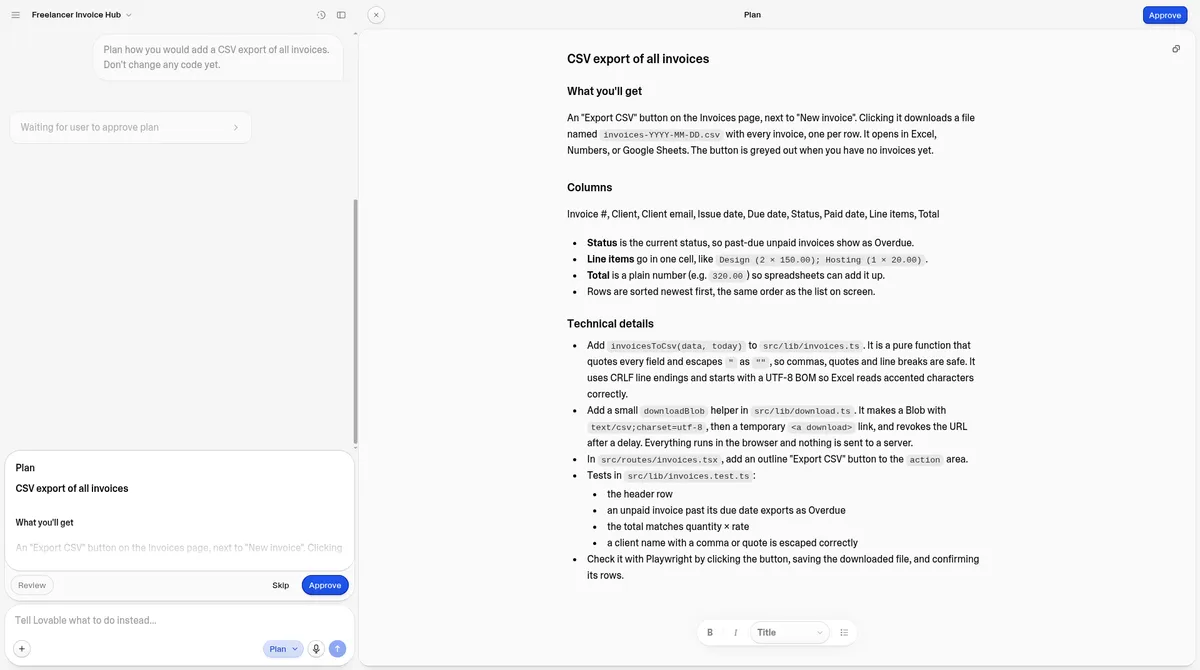
- Lovable Plan mode: one Plan-mode message cost 1 credit in our test, changed no code and produced a spec (a CSV export button with nine columns). Building it then took 1 message (1.5 credits). Lovable also has a Chat mode, which we didn’t test. Lovable’s docs say its current chat pricing applies only through October 31, 2026, so check the credits docs before you lean on it.
- Bolt: documents a Plan mode that it says uses fewer tokens because it doesn’t change code. We haven’t measured it.
- Base44: we added the same CSV export with one normal message (1.81 message credits). Base44’s editor docs describe a Discuss mode for talking a change through without editing the app (Base44 app editor docs); we didn’t test it.
Use planning for anything that touches the database or logins. Skip it for small wording changes.
Step 6: know what a prompt costs in each tool
| Our app | Bolt Free (tokens) | Lovable Pro (credits from balance) | Base44 Builder (message credits) |
|---|---|---|---|
| Landing page | ~15K | 1.5 | ~1.65 |
| Invoice tracker | ~100K | 3 | ~5.45 |
| Client portal | ~185K (one fix ~84K) | 1, plus that day’s 5 free daily credits | ~1.65 |
Source: our Oct 29, 2026 test logs. Units differ by tool, so compare within a column, not across. Lovable’s credit counter was inconsistent in our test, so the Lovable column shows how far the balance dropped. Its per-project usage page gave different numbers that added up to about 10.2.
The pattern: a complete first prompt is cheap; fixes on a big project are expensive. Our one Bolt fix cost more than five landing pages.
To estimate what your own app might use, try our AI app builder cost calculator; the raw numbers are in our AI app builder usage study. Building on $0? See how to build an app with AI for free.
Step 7: a template you can copy
Build a [type of app] for [who]. [Who] can [main action]. Screens: [list]. Save [data, with fields] in a real database, not in the browser. Rules: [automatic rules and who can see what]. The admin is [your email / the first account to sign up]. Use exactly these numbers and labels: [prices, statuses]. Don’t invent statistics, prices or customer claims. It’s done when [how you’ll check]. Works on mobile.
The bracketed lines on database, admin and “don’t invent” come from problems in our tests; we haven’t yet run this full template as a new test. For tested, ready-made prompts (including packs for accountants and freelancers), see the prompt library. Want to try one for free? Bolt’s free plan is the one we tested; you can paste a prompt in at bolt.new.
Role-specific examples: vibe coding for accountants and vibe coding for marketers. Tool walkthroughs: Lovable tutorial for beginners and Base44 step-by-step tutorial.
Related tests: Lovable review · Bolt review · Base44 review
Not sure what to build first? See what you can build with vibe coding.
Prompting AI app builders FAQ
How do I write a good prompt for Lovable?
Describe who the app is for, every screen, the data and its fields, the rules, and how you’ll know it works. Our three prompts built working apps in Lovable with one fix message in total. Add “use a real database” and name the admin, the two things our prompts missed.
What are the best prompts for vibe coding?
Specific ones. Our prompts that named every field, exact prices and what “done” looks like worked first time in Bolt, Lovable and Base44. Our tested prompts are in our prompt library.
Should I put everything in one prompt?
Put the whole spec in the first prompt, then send one change per follow-up. Our complete first prompts needed 0 fixes for the landing page and invoice tracker in Bolt, while one follow-up fix on a bigger app cost about 84K tokens.
Why did the AI ignore part of my prompt?
In our tests, the AI took vague lines literally or filled gaps itself: “saved after a refresh” became browser storage in Lovable, and Softr added prices we never gave it. Say exactly what you mean, including where data is saved.
Does planning mode save credits?
In Lovable, one Plan-mode message cost 1 credit and changed no code, which helped us scope a feature before building it. Bolt says its Plan mode uses fewer tokens, but we haven’t measured how many.
Do the same prompts work in every AI app builder?
They’ll run anywhere, but don’t expect identical apps. Our client-portal prompt, pasted unchanged into four tools, needed no fixes in Base44, one each in Lovable and Bolt, and never became a working portal on Softr Basic. Plan to test and adjust in whichever tool you pick.
Update history
- October 29, 2026: First published. Prompts and outcomes from our Oct 29, 2026 test round (Lovable Pro, Base44 Builder, Bolt Free, Softr Basic).