By the PrototypeVerdict Test Team · Pricing checked: Oct 29, 2026 · Last tested: Oct 29, 2026 on the Builder plan (billed monthly)
We may earn a commission if you buy through links on this page. How we make money.
Quick verdict
Our verdict
| Best for | Non-coders and small teams building internal tools, portals and back-office apps who want everything in one place |
| Not ideal for | Anyone who needs to move their app (backend included) off the platform later |
| Starting price (as of Oct 2026) | Free plan; Starter $16/month billed annually |
| Standout | Database, auth, analytics and hosting included on every plan, even Free |
| Watch out for | Exported code still depends on Base44’s backend; Base44 doesn’t support self-hosting |
| Our score | 8.1/10 from our Oct 29, 2026 hands-on test (score breakdown, how we score) |
Bottom line (based on our Oct 29, 2026 test and Base44’s documentation): Base44 is built for people who want a working app with the least setup. Every plan, including Free, comes with a database, user logins and hosting. The trade-off is lock-in. Base44 markets “nothing is locked to the platform,” but its own developer docs say exported code still relies on Base44 for data, logins and functions, and that self-hosting isn’t supported. If that’s acceptable for your use case (most internal tools), Base44 is one of the simplest ways to get there.
What is Base44?
Base44 calls itself “a no-code AI platform that uses vibe coding to build fully-functional apps and websites.” You describe what you need in plain language and it builds the frontend, backend, database, user authentication and payments. It also lists integrations with everyday tools such as Gmail, Slack, Notion, Google Drive, HubSpot and Salesforce. Source: https://base44.com/pricing
Base44 positions its apps for things like “a productivity tool, a back-office system, a customer portal.” Source: https://base44.com/pricing
Who Base44 is for
Non-coders who want zero infrastructure decisions. You don’t pick a database, a host or an auth provider. Base44’s pricing page lists an “integrated backend and database system,” “authentication and user management,” cloud storage and an analytics dashboard on every plan. Source: https://base44.com/pricing
Accountants, bookkeepers and tax pros building internal tools. Base44’s sweet spot lines up with common firm needs: an engagement tracker, a document-request checklist, a staff scheduling board, or a simple client portal. Practical cautions:
- Build with fake data first. Don’t load real taxpayer data into a prototype.
- Know where your data lives. Base44 hosts the database and doesn’t support self-hosting, so review its security documentation and your firm’s data policies before going live. Base44’s security overview says it is SOC 2 Type II and ISO 27001 certified, that data is encrypted at rest and in transit, and that you’re responsible for your own app’s security settings, including running its built-in security scan before you publish. Source: https://docs.base44.com/Setting-up-your-app/security-overview
- Keep backups. Base44 lets you export data tables as CSV files (see “Code export” below).
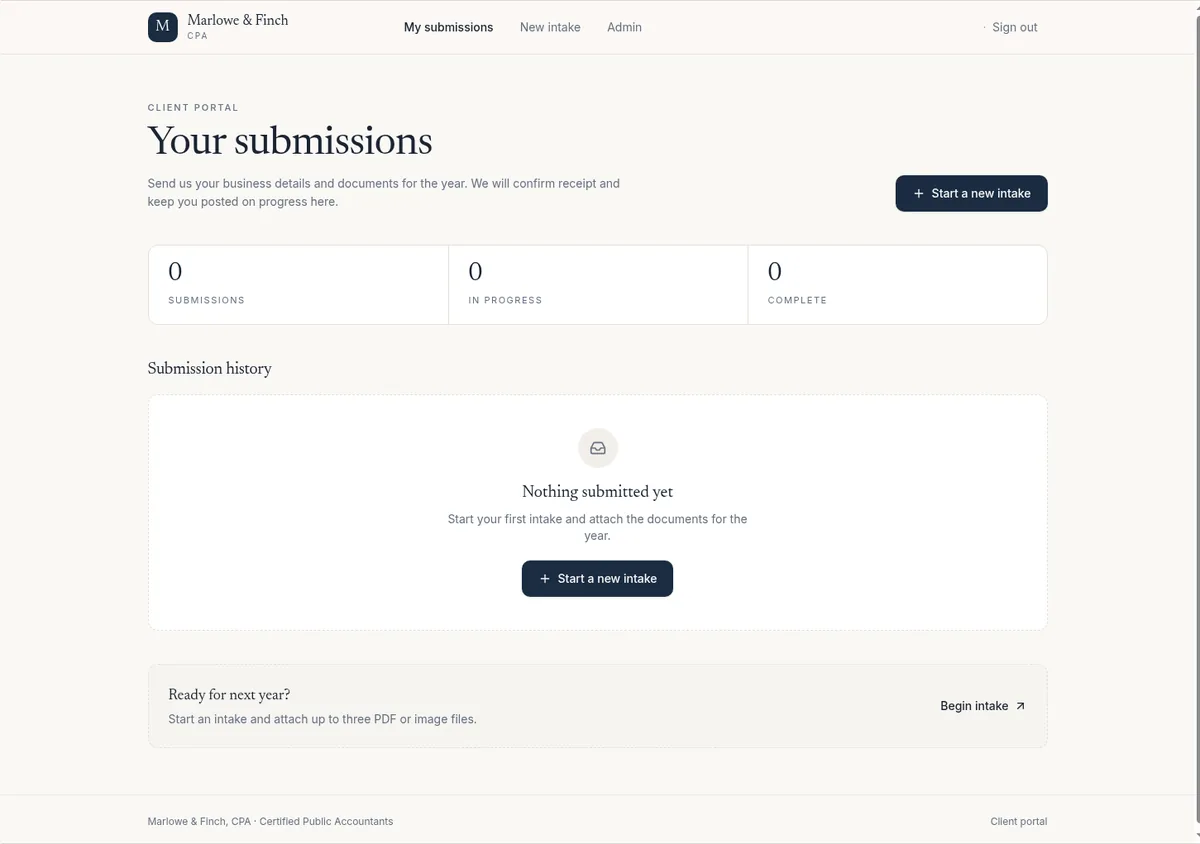
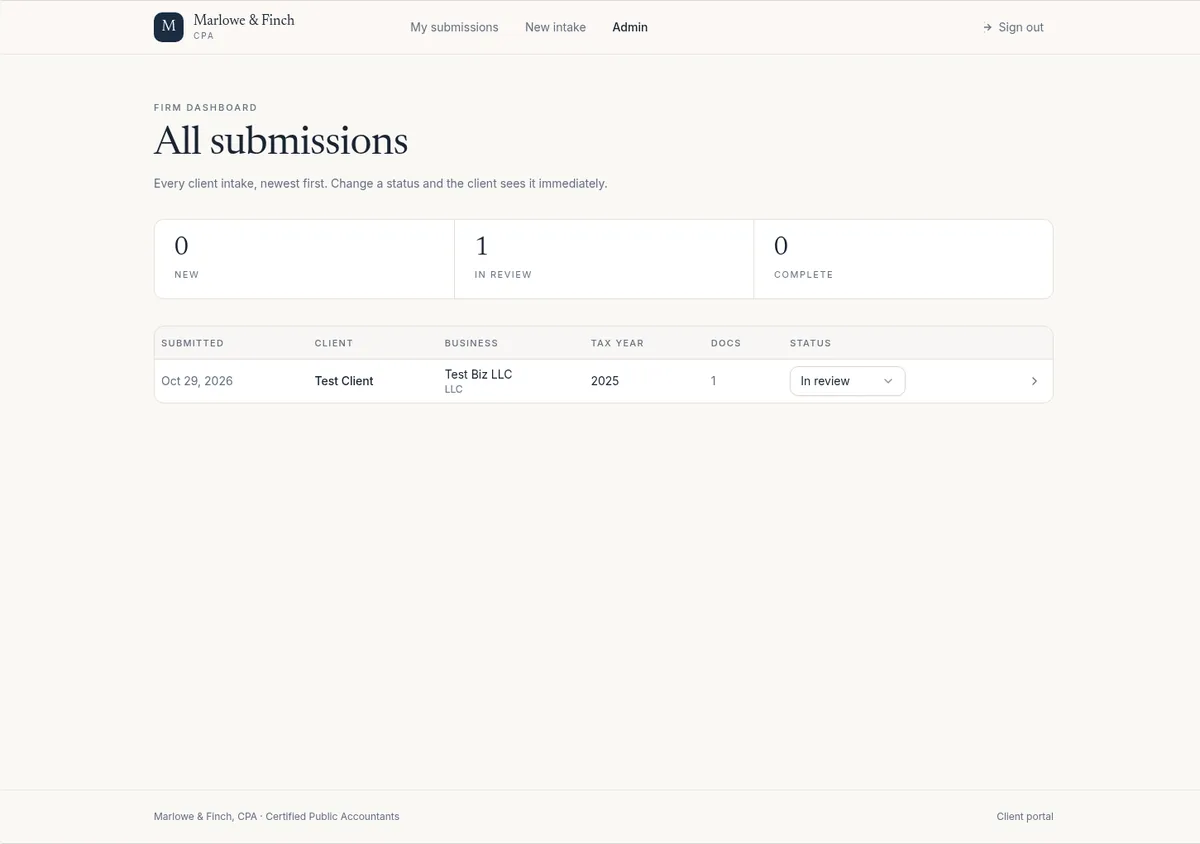
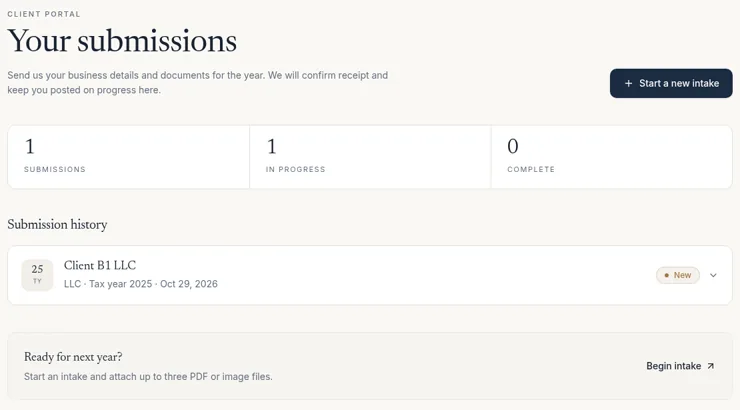
What we saw in our test (Oct 29, 2026, Builder plan): our client intake portal test app worked in about 4.5 minutes with no fix messages. The intake form, document upload (to private file storage), a client’s own submissions and an admin table with status changes all worked, and the data was saved in Base44’s built-in database. Access control passed our recheck. A separate non-admin test client saw no Admin link, got a “Firm staff only” message on the admin page, and saw only its own intake. A signed-out guest who opened the admin page was sent to the login page. Base44’s sign-up also rejected disposable email addresses and required a 6-digit code sent by email. Also note that new apps defaulted to “Public” visibility in our test, even though nothing was published.
User management and security scan (follow-up test, Oct 29, 2026): under Dashboard > App Users you can invite users by email or CSV file with a role, switch a user between admin and user in their edit panel, see pending requests and export the user list to CSV. We didn’t find a single switch to turn off sign-up, but app visibility (Public, Private or Workspace) and each sign-in method can be set separately. Base44’s free “Check Security” scan ran five checks in about a minute and used no credits. It flagged 7 high-severity vulnerabilities in two third-party packages the app depends on (1 in zod, 6 in vite) and offered a “Fix all” button, which we didn’t use. Check findings like these before any real client uses an app.
Freelancers. Good for fast client deliverables where the client is happy to stay on Base44. Less good if the client expects to take full ownership of the stack, because the backend stays on Base44.
Who should skip it: Developers who want a portable codebase and backend, or founders who expect to move to their own infrastructure. Look at Lovable instead. Compare them in Base44 vs Lovable.
Base44 pricing (as of October 2026)
Base44 has five self-serve plans plus custom Enterprise pricing. Base44 says annual billing saves 20% on every paid plan.
Plans
| Plan | Billed annually (per month) | Billed monthly | Message credits/mo | Integration credits/mo | Key extras |
|---|---|---|---|---|---|
| Free | $0 | $0 | 25 | 100 | Up to 5 apps; auth, database, analytics |
| Starter | $16/mo | $20/mo | 100 | 2,000 | Unlimited apps, in-app code edits, connect a domain (free domain for 1 year listed on annual billing) |
| Builder (“Popular”) | $40/mo | $50/mo (what we paid, before tax) | 250 | 10,000 | Adds AI model select, GitHub integration, 25 credits to share with a friend |
| Pro | $80/mo | $100/mo | 500 | 20,000 | Builder features + early access to beta features |
| Elite | $160/mo | $200/mo | 1,200 | 50,000 | Pro features, “top credits and dedicated support” |
| Enterprise | Custom | Custom | Custom | Custom | Talk to sales |
Prices in USD, as of Oct 29, 2026, read from both the Yearly and Monthly views of https://base44.com/pricing. The page opens on the yearly view, so the $40 Builder price you see first is the annual-billing price; on monthly billing Builder is $50/month, which matches what we paid for our test. Base44 says yearly billing saves 20%.
What the credits mean
Base44 defines credits as “your monthly usage allowance for AI messages and integration actions,” and says exact usage “varies based on the action and the selected AI model.” There are two pools: message credits (building with the AI) and integration credits (actions your app performs through integrations). Source: https://base44.com/pricing
What our three test builds used (Oct 29, 2026, Builder plan: 250 message credits and 10,000 integration credits a month):
| Test build | Message credits | Messages after the first prompt | Time to working |
|---|---|---|---|
| Client intake portal | ~1.65 | 0 | ~4.5 min |
| Invoice tracker | ~5.45 | 1 (“continue” after a checkpoint pause, not a bug fix) | ~12.5 min |
| LedgerLight landing page | ~1.65 | 0 | ~5 min |
| Total | ~8.75 (about 3.5% of the month) |
After our tests, the account showed 4 of its 10,000 monthly integration credits used. Base44 says integration credits are a separate pool from message credits, spent when your app runs Base44 services such as AI calls, file uploads, emails and in-app agents. We didn’t connect an integration such as email, so we haven’t measured how fast a real integration uses them. That’s untested.
Our CSV export follow-up (below) used 1.81 more message credits, bringing the total to about 10.56 of 250.
Extra costs
Base44 says there are no hidden fees, but third-party services you connect (it names Stripe, SendGrid and OpenAI) bill you directly. Source: https://base44.com/pricing
Discounts
Education and non-profit pricing are handled case by case, and founders can apply to “Base44 for Startups” for a free annual license and credits. Source: https://base44.com/pricing
The math: The lowest paid entry is $16/month on annual billing, which is $192 for the year paid up front (12 × $16, per Base44’s description of how annual billing is charged), or $20 on monthly billing. That’s cheaper than Lovable’s and Bolt’s entry plans ($25/month billed monthly for both; $21 and $18 a month billed annually), but compare the usage: 100 Base44 message credits isn’t the same unit as 100 Lovable credits or Bolt’s token allowance. Only a hands-on test tells you which goes further for your app.
Code export and ownership: the important fine print
Base44’s pricing FAQ says: “You own everything you build on Base44: your code, your data, your users. Two-way GitHub sync exports the full source code to your own repo at any time. Nothing is locked to the platform.” Source: https://base44.com/pricing
Base44’s developer documentation adds the details that matter:
- GitHub two-way sync requires the Builder plan or higher. Saved changes push to your repo automatically. Source: https://docs.base44.com/developers/app-code/local-development/github
- ZIP export is on Builder and higher. The ZIP contains a standard React project built with Vite, your frontend code, backend functions and data structure. It does not include your app’s data (export tables as CSV), secrets, users or version history.
- The exported code still runs on Base44’s backend. It uses the Base44 SDK for data, logins, backend functions and integrations. In Base44’s words: “Base44 doesn’t support self-hosting.” To run fully outside Base44 you’d need to replace those parts with your own backend.
Source for the last two points: https://docs.base44.com/documentation/building-your-app/developer-tools
What this means: you can keep a copy of your code and edit it in your own tools, but you can’t easily pick the whole app up and move it. For an internal tracker that’s usually fine. For a product you plan to sell or a client who wants full control, it’s a real limitation.
What we saw (Oct 29, 2026, Builder plan): the editor has a Code tab with the full file tree. “Export project as ZIP” and “GitHub connection” both appear in the editor menu. In a follow-up test, “Export project as ZIP” downloaded a ZIP with 108 files. The GitHub connection is offered, but we didn’t connect it. We also haven’t tried running the exported code outside Base44, so we can’t confirm what that would take beyond what Base44’s docs say. That’s untested.
Base44 features that matter (documented)
- Included backend on every plan: database, authentication and user management, cloud storage, analytics dashboard. Source: https://base44.com/pricing
- Backend functions: custom server-side code (Deno TypeScript) for business logic, third-party APIs with protected credentials and webhooks. Source: https://docs.base44.com/developers/backend/resources/backend-functions/overview
- In-app code edits: Starter and higher. Source: https://base44.com/pricing
- AI model select: Builder and higher. Source: https://base44.com/pricing
- Custom domain: Starter and higher, plus a free domain for 1 year on annual billing. Source: https://base44.com/pricing
- Multi-user editing and collaboration: every plan. Source: https://base44.com/pricing
- GitHub workflow: branches and pull requests, with Base44 handling deployment from reviewed code. Source: https://docs.base44.com/documentation/building-your-app/developer-tools
Our Base44 test: 3 apps built on the Builder plan
Tested Oct 29, 2026 on Base44 Builder (billed monthly). We used the same three prompts we use in every tool, pasted word for word (see how we test), with fake data and test accounts only. Nothing was published.
Build 1: Client intake portal
- Result: working with 0 fix messages. First preview in about 1.4 minutes, fully working in about 4.5.
- Credits: about 1.65 message credits.
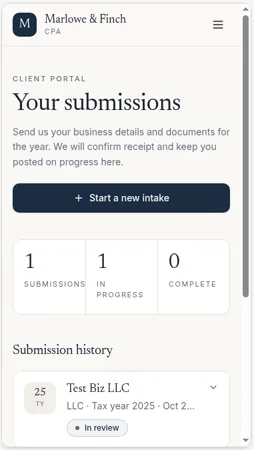
- Worked: the intake form with the entity-type dropdown, a PNG upload to private file storage, a client’s own submissions, and the admin table, where a status change from New to In review was still there after a refresh. Data was saved in Base44’s built-in database.
- Client vs admin (rechecked Oct 29, 2026): passed. The app’s sign-up rejected a disposable email address (“Disposable email detected”) and required a 6-digit code sent by email. Signed in as a separate non-admin client, we saw no Admin link, got “Firm staff only” on the admin page, and saw only that client’s own intake. A signed-out guest who opened the admin page was sent to the login page.
Build 2: Invoice tracker
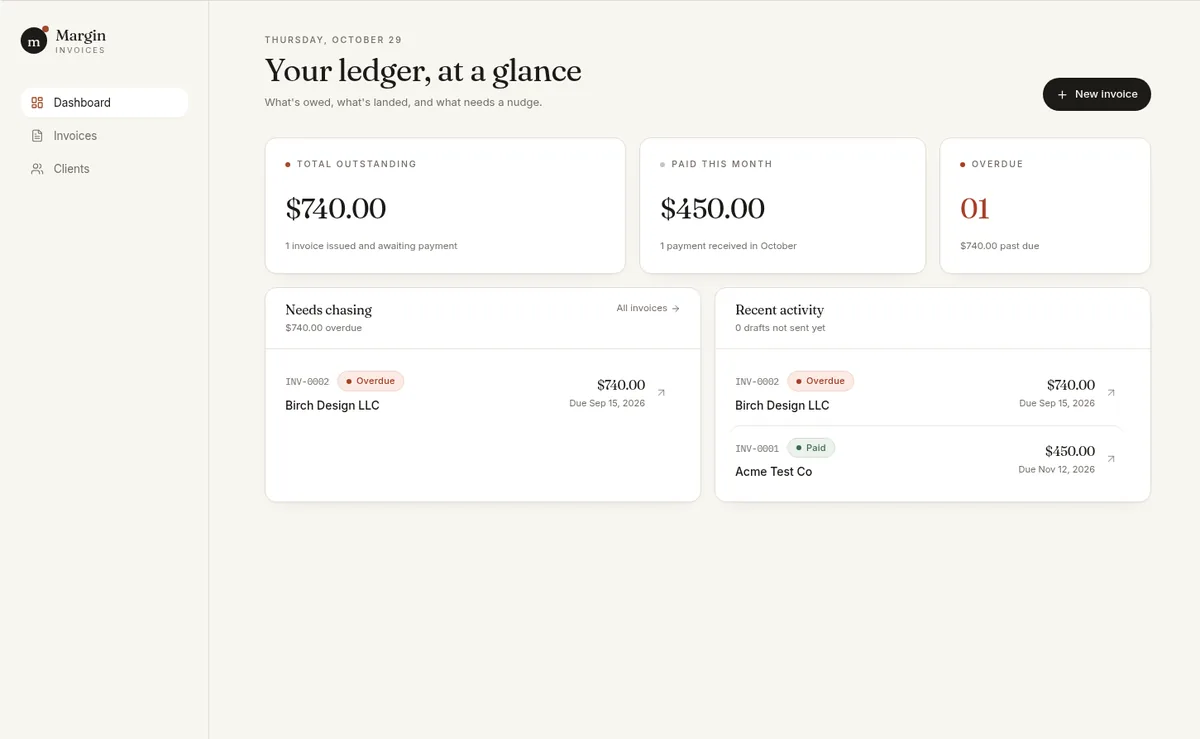
- Result: working with no bug fixes, but slower. The first preview (with sample data) appeared in about 2.5 minutes, and the app was fully working in about 12.5. Partway through, Base44 paused at a “processing checkpoint” and asked us to approve deleting its own test record. We sent one “continue” message.
- Credits: about 5.45 message credits, the most of our three builds.
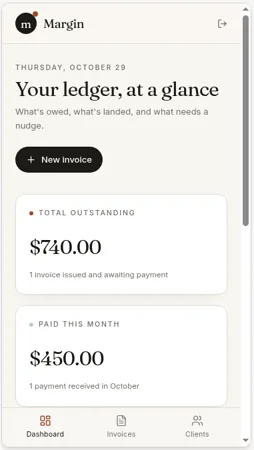
- Worked: two clients, line items with automatic totals, marking invoices Paid, automatic Overdue, and dashboard totals (outstanding, paid this month and overdue count), all still there after a refresh.
- Storage: a real database. We could see Client and Invoice tables under Dashboard > Data. In the same test, Lovable kept this app’s data in the browser only (see Base44 vs Lovable).
- Quirk: Overdue was applied only to invoices with the status Sent.
CSV export (follow-up test, Oct 29, 2026): we asked for an export, which took one message (1.81 message credits). The button downloaded our 2 test invoices with nine labeled columns: Invoice number, Client, Client email, Issue date, Due date, Status, Total, Paid date and Notes.
Build 3: LedgerLight landing page
- Result: working in about 5 minutes (first preview at about 4) with 0 fix messages, using about 1.65 message credits.
- Worked: the hero call-to-action, three features, the $49/$99/$199 pricing table, three testimonials labeled as samples, five FAQs, and a contact form that saved submissions to a database table.
- Note: Base44 filled in a placeholder contact email that you’d need to replace.
- Mobile: captured with Base44’s phone preview (about 373px wide).


Our score breakdown
| Part of the score (weight) | Score | Why |
|---|---|---|
| Ease of use (25%) | 9.0/10 | No bug fixes. The invoice tracker paused for our approval, and the three apps took about 22 minutes in total |
| Output quality (25%) | 9.5/10 | Every feature in the three prompts worked. Overdue applied only to invoices marked Sent |
| Pricing value (20%) | 7.0/10 | Tested on Builder at $50/month billed monthly. The three builds used about 8.75 of 250 message credits (about 10.56 with the CSV follow-up), and usage is split across two credit pools |
| Backend and data (15%) | 9.5/10 | Real database in all three apps, and a separate client account was kept out of the admin view. New apps defaulted to “Public” visibility. The security scan’s 7 dependency warnings are reported above but not scored, the same as for every tool |
| Code ownership and export (15%) | 4.5/10 | We downloaded a ZIP (108 files), and GitHub is offered. Base44’s docs say exported code still relies on its backend and self-hosting isn’t supported. Export needs Builder or higher, and the CSV export took one extra message |
| Overall | 8.1/10 | Weighted average, rounded to one decimal |
Scores come only from our own test log. How we score explains each deduction.
Pros and cons
Pros (from documented features and pricing)
- Backend, auth, storage, analytics and hosting included on every plan, including Free
- Lowest paid entry price of the three tools we tested ($16/mo billed annually, $20/mo billed monthly)
- Unlimited apps on all paid plans; Free allows up to 5
- Built-in integrations with common business tools
- Two-way GitHub sync and ZIP export (Builder and higher)
- Startup program with a free annual license (application required)
Cons (from documented policies)
- No self-hosting; exported code depends on Base44’s backend
- GitHub sync and ZIP export start at Builder ($40/mo billed annually or $50/mo billed monthly), not Starter
- Two separate credit pools (message and integration) to track
- Data, secrets and users aren’t included in the code export
- After connecting GitHub, you can’t use Version History to revert to versions from before the connection (per Base44’s GitHub docs)
From our Oct 29, 2026 test (Builder plan)
- Pro: All three test apps worked with no bug fixes (the only extra message was a “continue” after a checkpoint pause)
- Pro: Real database storage in every test app, including the invoice tracker
- Pro: Light credit use: about 8.75 of 250 monthly message credits for all three builds
- Con: The invoice tracker took about 12.5 minutes and paused partway for our approval
- Con: New apps defaulted to “Public” visibility, and Overdue applied only to invoices marked Sent
- Pro: Full user management: invites with roles, role changes and a user export
- Con: Its free security scan flagged 7 high-severity dependency vulnerabilities in our intake portal
Base44 alternatives
- Lovable — built-in backend on Supabase’s open-source foundation, with the option to connect your own Supabase project; better for portability. See Base44 vs Lovable.
- Bolt.new — browser-based builder with Bolt Cloud and the ability to claim a Bolt database into your own Supabase account. See Bolt vs Lovable.
- Full list: Base44 alternatives (coming soon).
Base44 FAQ
Is Base44 free?
Yes. The free plan includes 25 message credits and 100 integration credits a month, up to 5 apps, and authentication, database and analytics. Source: https://base44.com/pricing
How much does Base44 cost?
As of Oct 29, 2026, billed annually: Starter $16/month, Builder $40/month, Pro $80/month and Elite $160/month. Billed monthly: $20, $50, $100 and $200. Builder cost us $50/month on monthly billing. Enterprise is custom.
Can I export my code from Base44?
Yes, on Builder and higher, via two-way GitHub sync or a ZIP download. The code still relies on Base44’s backend for data, logins and functions, and Base44 doesn’t support self-hosting. Source: https://docs.base44.com/documentation/building-your-app/developer-tools
Do I own my Base44 app?
Base44 says you own “your code, your data, your users.” Ownership is different from portability, though: moving the app off Base44 requires replacing its backend.
Is Base44 good for accountants?
It’s a good fit for internal tools like trackers and checklists because there’s no setup. Build with fake data, and review Base44’s security documentation and your firm’s policies before storing client information.
Does Base44 have a discount?
Annual billing saves 20%. Education, non-profit and startup programs are available on application. Source: https://base44.com/pricing
Is Base44 worth it in 2026?
For internal tools where lock-in doesn’t matter, it did well in our Oct 29, 2026 test on the Builder plan. All three test apps worked with no bug fixes, every one saved its data in a real database, and together they used about 8.75 of 250 monthly message credits. The invoice tracker was slow (about 12.5 minutes, with a checkpoint pause). In a recheck, a separate non-admin client couldn’t reach the admin view and saw only its own intake. The trade-off is still that the backend can’t leave Base44.
Update history
- October 29, 2026: First published. Test results from our Oct 29, 2026 round. Prices checked Oct 29, 2026 on both the yearly and monthly views of Base44’s pricing page.