By the PrototypeVerdict Test Team · Pricing checked: Oct 29, 2026 · Last tested: Oct 29, 2026 on the Pro plan (100 credits/month, billed monthly)
We may earn a commission if you buy through links on this page. How we make money.
Quick verdict
Our verdict
| Best for | Non-coders, founders and freelancers who want a real web app and want to keep the code |
| Not ideal for | Anyone who needs a fixed, predictable monthly bill; teams that need SSO on a small budget |
| Starting price (as of Oct 2026) | Free plan; Pro from $25/month (100 credits), billed monthly |
| Standout | Built-in backend on Supabase’s open-source foundation, Git sync on every plan, code download on paid plans |
| Watch out for | Usage-based credits: bigger or more complex requests cost more credits, and hosting/AI features draw from the same balance |
| Our score | 8.4/10 from our Oct 29, 2026 hands-on test (score breakdown, how we score) |
Bottom line of our Lovable review (based on our Oct 29, 2026 test and Lovable’s documentation): Lovable is a strong pick if you care about owning your code and growing an app past the prototype stage. In our test it built all three apps fastest, and we downloaded its code and confirmed Git sync. The trade-off is cost predictability. Lovable bills in credits, and a single “build” message can cost anywhere from a fraction of a credit to many credits depending on the work. Budget-conscious users should start on the free plan and watch the per-message cost before upgrading.
What is Lovable?
Lovable describes itself as “an AI software engineer, which enables anyone to build for the web.” You chat with it in plain English, and it builds websites and web apps. Source: https://lovable.dev/pricing
Under the hood, Lovable generates both the frontend and the backend. Its built-in backend (called Cloud in parts of the product) includes a database, authentication, file storage, realtime updates and edge functions, and Lovable says it “utilizes Supabase’s open-source foundation.” You can also connect your own external Supabase project instead. Sources: https://docs.lovable.dev/features/cloud · https://docs.lovable.dev/integrations/supabase
That matters for one reason more than any other: if you outgrow Lovable, there’s a documented path out. Lovable states that you own your code, your projects, and customer data stored in Lovable. Source: https://lovable.dev/pricing
Who Lovable is for
Non-coders who want more than a website. If you need logins, a database and forms (not just a landing page), Lovable can set up the backend for you, with no servers to manage. In our Oct 29, 2026 test it set up its built-in database automatically for the client portal and the landing page’s contact form. It didn’t do that by default for the invoice tracker, which saved data in the browser only until asked. So when an app stores records, ask for a database explicitly.
Freelancers and small agencies. Git sync (GitHub, GitLab and Bitbucket) is on every plan, and code editing/download is on paid plans, so you can hand a client a real repository rather than a locked platform account. Lovable also runs a separate Expert program for people who build for clients. Sources: https://docs.lovable.dev/introduction/subscription-plans · https://lovable.dev/blog/introducing-lovable-partner-program
Accountants and tax professionals (with guardrails). Lovable is a reasonable fit for internal tools: an engagement tracker, a client document checklist, a simple intake form. Two cautions:
- Build and test with fake data. Don’t put SSNs, returns or bank details into a prototype.
- Before any real client uses it, review the access rules. Lovable documents row-level security (who can see which records) and built-in security scans. Sources: https://docs.lovable.dev/features/database-access · https://docs.lovable.dev/features/security
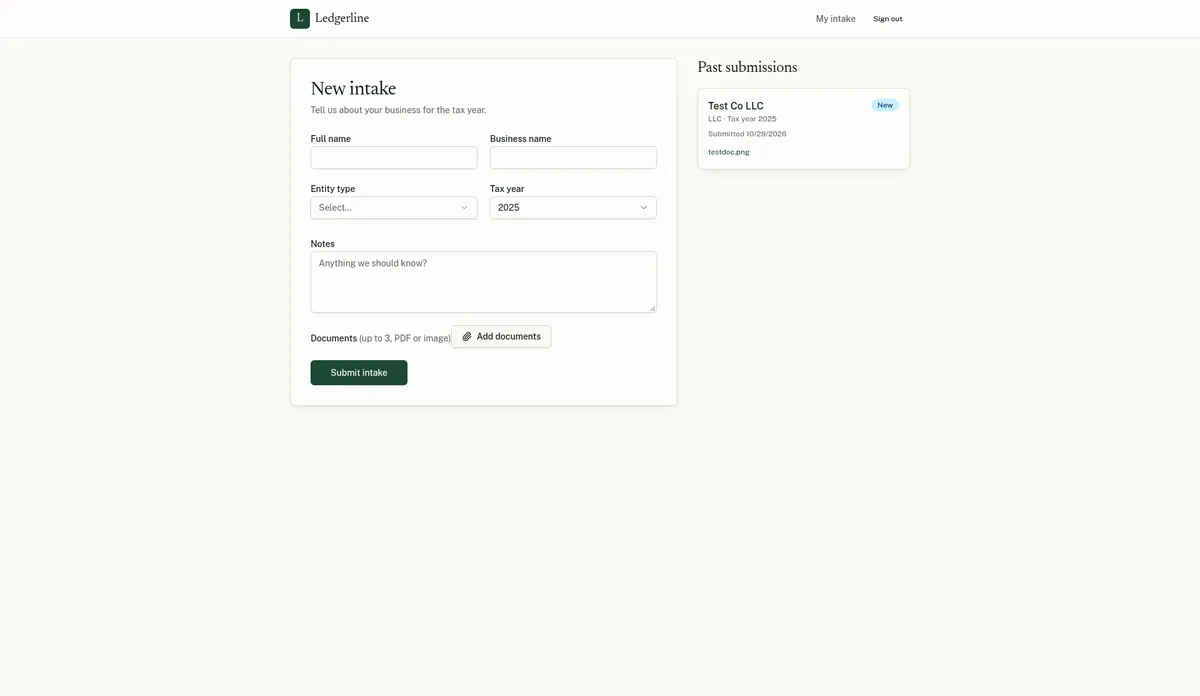
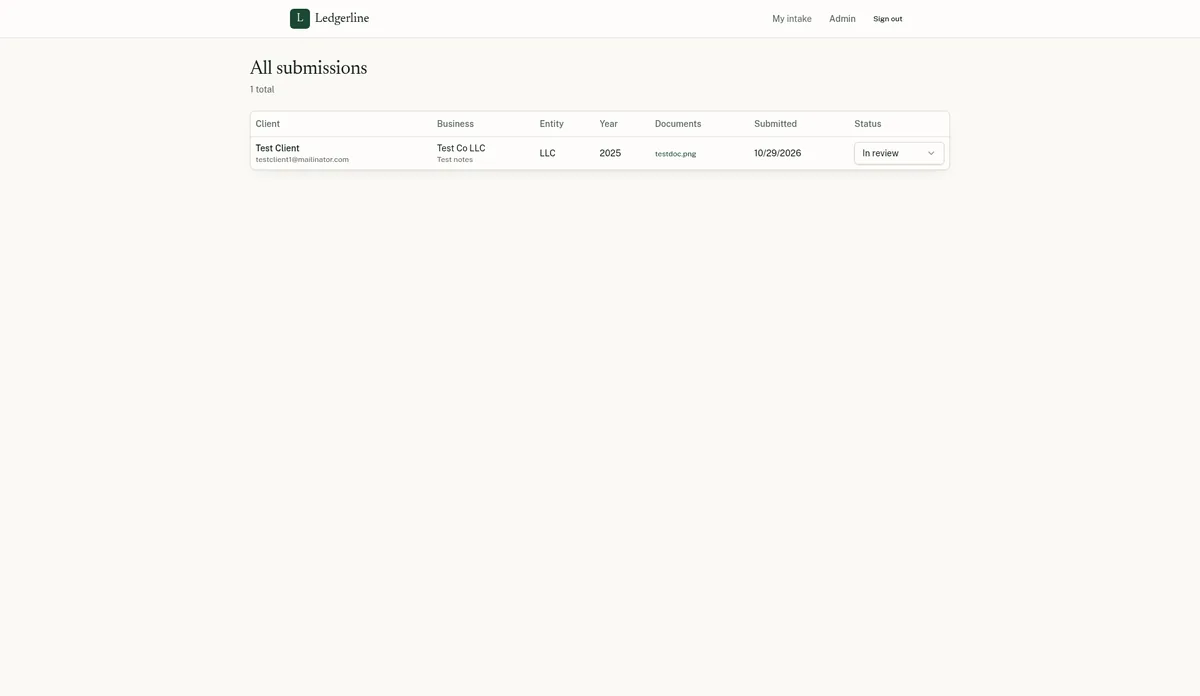
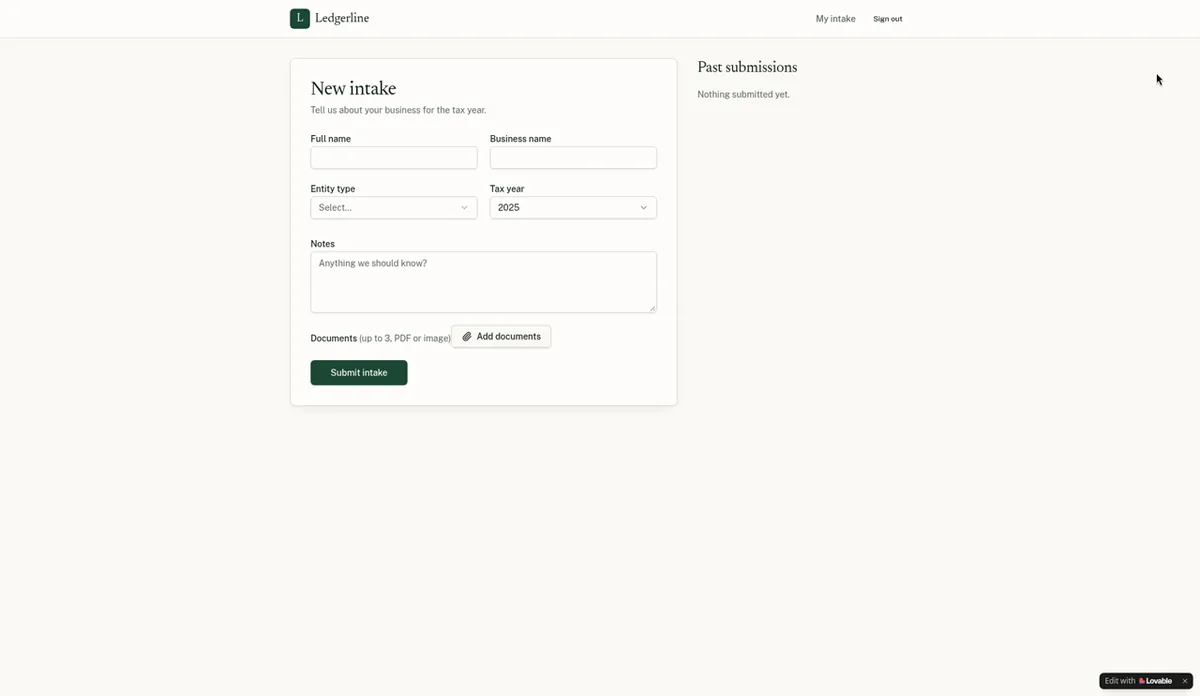
What we saw in our test (Oct 29, 2026, Pro plan): our client intake portal test app got sign-up and login, the intake form, file uploads, a client’s own submissions list and an admin table with a status dropdown working, all stored in Lovable’s built-in Cloud backend. One thing to know before trusting it with clients: Lovable gave us no built-in way to make the first admin (it took one extra message). On access control, we also signed up a separate, non-admin test client. That account saw no Admin link, got an “Admins only” message on the admin page, and could see only its own submissions, not the admin’s test data. Still review the access rules yourself before any real client logs in.
Security scan and user management (follow-up test, Oct 29, 2026): Lovable’s Security panel (More > Security) runs a quick scan automatically when you publish, and a free deep scan took about 2 minutes. The deep scan on our intake portal found no issues, with Lovable’s own note that a scan can’t catch every risk. The dependencies panel listed 53 packages and 12 known issues, without details for each package, so check those yourself before launch. The Users panel (More > Users) lets you add and delete users, switch off sign-up, and turn sign-in methods on or off (email was on; Google, Apple, Microsoft, SAML SSO and OIDC were available). We didn’t find a role or permissions editor in that panel; our admin role was set through the chat.
Who should skip it: If you want a flat price with no usage math, or you mainly need a simple marketing site, a traditional website builder will be simpler and more predictable.
Lovable pricing (as of October 2026)
Lovable has four plans: Free, Pro, Business and Enterprise. Pro and Business each come in credit tiers from 100 to 10,000 credits per month. Annual billing gives you two months free.
Entry tiers
| Plan | Monthly credits | Monthly billing | Annual billing |
|---|---|---|---|
| Free | 5 daily build credits (up to 30/month) | $0 | $0 |
| Pro | 100 | $25/mo | $250/yr ($21/mo) |
| Pro | 200 | $50/mo | $500/yr ($42/mo) |
| Pro | 400 | $100/mo | $1,000/yr ($84/mo) |
| Business | 100 | $50/mo | $500/yr ($42/mo) |
| Business | 200 | $100/mo | $1,000/yr ($84/mo) |
| Enterprise | Volume-based | Contact sales | Contact sales |
Prices in USD, as of Oct 29, 2026 (Pro 100 credits re-checked: $25/mo monthly, $250/yr annual). Pro and Business tiers go up to 10,000 credits/month ($2,250/mo Pro, $4,300/mo Business, billed monthly). Source: https://docs.lovable.dev/introduction/subscription-plans · Prices change often; check https://lovable.dev/pricing before buying.
What’s included on every plan (Free, Pro, Business)
- 5 daily build credits (capped at 30/month on Free; no monthly cap on Pro and Business)
- A monthly Cloud grant of 20 credits and a monthly AI grant of 4 credits
- A daily chat allowance (larger on Pro and Business)
- Unlimited workspace members (Lovable doesn’t charge per seat)
- Git sync with GitHub, GitLab and Bitbucket
Lovable notes the monthly Cloud and AI grants are “a temporary offering and subject to change.” Source: https://docs.lovable.dev/introduction/subscription-plans
What Pro adds over Free
Edit code, download code, custom domains, removing the “Edit with Lovable” badge, design systems, user roles and permissions, credit rollovers, top-ups and email support.
What Business adds over Pro
SSO, role-based access, a security center and security insights, workspace data excluded from AI model training by default (on Free and Pro you opt out per account), design templates, the Lovable API, preview link passwords and priority support.
Source for both lists: https://docs.lovable.dev/introduction/subscription-plans
Cost note on Business pricing: Business costs double Pro at the 100-credit tier ($50 vs $25 monthly). Lovable explains that Business credits are priced higher because of the added team and governance features, and that hosting and AI usage cost the same dollar value on both plans. Source: https://lovable.dev/pricing
Discounts
Verified students and teachers get 50% off Pro (100 credits, billed monthly) for up to 12 months. Source: https://docs.lovable.dev/introduction/subscription-plans
How Lovable credits actually work
This is where most “is Lovable worth it” questions come from, so here’s the plain version.
One balance pays for four things: building (your messages to Lovable), chat, running your app (Cloud hosting and database), and AI features inside your app. Source: https://docs.lovable.dev/introduction/credits-and-usage
Build cost depends on the work. In Build mode, cost depends on the complexity of the request. Plan mode costs 1 credit per message (plus any research Lovable runs while planning). Lovable’s own illustrative examples:
| Prompt (Lovable’s example) | Credits (illustrative) |
|---|---|
| “Make the button gray” | 0.50 |
| “Remove the footer” | 0.90 |
| “Add authentication” | 1.20 |
| “Build a landing page with images” | 2.00 (docs) / 1.70 (pricing page) |
Source: https://docs.lovable.dev/introduction/credits-and-usage and https://lovable.dev/pricing. The two pages show different figures for the landing page example; Lovable says actual costs vary by project.
Credits expire. Monthly plan credits expire 2 months after they’re issued (monthly plans). Top-up credits last 12 months. Daily build credits expire at the end of each day. Unused monthly credits roll over while your subscription is active, until their original expiry. Credits aren’t refundable.
Long jobs check in. For long-running Build mode messages, Lovable pauses at a credit “check-in” level (20 credits by default) so you can continue or wrap up. That’s a useful guardrail against surprise spend.
When you run out: building stops, AI features in deployed apps stop, and apps that use the built-in backend pause, until you add credits. Source: https://docs.lovable.dev/introduction/credits-and-usage
What this means for your budget: A 100-credit Pro plan at $25/month works out to $0.25 per credit (Lovable uses that rate when converting old balances). If your typical edit costs about a credit, 100 credits plus 5 free daily build credits goes a reasonable distance for a small project. But a big feature request or a busy live app can draw down much faster.
What our three test builds actually used (Oct 29, 2026, Pro plan, 100 credits/month):
| Test build | Fix messages | Time to working | Credits from balance |
|---|---|---|---|
| Client intake portal | 1 | ~9 min | 1 (105 → 104), plus the day’s 5 free build credits |
| Invoice tracker | 0 | ~4 min | 3 (104 → 101) |
| LedgerLight landing page | 0 | ~3 min | 1.5 (101 → 99.5) |
| Total | 1 | ~16 min | 5.5 (105 → 99.5) |
We use the balance figures throughout. Lovable’s usage page showed slightly different per-project numbers (6, 2.70 and 1.5, about 10.2 in total, which appears to include the 5 free daily build credits), so treat them as approximate. At Pro’s $25 for 100 credits ($0.25 each), the 5.5 credits taken from the balance are worth roughly $1.40. Your costs will differ with your app’s size and how many changes you ask for.
Lovable features that matter (documented)
Built-in backend (Cloud)
Database, user accounts and sign-in, file storage, edge functions, scheduled jobs, secrets and logs, all inside the project’s More menu. Enabling any one of database, users or storage provisions all three. Source: https://docs.lovable.dev/features/cloud
Your own Supabase, if you prefer
You can connect an external Supabase project for the backend. Source: https://docs.lovable.dev/integrations/supabase
Git sync and code access
Git sync with GitHub, GitLab and Bitbucket on all plans; edit and download code on paid plans. Source: https://docs.lovable.dev/introduction/subscription-plans
Security tooling
Security scans, API key protection, database access checks and dependency audits. Business adds a security center. Source: https://docs.lovable.dev/features/security
Plan mode vs Build mode
Plan mode lets you think through an approach without changing code (1 credit per message). Build mode makes changes. Using Plan mode first is the cheapest way to avoid expensive rework.
What we saw (follow-up test, Oct 29, 2026): Lovable showed three modes: Build, Chat and Plan. We used Plan mode on the invoice tracker to plan a CSV export. It changed no code, cost 1 credit and produced a short spec (a client-side Export CSV button, the file name format, nine columns and unit tests). We then built it in Build mode for 1.5 credits. We didn’t build the same feature without planning first, so we can’t say whether planning saved credits. We didn’t test Chat mode.
Our Lovable test: 3 apps built on the Pro plan
Tested Oct 29, 2026 on Lovable Pro (100 credits/month, billed monthly). We used the same three prompts we use in every tool, pasted word for word (see how we test), with fake data and test accounts only. Nothing was published.
Build 1: Client intake portal
- Result: working after 1 fix message. First preview in about 4 minutes, fully working in about 9.
- Credits: see the table above (about 1 credit from the balance, plus the 5 free daily build credits).
- Backend: Lovable set up its built-in Cloud backend automatically, with no extra cost prompt.
- Worked: sign-up and login (with email confirmation), the intake form with the entity-type dropdown and tax year, file uploads that were still there later, a client’s own submissions list, and an admin table where a status change was still there after a refresh.
- What broke: there was no built-in way to make the first admin, so we sent one message asking Lovable to make our test account an admin. After the email-confirmation link, the portal page was blank until we signed in again. The admin page was also blank for a few seconds on a hard reload.
- Client vs admin (rechecked Oct 29, 2026): passed. A separate non-admin test client signed up (email confirmation required), saw no Admin link, got “Admins only” on the admin page, and saw only its own submissions.
Build 2: Invoice tracker
- Result: worked on the first build with 0 fix messages. First preview in about 3 minutes, working in about 4.
- Credits: 3 from the balance (104 → 101).
- Worked: adding clients, invoices with line items and automatic totals, marking invoices Paid, automatic Overdue status, dashboard totals, and data that was still there after a reload.
- The catch: the invoice data appeared to be saved only in the browser, not in a database. When we opened the same app from a different address, the dashboard showed $0.00, and Lovable itself suggested adding online invoice storage. Without a follow-up request for a database, your invoices wouldn’t follow you to another device or browser. If you build anything that stores business records, ask Lovable for a database up front. In the same test, Base44 saved this app’s data in a real database.
- Minor: the “New invoice” button was briefly disabled after some page loads.
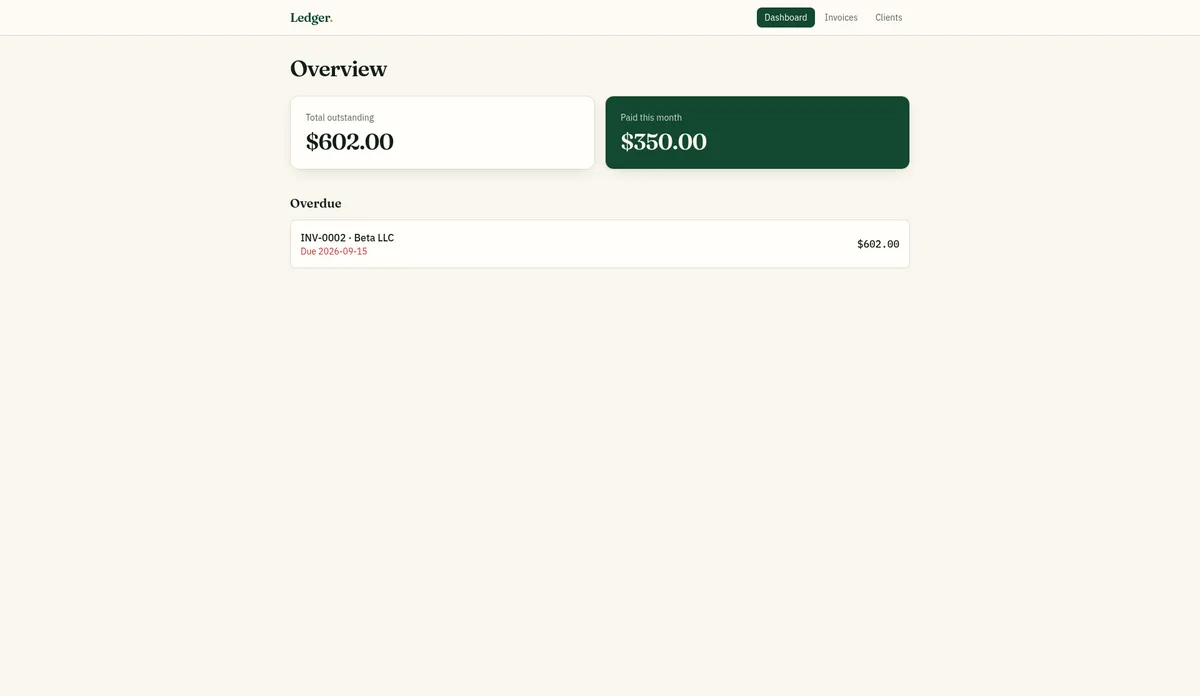
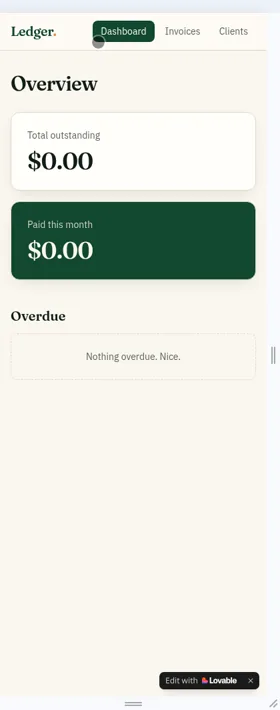
CSV export (follow-up test, Oct 29, 2026): the invoice tracker didn’t have a CSV export, so we asked for one. It took one build message (1.5 credits). The button stays greyed out until an invoice exists, and the downloaded file had nine labeled columns: Invoice #, Client, Client email, Issue date, Due date, Status, Paid date, Line items and Total.
Build 3: LedgerLight landing page
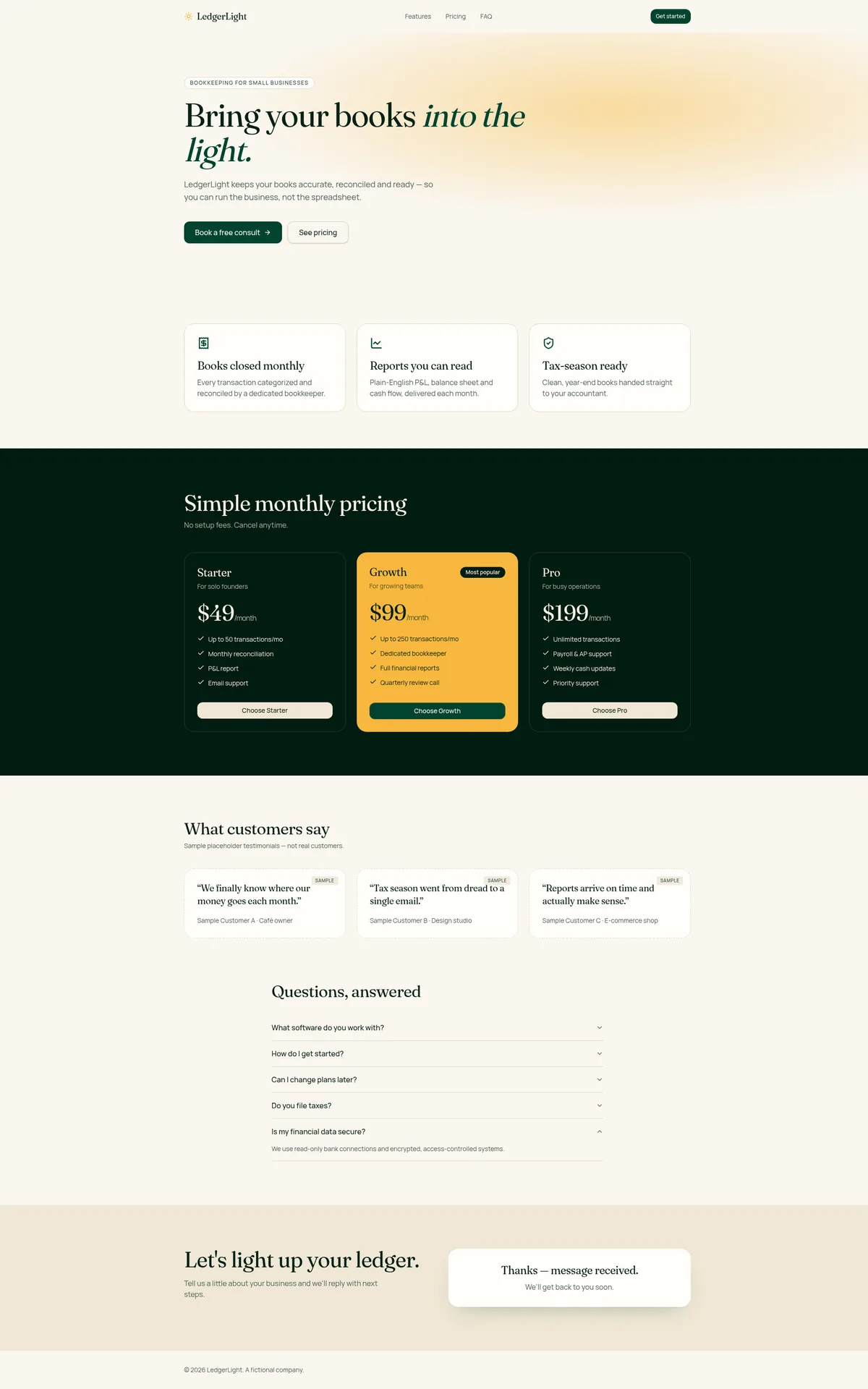
- Result: working in about 2 minutes 50 seconds with 0 fix messages, using 1.5 credits.
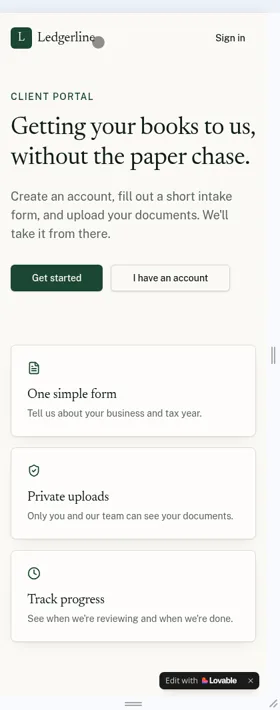
- Worked: a hero with a call-to-action button, three feature blocks, the $49/$99/$199 pricing table, testimonials labeled as samples, a five-question FAQ, and a contact form that saved submissions to a database table.
- Notes: the form didn’t send an email notification (Lovable said that needs a paid plan and your own domain). The FAQ and plan copy were written by Lovable, so you’d need to edit them.
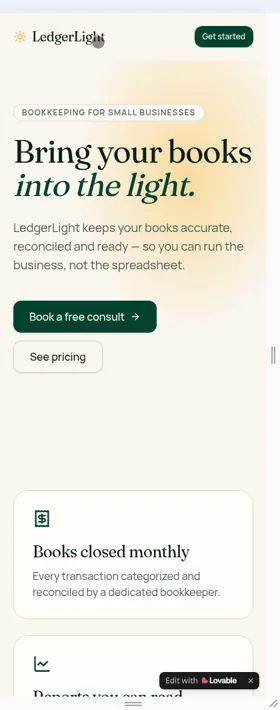
- Mobile: we retook the phone screenshots at a 400px phone width on Oct 29, 2026 (see below). Our first captures were about 840px wide.
Code ownership
On Pro, “Download codebase” gave us a one-time ZIP of the project with 100 files. Settings > Git offers two-way sync with GitHub, GitLab or Bitbucket. Each one creates a new repository, and importing an existing repository isn’t supported. We didn’t try to run the downloaded code outside Lovable. (Follow-up test, Oct 29, 2026.)
The follow-up tests used 2.5 more credits (99.5 → 97): 1 for Plan mode and 1.5 for the CSV export.
Our score breakdown
| Part of the score (weight) | Score | Why |
|---|---|---|
| Ease of use (25%) | 8.5/10 | All three apps working in about 16 minutes. One fix message (to create the first admin), and a blank page after the email-confirmation link |
| Output quality (25%) | 9.0/10 | Every feature in the three prompts worked. The admin page was blank for a few seconds on reload, and “New invoice” was briefly disabled |
| Pricing value (20%) | 8.0/10 | Tested on Pro at $25/month. The three builds used 5.5 of 100 credits, but hosting and in-app AI draw from the same balance |
| Backend and data (15%) | 8.0/10 | A separate client account was kept out of the admin view. The invoice tracker saved its data in the browser only until we asked for a database |
| Code ownership and export (15%) | 8.0/10 | We downloaded the code (100 files) and confirmed Git sync. Code download needs a paid plan, and the CSV export took one extra message |
| Overall | 8.4/10 | Weighted average, rounded to one decimal |
Scores come only from our own test log. How we score explains each deduction.
Pros and cons
Pros (from documented features)
- Real backend included (database, auth, storage, functions), built on Supabase’s open-source foundation
- Git sync on every plan, including Free; code download on paid plans
- No per-seat pricing: unlimited workspace members
- Clear credit controls: per-member limits, usage alerts and long-job check-ins
- Code download and two-way Git sync confirmed in our test
- You own your code and data, per Lovable
- Student/teacher discount (50% off Pro for up to 12 months)
Cons (from documented pricing and policies)
- Usage-based credits make monthly cost hard to predict
- Credits expire and aren’t refundable
- Hosting and in-app AI draw from the same balance; if credits hit zero, Cloud apps pause
- SSO and data excluded from model training by default require Business, at double the Pro price per credit tier
- Free plan can’t edit or download code or use a custom domain
From our Oct 29, 2026 test (Pro plan)
- Pro: Fastest of the three tools we tested: all three test apps were working in roughly 16 minutes in total (see Base44 vs Lovable and Bolt vs Lovable)
- Pro: The invoice tracker and landing page worked on the first build, with 0 fix messages
- Con: The invoice tracker saved its data in the browser only until we asked for a database, which matters for any business app
- Con: There was no built-in way to make the first admin, so the intake portal needed 1 extra message. After the email-confirmation link, the page was blank until we signed in again
Lovable alternatives
- Base44 — simpler all-in-one platform with a lower entry price ($16/mo billed annually), but exported code still relies on Base44’s backend. See Base44 vs Lovable.
- Bolt.new — browser-based builder with its own Bolt Cloud database and an Expo integration for mobile apps. See Bolt vs Lovable.
- Replit — a Lovable vs Replit comparison is coming soon.
- Full list: Lovable alternatives (coming soon).
Lovable FAQ
Is Lovable free?
Yes, there’s a free plan with 5 daily build credits (up to 30 per month), plus monthly Cloud and AI grants. Free doesn’t include code editing, code download or custom domains. Source: https://docs.lovable.dev/introduction/subscription-plans
How much does Lovable cost per month?
As of October 2026, Pro starts at $25/month for 100 credits (or $21/month billed annually) and Business starts at $50/month for 100 credits. Higher tiers go up to 10,000 credits a month.
What is a Lovable credit worth?
On the 100-credit Pro plan, $25 buys 100 credits, or $0.25 each. What a credit gets you varies: Lovable’s examples range from 0.50 credits for a small style change to about 2 credits for a landing page with images.
Do Lovable credits roll over?
Unused monthly plan credits roll over while your subscription stays active, but they still expire 2 months after issue on monthly plans. Daily build credits don’t roll over. Source: https://docs.lovable.dev/introduction/credits-and-usage
Do I own the code Lovable creates?
Lovable says you own your code, projects, customer data stored in Lovable and AI output, subject to any third-party rights in the underlying AI models. Source: https://lovable.dev/pricing
Is Lovable good for accountants or bookkeepers?
It can be good for internal tools like trackers and intake forms. Use fake data while building, and review access rules and security scans before any client data goes in. If your firm needs SSO, that’s a Business-plan feature.
Is Lovable worth it?
If you want a real app you can keep and grow, it’s a strong candidate: it scored 8.4/10 in our test. If you want a predictable flat bill, the credit model may frustrate you. In our Oct 29, 2026 test on Pro, Lovable built all three of our test apps faster than the other tools we tried, with 1 fix message in total and about 5.5 credits taken from the balance. The main caution: ask for a database for anything that stores business records, because our invoice tracker kept its data in the browser only. In a recheck, a separate non-admin test client couldn’t reach the admin view and saw only its own submissions.
Update history
- October 29, 2026: First published. Test results from our Oct 29, 2026 round, including follow-up tests the same day (Plan mode, CSV export, security scan, code export and user management). Prices checked Oct 29, 2026.