By the PrototypeVerdict Test Team · Pricing checked: Oct 29, 2026 · Last tested: Oct 29, 2026 on the Free plan
Our Bolt links are referral links: if you sign up through one, Bolt may reward us, at no extra cost to you. How we make money.
Quick verdict
Our verdict
| Best for | Trying an AI app builder for $0 with a real database, and anyone who wants a downloadable copy of their code |
| Not ideal for | Non-coders who don’t want to touch a database table, or long build sessions on the free plan |
| Starting price (as of Oct 29, 2026) | Free plan (1M tokens a month, 300K a day); Pro $25/month billed monthly or $18/month billed annually |
| Standout | Built all three of our test apps on a real database and let us download the code, all on the free plan |
| Watch out for | The three builds used the whole 300K daily token limit; making an admin took a hand edit in the database |
| Our score | 8.4/10 from our Oct 29, 2026 hands-on test on the Free plan (score breakdown, how we score) |
Bottom line (based on our Oct 29, 2026 test and Bolt’s documentation): Bolt’s free plan is more than a demo. With no card and no outside account, it built a client portal with logins and file uploads, an invoice tracker and a landing page, all saving to a real database, and it let us download the code as a 30-file ZIP. The limits showed up fast, though. The three builds used exactly the free plan’s 300K daily tokens, one login fix alone used about 84K, and we had to set the first admin by hand in the database. We tested only the Free plan. Pro, Teams and Bolt’s security audit are untested. For what each app used and how other tools’ free plans compare, see how to build an app with AI for free.
What is Bolt.new?
Bolt.new is a browser-based AI app builder from StackBlitz. You describe an app in the chat, and Bolt’s agent plans the project, writes the code and troubleshoots as you build, with a live preview next to the chat. Bolt offers two build agents: Standard (fast and token-efficient, the only one on the free plan) and Max (deeper reasoning, paid plans). Source: https://support.bolt.new/building/agents
Every project can use Bolt’s built-in database (Bolt Database) for data, sign-in, file storage and server functions, with hosting included. Paid plans add the option to connect your own Supabase database. Sources: https://bolt.new/pricing · https://support.bolt.new/bolt-cloud/database/advanced.md
Bolt also documents an Expo integration for building iOS and Android apps and publishing them to the app stores. We haven’t tested it. Source: https://support.bolt.new/integrations/expo.md
How we tested Bolt
Tested Oct 29, 2026 on Bolt’s Free plan (1M tokens a month, 300K a day). We pasted the same three prompts we use in every tool, word for word (see how we test), with fake data and test accounts only. All three apps used Bolt Database, which is Supabase-backed. No card or outside account was needed. Nothing was published.
Our token log
| Test build | First preview | Working | Fix messages | Tokens used | Share of the 300K daily limit |
|---|---|---|---|---|---|
| Client intake portal | ~6 min | ~9 min | 1 | ~185K (the fix alone ~84K) | ~62% |
| Invoice tracker | ~4 min | ~9 min | 0 | ~100K | ~33% |
| LedgerLight landing page | — | ~2–3 min | 0 | ~15K | ~5% |
| Total | ~20–21 min | 1 | ~300K | 100%: the daily cap, hit as the third build finished |
That’s 30% of the free plan’s 1M monthly tokens in one sitting. Bolt’s chat bar shows what’s left of the day’s tokens, so you can watch it drop.
Build 1: Client intake portal
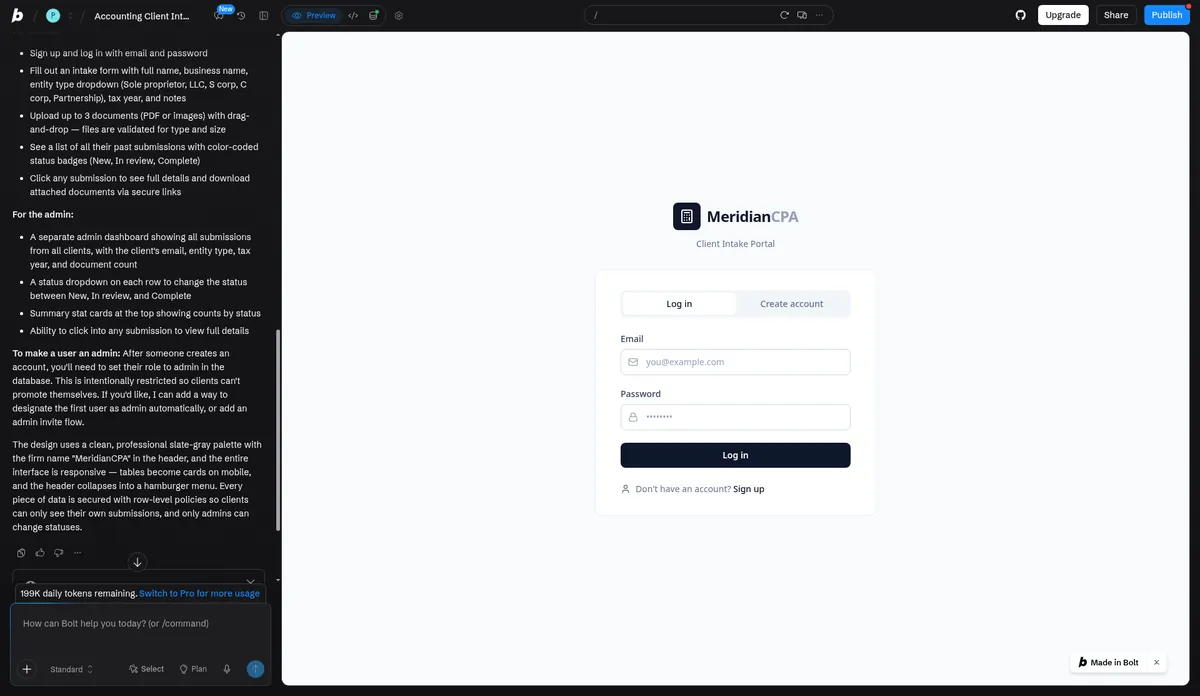
- Result: working in about 9 minutes (first preview at about 6) after 1 fix message.
- The fix: after sign-up, login got stuck on the login screen. The cause was a 500 error from database security rules (row-level security policies) that referred to themselves. One message fixed it: Bolt rewrote the admin check as a secure database function. That single fix used about 84K tokens, close to half of the build.
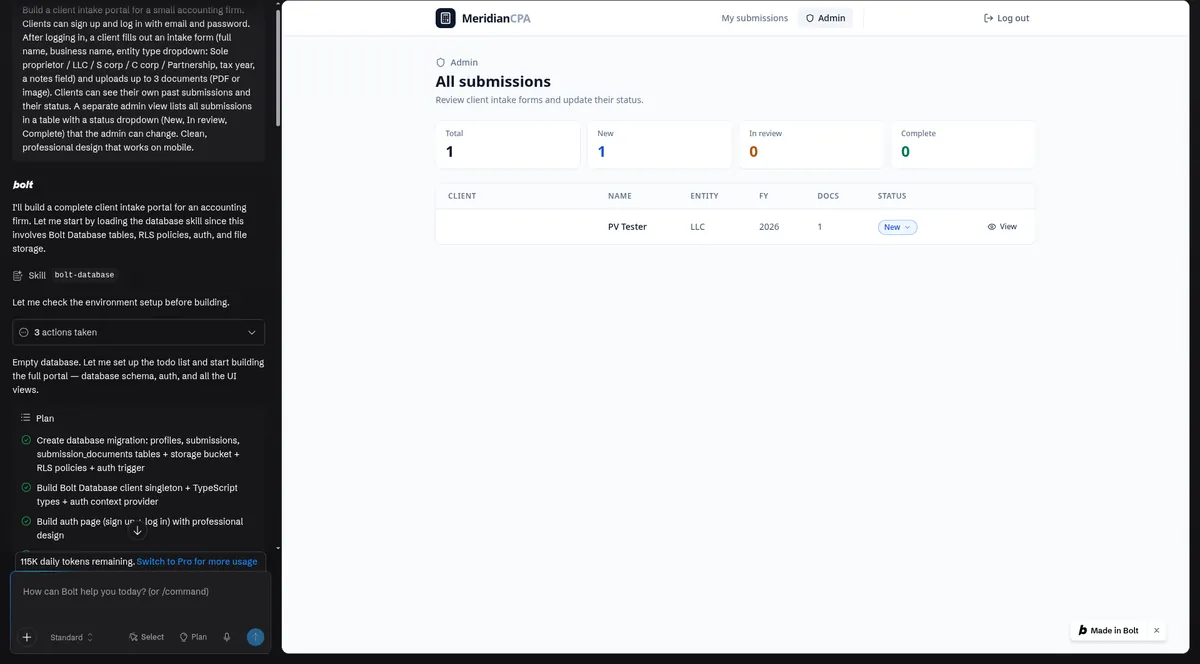
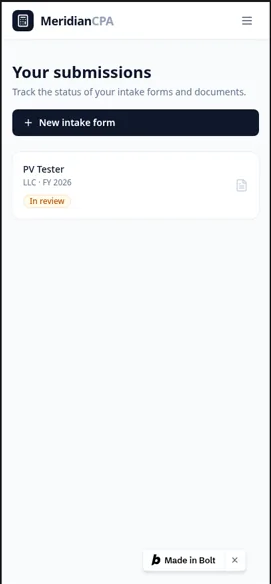
- Worked (after the fix): sign-up and login, the intake form with all five entity types, a PNG upload with a download link, a client’s past submissions with their status, and the admin table, where a status change from New to In review was still there after a reload. The data, logins, security rules and file storage were all in a real database.
- Making an admin: Bolt had no built-in way to make the first admin. Its own build summary said a new user’s role has to be set to admin in the database and that “this is intentionally restricted so clients can’t promote themselves,” and it offered to add an admin flow. We set the role by hand in the Database tab. That works, but it’s a step many non-coders won’t expect.
- Not tested: the 3-document upload limit, and a check with a separate non-admin client account. Whether this portal keeps one client out of another’s data is untested.
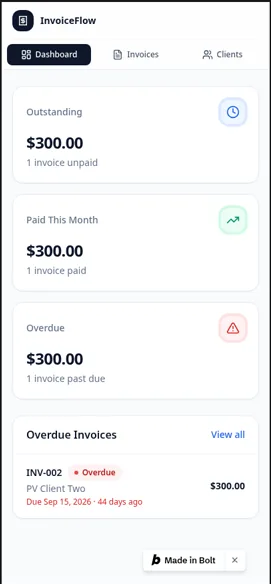
Build 2: Invoice tracker
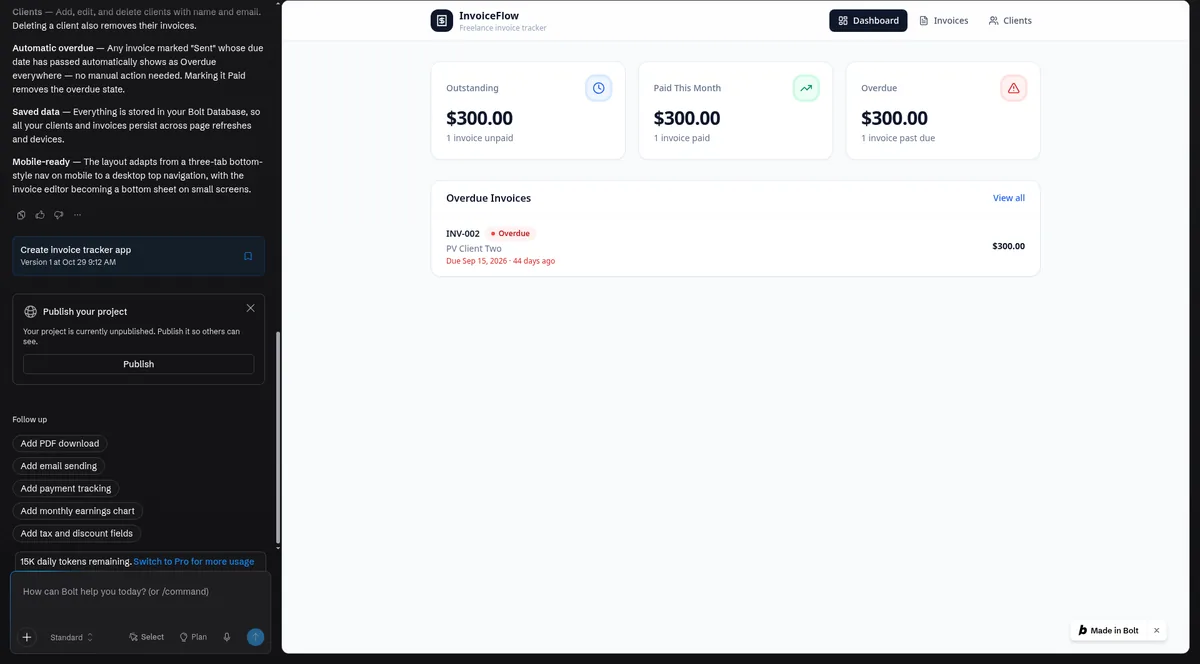
- Result: working in about 9 minutes (first preview at about 4) with 0 fix messages, using about 100K tokens.
- Worked: clients, invoices with line items and automatic totals, Draft/Sent/Paid statuses, automatic Overdue, dashboard totals with an overdue list, all still there after a reload.
- Storage: a real database. This app had no sign-in, because the prompt didn’t ask for one.
- CSV export: untested. When we came back to ask for a CSV export, Bolt replied “You’re out of tokens. Switch to Pro.” Bolt’s docs describe exporting selected table rows as CSV or JSON from the database view; we haven’t tried that either. Source: https://support.bolt.new/bolt-cloud/database/tables.md
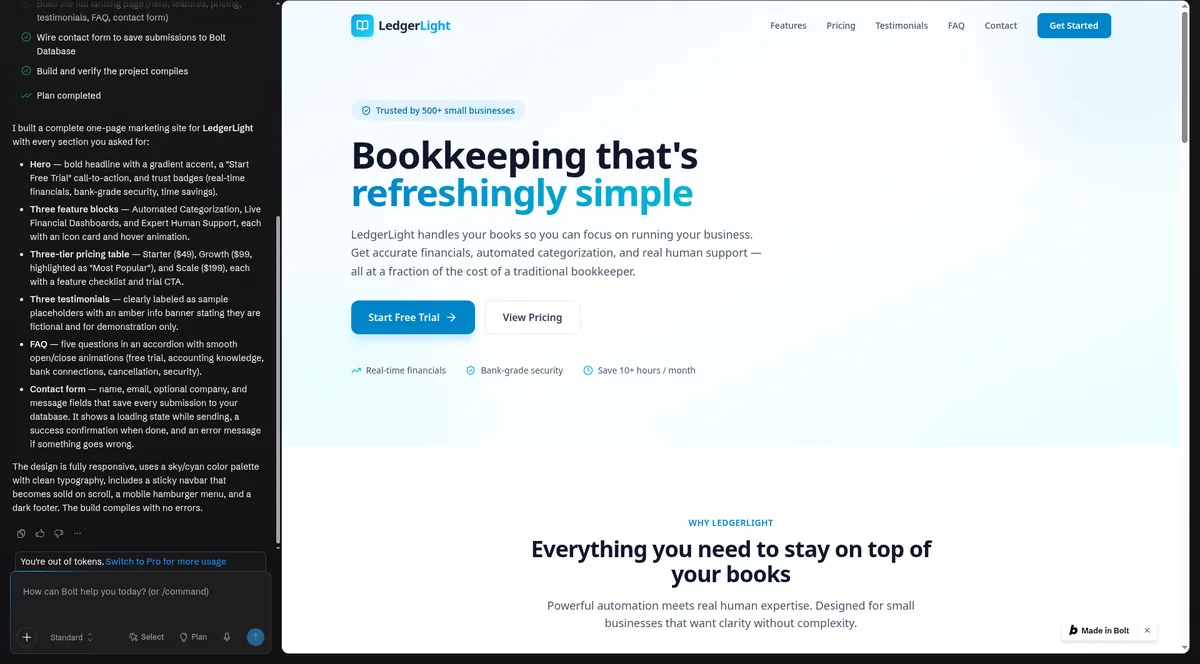
Build 3: LedgerLight landing page
- Result: working in about 2–3 minutes with 0 fix messages, using about 15K tokens.
- Worked: the hero call-to-action, three features, the $49/$99/$199 pricing table, three testimonials under a “Sample placeholders” banner, five FAQs, a contact form that saved submissions to a database table, and a hamburger menu on mobile.
- Bug: a literal “\u2019” appeared where an apostrophe should be (“we\u2019ll”). It’s small, but you’d want to fix it before showing anyone.
Hitting the free plan’s token wall
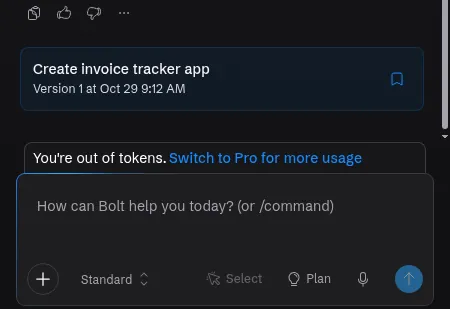
The third build finished right as we reached the daily 300K tokens. After that, Bolt showed an “out of tokens” upgrade prompt, and our follow-up request was blocked.
What that means in practice, per Bolt’s docs:
- The daily limit: Free has a 300K daily limit inside a 1M monthly allowance. Pro and Teams have no daily limit. Source: https://bolt.new/pricing
- Resets: free-plan tokens reset on the 1st of each calendar month. Paid plans reset on the renewal date. Source: https://support.bolt.new/account/tokens.md
- Why it goes fast: Bolt says most token usage comes from reading and syncing your project’s files, “so larger projects use more tokens per message.” Fixes on a bigger project cost more, which matches our 84K-token login fix. Source: https://support.bolt.new/account/tokens.md
- What doesn’t use tokens: direct edits in the Code view and restoring a version from version history. Source: https://support.bolt.new/account.md
Our take: the free plan is enough for an afternoon of building something small. If a fix goes wrong, you can hit the wall mid-build and have to wait for the daily reset.
Backend, data and security
- Database: all three test apps saved data in Bolt Database, with sign-in, row-level security and file storage on the portal. No card or outside account was needed.
- Your own Supabase: connecting a Supabase database, or claiming your Bolt database into your own Supabase account, needs Pro or Teams. Bolt warns that connecting Supabase to a project that already has a Bolt database replaces the connection and “may cause data loss,” so claiming is the safer route. Source: https://support.bolt.new/bolt-cloud/database/advanced.md
- Security checks: Bolt documents a project security audit (paid plans) that reviews code and database and fixes what it can without using tokens, and a lighter database security check (all plans). We didn’t find a scan option in project settings during our test and didn’t run either one, so both are untested. Source: https://support.bolt.new/building/security.md
- Client separation: untested. We haven’t signed in as a second, non-admin client to confirm it can’t see the admin view or other clients’ data. Run that check yourself before any real client uses a Bolt portal.
If you’re building a client portal, our client portal guide covers the checks to run first.
Code ownership and export
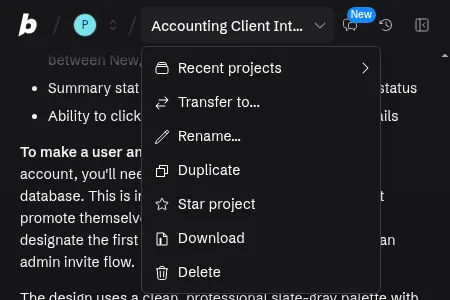
- Download: the project menu’s Download gave us a ZIP with 30 files on the free plan: React and TypeScript source, Supabase database migrations and Bolt’s config. Bolt’s docs say you can run a downloaded project locally with
npm install && npm run dev; we haven’t tried running ours outside Bolt. Source: https://support.bolt.new/managing-projects/projects-files.md - GitHub: Bolt documents a GitHub integration that backs up code, syncs commits and works with branches. You can also import an existing repo. We didn’t connect it. Source: https://support.bolt.new/integrations/git
- Ownership: Bolt says “all code that you create with Bolt and StackBlitz is your own code,” usable for commercial purposes. Source: https://support.bolt.new/account/corporate-commercial.md
Compared with the other tools we tested, this is Bolt’s strongest point. Base44‘s export needs a paid plan, and its own docs say the code still runs on Base44’s backend. Lovable‘s code download also needs a paid plan.
Bolt.new pricing (as of Oct 29, 2026)
| Plan | Billed monthly | Billed annually | Monthly AI tokens | Highlights |
|---|---|---|---|---|
| Free (what we tested) | $0 | $0 | 1M (300K daily limit) | Public and private projects, unlimited databases, website hosting, Bolt branding on websites |
| Pro | $25/mo | $18/mo ($216/yr) | Starts at 10M, no daily limit, unused tokens roll over | Your own domain, no Bolt branding, expanded database capacity, choice of database provider, newest AI models, connectors and MCPs, SEO boosting |
| Teams | $30/member/mo | $27/member/mo ($324/yr) | Starts at 10M per member | Centralized billing, team access management, admin controls, SSO, private NPM registries, priority support |
| Enterprise | Custom | Custom | Custom | SOC 2 Type II, audit logs, data governance, dedicated account manager, 24/7 support |
Prices in USD plus applicable taxes, as of Oct 29, 2026, from the Monthly and Yearly views of https://bolt.new/pricing. Bolt advertises yearly billing as “save up to 28%.”
Other limits worth knowing (from Bolt’s docs, Oct 29, 2026):
- File uploads: 10MB on Free, 100MB on Pro and Teams. Source: https://bolt.new/pricing
- Hosting: Free includes up to 10 GB bandwidth and 333,333 requests a month for your whole account, and free sites stop serving when they hit the limit until it resets. Pro includes 30 GB and 1 million requests, with optional pay-as-you-go above that. Source: https://support.bolt.new/bolt-cloud/hosting/plans.md
- Branding: a “Made in Bolt” badge appears on free-plan previews and published sites. Source: https://support.bolt.new/bolt-cloud/hosting/plans.md
- Rollover and top-ups: on paid plans, unused tokens roll over and stay valid for two months. Extra token reloads are available on the highest monthly Pro tier or any annual Pro plan. Source: https://support.bolt.new/account/tokens.md
What our builds would cost on Pro (untested): our three builds used about 300K tokens. That’s 3% of Pro’s 10M monthly tokens, or roughly $0.75 of a $25 month. We didn’t test Pro, and larger projects use more tokens per message.
Free or paid? Start on Free to see whether Bolt suits you. Consider Pro if you need a custom domain, no branding, longer sessions without the daily cap, or your own Supabase database.
Prices change. We’ll tell you when.
One email when a plan we track changes, plus a monthly roundup.
Free. Confirm by email. Unsubscribe any time. Privacy.
Our score breakdown
| Part of the score (weight) | Score | Why |
|---|---|---|
| Ease of use (25%) | 7.5/10 | One fix message (login stuck on a security-rule error), one step outside the chat (setting the admin role in the database), and about 20–21 minutes in total |
| Output quality (25%) | 9.5/10 | Every feature in the three prompts worked by the end. A literal “\u2019” showed on the landing page |
| Pricing value (20%) | 7.5/10 | Tested at $0, but the builds hit the 300K daily cap and the follow-up was blocked. Tokens per message grow with project size |
| Backend and data (15%) | 8.5/10 | Real database in all three apps. The separate-client check wasn’t run (scored as not run), and Bolt generated security rules that broke login until fixed |
| Code ownership and export (15%) | 9.0/10 | Downloaded a 30-file ZIP on the free plan. Not run outside Bolt, so not a 10. CSV export untested and not scored |
| Overall | 8.4/10 | Weighted average, rounded to one decimal. Free plan only |
Scores come only from our own test log. How we score explains each deduction. Two open items could move the score: the separate-client check (Backend would go to 9.5 if it passes, 6.5 if it fails) and the CSV export.
Who should use Bolt.new
Try-before-you-pay builders: Bolt is the only tool we’ve tested on its free plan so far, and that plan built all three of our apps on a real database. Keep prompts tight and expect to hit the daily cap.
Developers and freelancers who want the code: the ZIP includes source and database migrations, and GitHub sync is documented. You can take a copy of what you built with you.
Mobile app ideas: Bolt documents an Expo route to iOS and Android. Bolt’s docs say to ask for a mobile app in your first prompt, because web projects don’t easily switch over. We haven’t tested it.
Accountants and other firms: fine for prototypes with fake data. For a client portal with real documents, run the separate-client check and Bolt’s security checks first, since we haven’t. Our vibe coding guide for accountants covers data guardrails.
Who should skip it: non-coders who want zero database steps. In our test, Base44 built the same portal with no fixes and no database edits (on its paid Builder plan). See Base44 vs Bolt.
Pros and cons
Pros
- Pro: Free plan built all three test apps on a real database, with no card or outside account
- Pro: 30-file code download on the free plan, including database migrations
- Pro: Fast: about 9 minutes for the invoice tracker and 2–3 for the landing page
- Pro: Clear path up: Supabase connect or claim, GitHub sync and Expo for mobile (documented)
Cons
- Con: Three small builds used the whole 300K daily free token limit
- Con: The intake portal needed a login fix that used about 84K tokens
- Con: No built-in way to create the first admin; we edited the database by hand
- Con: Separate-client check, CSV export, security audit and paid plans are untested
Bolt.new alternatives
- Lovable: fixed its one problem (making the first admin) from a plain-English message and passed our separate-client check. See Bolt vs Lovable and Lovable pricing explained.
- Base44: the easiest build in our test, with 0 bug fixes, but its exported code still runs on Base44’s backend. See Base44 vs Bolt.
- Ranked by beginner friction: best AI app builders for beginners.
Bolt.new FAQ
Is Bolt.new free?
Yes. As of Oct 29, 2026, the Free plan includes 1M tokens a month with a 300K daily limit, public and private projects, unlimited databases and website hosting, with Bolt branding. No card is required. Source: https://bolt.new/pricing
Is Bolt.new any good?
In our Oct 29, 2026 test on the Free plan, it scored 8.4/10. All three test apps worked on a real database, and we downloaded the code. The client portal needed one login fix and a manual admin setup, and the builds used the whole daily free token limit.
Should I use Bolt free or paid?
Start free. Our three small test apps fit in one day’s free tokens, but only just. Pro ($25/month billed monthly, $18 billed annually) removes the daily limit, adds a custom domain and lets you connect your own Supabase database. We haven’t tested Pro.
How many tokens does it take to build an app in Bolt?
In our test: about 185K for a client portal with logins and uploads (including an 84K-token fix), about 100K for an invoice tracker and about 15K for a landing page. Bolt says larger projects use more tokens per message.
Can I export my code from Bolt?
Yes. The project menu’s Download gave us a 30-file ZIP on the free plan, and Bolt documents GitHub sync. We haven’t run the downloaded code outside Bolt.
Is Bolt safe for client data?
We haven’t verified it. Bolt’s portal used database security rules, but we haven’t run a separate-client check or Bolt’s security audit. Use fake data until you’ve run both.
Can Bolt build mobile apps?
Bolt documents an Expo integration for iOS and Android, including app-store publishing. We haven’t tested it. Source: https://support.bolt.new/integrations/expo.md
Update history
- October 29, 2026: First published. Test results from our Oct 29, 2026 round (Free plan). Prices and docs checked Oct 29, 2026.