By the PrototypeVerdict Test Team · Last tested: Oct 29, 2026 · Pricing checked: Oct 29, 2026
This is the exact client intake portal we build in every AI app builder we test: clients sign up, fill in an intake form, upload documents and track their status, while the firm reviews everything in an admin view. Below is the prompt we used, what happened in Base44, Lovable, Bolt and Softr on Oct 29, 2026, the fixes we had to send, and the checks to run before a real client logs in.
For the bigger picture (invoice trackers, websites, which tool fits which job), see vibe coding for accountants.
Quick verdict
Our verdict
| Easiest build | Base44: working in about 4.5 minutes with 0 fix messages, and a separate client account passed our access check |
| Best if you want the code | Lovable: working in about 9 minutes with 1 fix (first admin), passed the access check, and its code downloaded as a 100-file ZIP |
| Free option | Bolt Free: working in about 9 minutes, but it needed a login fix and a manual admin edit in the database. Its separate-client check is untested |
| Avoid for portals | Softr Basic: user groups were switched off by a plan limit, so a test client could see every submission. Softr says role-based permissions start on Pro (untested by us) |
| Time to budget | 10 minutes to build, then about as long again to test it properly |
What you’ll build
A portal for a small accounting firm with:
- Client sign-up and login with email and password
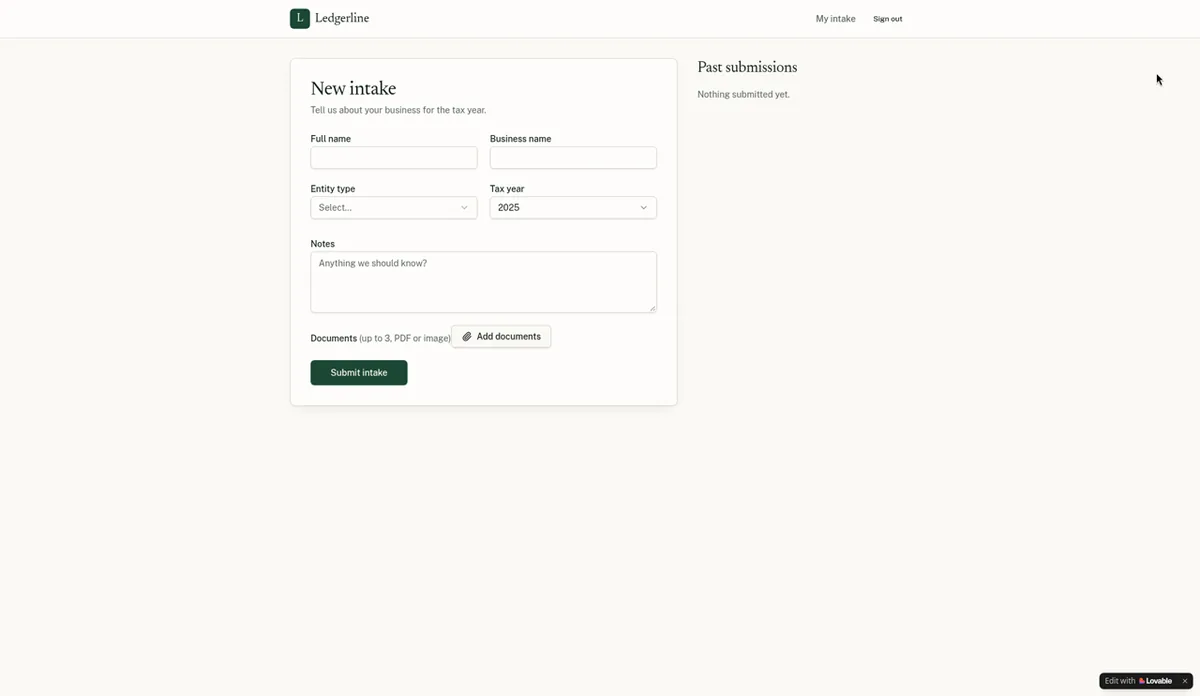
- An intake form: full name, business name, entity type (Sole proprietor, LLC, S corp, C corp, Partnership), tax year and notes
- Upload of up to 3 documents (PDF or image)
- A “my submissions” list with each submission’s status
- An admin view of all submissions with a status dropdown: New, In review, Complete
- A layout that works on a phone
Results by tool (Oct 29, 2026)
| Base44 | Lovable | Bolt.new | Softr | |
|---|---|---|---|---|
| Plan tested | Builder ($50/mo billed monthly) | Pro ($25/mo, 100 credits) | Free | Basic ($25/mo billed monthly) |
| First preview | ~1.4 min | ~4 min | ~6 min | ~3 min |
| Fully working | ~4.5 min | ~9 min | ~9 min | Not working |
| Fix messages | 0 | 1 | 1 | 1 (plus 2 clarifying questions) |
| First admin | Automatic (preview runs as the app owner) | Asked the AI in one message | Set by hand in the Database tab | Admin group switched off by plan limit |
| File upload | PNG saved to private file storage | Upload saved | PNG saved, with a download link | Not tested (form unreachable) |
| Status change survives refresh | Yes | Yes | Yes | Not testable (status was read-only) |
| Separate client sees only own data | Passed | Passed | Not run | Failed (checked with “Preview as”) |
| Used | ~1.65 message credits | 1 credit from the balance plus 5 free daily credits | ~185K tokens (the fix alone ~84K) | 0.94 AI credits |
Source: our test logs. The 3-document limit wasn’t tested in any tool, and no app was published.
Step 1: Pick a tool and plan
Choose based on what matters most to you:
- Least fuss: Base44. Base44 says every plan includes a database, user logins and cloud storage (source), and our portal needed no fixes. Code export is on Builder and up, and the exported code still relies on Base44’s backend.
- Code ownership: Lovable. Its built-in Cloud backend was set up automatically, and Git sync is on every plan. Code download needs a paid plan.
- $0 to try: Bolt. Its free plan built the portal with a real database, but the build took about 185K of the 300K daily tokens.
- Softr: only consider it on Pro or higher for portals, and we haven’t tested Pro. See our Softr notes.
Prices as of Oct 29, 2026: Base44 Starter $20/mo and Builder $50/mo billed monthly (source); Lovable Pro $25/mo for 100 credits (source); Bolt Free $0, Pro $25/mo (source); Softr Basic $25/mo, Pro $119/mo billed monthly (source).
Comparing two? See Base44 vs Lovable or Base44 vs Bolt.
Step 2: Prepare test data and test inboxes
Use made-up names and businesses, a sample image or PDF, and email addresses you control but aren’t real clients. Expect email rules:
- Lovable required email confirmation and rejected example.com addresses.
- Base44 rejected disposable email addresses (“Disposable email detected”) and sent a 6-digit verification code.
- Softr didn’t reject the disposable domain we tried.
You’ll need at least two accounts: one to be the admin and one to act as a client.
Step 3: Paste the prompt
This is the prompt we pasted, word for word, in every tool:
Build a client intake portal for a small accounting firm. Clients can sign up and log in with email and password. After logging in, a client fills out an intake form (full name, business name, entity type dropdown: Sole proprietor / LLC / S corp / C corp / Partnership, tax year, a notes field) and uploads up to 3 documents (PDF or image). Clients can see their own past submissions and their status. A separate admin view lists all submissions in a table with a status dropdown (New, In review, Complete) that the admin can change. Clean, professional design that works on mobile.
Optional additions (not part of our test prompt; they target problems we hit): “Store all data in a database, not the browser.” and “Make [your admin email] the admin, and only admins can open the admin view.”
Step 4: Answer questions and wait
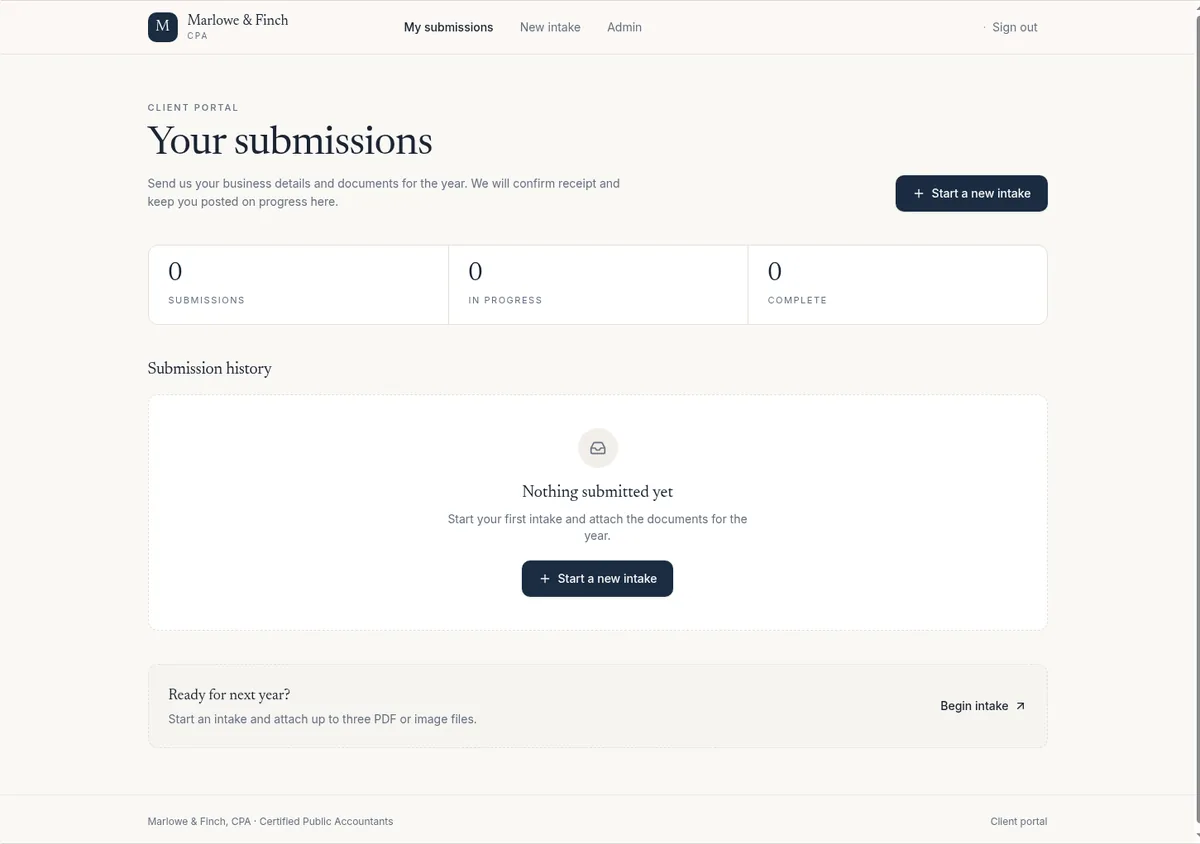
- Base44 showed a first preview in about 1.4 minutes and was fully working at about 4.5.
- Lovable set up its Cloud backend automatically, with no extra cost prompt. First preview at about 4 minutes.
- Bolt used its built-in Bolt Database (Supabase-backed) with no card or outside account. First preview at about 6 minutes.
- Softr asked two questions in chat (how clients submit, and who sees all submissions) plus setup steps for sign-in method, self sign-up, navigation and theme. It said “Your app is ready” after about 4.3 minutes, but the result wasn’t working (see Step 8).
Step 5: Set up the first admin
This was the most common snag.
Base44: nothing to do. The preview runs as the app owner, which has the admin role. Later, Dashboard > App Users lets you invite users by email or CSV with a role and change roles.
Lovable: the admin page said “Admins only” and there was no way to become one. One message fixed it. This is what we sent, with our test address replaced:
The /admin page says Admins only and I have no way to become an admin. Please make the account [your admin email] an admin (add it to the admin role) and add a link to the admin view in the nav for admins, so I can test changing submission statuses.
Lovable’s Users panel has no role editor, so roles are managed through chat.
Bolt: no built-in way to make an admin. We set role = admin by hand on our user row in the Database tab. It works, but it’s a step a non-coder may not find.
Softr Basic: the Admin and Client user groups were greyed out with a plan-limit warning, and “Add custom group” was disabled. We couldn’t assign anyone to a group.
Step 6: Test the client side
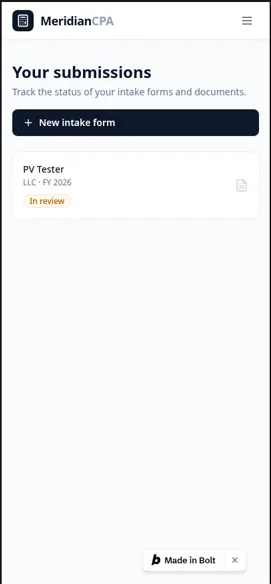
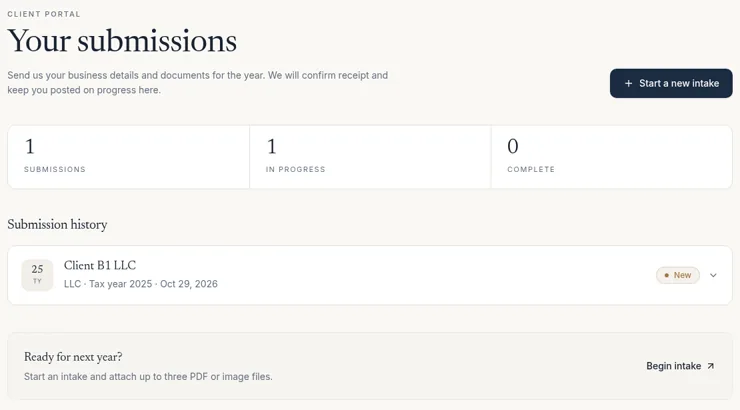
Sign up as your test client and go through the whole flow: submit the intake form, upload a file, then check the submission shows in the client’s list with status New.
Problems we hit:
- Bolt: login got stuck on the sign-in screen because of a database security-rule error. We reported it in one message and Bolt fixed it (it rewrote the rule), but that fix used about 84K tokens.
- Lovable: after the email-confirmation link, the portal page was blank. Signing in again from the sign-in page fixed it. The admin page was also blank for a few seconds on a hard reload.
- Softr: the intake form wasn’t reachable by clients in preview. There was no “Add submission” button except inside the editor, so uploads couldn’t be tested. The tax year also displayed as “2,025”.
Step 7: Test the admin side
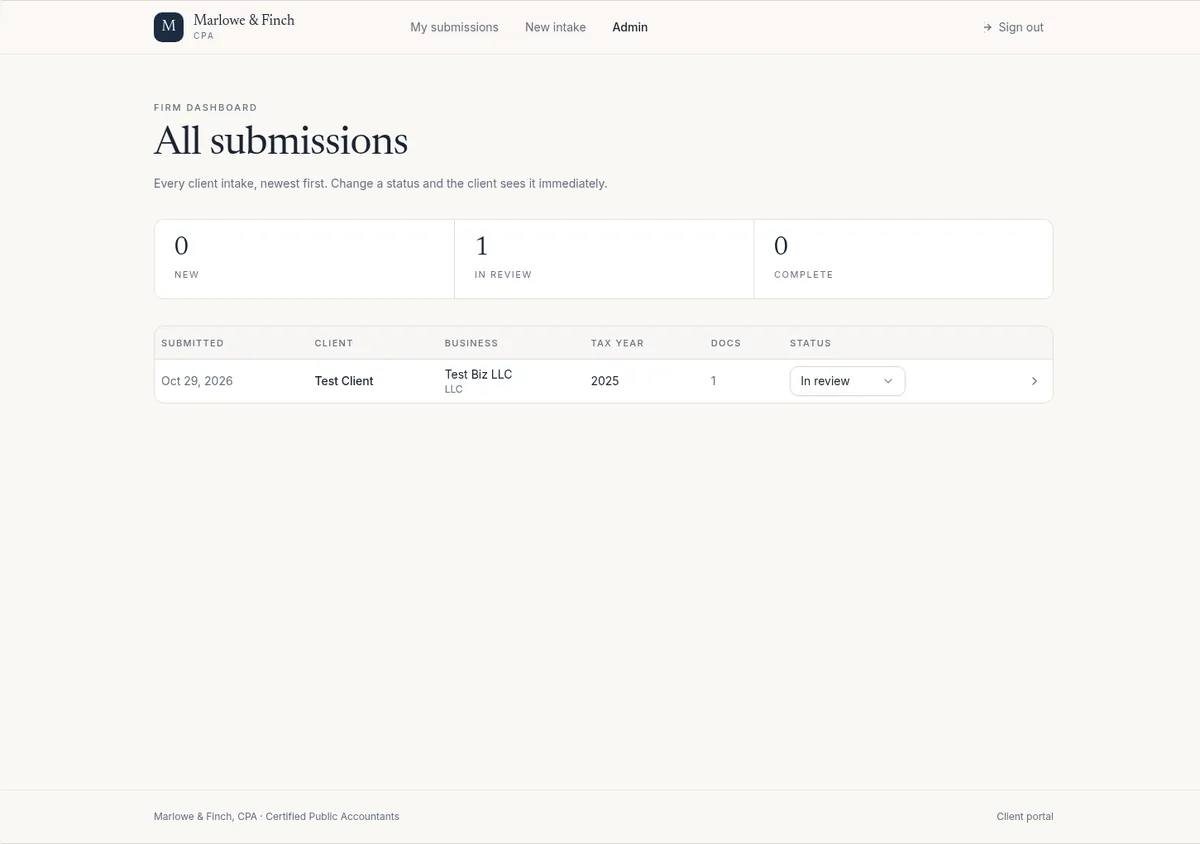
Sign in as the admin, open the admin view, change a submission from New to In review, and refresh the page. In Base44, Lovable and Bolt the new status was still there after the refresh. In Softr, statuses showed as read-only tags and the row menu only offered “Open”.
Step 8: Run the separate-client access check
This is the step that matters most. Sign up a second client and confirm:
- There’s no Admin link in its navigation.
- Typing the admin page’s address directly is blocked.
- It sees only its own submissions, not the first client’s.
- A signed-out visitor who opens the admin address is sent to the login page.
What we found:
- Base44: passed. As a signed-up client there was no Admin link, the admin page showed “Firm staff only”, and My Submissions listed only that client’s intake. A signed-out guest on the admin page was sent to login.
- Lovable: passed. No Admin link, the admin page showed “Admins only”, and the client saw none of the admin’s test submission.
- Bolt: not run yet. We haven’t signed in as a second client on Bolt yet, so whether one client can see another’s data is untested.
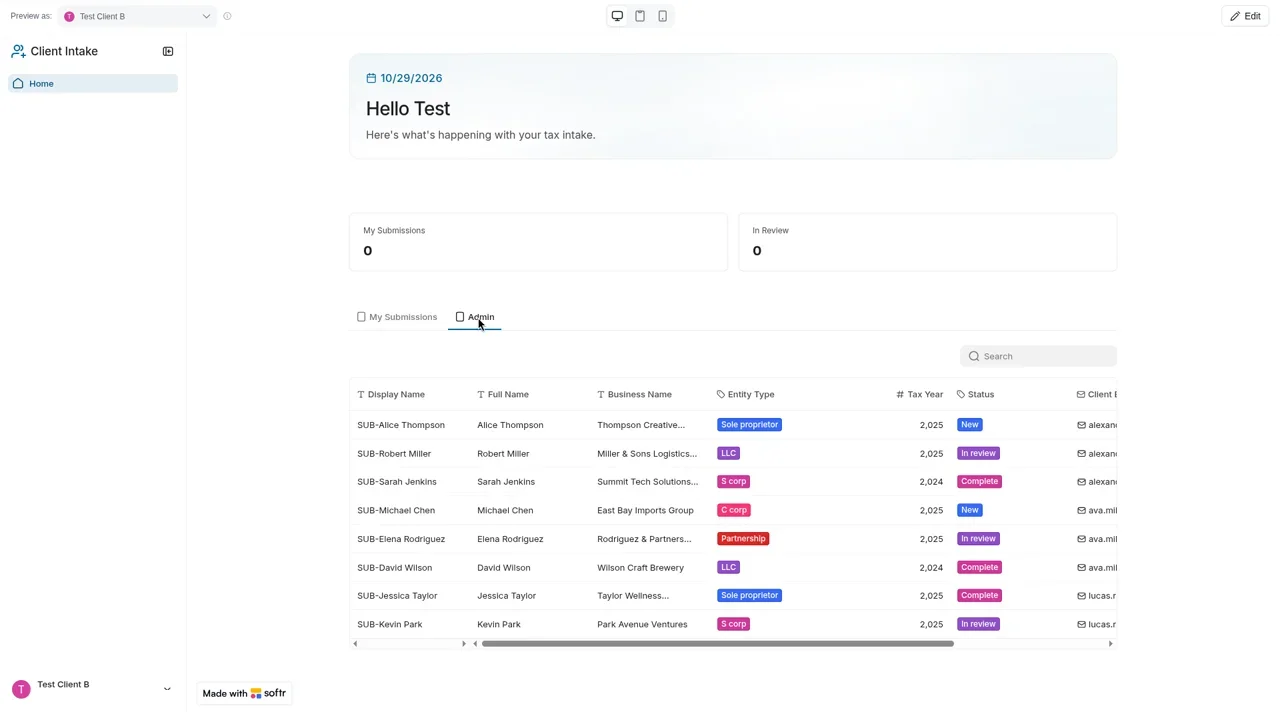
- Softr Basic: failed. We couldn’t sign in as a real user, because Softr says added users can’t access an app until it’s published. Using Softr’s “Preview as” switcher as Test Client B, the Home page had an Admin tab listing all 8 sample submissions, and the admin page opened with no block. Signed-out visitors were redirected to login. Softr’s AI said it had reactivated the user groups, but they were still off after a reload.
Softr’s docs say Basic includes 5 Client users with no add-on, and that Pro ($119/mo billed monthly, $99/mo billed yearly) is where “custom role-based permissions” start, with 3 custom user groups (source, as of Oct 29, 2026). We haven’t tested Pro.
Building another app with sign-ups? See our login and database setup guide, including the first-admin problem we hit in Lovable and Bolt.
Step 9: Check security and visibility settings
- Run the built-in scan. Base44’s free “Check Security” took about a minute and flagged 7 high-severity dependency issues, with a “Fix all” button. Lovable’s free Deep scan took about 2 minutes, found no issues on our portal and warned it can’t catch every risk; its dependency panel listed 12 known issues. We found no scan button in Bolt.
- Set who can open the app. Base44 defaulted new apps to “Public”; it also offers Private and Workspace. Lovable’s Users panel lets you turn off sign-up and choose sign-in methods, and its docs list publishing to invited people only (up to 10 people per project) on Free and Pro (source).
- Read the vendor’s responsibility note. Base44 says you’re responsible for your app’s security settings and should review permissions and run a scan before publishing (source).
Step 10: Before any real client data
- Publish the app (or share it to invited people) and repeat Step 8 with real sign-ins, not just the preview
- Test the 3-document limit and a 4th upload (we didn’t)
- Remove AI-generated sample records and invented copy
- Turn off open sign-up or restrict who can join, if the tool allows it
- Run the security scan and fix what it flags
- Decide who the admins are and how you’ll remove access when someone leaves
- Check where client files are stored against your firm’s data-security obligations
- Keep a CSV export or backup of submissions
What we haven’t tested yet
- Real sign-in on a published app (all checks were in previews)
- The 3-document upload limit, in every tool
- Bolt’s separate-client check and its security scan
- Softr Pro, and uploads on Softr
- Email notifications to the firm when a client submits
- Running exported code outside each platform
Pros and cons
Base44
- Pro: Fastest working portal (~4.5 min) with 0 fixes
- Pro: Passed the separate-client check; App Users panel with roles
- Con: New apps default to “Public”
- Con: Exported code still relies on Base44’s backend
Lovable
- Pro: Passed the separate-client check
- Pro: Code downloaded (100 files); Git sync on every plan
- Con: Needed a message to create the first admin
- Con: Blank page after the email-confirmation link
Bolt.new
- Pro: Built a working portal with a real database on the free plan
- Pro: Code downloaded (30 files) on Free
- Con: Login bug fix used ~84K tokens; admin set by hand in the database
- Con: Separate-client check not run yet
Softr (Basic)
- Pro: Signed-out visitors were redirected to login
- Con: User groups off on Basic, so a test client could see all submissions
- Con: Intake form unreachable for clients in preview; no code export
Our verdict
To build a client portal with AI today, start with Base44 if you want it working with the least effort, or Lovable if you want to own the code. Both built the portal in under 10 minutes and kept a second client out of the admin view and other clients’ data. Bolt can do it for free, but plan on a manual admin step and run the access check yourself, because we haven’t. Don’t use Softr Basic for a portal. Whatever you choose, the build is the quick part. Steps 8 to 10 are what make it safe for clients.
Related tests: Vibe coding for accountants · Base44 vs Lovable · Base44 review
Client portal with AI FAQ
Can I build a client portal with AI without coding?
Yes. In our Oct 29, 2026 test, Base44 built a working accounting-firm portal from one prompt with no fixes, and Lovable and Bolt each needed one fix. Softr Basic didn’t produce a working portal. We tested unpublished previews with fake data.
How long does it take?
About 4.5 minutes in Base44 and about 9 minutes in Lovable and Bolt, from prompt to all features working. Testing it properly, including a second client account, takes longer than the build.
Which AI tool is best for an accounting client portal?
Base44 needed the fewest fixes and passed our separate-client check. Lovable also passed and gives you the code. Bolt works on its free plan, but its client check is untested. Softr needs its Pro plan for role-based permissions, and we haven’t tested Pro.
How do I make sure clients can’t see each other’s documents?
Sign up a second client account and check that it has no Admin link, can’t open the admin page by its address, and sees only its own submissions. Do this again on the published app, not just the preview.
Can clients upload documents?
In our tests, file uploads were saved in Base44 (private file storage), Lovable and Bolt (with a download link). We didn’t test the 3-file limit in any tool, and Softr’s upload wasn’t testable because clients couldn’t reach the form.
What does it cost?
As of Oct 29, 2026: Bolt has a free plan (our portal used about 185K of its 300K daily tokens), Lovable Pro is $25/month, Base44 Starter is $20/month and Builder (what we tested) $50/month billed monthly, and Softr Pro is $119/month billed monthly.
Update history
- October 29, 2026: First published. Build 1 results from our Oct 29, 2026 test round (Base44 Builder, Lovable Pro, Bolt Free, Softr Basic). Prices checked Oct 29, 2026.