By the PrototypeVerdict Test Team · Hands-on test on the Basic plan ($25/mo, billed monthly) on Oct 29, 2026 · Pricing checked: Oct 29, 2026
Quick verdict
Our verdict
| Our recommendation | For client portals, go with Softr Pro ($119/month billed monthly, or $99/month billed yearly). Basic doesn’t include the custom user groups and permissions a portal needs |
| Best for | Teams that will pay for Softr Pro or higher and want AI to set up a database-backed internal tool or simple site they keep editing in a visual editor |
| Not ideal for | Client portals on the Basic plan, and anyone who wants the app’s source code |
| Starting price (as of Oct 29, 2026) | Free plan; Basic $19/month billed yearly or $25/month billed monthly (what we tested) |
| Standout | Low AI credit use: our three builds used 4.01 credits. CSV export of a table took two clicks, and the landing page worked first time |
| Watch out for | On Basic, our client portal’s Admin and Client groups were switched off by a plan limit, so a test client could see every submission. There’s no code export |
| Our score | Not scored yet: our tests need Softr Pro. Basic doesn’t include the custom user groups and permissions our client-portal test needs, so a score would test the plan rather than the product. See what Pro adds and what we found on Basic |
Bottom line: for a client portal in Softr, go with Pro. Softr recommends Pro “for small teams building client-facing apps” and says to “start here if you want your apps to be fully branded, with custom role-based permissions” (source: https://www.softr.io/pricing). Our hands-on test on the $25 Basic plan showed why. Basic switched off the Admin and Client user groups that Softr’s AI had created, so in our test portal every client could see every submission. We haven’t tested Pro yet, so we haven’t scored Softr; our untested best guess for Pro is in the next section. On Basic, Softr’s AI was quick and cheap to run (4.01 AI credits for three builds) and built a real database for every app. The invoice tracker was missing its Overdue status and the buttons to add invoices and line items, and the landing page worked. On any plan, check access with a second, non-admin account before a client logs in.
What Softr Pro adds, and how we think it would score
This section is an estimate, not a test result. We tested Softr on the Basic plan only, and we haven’t tested Pro.
Pro costs $119/month billed monthly, or $99/month billed yearly (Softr’s pricing page, checked Oct 29, 2026). Here’s what it adds that touches our three test builds, according to Softr’s pricing page and docs, and which of our findings on Basic each feature targets:
| Pro feature (per Softr) | What we found on Basic | Would it likely fix it? |
|---|---|---|
| Custom user groups (Softr’s docs list them for Pro, Business and Enterprise) | Client portal: Softr’s AI created Admin and Client groups, then Basic switched them off, so every test client could see every submission and open the admin page | Likely. With the groups active, the admin tab and admin page can be limited to the Admin group, which is how Softr’s AI set the app up. We’d still need a second account to confirm it |
| Action visibility: who sees add and edit buttons (docs: Pro and higher), part of “granular permissions & visibility” on the pricing page | Client portal: clients never got the intake form, and the admin couldn’t change a status. Invoice tracker: no buttons to add clients, invoices or line items in preview, although Studio showed them | Possibly. Pro lets you choose which group sees add and edit buttons, but from Basic we can’t tell whether the missing buttons were a plan lock or a build mistake |
| Email one-time code (OTP) and Google sign-in for app users | Client portal: the AI chose email codes, which Basic doesn’t allow, so sign-in was off until our fix message | Yes. The AI’s first choice would have been allowed, saving one fix message |
| 50 AI credits a month (Basic: 10) | Not a failure: our three builds used 4.01 credits | No change to what we saw; it’s headroom |
| 10,000 workflow actions a month (Basic: 2,500) | Invoice tracker: the “Mark Overdue Invoices” workflow showed an error and was never switched on | Unlikely. The workflow failed with an error, not a usage limit, and Pro doesn’t add an Overdue status |
One limit to know: Softr’s app-wide “global data restrictions,” a single rule that keeps each client to their own records everywhere in the app, start on Business ($395/month billed monthly), not Pro. On Pro, keeping each client to their own submissions depends on how each page and block is filtered and who can see it. That’s exactly what our separate client account check tests.
Our best guess: about 5.5 to 6.5 out of 10 on Pro. We haven’t tested Pro, so this is an untested estimate, not a score. It applies the same scoring rules we use for every tool to what Pro would likely change:
- Ease of use: likely better than on Basic. No sign-in fix would be needed, and if the add buttons showed up, the invoice tracker would need fewer follow-ups. The two clarifying questions, the follow-up that timed out and the long invoice-tracker session would still cost points.
- Output quality: could improve a lot if the groups and buttons work. The missing Overdue status, the errored workflow and three quirks (a “2,025” tax year, a $0.00 invoice total and invented yearly prices on the landing page) don’t look like plan limits.
- Pricing value: this part would drop. Pro’s $119/month billed monthly is over the $50 line in our rules, which is the largest price deduction we apply. Credits wouldn’t cost anything (4.01 is about 8% of Pro’s 50), and in-app AI features still share the same credit pool as building.
- Backend and data: could be near the top if the separate client account check passed and no sign-in fix was needed.
- Code ownership and export: stays low on any plan, because Softr has no code export.
What would still hold it down: the invoice tracker’s Overdue gaps and quirks, which Pro doesn’t obviously fix; no code export on any plan; the price, since $119/month billed monthly is more than double Base44 Builder’s $50 and would be the highest plan price of any tool we’ve scored; and credits, because in-app AI features draw from the same monthly pool and included credits don’t roll over. Even the top of our range would sit well below Lovable, Bolt and Base44 (8.1 to 8.4).
We’ll score Softr after testing Pro with the same three prompts and the separate client account check. Until then, this estimate isn’t a score, and it isn’t in our ratings or structured data.
Sources: https://www.softr.io/pricing and https://docs.softr.io/core-concepts-overview/user-groups–permissions (both checked Oct 29, 2026)
What is Softr?
Softr describes itself on its pricing page as “a hybrid AI app builder that lets you build with both AI and a no-code editor,” and says that unlike other AI app builders, which stop working once you run out of credits, you can keep building with the no-code editor. Source: https://www.softr.io/pricing
According to its docs, Softr’s AI Co-Builder does the following from a plain-language description:
- Database: creates the tables and fields, links them (for example, Projects linked to Tasks) and adds realistic sample data.
- Pages: creates a page structure with a navigation menu, using Softr’s standard blocks.
- Access: sets up user groups for the roles you describe (for example, Admin and Client), “with secure, appropriate permissions per group.”
- Questions first: it may ask 2 or 3 short clarifying questions before it builds.
Source: https://docs.softr.io/start-here/ai-co-builder
In our test, it also ran a short setup wizard for each app (sign-in method, whether people can sign up, navigation layout and theme), and it filled every app with invented sample records.
Who Softr is for
Teams on Pro or higher building internal tools. Softr’s AI set up real database tables for all three of our test apps, and you keep working in a visual editor rather than in code. Softr recommends Pro “for small teams building client-facing apps,” and says to “start here if you want your apps to be fully branded, with custom role-based permissions.” Source: https://www.softr.io/pricing. We tested Basic, not Pro, so we can’t confirm how the same builds behave on Pro (our untested estimate is above).
Simple marketing pages and lead forms. Our landing page build worked on the first try, and its contact form saved to a database table.
Accountants and bookkeepers: be careful on Basic. A client portal is the app our readers ask about most, and it’s where Softr’s Basic plan fell short in our test. A test client could see every other client’s submission. If you build a portal in Softr:
- Build with fake data first. Don’t put real client or taxpayer data into a prototype.
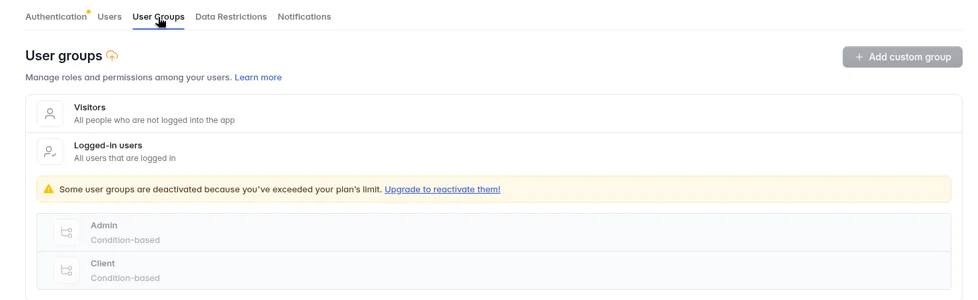
- Check access with a second, non-admin account before any client logs in. In Softr Studio, look under Users > User Groups for a “deactivated” warning.
- Expect to need Pro or higher for client and admin roles, based on Softr’s own plan advice and what we saw on Basic.
- Know how to get your data out. Tables export to CSV (see “Code export” below).
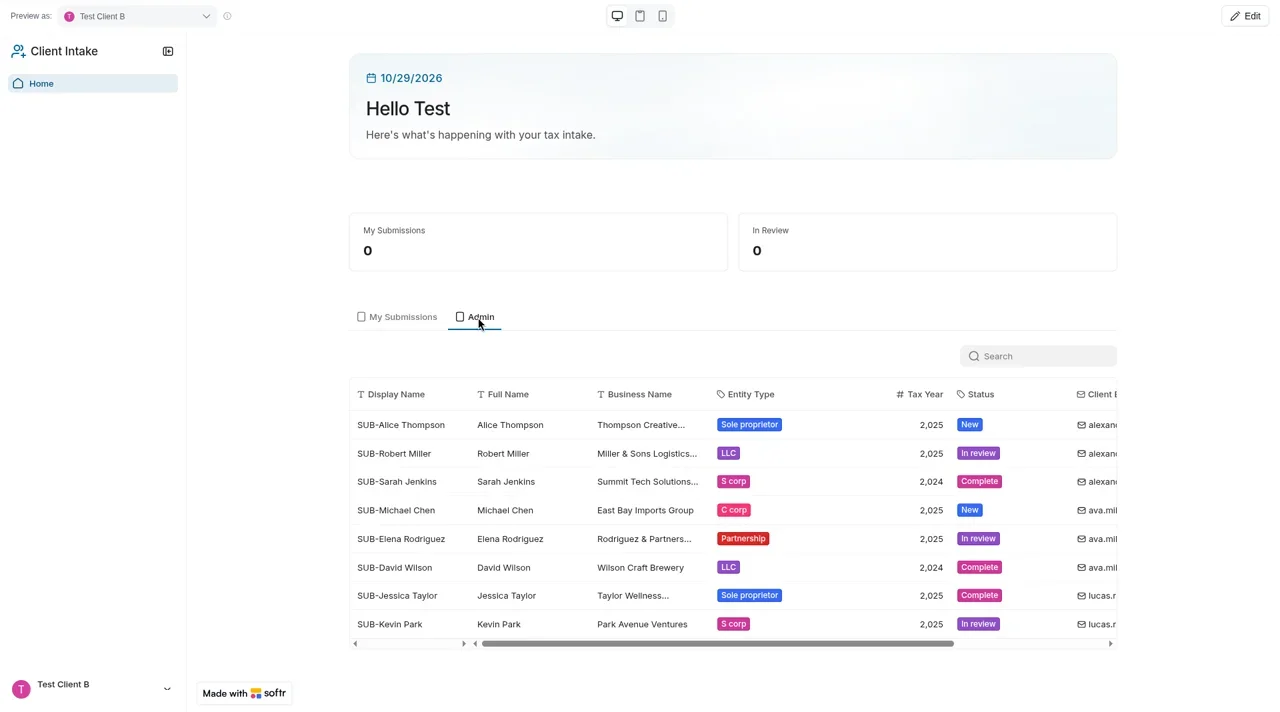
What we saw in our test (Oct 29, 2026, Basic plan): the client intake portal failed our separate client account check. Softr Studio showed “Some user groups are deactivated because you’ve exceeded your plan’s limit,” with the Admin and Client groups greyed out. Previewing as a second, non-admin test client, we found an Admin tab on the home page that listed all 8 sample submissions, and the admin page opened directly. A signed-out visitor was sent to the login page. All three apps saved their data in Softr’s built-in database.
Who should skip it: Anyone who needs a secure client portal but won’t pay for a higher plan, and developers or founders who want a portable codebase. Look at Base44 or Lovable, whose test portals passed the same client account check, or Bolt (see Bolt vs Lovable).
Softr pricing (as of October 29, 2026)
Softr has four self-serve plans plus custom Enterprise pricing. The pricing page opens on yearly billing (“2 months off”); we read both the yearly and monthly views.
Plans
| Plan | Billed yearly (per month) | Billed monthly | AI credits/mo | App users | Records | Workflow actions/mo | Key extras |
|---|---|---|---|---|---|---|---|
| Free | $0 | $0 | 5 | 5 | 5,000 | 500 | Unlimited apps, databases, workflows, agents and forms; API and MCP access; up to 3 builders |
| Basic | $19/mo | $25/mo (what we tested) | 10 | 5 team + 5 client | 50,000 | 2,500 | Custom domain, conditional form logic, automated database backup; 1 builder (extra builders $5/mo) |
| Pro | $99/mo | $119/mo | 50 | 10 team + 50 client (more from $1/mo) | 500,000 | 10,000 | Remove Softr branding, email code (OTP) and Google sign-in for app users, granular permissions and visibility, comments, custom code and API connectors; 2 builders (extra $10/mo) |
| Business (“Popular”) | $329/mo | $395/mo | 100 | 30 team + 100 client (more from $2/mo) | 1,000,000 | 25,000 | Two-factor sign-in, domain-restricted sign-up, global data restrictions, installable app (PWA), push notifications, priority support; 3 builders (extra $20/mo) |
| Enterprise | Custom | Custom | Custom | Custom | Custom | Custom | SSO (SAML/OpenID), SCIM, audit logs |
Prices in USD, as of Oct 29, 2026, read from both the yearly and monthly views of https://www.softr.io/pricing. Softr also lists a 50% discount for non-profits and education.
What the AI credits mean
Softr’s AI credits power its AI features, including the AI Co-Builder and the Vibe Coding block. Softr says credits are “consumed based on the model, task type, and size of the input/output,” that all AI features draw from one monthly pool, and that included credits reset every month without rolling over. If you run out, AI features pause until the next cycle unless you buy an add-on. Add-ons are billed as a subscription, and unused add-on credits roll over for up to one month. Source: https://docs.softr.io/workspace-and-billing/ai-credits
What our three test builds used (Oct 29, 2026, Basic plan): our account started with 60 AI credits: the plan’s 10 plus a 50-credit bonus shown on the Plan and billing page. Softr spent the bonus credits first, and the 10 included credits were still untouched at the end.
| Test build | AI credits | Messages after the first prompt | Result |
|---|---|---|---|
| Client intake portal | 0.94 (0.76 build + 0.18 fix) | 1 fix, plus 2 answers to the AI’s questions | Failed: client access and intake form |
| Invoice tracker | 2.70 (0.77 build + 1.93 for follow-ups) | 4 | Partly working |
| LedgerLight landing page | 0.37 | 0 | Working |
| Total | 4.01 (60 to 55.99) |
Even without the bonus, 4.01 credits would have fit within Basic’s 10 a month (about 40%). The chat panel didn’t show a balance, so we read it from the Plan and billing page. Our balance screenshots show 60 at the start, 59.06 after the portal, 58.29 after the invoice tracker’s first build (before its follow-ups) and 55.99 at the end. We didn’t screenshot the balance after the tracker’s follow-ups, so the split between those follow-ups (1.93) and the landing page (0.37) comes from our session notes; together they’re the 2.30 the screenshots show.
Other costs and refunds
Softr’s pricing FAQ lists extra custom domains at $15/month ($13/month billed yearly), a free trial with no credit card, and a free-forever plan. It also says refunds are available within 14 days on monthly plans and 30 days on yearly plans. Source: https://www.softr.io/pricing
Which plan should you test on?
We tested on Basic, the cheapest paid plan, at $25/month billed monthly. Credits weren’t the problem: three builds used 4.01. Plan features were. On Basic we hit these locks and warnings:
- Sign-in: the AI first set the portal to sign in with an emailed one-time code, a Pro feature. Softr warned “Users can’t log in with email currently,” until our fix message switched it to email and password.
- User groups: “Some user groups are deactivated because you’ve exceeded your plan’s limit,” with Admin and Client greyed out and “Add custom group” disabled.
- Higher-plan labels: in-app notifications (Pro), two-factor sign-in and domain-restricted sign-up (Business), and single sign-on (Enterprise).
The math: Basic at $25/month billed monthly is the same monthly price we found for Lovable’s and Bolt’s entry plans, and above Base44 Starter’s $20 (all checked Oct 29, 2026; see our Base44 review). But a client portal with working roles points to Pro at $119/month, more than double Base44 Builder’s $50.
Code export and ownership: the important fine print
Softr is a hosted platform. Your app runs on Softr, and there’s no button that exports it as a standalone codebase. Softr says so itself, in its own roundup of AI app builders: “No raw code export: Apps live on Softr’s platform; you can export data, but not the full codebase.” Source: https://www.softr.io/blog/best-ai-app-generators
What you can do, according to Softr’s docs:
- Edit code inside Vibe Coding blocks. The Vibe Coding block generates a custom block from a prompt. You can edit its code, revert to earlier versions, and copy the block to another Softr project. That code runs inside Softr, not as a standalone app. Sources: https://docs.softr.io/vibe-coding and https://docs.softr.io/vibe-coding-developer-guide
- Reach your data over Softr’s API and MCP server. Softr lists API and MCP access on every plan, including Free. Source: https://www.softr.io/pricing
What we saw (Oct 29, 2026, Basic plan):
- No code export. The app menu offered only “Rename” and “Create a template,” and the app settings had no export option. Version history, “App as MCP” and an Advanced panel were there; custom code was labeled Pro and audit log Enterprise.
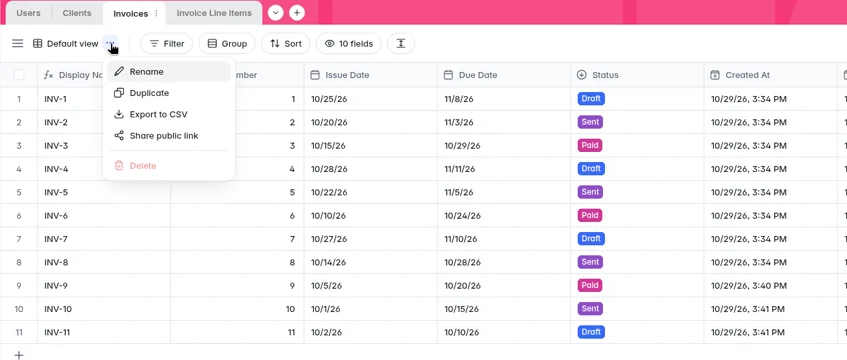
- CSV export worked without an AI message. In the database, the Invoices table’s view menu has “Export to CSV.” It downloaded 11 rows with 10 columns: Display Name, Invoice Number, Issue Date, Due Date, Status, Created At, Updated At, Client, Line Items and Total Amount.
- API and MCP on Basic: account settings had an API tokens page (“Let other tools access your Softr account via API or MCP”), and the app settings had “App as MCP.” We didn’t create a token.
- Vibe blocks: the AI built parts of our landing page as vibe blocks with a code button. We didn’t open or edit that code.
What this means: with Softr you’re choosing a platform, not getting a codebase. Your data can leave as CSV files, but the app can’t. If you might want to move the app to your own hosting later, look at Lovable or Bolt instead.
Softr features that matter (documented)
- AI Co-Builder: builds the database, pages and user groups from a description, then keeps editing on request. Source: https://docs.softr.io/start-here/ai-co-builder
- Vibe Coding block: custom AI-built blocks connected to your data, with version history. Source: https://docs.softr.io/vibe-coding
- Softr Databases, Workflows, Agents and Forms: unlimited on every plan, within the record and workflow-action limits shown above. Source: https://www.softr.io/pricing
- App user sign-in: email codes (OTP) and Google sign-in for app users start on Pro; two-factor sign-in and domain-restricted sign-up start on Business; SSO is Enterprise. Source: https://www.softr.io/pricing
- Permissions: granular permissions and visibility start on Pro; global data restrictions on Business. Source: https://www.softr.io/pricing
- Custom domain: Basic and higher. Source: https://www.softr.io/pricing
What we found on Basic
Hands-on notes from Oct 29, 2026 on Softr Basic (billed monthly). These are findings, not a score. Our AI agents ran the same three prompts we use in every tool, pasted word for word (see how we test), with fake data and test accounts only. Nothing was published. Softr can’t sign in added users until an app is published, so we checked each user’s view with Softr’s “Preview as” switcher.
Build 1: Client intake portal
- Result: not working after 1 fix message. The build finished in about 4.3 minutes (“Your app is ready”), and we stopped after about 15 minutes.
- Questions first: the AI asked two clarifying questions in chat (how clients submit intakes, and who can manage all submissions), and we answered both.
- Credits: 0.94 AI credits (0.76 build, 0.18 for the fix).
- Fix message: “Sign-in is set to email one-time code, which my plan doesn’t allow, and the Admin and Client user groups are deactivated. Please switch to email and password sign-in, and make the admin view and each client’s own submissions work on my current plan.” Sign-in switched to email and password. The user groups stayed deactivated after a reload, even though the AI said it had reactivated them.
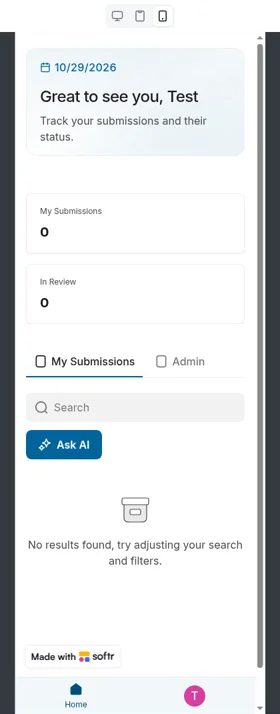
- Worked: an email-and-password sign-up page, Users, Submissions and Documents tables with all five intake fields plus status, all five entity types, an admin list of every submission, and a phone-width layout (375 px). A signed-out visitor who opened the admin page was sent to the login page.
- Didn’t work: clients never got the intake form in preview (no add button for a test client), so we couldn’t test document uploads or the 3-document limit. The admin’s status was a read-only tag, with no dropdown to change it. Tax year showed as “2,025.”
- Client vs admin (separate account check): failed. Previewing as a second, non-admin test client, there was no Admin link in the navigation, but the home page had an Admin tab listing all 8 sample submissions, and the admin submissions page opened directly. Softr’s User Groups page said the Admin and Client groups were deactivated because of the plan limit.
Build 2: Invoice tracker
- Result: partly working after 4 follow-up messages. The session ran from about 3:30 to about 4:03 PM CT (we didn’t log the exact start time).
- Credits: 2.70 AI credits (0.77 build, from our balance screenshots, and 1.93 for follow-ups, from our session notes).
- Follow-ups: the first asked for a way to add line items in the preview, and Softr replied “I ran into issues while planning tasks.” Our fourth repeated that there was still no Add line item or Edit invoice button, that the Overdue column was empty and that the overdue workflow showed an error. Softr replied: “The request took too long to reason about and I couldn’t retrieve the response. Please try breaking it down into smaller change requests.”
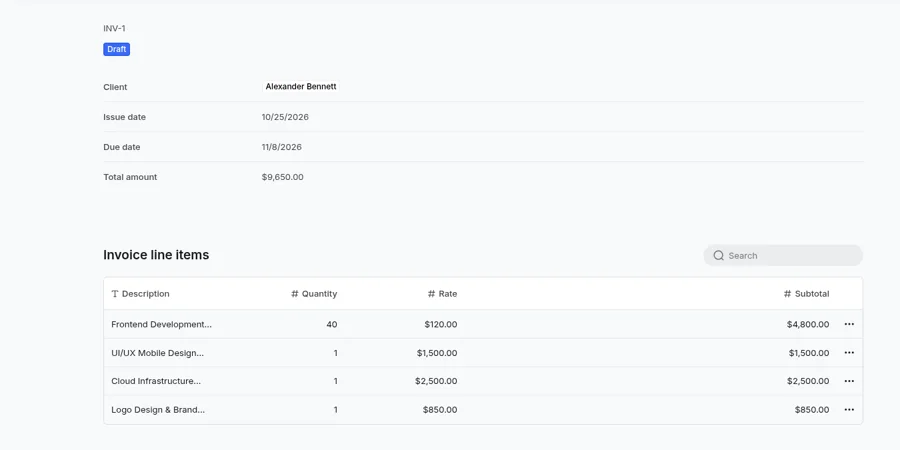
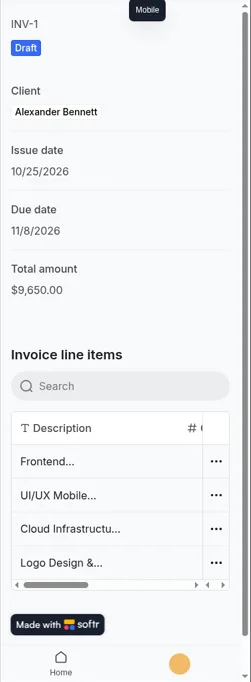
- Worked: Users, Clients, Invoices and Invoice Line Items tables in Softr’s database; Draft, Sent and Paid statuses; line items with quantity, rate and subtotal; a correct total on a sample invoice ($9,650.00 from four line items); data still there after a reload; and a phone-width layout (375 px).
- Didn’t work: there’s no Overdue status, only Draft, Sent and Paid. Softr created a “Mark Overdue Invoices” workflow, but it showed an error and wasn’t switched on. In preview there were no buttons to add clients, invoices or line items, and no Clients or Invoices links in the navigation, although the Studio editor showed those buttons. One invoice the AI added (INV-10) showed a $0.00 total even though it had line items.
- Dashboard: the home page’s overdue list is based on due dates, not status. Because we couldn’t enter our own test invoices in preview, we couldn’t check the outstanding and paid-this-month totals against known figures.
Build 3: LedgerLight landing page
- Result: working in about 4 minutes with 0 fix messages, using 0.37 AI credits. No clarifying questions in chat.
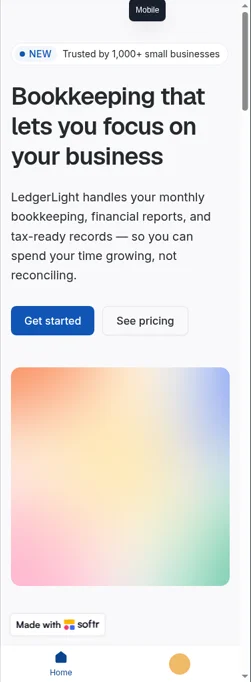
- Worked: the hero headline and call-to-action buttons, three feature blocks, the $49/$99/$199 pricing table (on the Monthly setting), three testimonials marked “Sample testimonial” and “Sample placeholder,” five FAQs, and a contact form that saved our test entry to a Leads table in the database. The layout stacked cleanly at 375 px.
- Quirk: the pricing switch opened on “Yearly,” showing $39/$79/$159, a yearly discount the prompt didn’t ask for.
- Invented copy: a “Trusted by 1,000+ small businesses” badge, plan features and FAQ answers, plus sample leads and testimonials in the database. These are sample text the tool generated, not real claims.
Why we haven’t scored Softr yet
Our scores measure what each tool does with the same three prompts. Our client-portal prompt asks for separate admin and client access, and on Basic, Softr’s custom user groups and action visibility (who sees add and edit buttons) aren’t available; Softr’s docs list them for Pro and higher. A score from Basic would mostly measure the plan’s limits, not the product. We’ll score Softr after testing it on Pro with the same prompts and the separate client account check. How we test explains our method.
Pros and cons
Pros (from documented features and pricing)
- The AI builds the database, pages and user groups in one go
- You can keep building in a no-code editor when AI credits run out
- Database, workflows, agents, forms, API and MCP access on every plan, including Free
- The Free plan doesn’t expire, and the free trial doesn’t need a card
- 50% discount for non-profits and education
Cons (from documented policies)
- No full code export; apps run on Softr
- Small AI credit allowances: 5 a month on Free, 10 on Basic, 50 on Pro
- Granular permissions and email-code or Google sign-in for app users start on Pro ($119/month billed monthly)
- Some things, like conditional form branching, still need manual setup after the AI builds
From our Oct 29, 2026 test (Basic plan)
- Pro: Very light credit use: 4.01 credits for all three builds
- Pro: A real database in every test app, and CSV export from the database took two clicks
- Pro: The landing page worked first time, and its contact form saved to a table
- Con: Security warning on Basic: a non-admin test client could see every submission and open the admin page, because Softr deactivated the Admin and Client groups
- Con: Clients never got the intake form, and the admin couldn’t change a status
- Con: The invoice tracker had no Overdue status, its overdue workflow errored, and the preview had no buttons to add clients, invoices or line items
- Con: The AI said it had reactivated the user groups when it hadn’t, and one follow-up timed out
- Con: Invented copy on the landing page, including a “Trusted by 1,000+” badge and a yearly discount
Softr alternatives
- Base44: all-in-one AI builder; its test portal passed our separate client account check on the Builder plan. Its exported code still relies on Base44’s backend. See Base44 vs Lovable.
- Lovable: AI writes a full codebase you can sync to GitHub and download; its test portal also passed the client account check.
- Bolt.new: browser-based builder that built all three of our test apps on its free plan; see Bolt vs Lovable.
- Softr vs Lovable for client portals (coming soon).
Softr FAQ
Is Softr free?
Yes. As of Oct 29, 2026, Softr’s Free plan costs $0 and includes 5 AI credits a month, 5 app users, 5,000 records and 500 workflow actions a month, with unlimited apps. Source: https://www.softr.io/pricing
How much does Softr cost?
As of Oct 29, 2026, billed yearly: Basic $19/month, Pro $99/month and Business $329/month. Billed monthly: $25, $119 and $395. Enterprise is custom. Source: https://www.softr.io/pricing
Can I build a client portal on Softr Basic?
Not safely, in our test. On Basic, Softr deactivated the Admin and Client user groups its AI had created, citing the plan’s limit, and a non-admin test client could see every submission. For a client portal, go with Pro ($119/month billed monthly as of Oct 29, 2026), which Softr recommends for client-facing apps with role-based permissions. We haven’t tested Pro yet; our untested best guess for how it would do is in What Softr Pro adds, and how we think it would score above.
Can I export my code from Softr?
No. In our test on Basic there was no code export, and Softr says apps live on its platform and you can export data but not the full codebase. Tables export to CSV from the database’s view menu.
How many AI credits does a Softr app use?
In our Oct 29, 2026 test, our three test builds used 4.01 AI credits in total, including five fix messages: 0.94 for the client portal, 2.70 for the invoice tracker and 0.37 for the landing page.
Is Softr worth it in 2026?
For client portals, only on Pro or higher, which we haven’t tested yet. On Basic, our test portal failed the separate client account check and the invoice tracker was missing key features. Softr used very few AI credits, and the landing page worked. We haven’t scored Softr yet.
Update history
- October 29, 2026: First published as hands-on notes, not scored. Findings from our Oct 29, 2026 test on the Basic plan (billed monthly). Prices checked Oct 29, 2026 on both the yearly and monthly views of Softr’s pricing page.