By the PrototypeVerdict Test Team · Built and tested: Oct 29, 2026 · Prices checked: Oct 29, 2026
This is exactly how we built three working apps in Lovable on the Pro plan on Oct 29, 2026: a client intake portal, an invoice tracker and a landing page. For each one you get the idea, the written spec we pasted as the prompt, what Lovable produced, every follow-up message word for word, how we tested it, and the time and credits it took. Nothing here is reconstructed. Where our log has no record of something, we say so.
Only want the client portal? Our client portal guide compares the same build across four tools. This page follows one tool, Lovable, from idea to finished app.
At a glance
What three apps cost us in Lovable
| App | Time to fully working | Fix messages | Credits used |
|---|---|---|---|
| Client intake portal | About 9 minutes | 1 (make the first admin) | 1 from the monthly balance, plus all 5 free daily build credits (Lovable’s usage page: about 6) |
| Invoice tracker | About 4 minutes | 0 | 3 from the balance (usage page: 2.70) |
| Landing page | About 3 minutes | 0 | 1.5 |
| Follow-ups: Plan mode + CSV export | Not timed | None (2 feature messages: 1 in Plan mode, 1 in Build mode) | 2.5 (1 + 1.5) |
| Total | About 16 minutes of building | 1 fix | 8 from the balance (105 to 97), plus the 5 daily credits |
Plan: Lovable Pro, $25/month billed monthly for 100 credits, bought Oct 29, 2026. None of the three apps was published, so the “final product” here is a working app in Lovable’s preview.
Our balance went from 105 to 97 across the three builds and follow-ups. Lovable’s per-project usage page showed slightly different figures (6, 2.70 and 1.5 for the three builds), apparently because it also counts the free daily credits. Our test log doesn’t record the cause of the difference, so we use the balance figures.
Step 1: Start with the idea and write it as a spec
Each app started as a one-line idea that a small accounting firm or freelancer might actually need:
- A client intake portal for an accounting firm, so clients can send their details and documents in one place.
- An invoice tracker for a freelancer that knows what’s paid, what’s owed and what’s late.
- A one-page landing page for a made-up bookkeeping service called LedgerLight, with a contact form that saves leads.
Before opening the tool, we turned each idea into a written spec: who uses the app, every field, every status and every screen, plus “works on mobile”. That spec is the prompt. We paste exactly the same text into every AI app builder we test, so the prompts below are word for word what we sent. You can copy all three from our prompt library.
Our rules for the test: one first prompt per app, then only fix messages if something is broken, with at most five fixes per app. We logged the time to first preview, the time to a fully working app, the credits used and the messages we sent.
Never built anything before? Our start-to-finish path for first-time builders covers the basics, and our five-line spec method shows how to turn an idea like these into a first prompt.
Step 2: Pick a plan and open a new project
We bought Lovable Pro ($25/month billed monthly, 100 credits). Pro also gets 5 free daily build credits, and in our test Lovable used those up before it touched the balance. According to Lovable’s docs, the free plan has the same 5 daily credits, capped at 30 a month. We didn’t test on Free. If you’re on Free, read our guide to running out of credits first.
Account sign-up and the new-project screen: Not logged. We started each app as a new project and pasted the prompt into the chat box.
Step 3: Build the client intake portal
3a. Paste the prompt
Build a client intake portal for a small accounting firm. Clients can sign up and log in with email and password. After logging in, a client fills out an intake form (full name, business name, entity type dropdown: Sole proprietor / LLC / S corp / C corp / Partnership, tax year, a notes field) and uploads up to 3 documents (PDF or image). Clients can see their own past submissions and their status. A separate admin view lists all submissions in a table with a status dropdown (New, In review, Complete) that the admin can change. Clean, professional design that works on mobile.
3b. What Lovable produced
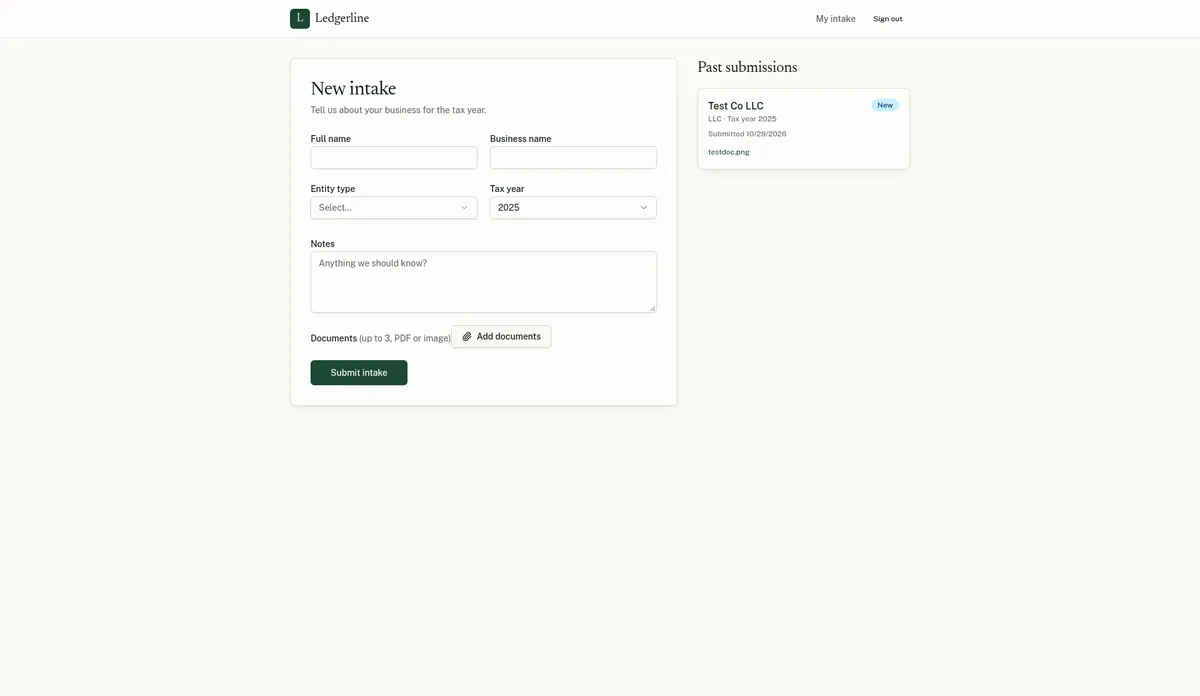
A first preview appeared in about 4 minutes. Lovable set up its built-in backend, Lovable Cloud, on its own, with no extra cost prompt. That gave the app real sign-up and login, a database and file storage. It named the firm “Ledgerline” by itself.
3c. Test it, and the one fix we needed
We signed up as a test client. Lovable required email confirmation, and it rejected example.com addresses, so use an inbox you control. After clicking the confirmation link we got a blank page. Signing in again at the app’s /auth page fixed it, with no message to Lovable needed.
Then we hit the real blocker. The admin page said “Admins only”, and the app had no way to make anyone an admin. We sent one fix message. This is it word for word, with our test address replaced:
Fix message 1 of 1. It worked: the account became an admin and an Admin link appeared in the nav.
With admin access we checked every feature in the spec:
- Sign-up and login: passed (email confirmation required).
- Intake form with the entity-type dropdown and tax year: passed.
- File upload: passed. The file was still there later.
- The client’s own submissions list: passed.
- Admin table with a status dropdown, and the new status still there after a refresh: passed. The admin page sometimes stayed blank for a few seconds on a hard reload.
- Mobile layout: passed at 400px wide in the browser’s device mode.
- The “up to 3 documents” limit: Not tested.
The access check. Later the same day we signed up a second, separate test client. It saw no Admin link, got “Admins only” on the admin page, and saw none of the first client’s submissions. Passed.
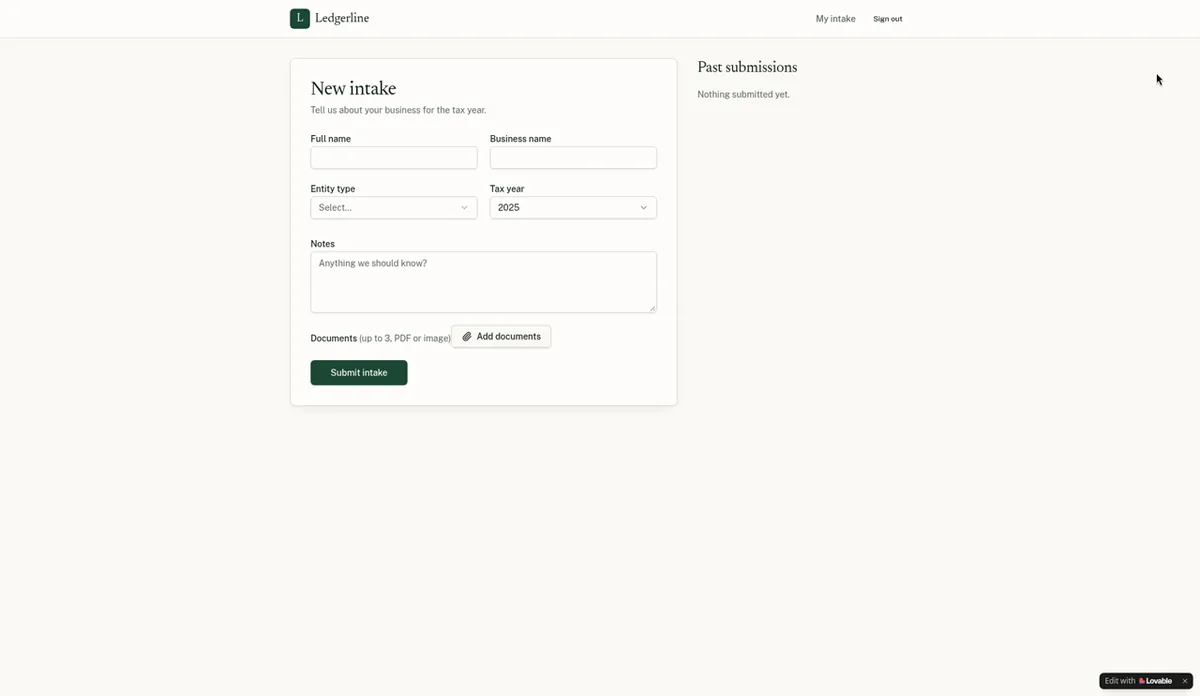
Time and credits: about 4 minutes to first preview and about 9 to fully working. It used all 5 free daily build credits plus 1 credit from the balance (105 to 104).
Step 4: Build the invoice tracker
4a. Paste the prompt
Build an invoice tracker for a freelancer. I can add clients (name, email) and create invoices with an invoice number, client, issue date, due date, line items (description, quantity, rate), and an automatic total. Each invoice has a status: Draft, Sent, Paid, Overdue (Overdue is automatic when the due date has passed and it isn't paid). A dashboard shows total outstanding, total paid this month, and a list of overdue invoices. Data must be saved so it's still there after a page refresh. Works on mobile.
4b. What Lovable produced
First preview in about 3 minutes, and it worked on the first try, with no fix messages. Lovable called the project “Freelancer Invoice Hub”.
4c. Test it
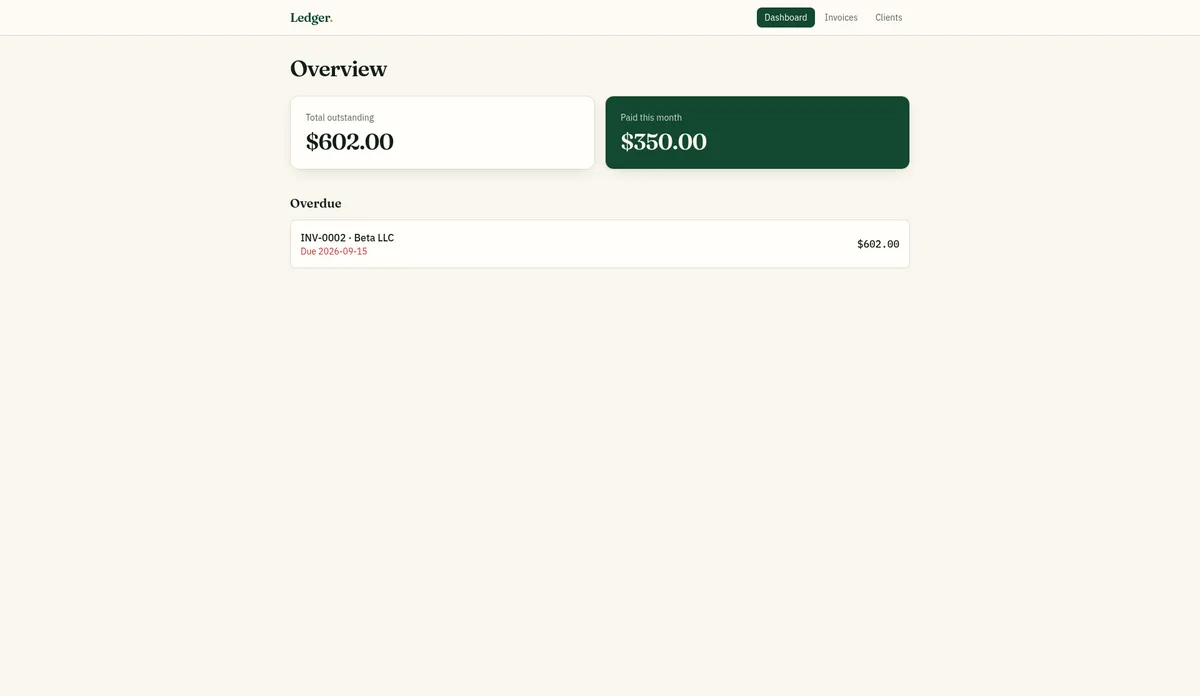
- Adding clients, and invoices with line items and an automatic total ($350.00 and $602.00 in our test): passed.
- Marking an invoice Paid, and automatic Overdue once the due date passed: passed.
- Dashboard totals and the overdue list: passed.
- Data still there after a page refresh: passed.
The catch we only found by testing. The invoices were saved in the browser (localStorage), not in a database. The prompt’s “still there after a page refresh” was met, but the data wouldn’t follow you to another device or browser. Lovable itself suggested “Add online invoice storage”. We didn’t send that, so the cost of adding a database is not tested. If you build this, add “Store all data in a database” to the first prompt (an extra line we haven’t tested).
One small glitch: the “New invoice” button was briefly greyed out after a hard page load.
Time and credits: about 3 minutes to first preview and about 4 to working. Balance 104 to 101 (3 credits).
Step 5: Build the landing page
5a. Paste the prompt
Build a one-page marketing landing page for a fictional bookkeeping service called "LedgerLight" for small businesses. Include a hero with headline and call-to-action button, three feature blocks, a three-tier pricing table ($49, $99, $199 per month), three testimonials clearly labeled as sample placeholders, an FAQ with five questions, and a contact form that saves submissions. Fast, modern, mobile-friendly.
5b. What Lovable produced, and how we tested it
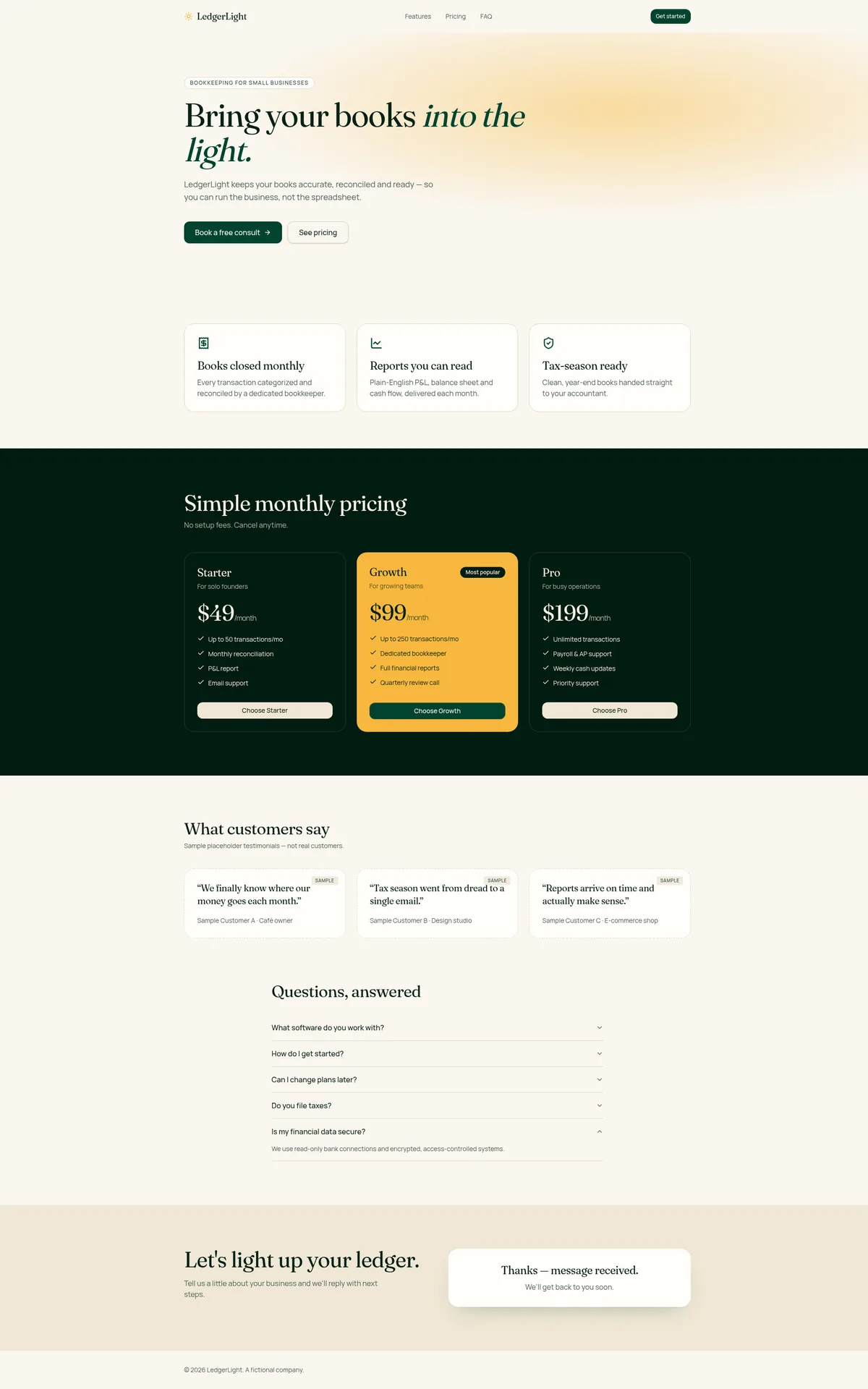
Working in about 2 minutes 50 seconds, with no fix messages. Every item in the spec was there:
- Hero with a call-to-action button, three feature blocks and the $49 / $99 / $199 pricing table: passed.
- Three testimonials, labeled SAMPLE: passed.
- A five-question FAQ (as an accordion): passed.
- Contact form: passed. Submissions were saved to a database table in Lovable Cloud.
Before you publish anything like this: Lovable wrote the FAQ answers and plan descriptions itself, so read every line. The form saves submissions but doesn’t email you. Lovable’s chat told us email alerts need a paid plan and your own domain; we didn’t try to set them up.
Time and credits: about 2 minutes 50 seconds. Balance 101 to 99.5 (1.5 credits).
Step 6: Add a feature with Plan mode, then Build mode
Later the same day we added a CSV export to the invoice tracker, to see how Lovable handles a change to an existing app. Lovable has three modes: Build, Chat and Plan. We used Plan first. This is the message, as shown in our screenshot:
Plan mode. Cost: 1 credit. No code changed.
Lovable replied with a short spec: an “Export CSV” button next to “New invoice”, a file named invoices-YYYY-MM-DD.csv, nine columns, and unit tests. It then waited for us to approve the plan.
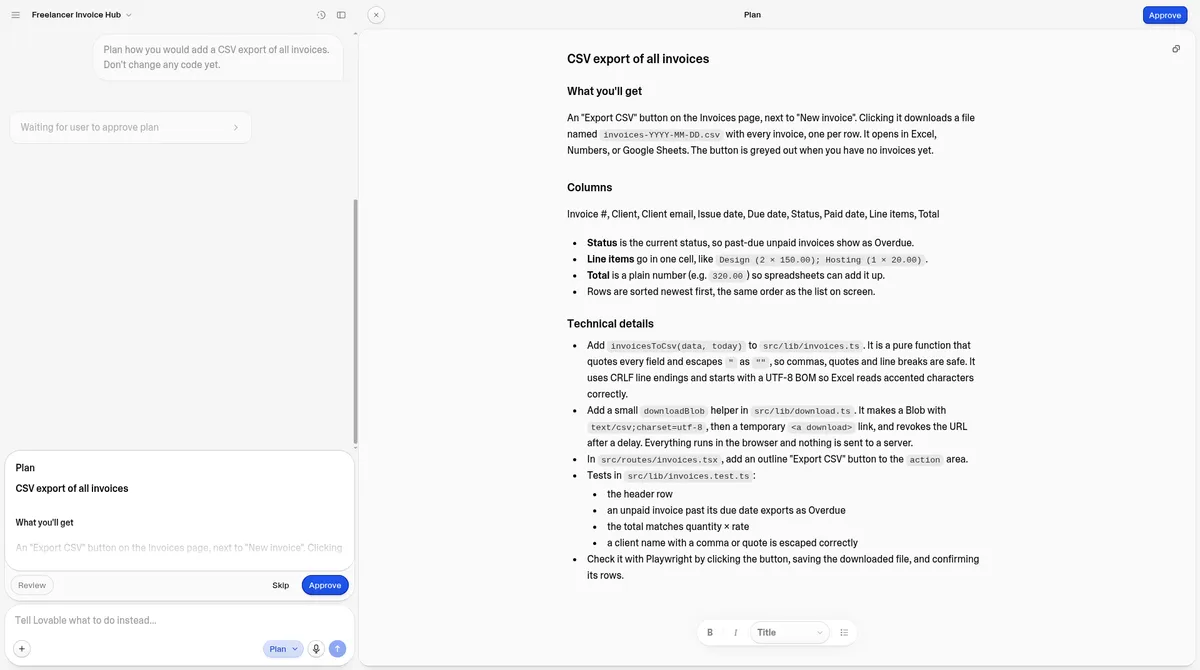
Then we switched to Build mode and sent this, as shown in our screenshot:
Build mode. Cost: 1.5 credits.
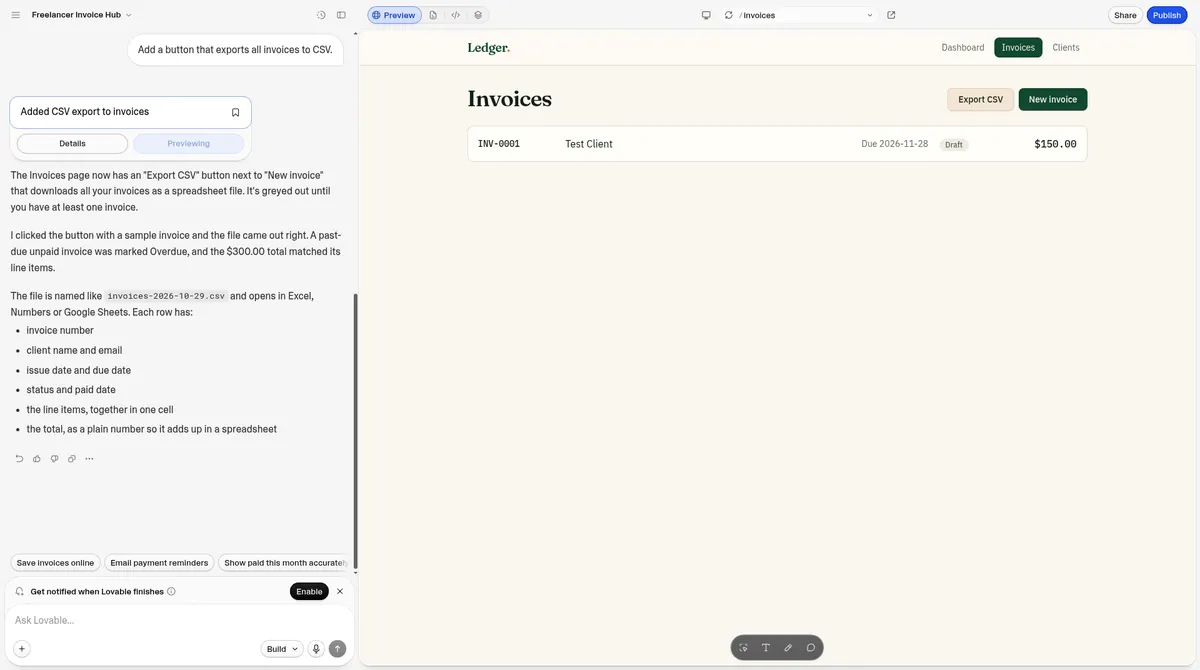
Test: the button stays greyed out until an invoice exists. The file downloaded with nine labeled columns (Invoice #, Client, Client email, Issue date, Due date, Status, Paid date, Line items, Total). Passed. We didn’t build the feature without planning first, so we can’t say whether Plan mode saved credits. Chat mode: not tested.
Step 7: Check security, users and your code
Before an app like this goes near real clients, these are the checks we ran in Lovable:
- Security (More, then Security): a quick scan runs automatically on publish. We ran the free deep scan on the client portal. It took about 2 minutes and found no issues, with Lovable’s own note that the scanner “can’t catch every possible risk.” The dependencies panel listed 53 packages with 12 known issues and no per-package details.
- Users (More, then Users): add or delete users and switch sign-in methods (Email was on; Google, Apple, Microsoft, SAML SSO and OIDC were available), plus “Disable sign-up”. There’s no role editor, so admins are set by asking in chat, as in Step 3.
- Your code (Settings, then Git): two-way sync with GitHub, GitLab or Bitbucket, which creates a new repository. “Download codebase” gave us a one-time ZIP of 100 files. We didn’t connect Git or run the code outside Lovable.
More on logins and access rules: setting up the first admin and testing with a second account, with what Bolt, Base44 and Softr did differently.
Step 8: The final product, and what’s left
After about 16 minutes of building, one fix message and 8 credits from the balance (plus the 5 daily credits), we had three working apps in Lovable’s preview: a portal that keeps clients apart, an invoice tracker with CSV export (its invoices saved in the browser only), and a landing page whose form saves leads.
What we haven’t done, so we can’t walk you through it from experience:
- Publishing an app and connecting a custom domain: Not tested. Our custom domain guide follows Lovable’s docs.
- Moving the invoice data to a database: Not tested.
- Building on the free plan: Not tested. We built on Pro.
- Chat mode, the 3-document upload limit and running the downloaded code elsewhere: Not tested.
What we’d add to the prompts next time
These lines target the two problems we hit. We haven’t tested them yet:
- “Make [your email] the admin, and only admins can open the admin view.” (Would have saved our one fix message.)
- “Store all data in a database, not the browser.” (Would have avoided the browser-only invoices.)
For the full results and score, read our Lovable review and Lovable pricing guide. Weighing it against Base44? See Base44 vs Lovable, or the same walkthrough for Base44.
Sources
- Our test log, Lovable Pro, Oct 29, 2026: prompts, follow-up messages, times, credit balances and checks, plus the follow-up tests and the recheck the same day.
- Our screenshots from the same tests (the follow-up message text in Step 6 is copied from them).
- Lovable Pro price and credits as bought on Oct 29, 2026.
Frequently asked questions
How long does it take to build an app with Lovable?
In our Oct 29, 2026 test on Lovable Pro, a client intake portal took about 9 minutes to fully work, an invoice tracker about 4 and a landing page about 3.
How many Lovable credits does an app use?
Our three apps used 5.5 credits from the Pro credit balance, plus all 5 free daily build credits on the first app. Adding a CSV export later cost 2.5 more (1 for Plan mode, 1.5 to build).
Do I need to know how to code to use Lovable?
Not for these three apps. We only typed plain-English messages. The one fix we needed was asking Lovable to make our test account an admin.
Did Lovable save the data in a real database?
For the client portal and the landing page form, yes, in Lovable Cloud. The invoice tracker saved invoices in the browser only until asked, so ask for a database in your first prompt.
Update history
- October 29, 2026: First published. Our test results are from the Oct 29, 2026 round (Lovable Pro, Base44 Builder, Bolt Free, Softr Basic). Vendor docs and prices checked Oct 29, 2026.