By the PrototypeVerdict Test Team · Docs checked: Oct 29, 2026 · Pre-publish checks from our Oct 29, 2026 tests
Our Bolt links are referral links: if you sign up through one, Bolt may reward us, at no extra cost to you. How we make money.
How this guide was made: we built the same three apps in Lovable, Bolt, Base44 and Softr on Oct 29, 2026, but we haven’t published any of them. So the publishing steps below come from each tool’s own documentation, read on Oct 29, 2026, with a link next to each one. The “before you publish” checks come from our own tests.
New to all this? Start with vibe coding for beginners.
Quick verdict
Our verdict
| Can you publish for free? | Yes on all three, per their docs: Bolt to a bolt.host address, Lovable to a lovable.app address, Base44 from its Publish button |
| Does publishing cost credits? | Bolt and Lovable say their Publish buttons don’t. Lovable says asking the chat to publish does use credits |
| Custom domain | Paid plans only on all three |
| Before you publish | Test with a second, non-admin account, remove sample content, set visibility and run the security scan |
| App Store or Google Play? | None of these is a one-click store publish. We haven’t tested any mobile path |
Preview vs publish vs share link
- Preview is the version you see in the editor while you build. In our tests, every app ran only in preview.
- Publish puts a snapshot of your app on a live web address that other people can open. Later changes don’t go live until you publish again (Lovable and Base44 both say this in their docs).
- Share link usually means sharing the editor or preview with a collaborator, not the live app. Lovable’s docs say share preview links expire after 7 days by default.
Before you hit Publish (from our tests)
These are the problems we found in previews. Publishing makes them public.
- Test with a second, non-admin account. Sign up as a “client”, then check that you can’t see the admin link, can’t open the admin page by typing its address, and see only your own data. Lovable and Base44 passed this check in our test. We didn’t run it on Bolt. On Softr Basic it failed: a test client could see every submission. Do it again on the live app.
- Remove sample and invented content. AI builders invent text. Softr added a “Trusted by 1,000+ small businesses” badge, Lovable wrote its own FAQ answers, and Base44 used a placeholder email (hello@ledgerlight.example). Read every word.
- Check visibility. New Base44 apps defaulted to “Public” in our test.
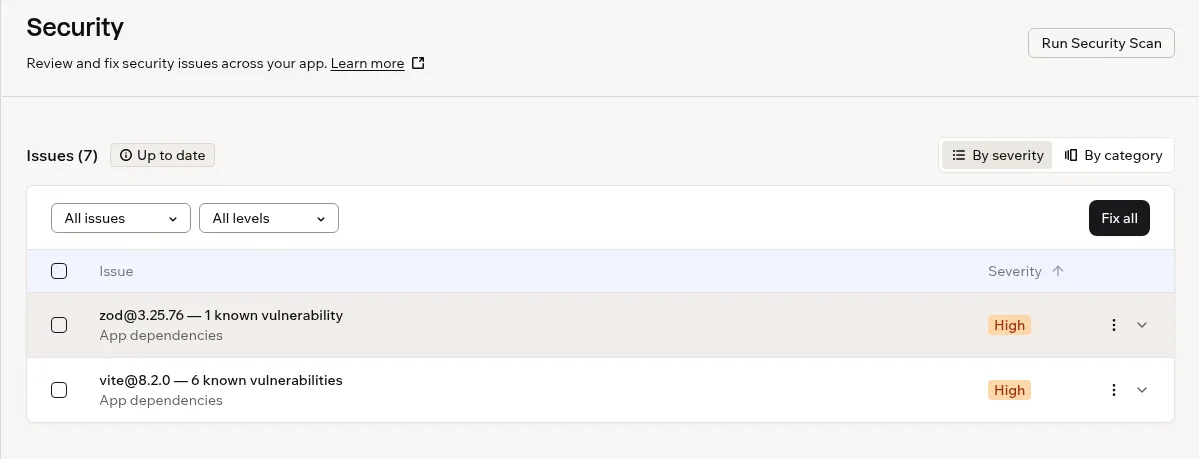
- Run the security scan. Lovable’s free deep scan found no issues in our portal, but listed 12 dependency issues without details. Base44’s free “Check Security” flagged 7 high-severity issues in third-party packages. We found no scan button in Bolt’s project settings. Bolt’s docs put a project security audit in the Publish menu on paid plans, and a database security check on all plans; we haven’t run either (Bolt security docs).
- Use fake data until all of this passes. Never put real client details in a test app.
- Fix cosmetic bugs. Our Bolt landing page showed “\u2019” instead of an apostrophe.
The second-account check is explained step by step in how to add login and a database.
How to publish a Lovable app
From Lovable’s publish docs, read Oct 29, 2026. Not tested by us.
- Click Publish in the top-right corner of the editor (next to Share).
- The dialog suggests a web address ending in lovable.app and runs a quick security scan, which Lovable says takes about 10 seconds. You can change the address.
- Choose who can see it. On Free and Pro, the options are Public (the default) or Invite only, which lets up to 10 invited people per project open it after logging in.
- Click Publish. Lovable shows your live link when it’s done.
- To update the live app later, open the dialog again and click Publish changes.
Cost: Lovable’s docs say publishing from the dialog is free and works even at a zero credit balance, but asking Lovable in the chat to publish counts as build usage and uses credits. Once live, a Lovable app’s built-in backend uses credits as people use it. Our own test note: Lovable’s credit counter was inconsistent in our builds (the balance and the usage page gave different totals), so note your balance before you go live and check it again a few days later.
Custom domain: paid plans only, per Lovable’s docs. If it gets stuck, see Lovable custom domain not working. Lovable Pro was $25/month for 100 credits on Oct 29, 2026 (Lovable plans).
To take it down: Project settings → Publishing → Unpublish project. Your project stays in the editor.
How to publish a Bolt app
From Bolt’s hosting docs and Bolt FAQ, read Oct 29, 2026. Not tested by us.
- Open the Publish menu in the top-right corner and click Publish.
- Bolt hosts the app at a free bolt.host address. Bolt says the Publish button itself doesn’t use tokens.
- To update, publish again after your changes.
On the free plan (docs): Free sites show a “Made in Bolt” badge, and the account gets up to 10 GB of bandwidth and 333,333 requests a month. Bolt’s FAQ says a free site that goes over goes offline for the rest of the month. Our test apps were built on Bolt Free, so publishing them would be $0, but we haven’t done it.
Custom domain: Pro only. Bolt Pro was $25/month billed monthly, or $18/month billed annually, on Oct 29, 2026 (bolt.new/pricing). We haven’t tested Pro. See Bolt’s plans →
Netlify instead (docs): Bolt can publish to your own Netlify account instead of Bolt hosting. Bolt’s docs say Netlify suits browser-only sites like landing pages, but can’t host a database or backend, so an app with logins or saved data should stay on Bolt hosting. Our landing page saved its contact form to a database, so even that would need Bolt hosting. Steps: connect Netlify under project settings → Applications, then pick Netlify under Domains & Hosting before your first publish (Bolt Netlify docs).
How to publish a Base44 app
From Base44’s access docs and app editor docs, read Oct 29, 2026. Not tested by us.
- Set visibility first: your app’s Dashboard → Overview → App Visibility. Options: Public (anyone, no sign-in), Private (only invited people) or Workspace (your Base44 team). Base44’s docs say Private is on paid plans only, and that apps that act like public sites, such as landing pages, are set to Public automatically.
- Click Publish in the top-right corner of the editor.
- Share it: Publish → Share your app, then invite people by email with a role, or copy the link.
- Your live app only changes when you publish again. From Version History you can also publish an earlier version while you keep working on your draft.
What we saw: our Base44 client portal, an app with logins, was set to “Public” by default before we published anything (on the Builder plan). For public apps, Base44’s access docs suggest clicking Run Security Scan to check for common issues before you share the app.
Custom domain: Starter plan and up ($20/month billed monthly as of Oct 29, 2026, base44.com/pricing).
Free vs paid publishing at a glance
| Lovable | Bolt | Base44 | |
|---|---|---|---|
| Free web address | lovable.app | bolt.host | Yes (from the Publish button) |
| Publish button uses credits? | No (chat publish does) | No | Not stated in the docs we read |
| Restrict who can open it on Free | Invite only, up to 10 people | No: Bolt’s pricing page lists private sharing on paid plans, not Free | No: Private needs a paid plan |
| Custom domain | Paid plans | Pro | Starter and up |
| Badge on free sites | “Edit with Lovable”; removing it needs a paid plan | “Made in Bolt” | “Edit with Base44” on public apps; hiding it needs Starter |
All from docs and pricing pages, Oct 29, 2026 (Lovable plans, bolt.new/pricing, Base44 access docs). “Not stated” means we didn’t find it in the docs we read for this page.
What else the free plans include, and where they stop: how to build an app with AI for free.
Can I publish to the App Store or Google Play?
Not with one click, and we haven’t tested any mobile path. Our test apps are all web apps.
- Lovable says it builds web apps only. Its docs suggest making the app installable as a Progressive Web App (PWA), or wrapping it with a tool called Capacitor outside Lovable.
- Bolt: its help center describes using Expo to turn a project into iOS and Android apps and submit them to the stores (Bolt Expo docs). We haven’t tried it.
- Base44: we didn’t check Base44’s docs on app-store publishing for this page.
“Publishing failed”: what to do
Lovable’s docs list the main causes: a temporary problem (click Try again), an error in your app’s code (click Try to fix; Lovable says your account gets 10 free fixes, each available again 24 hours after you use it, and fixes after that use credits), a configuration issue, an expired outside connection, a database change that conflicts with live data, or a problem on Lovable’s side. For the general approach, roll back or send one clear fix message, see how to fix it when the AI breaks your app.
Related tests: Lovable review · Bolt review · Base44 review · Base44 vs Bolt
Publish your AI-built app FAQ
How do I publish a Lovable app?
According to Lovable’s docs, click Publish in the top-right corner, keep or edit the suggested lovable.app address, choose Public or Invite only, and click Publish. Use Publish changes for later updates. We haven’t published a test app ourselves.
Is publishing free?
Bolt and Lovable both say their Publish buttons are free and include a free web address, and Base44 publishes from its Publish button too. Custom domains cost extra on all three. These are from their docs; we haven’t published a test app.
Can I publish my app privately?
Lovable’s docs offer Invite only on Free and Pro, for up to 10 people per project. Base44’s docs say Private apps need a paid plan, and Bolt’s pricing page lists private sharing on paid plans only. We haven’t published privately ourselves.
Can I use my own domain?
Yes, on paid plans: Lovable’s paid plans, Bolt Pro and Base44 Starter and up, according to their pricing pages and docs. We haven’t connected a custom domain.
Can I publish an AI-built app to the App Store?
Not with one click from these tools. Lovable suggests a Progressive Web App or a Capacitor wrapper, and Bolt documents an Expo integration. We haven’t tested either.
What should I check before publishing?
Test with a second, non-admin account, remove invented or sample content, set who can see the app, and run the tool’s security scan. Those checks caught real issues in our previews.
Update history
- October 29, 2026: First published. Steps from Lovable, Bolt and Base44 docs read Oct 29, 2026; pre-publish checks from our Oct 29, 2026 tests. No test app has been published.