By the PrototypeVerdict Test Team
Our Bolt links are referral links: if you sign up through one, Bolt may reward us, at no extra cost to you. How we make money.
A landing page is the easiest first thing to build with AI. On Oct 29, 2026 we pasted the same one-paragraph prompt into Lovable, Bolt, Base44 and Softr for a fictional bookkeeping service called LedgerLight. Every tool produced a working page in about 2 to 5 minutes with no fix messages, and the one we built on Bolt’s free plan cost nothing. Every tool also made something up: fake stats, invented prices or a placeholder email. This guide gives you the exact prompt, what each tool used, and the checks to run before anyone sees your page.
New to all this? Start with the beginner walkthrough.
Quick verdict
Our verdict
| Can you do it for free? | Yes, tested on Bolt Free: our page used about 15K of the 300K daily tokens. Lovable Free and Base44 Free should fit too, but we didn’t test them (estimate) |
| How long it took | About 2 to 5 minutes to a working page in every tool, with 0 fix messages |
| What every tool needed checking | Made-up copy: invented stats or badges (Bolt, Base44, Softr), invented plan features and FAQ answers (Lovable, Softr), invented yearly prices (Softr), a placeholder email (Base44) |
| Contact form | Saved to a real database table in all four tools |
| What we didn’t do | Publish any of the pages. Publishing steps below are from each tool’s docs |
Quick answer: same prompt, 4 tools
| Tool (plan we used) | Time to working | Cost of the build | Fix messages | What it got wrong or made up |
|---|---|---|---|---|
| Lovable (Pro) | ~2 min 50 s | 1.5 credits | 0 | Invented plan features and FAQ answers; no email alert when the form is used (Lovable says that needs a paid plan and your own domain) |
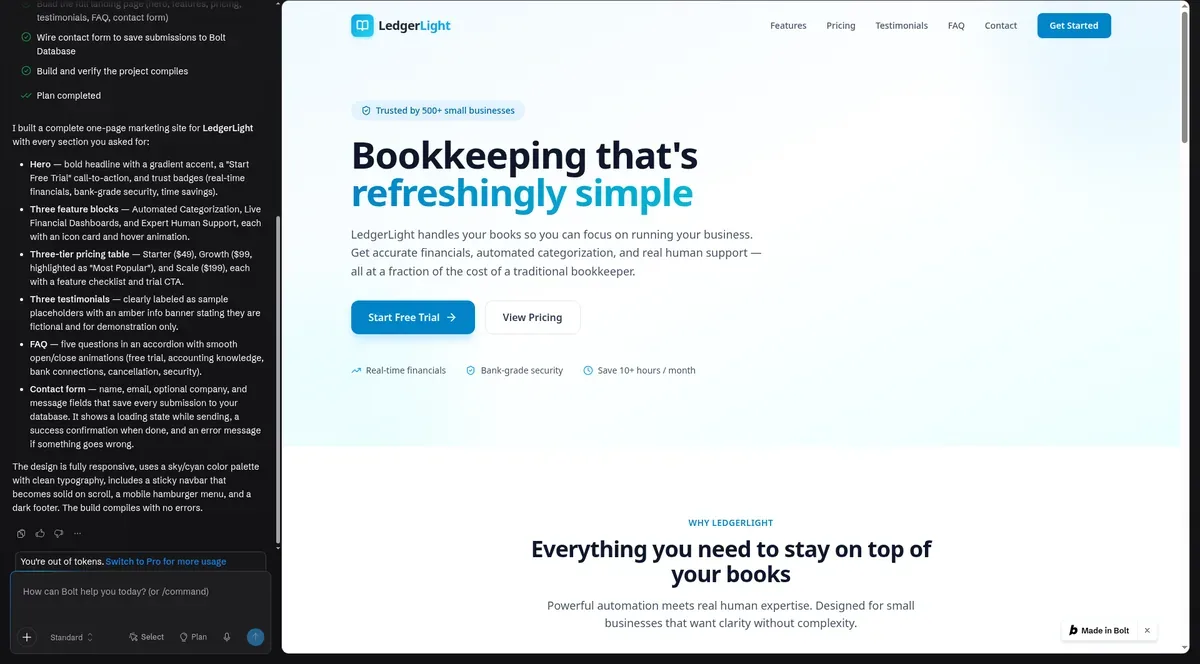
| Bolt (Free) | ~2–3 min | ~15K tokens, $0 | 0 | Showed a literal “\u2019” instead of an apostrophe; a “Trusted by 500+ small businesses” badge |
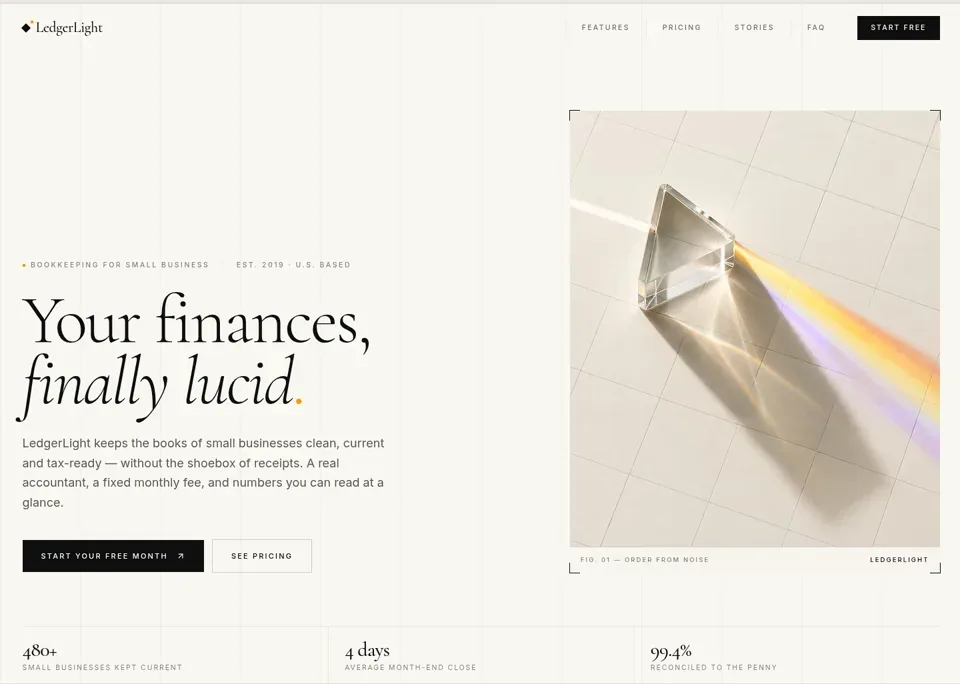
| Base44 (Builder) | ~5 min (first preview ~4 min) | ~1.65 message credits | 0 | A made-up “hello” email address at ledgerlight.example; stats such as “480+ small businesses kept current” and “Est. 2019” |
| Softr (Basic) | ~4 min to first preview | 0.37 AI credits | 0 | Pricing opened on an invented “Yearly” view ($39/$79/$159); a “Trusted by 1,000+ small businesses” badge; invented plan bullets; 8 sample leads in the database |
Source: our test logs and screenshots, Oct 29, 2026. One run per tool, so treat the times as indicative. Lovable and Base44 were tested on paid plans; Softr on its Basic plan. Softr: Not scored yet: our tests need Softr Pro.
We built ours on Bolt’s free plan, so you can try the same prompt in Bolt.
Can you build a landing page with AI for free?
| Tool | Free allowance | What our page used | Fits on Free? | Tested on Free? |
|---|---|---|---|---|
| Bolt | 1M tokens a month, 300K a day (bolt.new/pricing) | ~15K tokens | Yes | Yes |
| Lovable | 5 build credits a day, up to 30 a month (Lovable plans docs) | 1.5 credits on Pro | Probably (estimate) | No |
| Base44 | 25 message credits a month, up to 5 apps (base44.com/pricing) | ~1.65 message credits on Builder | Probably (estimate) | No |
| Softr | Not checked for this page | 0.37 AI credits on Basic | Unknown | No |
Bolt was the only free plan in this page’s test. We later built the same landing page on Replit’s free plan (Oct 30, 2026); that build is in our Replit review (7.5/10), not in this comparison. The Lovable and Base44 rows compare what our paid-plan builds used with the free allowance on each tool’s own page. Free plans may behave differently, so treat those two as estimates. For the full picture, see what’s free on each plan.
Publishing on a free plan is a separate question: see which free publishing options each tool has.
Step 1: Write your page down before you prompt
The AI fills every gap with something plausible. If you don’t give it your prices, your stats or your email address, it invents them. Before you open any tool, write down:
- Sections, in order. Ours: hero, three features, pricing, testimonials, FAQ, contact form.
- Your real prices and plan names, and whether there’s a yearly price at all.
- Your real copy for the headline and any number you want to claim. If you don’t have a number, say “no statistics or customer counts”.
- One call to action. What should a visitor do: book a call, start a trial, fill in the form?
- Where form entries go, and who should be told about them.
Step 2: Use the prompt we tested
This is our standard landing-page prompt, word for word. It’s one of the three prompts we give every builder:
Build a one-page marketing landing page for a fictional bookkeeping service called “LedgerLight” for small businesses. Include a hero with headline and call-to-action button, three feature blocks, a three-tier pricing table ($49, $99, $199 per month), three testimonials clearly labeled as sample placeholders, an FAQ with five questions, and a contact form that saves submissions. Fast, modern, mobile-friendly.
Why each part is there:
- “fictional … LedgerLight” gives the AI a name and tells it the page isn’t for a real business.
- The section list is the checklist we scored against. Every tool built all six sections.
- “$49, $99, $199 per month” pins the prices. Softr still added a yearly view with lower prices, so add “monthly prices only, no yearly toggle” if that matters.
- “clearly labeled as sample placeholders” worked in every tool: no tool presented a fake testimonial as real.
- “saves submissions” made every tool create a database table for the form.
To adapt it, swap in your business, your sections and your real copy, and add a line such as “Don’t invent statistics, customer counts, founding dates or email addresses.” That line isn’t in our tested prompt, so it’s an untested suggestion. More on prompt wording in how to write a better prompt.
Step 3: Build it (pick a tool)
Bolt (what we used for free): sign up at Bolt, paste the prompt into the chat, and wait. Our page was working in about 2–3 minutes and saved form entries to a contact_submissions table in Bolt’s built-in database, with no card and no outside account. It used about 15K tokens, roughly 5% of a free day. Try Bolt free →
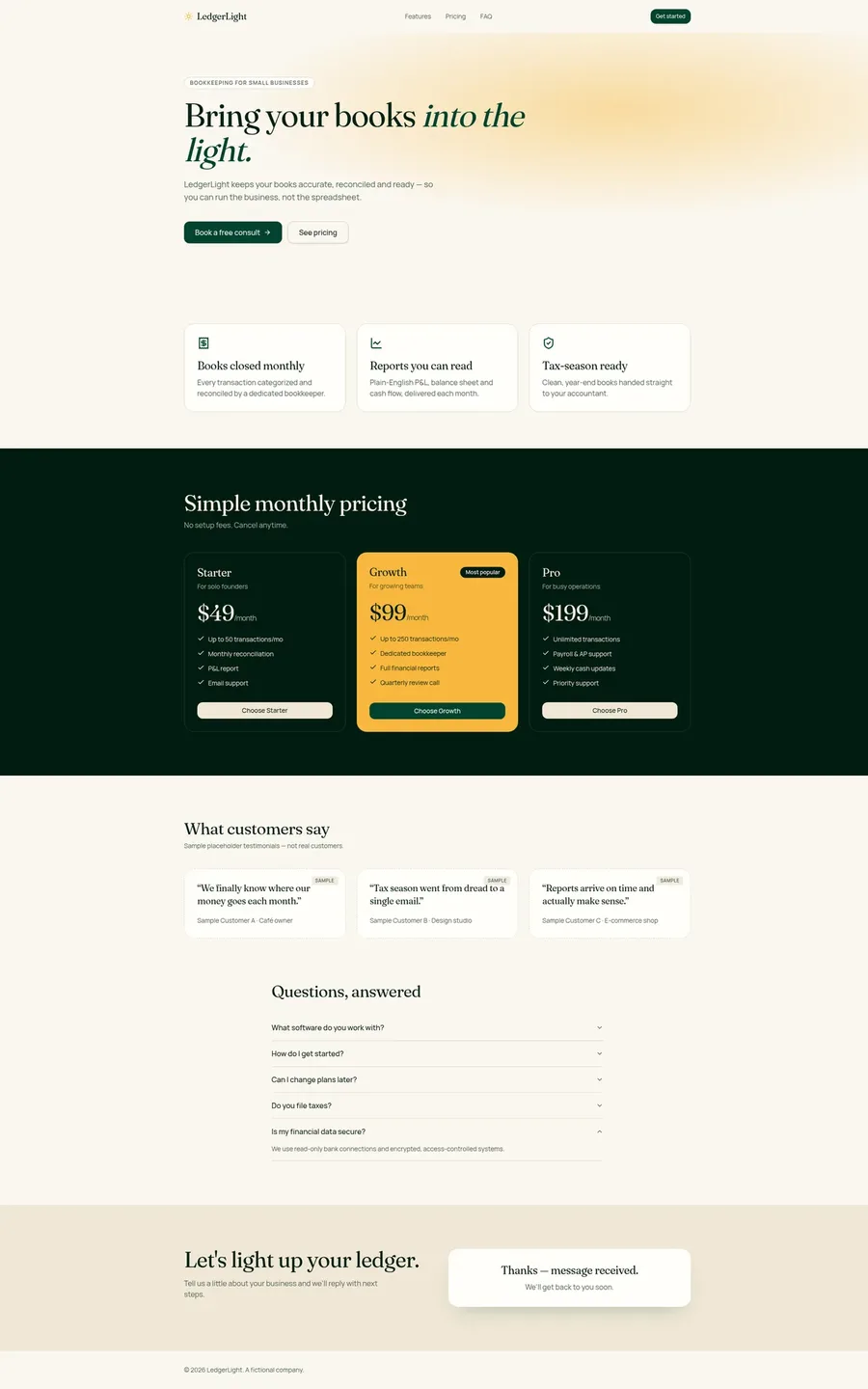
Lovable: paste the prompt into a new project. Ours was working in about 2 minutes 50 seconds for 1.5 credits, and the form saved to a contact_submissions table in Lovable Cloud. Step-by-step screens: full Lovable tutorial. Lovable’s site: lovable.dev.
Base44: paste the prompt into a new app. The first preview came at about 4 minutes and it was working at about 5, and the form saved to a ContactSubmission table. Step-by-step screens: full Base44 tutorial. Base44’s site: base44.com.
Softr: Softr asked setup questions in a wizard first (sign-in method, navigation and theme), then built the page. The first preview came at about 4 minutes and the form saved to a Leads table. Softr has more steps for a beginner because of the wizard. More in our Softr (not scored yet) notes.
Step 4: Check what the AI made up
This is the step most beginners skip. Every tool in our test added things we never asked for:
| What to look for | What we found (Oct 29, 2026) |
|---|---|
| Stats and badges | Bolt: “Trusted by 500+ small businesses” and “Save 10+ hours / month”. Base44: “480+ small businesses kept current”, “4 days average month-end close”, “99.4% reconciled to the penny” and “Est. 2019 · U.S. based”. Softr: “Trusted by 1,000+ small businesses” |
| Prices | Softr’s pricing opened on a “Yearly” view showing $39/$79/$159, a discount we never asked for. The $49/$99/$199 prices only showed under “Monthly” |
| Plan features and promises | Lovable and Softr both wrote plan bullets (for example “Up to 50 transactions/mo”). Softr added “No hidden fees, cancel anytime” and a one-business-day reply promise |
| Emails and contact details | Base44 used a made-up “hello” email address at the placeholder domain ledgerlight.example. Replace it with your real address |
| Typos and stray characters | Bolt showed “we\u2019ll” instead of “we’ll” |
| Testimonials | All four labeled them as samples, because the prompt asked for that |
None of those numbers is real. LedgerLight is a fictional business, so every stat, badge, customer count and founding date in the table is placeholder copy the AI wrote on its own. Our prompt didn’t ask for any of it.
How to fix it: either edit the text yourself in the tool’s visual editor, or send one short message per problem, such as “Remove the ‘Trusted by 500+’ badge and any statistics” or “Show monthly prices only and remove the yearly toggle”. We didn’t send these fix messages in our test, so we can’t tell you what each costs.
If you’re writing for a business, false stats and prices can mislead customers. Treat every number on the page as wrong until you’ve checked it.
Step 5: Make sure the contact form actually saves
A form that looks fine can still go nowhere. In our test, every tool saved the form to a real database table:
- Lovable: a contact_submissions table in Lovable Cloud. It didn’t send an email when someone used the form; Lovable said that needs a paid plan and your own domain.
- Bolt: a contact_submissions table in Bolt’s built-in database.
- Base44: a ContactSubmission table.
- Softr: a Leads table. Softr also filled that table with 8 sample leads (such as “John Smith” at acme.com). Delete sample rows before launch, or you’ll mistake them for real enquiries.
To check: send one test entry with fake details, then open the tool’s database view and find your row. If you need an email alert for each entry, ask for it in a follow-up message and test it. We didn’t test email alerts in any tool. For more on where your data lives, see the login and database guide.
Step 6: Check it on a phone
We logged no layout problems on any of the four landing pages at phone width:
- Lovable: passed at 400px width (we used browser developer tools, because Lovable’s own phone toggle showed about 840px).
- Bolt: passed in Bolt’s iPhone preview (402 × 874), switching to a hamburger menu.
- Base44: no layout problems logged in its phone view (about 373px).
- Softr: passed at 375px: the pricing cards stacked and buttons went full width.
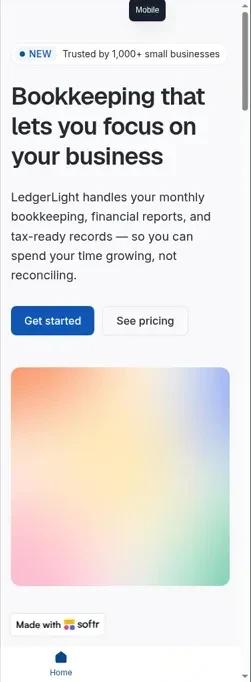
These were preview checks, not real phones. Our phone guide shows how each test app looked and how to check yours.
Step 7: Publish
None of our test pages were published, so we can’t confirm the steps first-hand. According to their docs, all three of Lovable, Bolt and Base44 can publish to a free web address, and Bolt Free shows “Bolt branding on websites” (bolt.new/pricing). Custom domains need a paid plan on all three. Before you publish, re-check Step 4 and Step 5, then publish it.
Which tool for a landing page?
All four built the page. For a first landing page:
- Free and fast: Bolt Free worked for us at $0, but read its copy carefully (stray characters and a made-up badge).
- Fewest invented numbers: Lovable’s page had no invented stats or badges in our test, though it wrote its own plan features, FAQ answers and a “No setup fees. Cancel anytime.” line. It cost 1.5 credits on Pro.
- Base44: working in about 5 minutes with 0 fixes, but it added the most invented numbers.
- Softr: worked on its Basic plan but defaulted to invented yearly prices. Not scored yet: our tests need Softr Pro.
Only need a small-business website? Durable (not yet tested hands-on): Durable is an AI website builder for small businesses. It generates website pages with AI and adds booking, a simple CRM and SEO tools around them. We have not built our LedgerLight page in Durable, so there is no result or score for it here. Per the Durable pricing page, the Free plan ($0) lets you build and preview a website, with 300 AI credits in total (not monthly) and a CRM for up to 10 customers. Its comparison table shows a durable.site subdomain and a custom domain only from the Launch plan, at $25/month ($22/month billed yearly), so check the Durable pricing page for what publishing needs. Grow is $49/month ($41/month billed yearly). When NOT to use Durable: you need a contact form that saves to your own database, app features such as logins, or control over the code. Durable says it is a no-code tool and does not offer extensive HTML editing. Free alternative: Bolt, whose free plan built our landing page for $0 in the test above.
For a full comparison, see our ranking of beginner-friendly builders. If you’re a marketer, our guide for marketers covers the same build from a campaign angle. Wondering how long a bigger app takes? See how long it takes to build an app with AI.
Pros and cons
Pros
- Pro: The fastest first project: about 2 to 5 minutes to working in every tool we tested
- Pro: $0 on Bolt Free, tested; the page used about 5% of a free day
- Pro: Every tool saved the contact form to a real database
- Pro: Every tool labeled sample testimonials when asked
Cons
- Con: Every tool invented something: stats, badges, prices, an email or plan features
- Con: No email alert for form entries in our Lovable test (paid plan and own domain needed, per Lovable)
- Con: Lovable Free and Base44 Free weren’t tested; their fit is an estimate
- Con: We didn’t publish, so publishing and custom domains are docs-only
Landing page with AI FAQ
Can Lovable build a landing page for free?
Probably. Lovable Free gives 5 build credits a day, according to its docs, and our landing page used 1.5 credits on Lovable Pro. That’s an estimate from a paid-plan test; we haven’t built on Lovable Free.
How do I create a landing page for free with AI?
Write down your sections, prices and copy, paste a prompt like ours into Bolt’s free plan, then check the copy, the contact form and the phone layout before publishing. Our page on Bolt Free used about 15K of the 300K daily tokens.
What’s a good Lovable landing page prompt?
Name the business, list every section, give exact prices, ask for testimonials labeled as samples, and ask for a contact form that saves submissions. Our tested LedgerLight prompt is on this page and in our prompt library.
How long does it take to build a website with Lovable?
Our one-page landing site was working in about 2 minutes 50 seconds on Lovable Pro, with no fix messages. Checking the copy and publishing take longer, and we didn’t publish.
How much does it cost to build a landing page with AI?
Nothing on Bolt Free in our test. On Lovable Pro our page used 1.5 credits, which is about $0.38 at Pro’s $25 for 100 credits (our math). On Base44 Builder it used about 1.65 of 250 monthly message credits.
Can Base44 build a website?
Yes. Base44 built our one-page landing site in about 5 minutes with no fix messages, and the contact form saved to a database table. Check its copy: it added invented stats and a placeholder email.
Is Bolt’s website builder free?
Bolt has a free plan with 1M tokens a month and a 300K daily limit, with Bolt branding on websites, according to bolt.new/pricing. We built our landing page on it for $0.
Sources
- Our test logs, Oct 29, 2026: tests/log-lovable.md (B3), tests/log-bolt.md (B3), tests/log-base44.md (B3), tests/log-softr.md (B3), and the B3 screenshots in tests/screens/ and tests/shots/softr/.
- Prompt: tests/prompts.md (Build 3), used word for word.
- bolt.new/pricing.
- base44.com/pricing.
- Lovable subscription plans (docs). Lovable’s own pricing page renders its plan cards in the browser, so the plan figures here are from its docs.
- durable.com/pricing, read for the Durable paragraph (date in the update history).
Update history
- October 30, 2026: First published. Tested Oct 29, 2026 (Lovable Pro, Bolt Free, Base44 Builder, Softr Basic). Free-plan details from pricing pages and docs, checked Oct 29, 2026.
- October 30, 2026: Noted that we later built the same landing page on Replit’s free plan (see our Replit review).
- October 31, 2026: Added a short Durable paragraph. Durable is not yet tested hands-on; its plans are from durable.com/pricing, read that day.
- November 13, 2026: List prices re-confirmed on the vendors’ pricing pages on Nov 11, 2026; no prices changed.
Tested: Oct 29, 2026. Pricing checked: Oct 29, 2026 (re-confirmed Nov 11, 2026). Published: Oct 30, 2026. Updated: Nov 16, 2026.