By the PrototypeVerdict Test Team
Quick verdict
Our verdict
| Best for | Trying an AI app builder for $0 when you can spread the work over several days, and apps that need real sign-in, file uploads and a database |
| Not ideal for | Finishing several builds in one sitting on the free plan, or anyone who wants to see exactly how much free usage is left |
| Starting price (as of Oct 30, 2026) | Free plan (Replit calls it Starter); Core $20/month billed monthly or $18/month billed annually |
| Standout | The client portal came with sign-in, private file uploads and a database, and the landing page saved contact messages to a PostgreSQL database |
| Watch out for | One build plus two follow-ups used about 86% of a day’s free allowance, so our three builds took two days. The invoice tracker saved data in the browser only |
| Our score | 7.5/10 from our Oct 29–30, 2026 hands-on test on the Free plan (score breakdown, how we score) |
Bottom line (based on our Oct 29–30, 2026 test and Replit’s documentation): Replit’s free plan built all three of our test apps, and the client portal came with sign-in, private document uploads and an admin view. The catch is the daily free allowance. The client portal and two follow-ups used about 86% of it, the next build ran out after about 3 minutes, and our standard three-build test took two days. Sign-up in the portal also needed a 15+ character password and an emailed code, and Replit’s agent told us changing that needs Replit Pro, which we couldn’t confirm in Replit’s docs. We tested only the Free plan. Core, Pro and the stronger Agent modes are untested.
What is Replit?
Replit is a browser-based platform where you describe an app in a chat and Replit Agent builds it, with a live preview, a file view and tools such as a database viewer in the same workspace.
On the free plan you use Agent in Free Mode. Replit says Free Mode “always uses intelligent model routing, so Replit selects the model for your request,” and free-plan users “need to upgrade before using Power Mode or Max Mode.” Source: https://docs.replit.com/chat/free-mode
The free plan only has Lite build. Replit describes Full build, where Agent works “with more power and autonomy,” as a Core or Pro feature. Source: https://docs.replit.com/billing/plans/starter-plan
How we tested Replit
Tested Oct 29–30, 2026 on Replit’s Free plan (the account’s billing page showed “Current plan: Free” with no payment method). Agent stayed in Free Mode the whole time; we never picked Power or Max. We pasted the same three prompts we use in every tool, word for word (see how we test), with fake data and test accounts only. Nothing was published.
Our usage log
| Test build | Date (CT) | First preview | Working | Follow-up messages | Free allowance shown afterwards |
|---|---|---|---|---|---|
| Client intake portal | Oct 29 | ~11–12 min | ~20 min (admin view at ~23 min) | 2 (1 fixed, 1 not possible on Free) | “86% used” (with both follow-ups) |
| Invoice tracker | Oct 29, then Oct 30 | ~1–2 min | ~6–7 min of agent time over two days | 1 (“continue” after the quota reset) | “100% used” after ~3 min on Oct 29 |
| LedgerLight landing page | Oct 30 | ~3 min | ~4 min | 0 | “82% used” (Oct 30, including the invoice tracker’s finish) |
| Total | 2 days | ~30–34 min of build time | 3 | Didn’t fit in one day’s free allowance |
The free plan shows the allowance only as a percentage. At the start of each day the sidebar showed no number, just “Upgrade your plan / Unlock more credits,” and the Usage page was greyed out on our account. Replit doesn’t publish the size of the free allowance either. Its docs say only that free-plan users get “daily credits for Agent usage, up to a monthly cap.” Source: https://docs.replit.com/billing/plans/starter-plan
Hitting the free plan’s daily quota
Our first build, the client portal, plus two follow-up messages took the free allowance to 86% used. We started the invoice tracker straight after. About 3 minutes in, the allowance hit 100% and the agent stopped mid-check. The chat said:
“You’ve reached your daily free quota limit. It will reset at 12:00 AM UTC.”
A banner and pop-up added: “You’ve used up your daily credits. Upgrade to continue.” We didn’t upgrade.
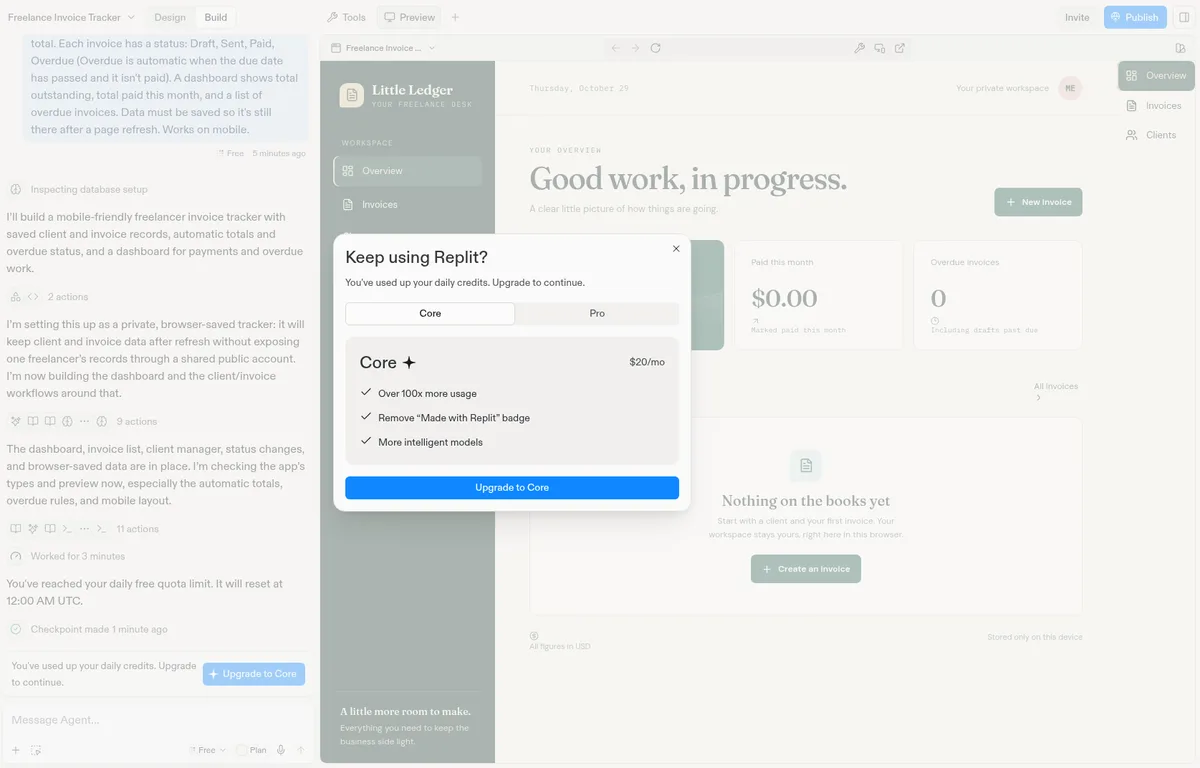
What that means in practice:
- The reset is at 12:00 AM UTC. That’s 6:00 PM Central in winter (standard time) and 7:00 PM Central in summer (daylight saving time). We resumed after the reset, the next evening.
- Day 2: finishing the invoice tracker and building the whole landing page used about 82% of the new day’s allowance.
- Plan for more than one day. On the free plan, our three small test apps didn’t fit in one day. One client-portal-sized build with a couple of follow-ups was most of a day.
- Paid plans work differently. Replit says Core and Pro include a Free Mode allowance “that refreshes every five hours,” and the pricing page lists “Up to 30 hours of chat on Free Mode” for Core. We haven’t tested either plan. Sources: https://docs.replit.com/chat/free-mode · https://replit.com/pricing
Build 1: Client intake portal
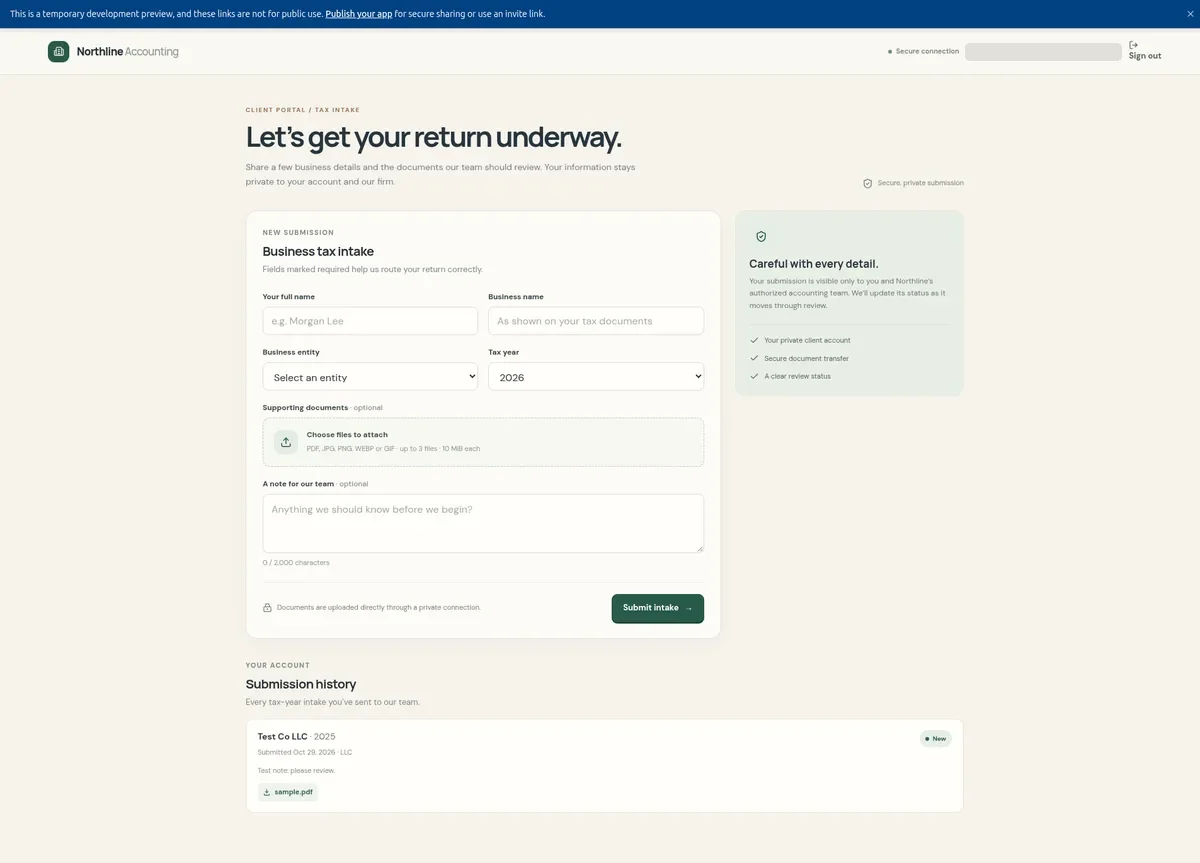
- Result: first preview in about 11–12 minutes, working in about 20, and the admin view reached at about 23 minutes after the second follow-up. Before building, the agent asked one question: which email should get first-admin access.
- What Replit set up (per the agent): Replit-managed sign-in through Clerk, a database, and private file storage for uploads, with server-side access checks.
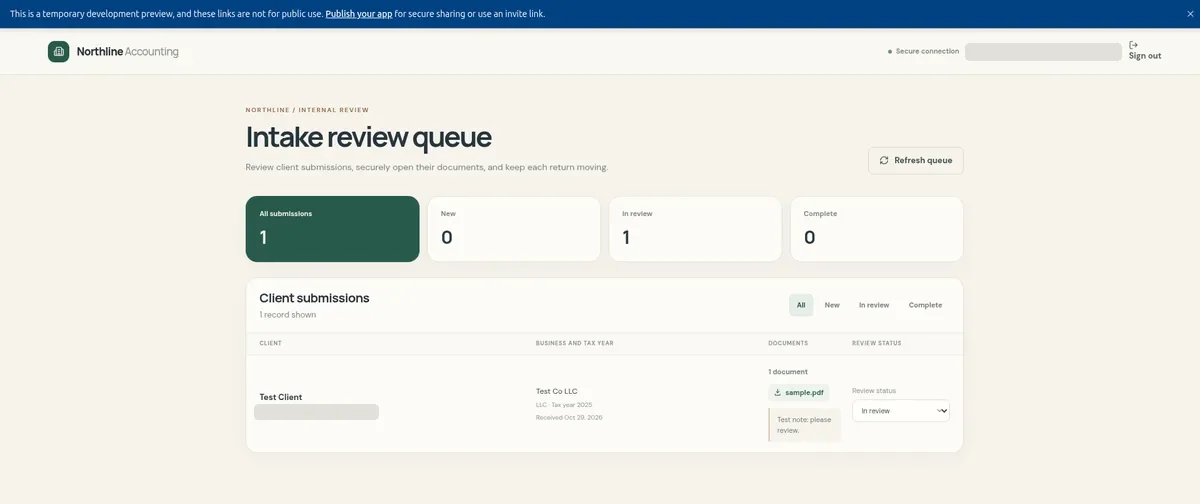
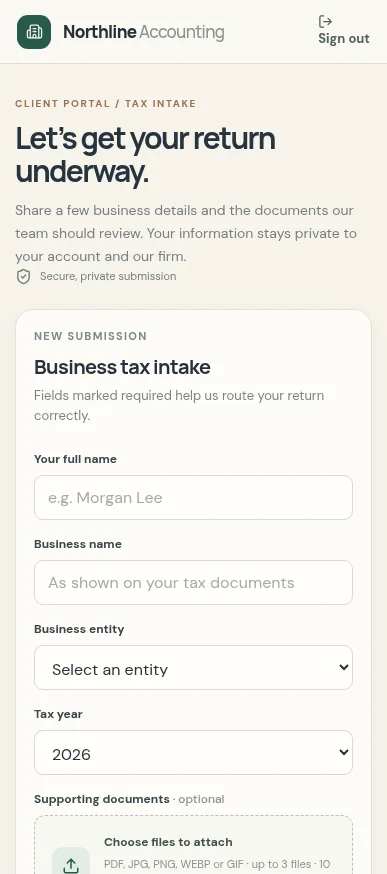
- Worked: sign-up and login (we signed out and back in), the intake form with all five entity types, a tax year dropdown (2020–2026), a PDF upload, the client’s own submissions with a “New” status, and the admin table, where a status change from New to In review was still there after a reload. The upload accepts PDF, JPG, PNG, WEBP and GIF files, up to 10 MiB each. The form says “up to 3 files”; we uploaded one and didn’t try a fourth.
- The sign-up catch: by default, sign-up required a password of 15 or more characters and an emailed code. A made-up email address can’t receive that code, so we used Clerk’s test-address pattern for development. Our first follow-up asked for 8-character passwords and no email code. The agent said those settings live in the Replit-managed Clerk dashboard, which needs Replit Pro, so it couldn’t change them. We couldn’t confirm that in Replit’s docs. They say the Clerk dashboard for Replit-managed sign-in is available on Pro and Enterprise, but also that most sign-in settings are managed in the Auth tool, and they don’t say where password length or the email code is set. We didn’t check the Auth tool. Source: https://docs.replit.com/features/auth-and-identity/clerk-auth
- Making an admin: the first admin was set to an address that couldn’t receive a sign-in code. Our second follow-up asked Replit to also treat our test account as an admin, and it did (as a development-only admin).
- Mobile: passed in Replit’s phone preview.
- Not tested: a check with a separate non-admin client account (our test account became the admin), so whether a client sees an admin’s status change, and whether one client is kept out of another’s data, is untested.
Build 2: Invoice tracker
- Result: about 3 minutes of agent work on Oct 29 before the quota ran out, then about 3 more on Oct 30 after one message: “Please continue and finish the build you were working on.” The agent added the overdue list to the dashboard and finished. Roughly 6–7 minutes of agent time in total, over two days.
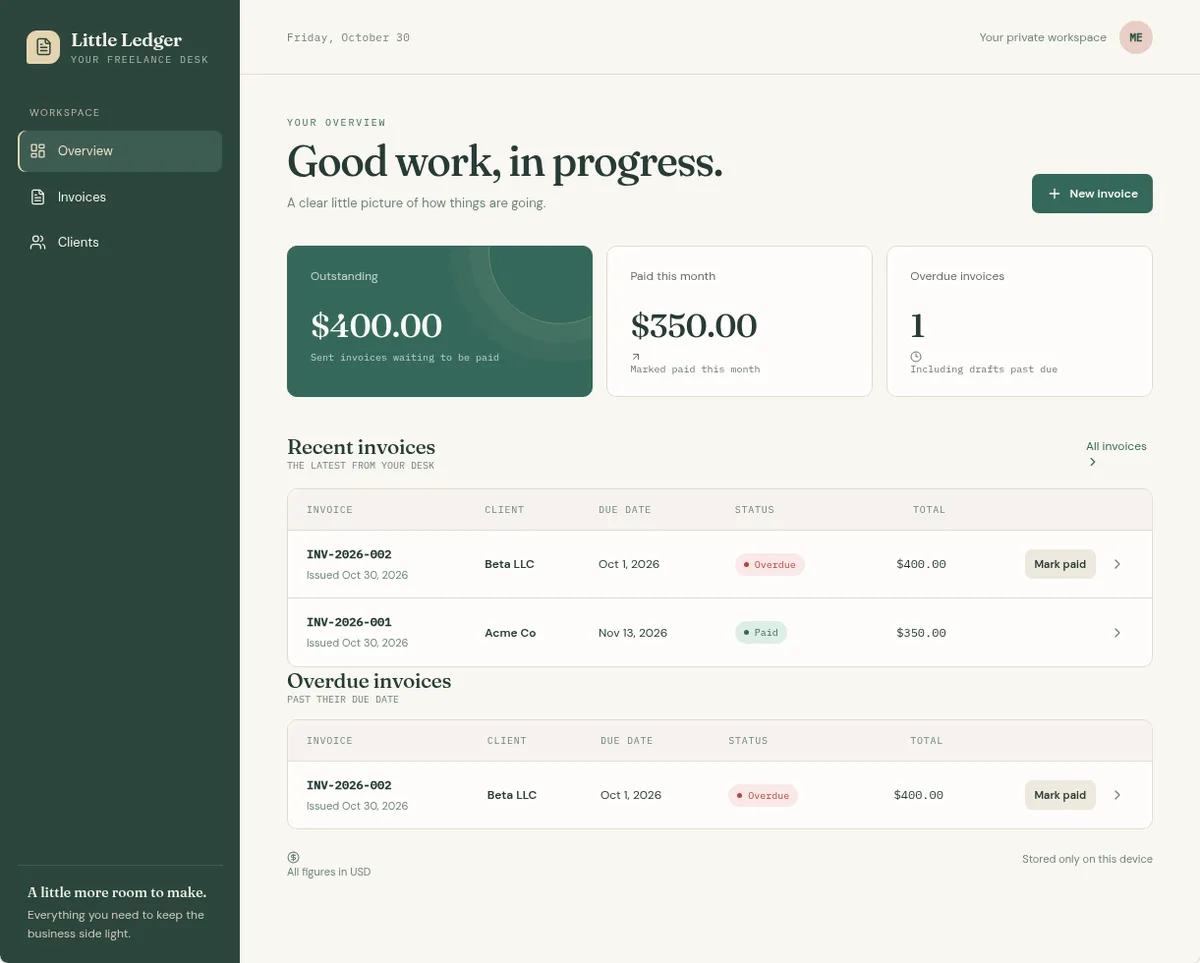
- Worked: adding clients, invoices with line items (3 × $100 + 1 × $50 showed $350.00), automatic Overdue for a sent invoice past its due date, Mark paid, and dashboard figures (outstanding $400, paid this month $350, the overdue invoice listed). Everything was still there after a reload.
- Worth knowing: new invoices always start as Draft, and you use the “Mark sent” button to change them. Drafts past their due date also count as overdue, and the app says so on the dashboard.
- Storage: browser only. The app saves to the browser (“Stored only on this device”). There’s no database and no sync across devices, so clearing the browser or switching computers loses the data. If you build something like this, ask for a database in your first prompt.
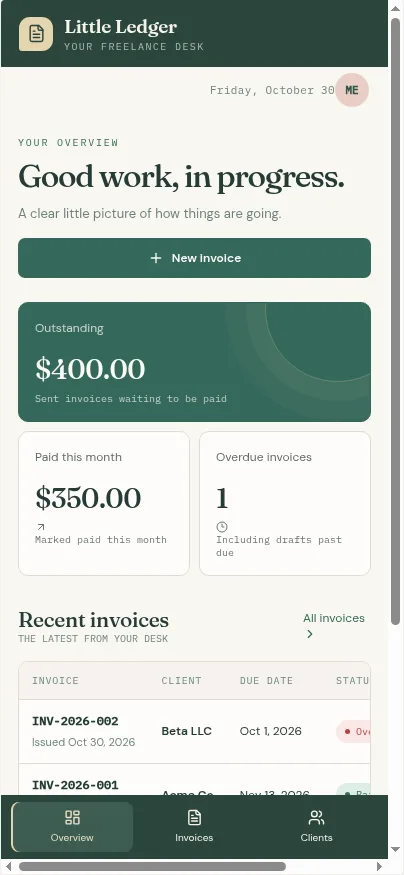
- Mobile: the bottom navigation and stacked cards work, but the invoice table scrolls sideways on a phone.
Build 3: LedgerLight landing page
- Result: first preview in about 3 minutes and working in about 4, with 0 fix messages and no questions from the agent.
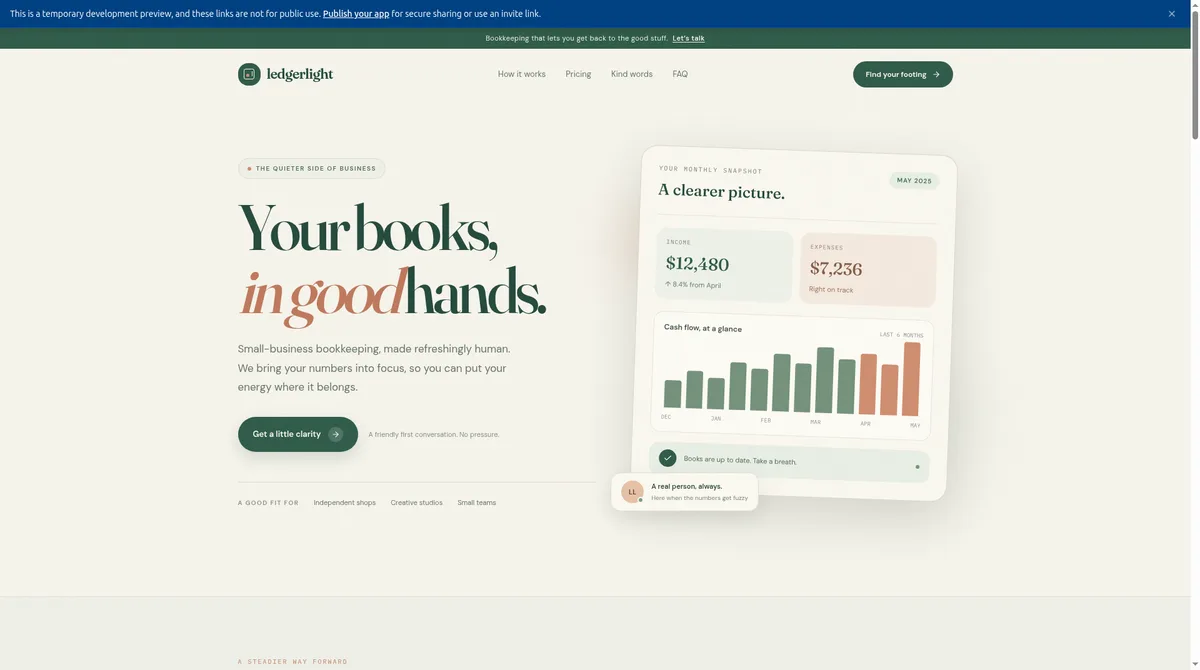
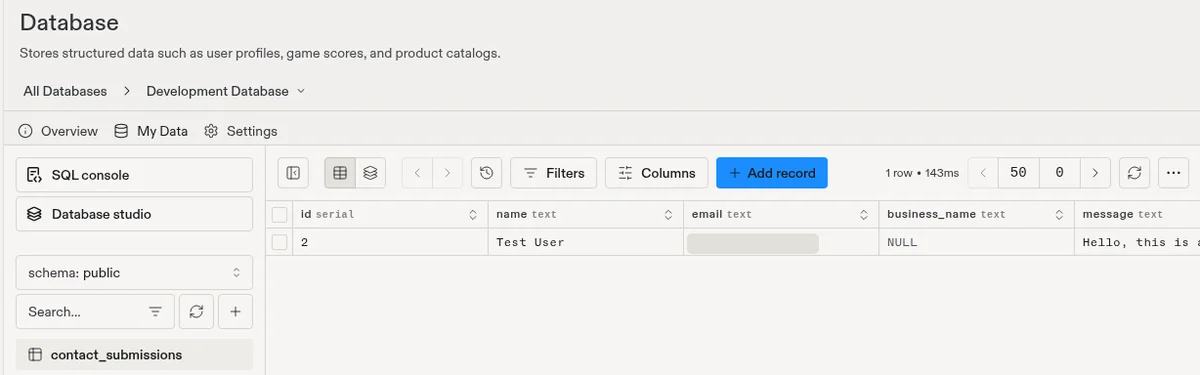
- Worked: the hero (“Your books, in good hands.”) with a button that scrolls to the contact form, the $49/$99/$199 monthly pricing tiers, three testimonials each tagged “SAMPLE PLACEHOLDER”, five FAQs that all expand, and a contact form that saved a row to the database (we saw it under Tools > Database).
- Quirk: we asked for three feature blocks. The page has one numbered set of three plus a second set of three feature-like blocks, so six in total.
- Contact form storage: we asked where submissions go. The agent said they’re saved in a PostgreSQL table, with separate development and production databases. Submissions aren’t emailed to anyone, and there’s no inbox view yet, so you’d check the database or ask for a notification.
- Mobile: single column with a hamburger menu and nothing spilling off the screen. We checked only the top of the page at phone width.

Backend, data and security
- Database: the client portal used a database plus private file storage, and the landing page saved to PostgreSQL with separate development and production databases. The invoice tracker used browser storage only, because the agent chose that and the prompt only asked for data to survive a refresh.
- Sign-in: Replit set up Clerk sign-in, managed by Replit. The defaults (15+ character passwords and an emailed code) are strict. Replit’s agent told us changing them needs Pro; we couldn’t confirm that in Replit’s docs (see Build 1).
- Client separation: untested. We haven’t signed in as a second, non-admin client to confirm it can’t see the admin view or other clients’ records. We did see
/adminredirect users who aren’t admins. Run a full two-account check yourself before any real client uses a Replit portal. - Security scan: we didn’t look for or run one.
If you’re building a client portal, our client portal guide covers the checks to run first.
Code ownership and export
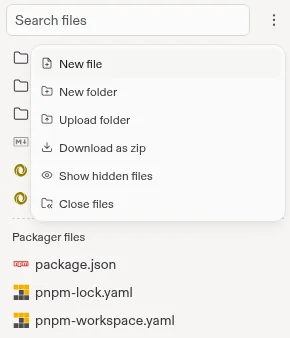
- Download: the file menu has “Download as zip”, and the code files are visible in the Files tab. We saw the option on the free plan but didn’t download anything, so we can’t tell you what’s in the ZIP or whether it runs outside Replit.
- Git: searching “git” in the workspace’s “+” menu shows a tool called “Git – Version control for your App.” We didn’t open or connect it, so we haven’t confirmed a GitHub connection on the free plan.
- Running it elsewhere: untested. Our portal used Replit-managed sign-in and storage, so expect some setup work if you move it.
Our guide to exporting and backing up AI-built app code covers what to check in any tool.
Replit pricing (as of Oct 30, 2026)
| Plan | Billed monthly | Billed annually | What you get (from Replit’s pages) |
|---|---|---|---|
| Free / Starter (what we tested) | $0 | $0 | Daily Agent credits up to a monthly cap (size not published), Free Mode only, Lite build only, monthly credits for cloud usage, 1 published app that goes down after 30 days and shows a “Made with Replit” badge |
| Core | $20/mo | $18/mo | Up to 30 hours of chat on Free Mode, up to 60 projects on Free Mode, $20 towards more powerful models, unlimited workspaces, AI integrations |
| Pro | $100/mo | $90/mo | Everything in Core plus even more Free Mode usage, $100 towards the most powerful models, premium support, up to 15 collaborators, database rollback up to 28 days. In the Yearly view, Pro also lists larger tiers at $215, $425, $825 and $2,000 a month |
| Enterprise | Custom | Custom | SSO, SCIM and audit logs, centralized security management, private networking options |
Prices in USD, “subject to tax depending on your location,” as of Oct 30, 2026 (paid-plan list prices re-confirmed Nov 11, 2026). Paid plans are from https://replit.com/pricing (Monthly and Yearly views; the page advertises “Up to 10% off” yearly). The free plan isn’t listed on the pricing page; its details are from https://docs.replit.com/billing/plans/starter-plan. The $20 and $100 monthly prices match what our account’s billing page showed on Oct 29, 2026.
What needs Core (per Replit’s Starter docs): Full build, Plan Mode, third-party connectors such as Google and Stripe, Replit AI Integrations, removing the “Made with Replit” badge, more than one published app, and artifact types other than web and mobile apps. Source: https://docs.replit.com/billing/plans/starter-plan
Publishing on the free plan: the Publish panel offered a free .replit.app address, public access and a custom domain option, with no price shown. We didn’t publish. Replit’s docs say the free plan’s one published app goes down after 30 days.
Free or paid? Start free if you can spread a build over a few days. Consider Core if you want to finish several builds in one sitting or need Plan Mode, Full build or connectors. We haven’t tested Core, so we can’t say how far its allowance goes.
Replit vs the other builders we tested
| Replit | Lovable | Base44 | Bolt | |
|---|---|---|---|---|
| Plan we tested | Free ($0) | Pro ($25/mo) | Builder ($50/mo) | Free ($0) |
| Our score | 7.5/10 | 8.4/10 | 8.1/10 | 8.4/10 |
| Time to working, 3 builds | ~30–34 min, over 2 days | ~16 min | ~22 min | ~20–21 min |
| Real database in all 3 apps | No (invoice tracker in the browser only) | No (invoice tracker in the browser until asked) | Yes | Yes |
| Free-plan limit hit | Yes: daily quota, test took 2 days | n/a (paid plan) | n/a (paid plan) | Yes: 300K daily tokens, as the 3rd build finished |
| Code export | “Download as zip” seen, not used; Git tool seen, not connected | ZIP downloaded; Git sync confirmed | ZIP downloaded; code still relies on Base44’s backend | 30-file ZIP downloaded on Free |
Each tool was tested on a different plan, so this isn’t a like-for-like price comparison. Scores and figures come from our own test logs. Replit was tested Oct 29–30, 2026; the others on Oct 29, 2026.
Our score breakdown
| Part of the score (weight) | Score | Why |
|---|---|---|
| Ease of use (25%) | 6.0/10 | Two follow-ups on the client portal (one couldn’t be done on Free), one clarifying question, one “continue” message after the quota stop, and about 30–34 minutes in total |
| Output quality (25%) | 9.0/10 | Every feature we tested worked by the end. The invoice table scrolls sideways on a phone, and the landing page has six feature-like blocks instead of three |
| Pricing value (20%) | 7.5/10 | Tested at $0, but the builds hit the daily free limit and the test took two days. Agent credits and cloud credits are separate pools |
| Backend and data (15%) | 7.0/10 | The invoice tracker saved to the browser only, not a database, and the separate-client check wasn’t run |
| Code ownership and export (15%) | 8.0/10 | “Download as zip” and a Git tool are there on Free, but we didn’t download or connect, so not a 9 |
| Overall | 7.5/10 | Weighted average, rounded to one decimal. Free plan only |
Scores come only from our own test log. How we score explains each deduction. Open items that could move the score: the separate-client check (Backend would go to 8.0 if it passes, 5.0 if it fails) and actually downloading the ZIP (Code would go to 9.0).
Who should use Replit
Patient free-plan builders: if you can work in short sessions and wait for the daily reset, Replit’s free plan built a working client portal with sign-in, uploads and a database. Watch the allowance percentage in the sidebar.
People who want sign-in and storage set up for them: the portal came with Clerk sign-in, a database and private file storage without us connecting any outside accounts.
Accountants and other firms: fine for prototypes with fake data. For a client portal with real documents, run a two-account client check first, since we haven’t. Our vibe coding guide for accountants covers data guardrails.
When NOT to use Replit
- You want to finish several apps today on the free plan. Our client portal and two follow-ups used about 86% of a day’s allowance, and our three small builds needed two days.
- You need to budget free usage precisely. The free plan shows the allowance only as a percentage, and Replit doesn’t publish its size.
- Your clients need simple sign-up with a short password. The portal’s defaults were a 15+ character password plus an emailed code, and Replit’s agent told us changing them needs Pro (we couldn’t confirm that in Replit’s docs).
- You need records to be safe across devices without asking. The invoice tracker kept everything in one browser. Ask for a database up front.
- You’ll handle real client data before testing access. We haven’t run the separate-client check.
Free alternatives
- Bolt free plan: in our test it built all three apps on a real database in one day, just inside its 300K daily token limit, and we downloaded the code on Free. Making the first admin took a hand edit in the database.
- A spreadsheet or the invoicing tool you already use: for tracking a handful of invoices, you may not need a custom app at all.
- What we built on $0 in other tools: how to build an app with AI for free.
Pros and cons
Pros
- Pro: Free plan built all three test apps with no card
- Pro: Client portal came with sign-in, private document uploads and an admin view
- Pro: Landing page contact form saved to PostgreSQL, with separate development and production databases
- Pro: “Download as zip” and a Git tool are available on the free plan (not used in our test)
Cons
- Con: The free daily quota couldn’t fit our three-build test in one day; it took two
- Con: Free usage is shown only as a percentage, and the allowance size isn’t published
- Con: Strict sign-up defaults (15+ character password, emailed code); Replit’s agent told us changing them needs Pro (not confirmed in Replit’s docs)
- Con: Invoice tracker saved to the browser only, and its table scrolls sideways on a phone
- Con: Contact form submissions aren’t emailed and have no inbox view
Replit alternatives
- Lovable: the fastest in our test (about 16 minutes for all three builds on its Pro plan), with code download and Git sync confirmed. See Lovable pricing explained.
- Base44: no bug fixes and a real database in all three apps on its Builder plan, but its exported code still runs on Base44’s backend.
- Bolt: the other free plan we’ve tested; all three apps in one day on a real database.
- Ranked by beginner friction: best AI app builders for beginners.
Replit FAQ
Is Replit free?
Yes. As of Oct 30, 2026, Replit’s free plan (Starter) gives daily Agent credits up to a monthly cap, Free Mode only, Lite build only and one published app that goes down after 30 days. Replit doesn’t publish how big the daily allowance is. Source: https://docs.replit.com/billing/plans/starter-plan
How much can you build on Replit’s free plan in a day?
In our test, one client portal plus two follow-ups used about 86% of a day’s free allowance, and the next build ran out after about 3 minutes. Finishing that build and a simple landing page used about 82% the next day. Our three small test apps took two days.
When does Replit’s free quota reset?
Replit’s message said the daily free quota resets at 12:00 AM UTC. That’s 6:00 PM Central in winter (standard time) and 7:00 PM Central in summer (daylight saving time).
How much does Replit cost?
As of Oct 30, 2026, Core is $20 a month ($18 a month billed annually) and Pro is $100 a month ($90 a month billed annually), plus tax where it applies. Enterprise is custom. Source: https://replit.com/pricing
Does Replit include a database?
Yes. In our test the client portal used a database and private file storage, and the landing page saved contact messages to PostgreSQL with separate development and production databases. The invoice tracker saved to the browser only, so ask for a database in your first prompt.
Can I export my code from Replit?
The file menu has “Download as zip” on the free plan, and a Git version-control tool appears in the workspace’s “+” menu. We didn’t download the ZIP or connect Git, so we haven’t checked the files or run them outside Replit.
Is Replit safe for client data?
We haven’t verified it. Per the agent, the portal checks access on the server, and in our test its admin page redirected users who aren’t admins. But we haven’t run a full check with a separate client account. Use fake data until you have.
Update history
- October 30, 2026: First published. Test results from our Oct 29–30, 2026 round (Free plan). Prices and docs checked Oct 30, 2026.
- November 13, 2026: List prices re-confirmed on the vendors’ pricing pages on Nov 11, 2026; no prices changed.
Last tested: Oct 29–30, 2026 on the Free plan. Pricing checked: Oct 30, 2026 (list prices re-confirmed Nov 11, 2026). Published: Oct 30, 2026. Updated: Nov 16, 2026.