By the PrototypeVerdict Test Team
Our Bolt links are referral links: if you sign up through one, Bolt may reward us, at no extra cost to you. How we make money.
Yes, you can download the code of an app you built with AI. On Oct 29, 2026 we downloaded our test apps from Lovable (100 files), Bolt (30 files, on the free plan) and Base44 (108 files), and exported data as CSV from Lovable, Base44 and Softr. But a code download is not a full backup. Your database records, uploaded files, user accounts and secret keys stay behind on every tool. This guide shows where each download button is, what we actually got, and a simple backup routine that covers the rest.
New to all this? Start with vibe coding for beginners.
Quick verdict
Our verdict
| Easiest code download | Bolt: Download from the project menu, on the free plan (tested: 30 files) |
| Most export options | Lovable: a ZIP on paid plans (tested: 100 files) plus Git sync to GitHub, GitLab or Bitbucket on every plan (docs; we didn’t connect it) |
| The big catch | Base44: the ZIP (tested: 108 files) still relies on Base44’s backend, and Base44 doesn’t support self-hosting (docs) |
| No code export | Softr: none found on Basic; its CSV export works |
| What no code export includes | Your data, uploaded files, users and secrets. Export those separately |
Quick answer: what each tool lets you export
| Tool | Code download (plan) | GitHub sync (plan) | Data export | Tested by us? |
|---|---|---|---|---|
| Lovable | ZIP, “Download codebase”, paid plans (docs). We got 100 files on Pro | GitHub, GitLab or Bitbucket, all plans (docs) | CSV per table (docs); full database archive (docs) | ZIP and a CSV button: yes. Git sync: no |
| Bolt | ZIP from the project menu. We got 30 files on Free | GitHub (docs) | Not tested | ZIP: yes. GitHub and CSV: no |
| Base44 | ZIP, “Export project as ZIP”, Builder plan and up (docs). We got 108 files on Builder | GitHub, Builder plan and up (docs) | CSV per table (docs); App Users list to CSV (seen) | ZIP and a CSV button: yes. GitHub: no |
| Softr | None found on Basic | None found | Built-in “Export to CSV” | Yes (Basic) |
Tested items: our logs, Oct 29, 2026. Docs items: each tool’s docs and pricing pages. Softr: Not scored yet: our tests need Softr Pro.
Why back up at all?
Three beginner reasons:
- To roll back after the AI breaks something. Most of these tools keep a version history inside the tool, but a copy outside it is safer.
- To hand the app to a developer, who will ask for the code.
- To leave the platform, or to have the option.
One lesson from our tests: a code backup doesn’t include your data. Our first Lovable invoice tracker even kept its invoices in the browser only until we asked for a database. So back up code and data separately, and check where your data actually lives. See where your data and logins live.
Code vs data vs logins: what an export includes
According to the tools’ own docs:
| Lovable ZIP or Git sync | Base44 ZIP | Bolt ZIP | |
|---|---|---|---|
| Source code | Yes | Yes (a React project built with Vite) | Yes (our ZIP: React/TypeScript source) |
| Database structure | Yes, as migration files | Yes, the fields and permissions for each table | Our ZIP had Supabase migration files |
| Database records | No | No (export each table as CSV) | Not checked in the docs |
| Uploaded files | No | Not stated | Not checked |
| Users and logins | No (users are in the separate database export) | No, users stay in Base44 | Not checked |
| Secrets | No | No | Our ZIP included a .env file with the backend address and its public key |
| Version history | Only through Git sync | No | Not checked |
Sources: Lovable: deploying and hosting outside Lovable, Lovable: database backups and export, Base44 developer tools. The Bolt column is from our own ZIPs.
About that .env file: when we downloaded our Bolt portal again for our import test, the ZIP held a project/.env file with the app’s backend address and its public (anon) key. Delete it before you share a ZIP with anyone or upload it somewhere. Lovable’s import screen gives the same advice: “Leave out .env files, node_modules, and build output.”
How to download your code from Lovable
Tested on Lovable Pro, Oct 29, 2026:
- Open your project.
- In the code view, click Download codebase. It’s also in Settings → Git, under “Download codebase”.
- Save the ZIP. Ours had 100 files.
Lovable’s docs say the download is on paid plans only. On the free plan, use Git sync instead (Lovable docs).
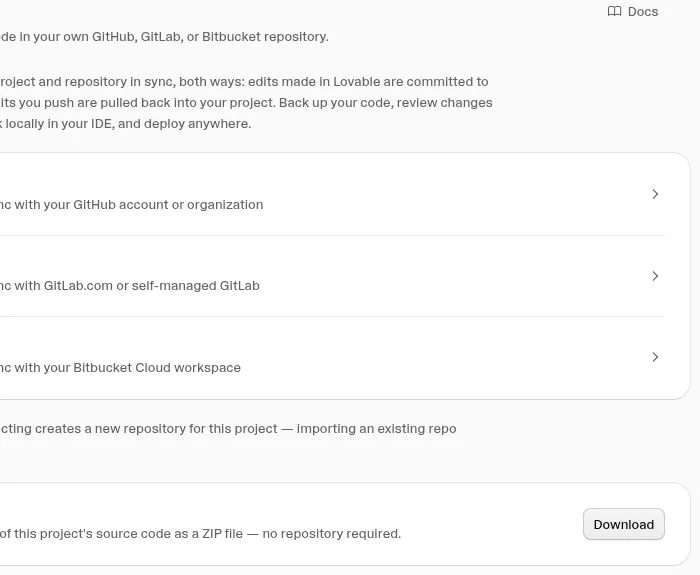
Git sync (docs-only for us): in Settings → Git we saw three choices: GitHub, GitLab and Bitbucket. Each creates a new repository for the project, and Lovable says connecting an existing repository isn’t supported. After that, Lovable’s docs say changes sync both ways. We didn’t connect any of them, because that needs an outside account, so we can’t confirm the connect steps or how the sync behaves. Docs: Lovable Git sync.
More in how Lovable scored on code ownership.
How to download your Bolt project
Tested on Bolt Free, Oct 29, 2026:
- Open the project.
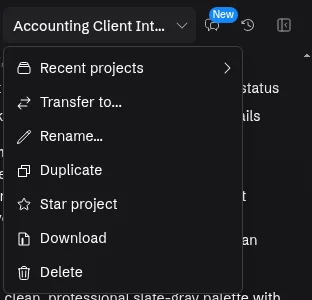
- Click the project name at the top left.
- Click Download. Ours gave a ZIP with 30 files: React and TypeScript source, Supabase database migrations and Bolt config.
That worked on the free plan, which is unusual: Lovable and Base44 both need a paid plan for their ZIP. See what Bolt Free includes. Try Bolt free →
Bolt also keeps a version history inside each project, which we saw but didn’t use to restore. Bolt’s help center says restoring an earlier version doesn’t change your database, and that you can rebuild a project from a downloaded ZIP through a StackBlitz account (Bolt: backups, restore and version history). GitHub sync is docs-only for us (Bolt GitHub docs).
How to export code from Base44
Tested on Base44 Builder, Oct 29, 2026:
- Open the app editor.
- Click the ⋯ (More actions) menu at the top right.
- Choose Export project as ZIP, then Download ZIP. Ours had 108 files and no .env file.
Base44’s docs say ZIP export needs the Builder plan or higher, and it isn’t available from the editor on a phone. A GitHub connection is in the same menu, also on Builder and up. We didn’t connect it.
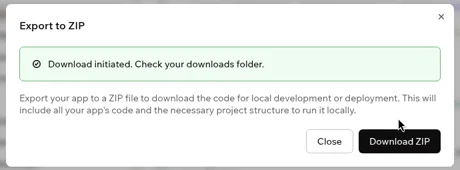
The catch: Base44’s pricing page says “Nothing is locked to the platform”, but its developer docs say: “The exported code still relies on Base44 to run, so a ZIP is a copy of your code, not a way to move your app off Base44.” Data, logins, backend functions and integrations still come from Base44, and “Base44 doesn’t support self-hosting” (Base44 developer tools). The README in our ZIP said the same. More in Base44’s code-export catch and Base44 vs Lovable on code ownership.
How to export your data (CSV)
| Tool | How we got a CSV | Cost in our test | Result |
|---|---|---|---|
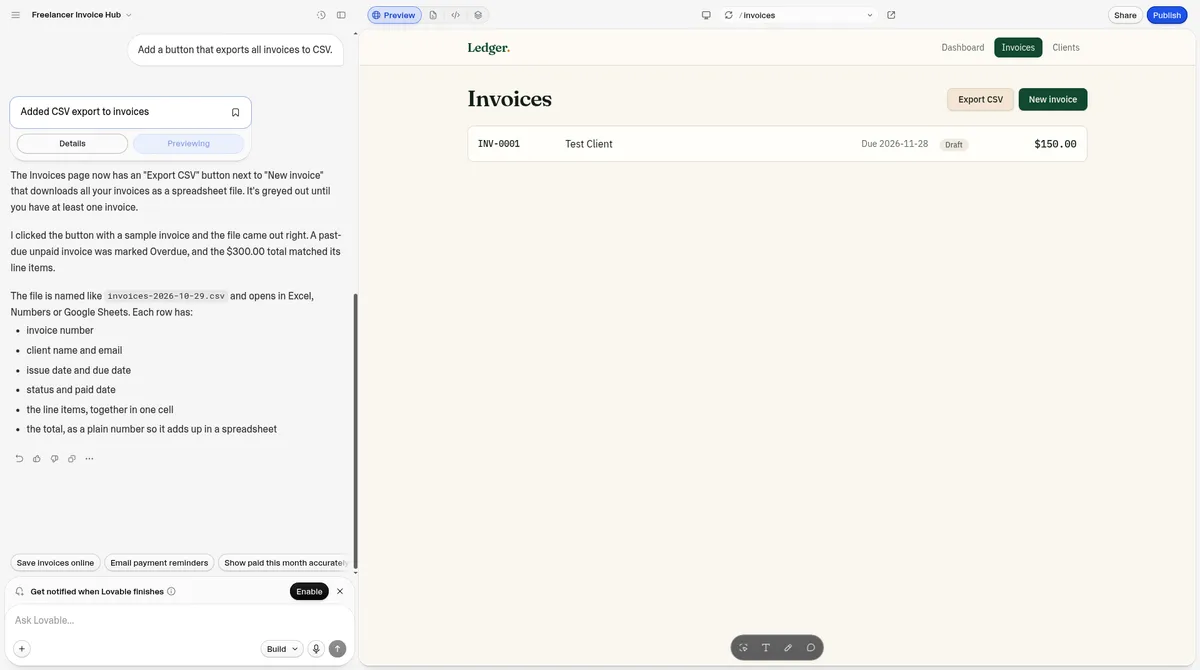
| Lovable | Asked for an “Export CSV” button on the invoice tracker | 1 build message, 1.5 credits | Pass: 9 columns, from invoice number to total |
| Base44 | Asked for an export button on the invoice tracker | 1 message, 1.81 message credits | Pass: 2 invoices, 9 columns |
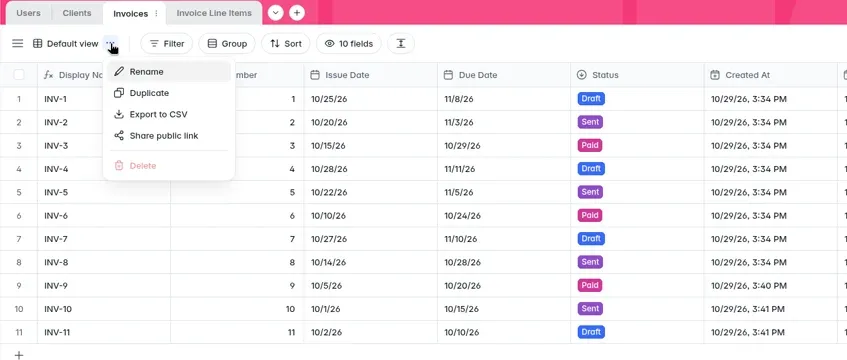
| Softr | Built in: Data → table → “⋯” next to the view → Export to CSV | No message needed | Pass: 11 rows on Basic |
| Bolt | Not run: the free plan’s tokens had run out | — | Not tested |
Both Lovable and Base44 also describe a CSV download per table from their database or data view, without building a button (Lovable database docs, Base44 developer tools). We built buttons instead, so those built-in routes are docs-only for us. In Base44 we also saw an Export to CSV on the App Users screen, which lists your app’s users.
Full database backup (Lovable, docs-only): Lovable’s docs describe an export of the whole database, including users and their password hashes, as a compressed PostgreSQL archive. It doesn’t include stored files, secrets, sign-in settings or API keys. That archive is for a developer to restore, not to open yourself. We didn’t run it.
What about Softr?
We found no code export on Softr’s Basic plan: the app menu has only “Rename” and “Create a template”, and the settings panel has no export. Its data export works, though, with no AI message needed.
Softr is Not scored yet: our tests need Softr Pro. See Softr’s Basic-plan results.
A simple backup routine for non-coders
You don’t need to know Git. Once a week, or before any big change:
- Download a code ZIP (Bolt on any plan; Lovable and Base44 on paid plans). If there’s a .env file inside, delete it before you share the ZIP.
- Export each important table as CSV: clients, invoices, form entries, users.
- Download uploaded files, if your app stores documents or images. Lovable’s docs put these under More → Storage. We didn’t test this.
- Write down your settings: your domain, which sign-in methods are on, and who the admins are. No export includes these.
- Keep the files somewhere outside the tool, with the date in the file name.
If you’re on Lovable’s free plan, Git sync is the docs route to a code copy, but it needs a GitHub, GitLab or Bitbucket account.
Exported Lovable code won’t run? Check these first
We haven’t run exported Lovable code outside Lovable, so this checklist comes from Lovable’s own hosting docs, not from our tests.
- Run it on your own computer before any host. Lovable’s docs say a local run from a clone of the repository confirms what the app needs installed, its dependencies and the environment variables it reads.
- Match the lockfile. If the repository has only
bun.lock, the docs say to install with Bun, or runnpm installlocally and commit the generatedpackage-lock.jsonbefore usingnpm ci. - Set the backend variables before you build. If the app uses Lovable’s built-in backend, the docs say
VITE_SUPABASE_URLandVITE_SUPABASE_PUBLISHABLE_KEYmust be set beforenpm run build. The values are in the project’s.envfile. A TanStack Start app also needsSUPABASE_URLandSUPABASE_PUBLISHABLE_KEYset for its server. - Rebuild after changing them. Variables that start with
VITE_are embedded at build time, not read at runtime. - Use the documented build settings for your stack. For an older React + Vite app: build command
npm run build, output folderdist/, Node 22 recommended. A newer TanStack Start app (itspackage.jsonlists@tanstack/react-start) builds a server, so it needs a host that runs Node.js 22, not only a static file host. - Remember that exporting code doesn’t move your backend. Lovable’s docs describe hosting the frontend elsewhere while the backend and data stay on its built-in backend; moving the backend is a separate migration.
If it still fails, copy the exact error text and use the message shape in our fix guide. Source: Lovable docs, Deploying and hosting outside Lovable.
Moving to another builder
A ZIP is also how you move an app. Lovable can import a ZIP from Bolt or Base44, which we tested: our code moved, but our data and users didn’t, and Lovable says users have to set a new password. See move a Bolt or Base44 app into Lovable. To compare other source and destination pairs, open the export-and-move planner. We haven’t run any exported ZIP on our own hosting, so we can’t tell you it runs elsewhere. When you do launch, see publish your app.
Pros and cons
Pros
- Pro: All three code builders gave us a real ZIP of our app’s code
- Pro: Bolt’s download works on the free plan
- Pro: Lovable’s Git sync is on every plan, per its docs
- Pro: CSV data export worked in Lovable, Base44 and Softr
Cons
- Con: No code export includes your data, users or uploaded files
- Con: Base44’s exported code still needs Base44’s backend
- Con: Lovable and Base44 need a paid plan for the ZIP
- Con: Softr has no code export on Basic
- Con: We didn’t connect GitHub anywhere, run a ZIP elsewhere, or test Bolt’s CSV export
Export and backup FAQ
How do I export my code from Lovable?
On a paid plan, click Download codebase in the code view or in Settings, Git. We got a 100-file ZIP on Lovable Pro. On any plan, Lovable’s docs say you can sync the code to GitHub, GitLab or Bitbucket instead.
Can I export Lovable code without GitHub?
Yes, on paid plans. Download codebase gives a one-time ZIP with no repository needed; we used it on Lovable Pro. On the free plan, Lovable’s docs say Git sync is the way to get a copy.
Is Lovable code export free?
Partly. Lovable’s docs say Git sync is on all plans, including Free, but the ZIP download needs a paid plan. We tested the ZIP on Pro and didn’t connect Git sync.
Can Base44 export source code?
Yes, on the Builder plan and up. We exported a 108-file ZIP. But Base44’s docs say the exported code still relies on Base44 for data, logins and backend functions, and Base44 doesn’t support self-hosting.
How do I download my Bolt project?
Open the project, click the project name at the top left, then Download. On Bolt’s free plan we got a 30-file ZIP with the source code and database migrations.
Does exporting my code back up my database?
No. In Lovable and Base44 the docs say the code export leaves out your database records, users and secrets, so export your data separately, for example as CSV per table. Bolt’s docs we read don’t say, so treat its ZIP the same way.
Why is my Lovable GitHub connection not working?
We haven’t connected GitHub, so we can’t troubleshoot it first-hand. One documented limit: Lovable creates a new repository when you connect and can’t connect an existing one, according to its docs and the note we saw in its Git settings.
What if the exported Lovable code will not run?
We did not log a case where downloaded Lovable code failed to run outside Lovable. On Oct 29, 2026 we downloaded a 100-file ZIP from Lovable Pro. This guide covers getting a copy out, not running that ZIP as a standalone app. A code download is not a full backup: database records, uploaded files, user accounts and secret keys stay on Lovable. If the app is broken inside Lovable itself, see how we fixed errors.
Sources
- Our test logs, Oct 29, 2026: tests/log-lovable.md (code export, Git settings, CSV), tests/log-bolt.md (Download, 30 files; CSV not run), tests/log-base44.md (ZIP, 108 files; CSV; App Users), tests/log-softr.md (no code export; CSV), tests/lovable-import/log-lovable-import.md (.env in the Bolt ZIP; Base44 README).
- Lovable subscription plans, deployment, hosting and ownership, external deployment, Git sync, database backups.
- Bolt: backups, restore and version history, Bolt: GitHub.
- Base44 developer tools and base44.com/pricing.
Update history
- October 30, 2026: First published. Exports tested Oct 29, 2026 (Lovable Pro, Bolt Free, Base44 Builder, Softr Basic). Docs checked Oct 29, 2026.
Tested: Oct 29, 2026. Docs checked: Oct 29, 2026 (Lovable hosting docs also read Nov 10, 2026). Published: Oct 30, 2026. Updated: Nov 16, 2026.