By the PrototypeVerdict Test Team · Tested: Oct 29, 2026 · Docs checked: Oct 29, 2026
Lovable now has an “Import project to Lovable” option that takes a ZIP of an app built somewhere else and rebuilds it as a Lovable project. On the evening of Oct 29, 2026 we tried it with the same client intake portal we had already built that morning in Bolt, Base44 and Lovable itself. That let us put an imported app next to a native Lovable build of the exact same prompt.
Below are the steps for each tool, what it cost in credits, how long it took, what Lovable said was Ready and what was Still needed, which features worked, how data and users move, and the security changes Lovable made along the way. Every number on this page comes from our imports, Oct 29, 2026 unless it’s marked as coming from Lovable’s docs.
New to AI app builders? Start with vibe coding for beginners.
Quick verdict
Our verdict
| Does it work? | Yes, for code. Both portals ran in Lovable with sign-up, the intake form, uploads and the admin view all working after 1 or 2 short messages |
| What doesn’t come across | Your records, your users and your uploaded files. Both apps started with an empty database, and old passwords never carry over |
| Cost (our imports, Oct 29, 2026) | Bolt: free (our first import) plus about 1.6 daily credits for 2 fixes. Base44: about 15.3 to 15.7 credits for the import (Lovable’s two counts disagree) plus 0.8 for 1 follow-up |
| Time to first preview | Bolt: about 3 to 3.5 minutes. Base44: about 9 minutes |
| Biggest surprise | Lovable’s report said our original Bolt app let any signed-in client make themselves an admin, and that it moved admin access to a list clients can’t change. We didn’t test that claim in Bolt |
| Best for | A small app with few or no live users, especially a Base44 app you want to run off Base44’s backend |
| Think twice if | You have many active users (all of them must set a new password) or lots of stored documents |
What we tested, and on what plans
- Lovable: our existing Pro plan ($25/month billed monthly, 100 credits, plus 5 daily build credits). Before the test we had 97 credits and 5 daily credits left. No new plan or purchase.
- The app: Build 1 from our standard prompts (how we test), a client intake portal for a small accounting firm: sign-up and login, an intake form with an entity-type dropdown, up to 3 document uploads, the client’s own submissions with status, and an admin table with a status dropdown. We picked it because it tests sign-in, file storage and the admin/client split in one app.
- The exports: our Bolt version (built on Bolt’s Free plan) and our Base44 version (built on Base44’s Builder plan), both from the same morning. Our step-by-step guide to that build is How to build a client portal with AI.
Where to find the import
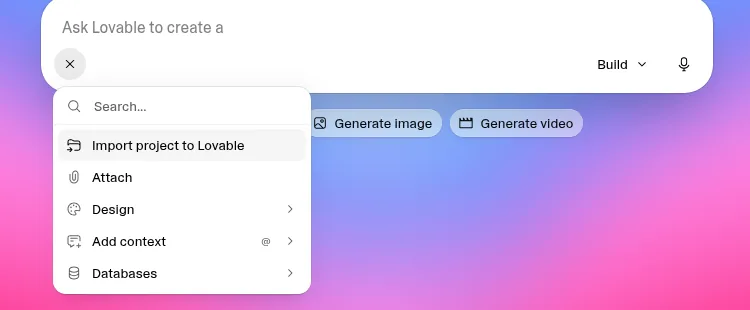
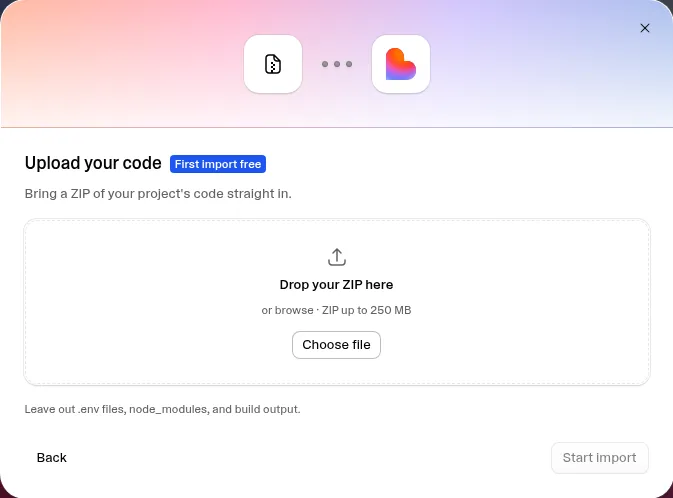
On the Lovable dashboard, click the + in the chat box and choose Import project to Lovable. The dialog is titled “Import a project”. Under App builders it lists Replit, Manus, Bolt, Base44 and v0; under Everything else it offers Website URL, Upload code (a ZIP up to 250 MB) and Other platforms. The import is available on all plans, according to Lovable’s import docs (read Oct 29, 2026), but the workspace needs credits available to start one.
Step by step: Bolt to Lovable
- Export from Bolt. Open the project, click the project name in the top-left, then Export, then Download. Lovable’s dialog shows these same steps. Our Bolt export was a ZIP with 30 files.
- Strip the .env file. Lovable’s dialog says “Delete any .env file inside it before uploading.” Our Bolt ZIP had one at
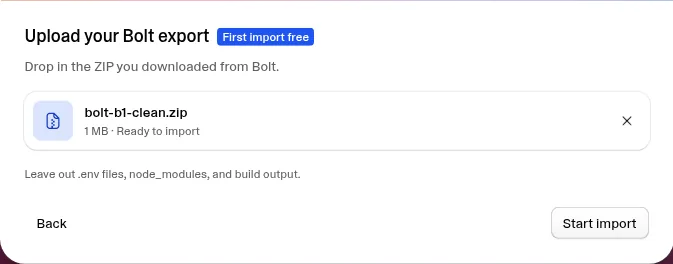
project/.env, holding the app’s database address and its public key. We deleted it and re-zipped the rest: 29 files, with nonode_modulesor build output (Lovable’s upload dialog listed the ZIP as 1 MB). Lovable’s docs say it will ask for any keys it needs later, in a secret form, never in the chat. - Upload. In the import dialog choose Bolt, then upload the ZIP. When it shows “Ready to import”, click Start import.
- Let it run. Lovable opened a new project and sent its own first message: “/skill:migrate-external-project Source: Bolt. Migrate the attached project into Lovable.” It switched on its built-in backend, Lovable Cloud, by itself. It didn’t ask for any keys or for a Bolt or database account.
- Read the report. About 3 to 3.5 minutes after Start import we had a first preview and a report titled “Migrated Meridian intake to Lovable”, ending: “This is code migration complete, not a full migration yet.”
- Make the first admin and test. We sent 2 fix messages (details below), then tested every feature.
Step by step: Base44 to Lovable
- Export from Base44. The dialog says: “Open your app in Base44”, “Select the ⋯ menu in the top-right”, “Choose Export project as ZIP”. Lovable’s docs add that Base44 code export needs Base44’s Builder plan or higher; we were on Builder.
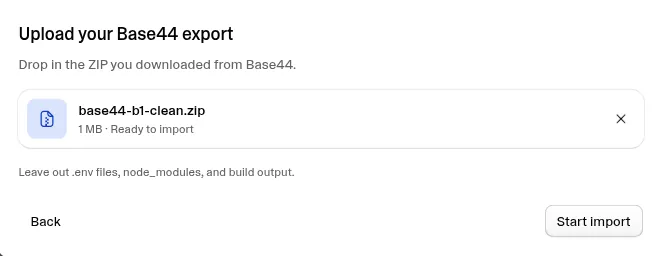
- Check for .env. Our Base44 ZIP had 108 files and no .env file, so there was nothing to strip. We still re-zipped it after checking (the upload dialog listed it as 1 MB). Its README says the code relies on the Base44 backend and command-line tools, which is why a Base44 export alone isn’t a way to leave Base44.
- Upload and start. Choose Base44, upload the ZIP, click Start import. Lovable showed no cost text before or at Start import, even though our free import had already been used on Bolt.
- Let it run. Lovable sent “Migrate External Project – Source: Base44.” and again picked Lovable Cloud automatically (“database, user accounts, file storage and server-side code”), asking no questions.
- Read the report. About 9 minutes after Start import we had a first preview. Lovable’s project details showed 8m 57s for the import step.
- Name a staff account and test. Lovable didn’t create a staff account, so we sent 1 message asking it to make our test account staff, then tested.
What it cost: credits (our imports, Oct 29, 2026)
| Bolt import | Base44 import | |
|---|---|---|
| Free first import used? | Yes (“First import free”) | No, already used on the Bolt import |
| Cost shown before Start import | Free badge | None |
| Credits for the import itself | 0 | About 15.7 by our balance; 15.3 by Lovable’s project details |
| Follow-up messages | 2 fixes, about 1.6 daily credits | 1 message, about 0.8 credits |
| Balance before | 97 credits + 5 daily | 97 credits + 3 daily |
| Balance after | 97 credits + 3.4 daily | 83.5 credits + 0 daily (84.3 before the follow-up) |
| Total | About 1.6 credits | About 16.5 by our balance (16.1 if you use Lovable’s 15.3 import figure) |
Lovable’s credit counter was inconsistent in our test. For the Base44 import our balance fell 12.7 monthly credits plus 3 daily credits, about 15.7 in total, while the project’s Details panel showed 15.3 for the import step. We report both figures. There’s a second, smaller gap: our balance showed 3.4 daily credits left at 9:26 PM CT, after the Bolt test, and 3 left at 9:27 PM CT, just before the Base44 import, with no message sent in between that we logged. Across the whole evening our balance went from 97 credits plus 5 daily to 83.5 plus 0 daily. Our original Lovable builds showed a similar mismatch: the usage page listed 6, 2.70 and 1.5 credits (about 10.2) while the balance fell 5.5 (details in our Lovable review). If exact credits matter to you, note your balance before and after each step, as we did.
What Lovable’s pages say about cost (read Oct 29, 2026):
- The free-import page says “Your first website or project import is free until you see a working preview. After that, standard credit usage applies.” You get one free import per account and per workspace, shared between project and website imports (lovable.dev/free-import).
- The docs add that the free import counts as used as soon as Lovable creates the project, even if the import fails or you delete the project, and that every later import “consumes credits” depending on the project’s size and how much Lovable has to rewrite. The message where you add your data is also standard, paid build usage (Lovable docs).
Our Base44 portal is a small app. A bigger app will likely cost more to import, but we haven’t tested one, so we can’t say how much.
What Lovable marked Ready and Still needed
Lovable ends each import with a short report. These are its words, trimmed.
| Bolt import | Base44 import | |
|---|---|---|
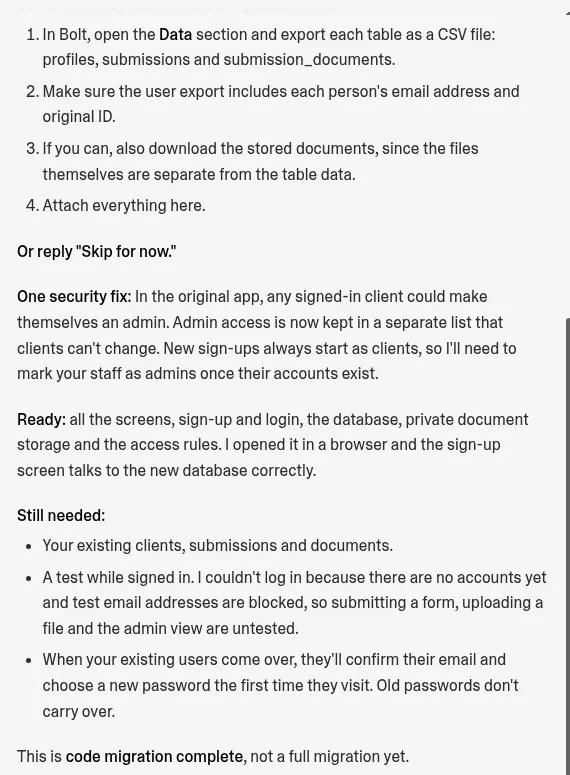
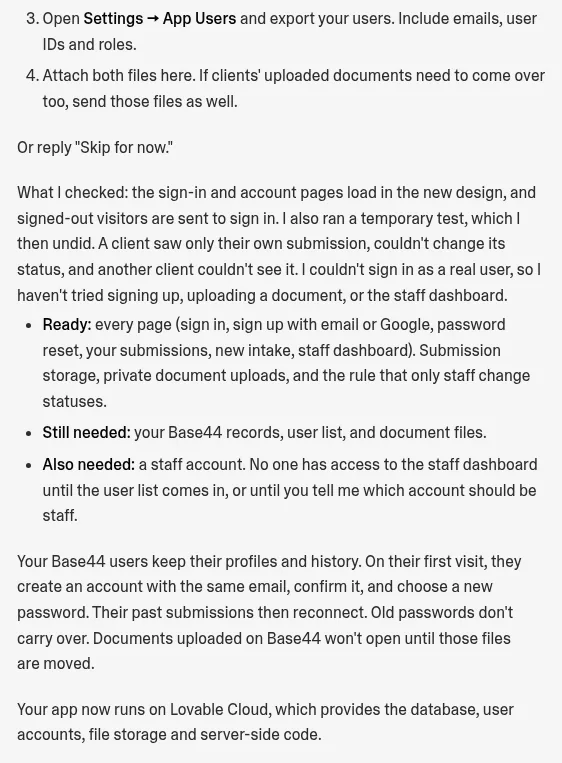
| Ready | “all the screens, sign-up and login, the database, private document storage and the access rules” | “every page (sign in, sign up with email or Google, password reset, your submissions, new intake, staff dashboard). Submission storage, private document uploads, and the rule that only staff change statuses” |
| Still needed | Existing clients, submissions and documents; “A test while signed in” (it couldn’t log in because there were no accounts and test addresses were blocked); “Old passwords don’t carry over” | “your Base44 records, user list, and document files” |
| Also needed | Not listed | “a staff account. No one has access to the staff dashboard until the user list comes in, or until you tell me which account should be staff.” |
| Status line | “This is code migration complete, not a full migration yet.” | Not captured in our log |
Which features survived
We tested the imported apps by hand in Lovable’s preview, using a throwaway test inbox on a real domain. In the Bolt import, the app rejected example.com addresses (“Placeholder, reserved, or mistyped domains… cannot receive email”). Both imported apps required email confirmation.
| Feature from the prompt | Bolt app in Lovable | Base44 app in Lovable |
|---|---|---|
| Sign-up | Pass (email confirmation required) | Pass (email confirmation required) |
| Login | Pass | Pass (the first try failed while the page was still loading) |
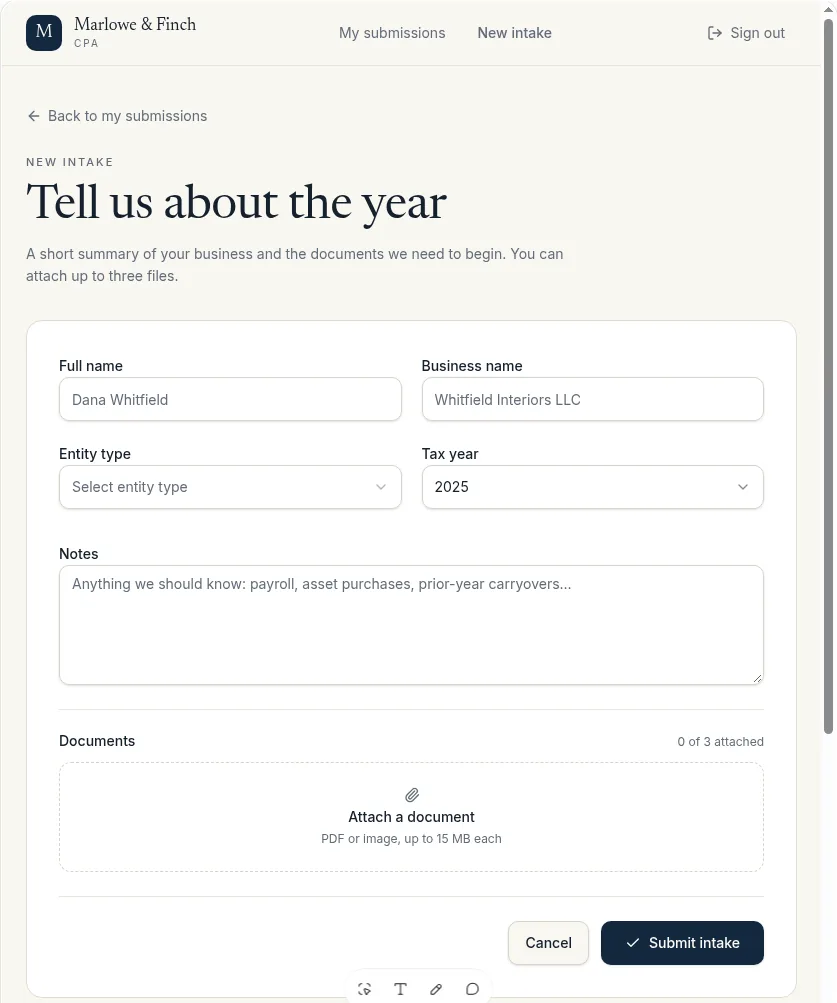
| Intake form with the 5-option entity dropdown | Pass | Pass |
| Document upload | Pass (1 PDF, listed with a Download link) | Pass (“1 of 3 attached”) |
| Client’s own submissions with status | Pass | Pass (“New”) |
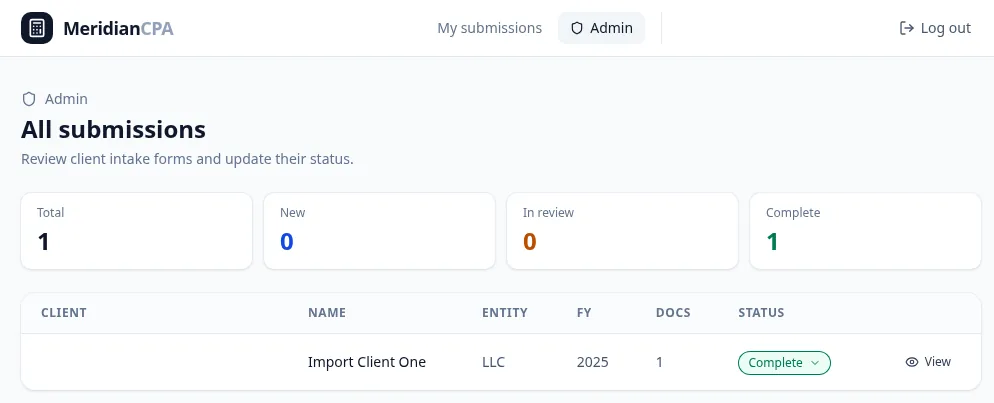
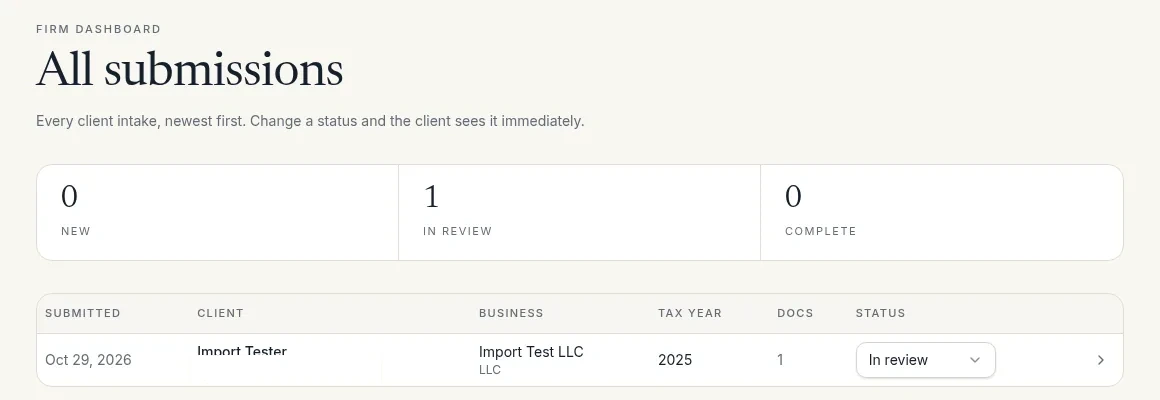
| Admin/staff table and status change | Pass after 2 fixes | Pass after 1 follow-up (New to In review) |
| Status still there after reload | Pass (the client view showed the new status) | Pass (the client view showed “In review”) |
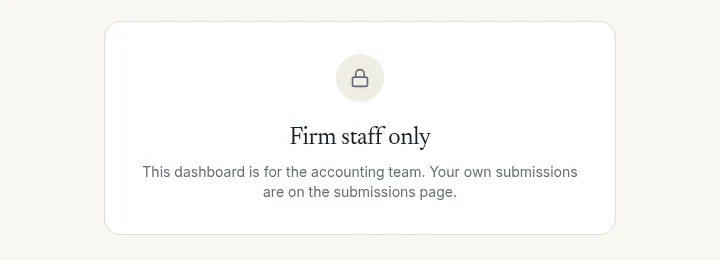
| Client blocked from the admin page | Not checked separately | Pass: /admin showed “Firm staff only” to a client |
| Mobile layout | Partial: login screen only | Partial: the signed-in intake form at about 447px looked clean |
| 3-document limit | Not tested | Not tested (the form shows “of 3”) |
The two fixes on the Bolt import:
- /admin gave a 404. Lovable explained that the original app only showed an Admin button to admins, so there was no admin page to reach. It added /admin and made our test account an admin. Fixed.
- The status dropdown was cut off by the edge of the table. Fixed.
On the Base44 import we sent one message asking Lovable to make our test account staff. An Admin link appeared, /admin showed “Firm dashboard – All submissions”, and changing a status from New to In review worked, stayed after a reload and showed up on the client’s side.
One bug we left alone: in the Base44 import, the editor’s preview address kept growing into a self-nesting /login?returnTo= loop, though the page still rendered.
How data and users move (they don’t, automatically)
This is the part to plan for. Neither import brought over a single record, user or file. Both apps started with an empty database, and Lovable said so plainly. Lovable’s Base44 report put it this way: “The Base44 code download doesn’t include your live submissions or user accounts, so the preview starts empty.”
What Lovable asked for instead:
- Bolt: export each table (for our app: profiles, submissions and submission_documents) as CSV, make sure the user export includes each person’s email and original ID, download the stored documents separately, and attach everything in the project chat. Or reply “Skip for now.”
- Base44: export the submissions table as CSV and the App Users list (emails, IDs and roles), attach both, and send any document files too.
Lovable’s docs fill in the details (read Oct 29, 2026):
- Lovable reads CSV and JSON files. Each file can be up to 2 MB, and one message can carry up to 10 files and 25 MB. A single SQL dump of the whole database isn’t accepted.
- It removes password and token fields it recognizes, keeps the original IDs so records still link up, and checks the row counts.
- Database rows that point to uploaded files don’t contain the files. You need a separate file export from the old tool.
- Records created in the old app after your export won’t be in Lovable, so export when your users have stopped using the old app.
Passwords never move. Both reports said “Old passwords don’t carry over.” For Base44, Lovable said users “create an account with the same email, confirm it, and choose a new password. Their past submissions then reconnect.” The docs add that Lovable doesn’t email your users about this, so you have to tell them.
What we didn’t test: we didn’t run the CSV data import or move any document files, so we can’t confirm that records and past submissions reconnect as described. Those claims are Lovable’s, not ours.
Security changes Lovable made
- Bolt: Lovable says it closed an admin-access gap. Lovable’s report said: “In the original app, any signed-in client could make themselves an admin. Admin access is now kept in a separate list that clients can’t change.” It added that new sign-ups always start as clients, so staff have to be marked as admins. This is Lovable’s claim, and we didn’t verify it. Our own Bolt test never ran a second, non-admin client account (our Bolt review lists that check as not run), so we can neither confirm nor rule it out. Bolt’s own build summary had said the opposite: that the admin role is “intentionally restricted so clients can’t promote themselves”. In that build we set the first admin by hand in Bolt’s Database tab, and our one fix message was for a login error, not this. It’s also one app Bolt generated from our prompt, so it says nothing about Bolt apps in general. If you’re moving a Bolt app that has real users, check who can change roles before and after the import.
- Base44: staff-only status changes. Lovable listed “the rule that only staff change statuses” as Ready and said it ran its own temporary test in which a client saw only their own submission, couldn’t change its status, and another client couldn’t see it. Our own check matched part of that: a signed-in client got “Firm staff only” on /admin.
- No keys handled. Lovable didn’t ask for the Bolt app’s database keys, and its docs say it never asks for passwords or API keys in the chat. When an app needs a key, it opens a secret form.
One thing that didn’t change: the first admin. In our native builds, first-admin setup took a fix message in Lovable and a manual database edit in Bolt. Both imports needed a message for it too.
Time taken (our imports, Oct 29, 2026)
| Bolt import | Base44 import | |
|---|---|---|
| Export and clean the ZIP | Downloaded 9:09 PM CT; .env removed by hand | Exported 9:11 PM CT; no .env to remove |
| Start import | About 9:13:38 PM | 9:28:45 PM |
| First preview | About 3 to 3.5 minutes | About 9 minutes (Lovable’s timeline: 8m 57s) |
| Start to our last check, including fixes and testing | About 12 minutes (credits read at 9:26 PM) | About 16 minutes (staff test done about 9:45 PM) |
We didn’t log a separate “fully working” time for either import, so the last row includes our own testing.
Imported vs native: the same client portal, three ways (B1)
Here’s the same prompt built natively in Lovable that morning, next to the Bolt and Base44 versions imported that night. All figures are from our Oct 29, 2026 tests.
| Native Lovable build | Bolt app imported into Lovable | Base44 app imported into Lovable | |
|---|---|---|---|
| Starting point | Our prompt, typed into Lovable | Bolt export ZIP | Base44 export ZIP |
| Time to first preview | About 4 min | About 3 to 3.5 min | About 9 min |
| Fix or follow-up messages | 1 (make the first admin) | 2 (missing /admin page, clipped dropdown) | 1 (name a staff account) |
| Credits | 1 from the balance plus 5 daily (usage page: about 6) | 0 for the import (free), about 1.6 daily for fixes | About 15.3 to 15.7 for the import, plus 0.8 |
| Backend | Lovable Cloud, automatic | Lovable Cloud, automatic | Lovable Cloud, automatic |
| All prompt features working at the end | Yes | Yes | Yes |
| First admin out of the box | No | No | No |
| Client kept out of the admin page | Pass (separate client account) | Not checked separately | Pass (“Firm staff only”) |
| Mobile | Pass at 400px | Login screen only | Intake form at about 447px only |
| Quirks | Blank page after the email-confirmation link; /admin blank for a few seconds on hard reload | None logged after fixes | Self-nesting /login?returnTo= preview address; first login failed while loading |
| Existing data | n/a (new app) | Not moved; CSV steps offered | Not moved; CSV and App Users steps offered |
For reference, the original builds: in Bolt (Free) the portal took about 9 minutes to work, 1 fix for a login bug and a manual database edit to make the admin; in Base44 (Builder) it took about 4.5 minutes, no fixes and about 1.65 message credits. Full results are in our Bolt review and Base44 review.
What the comparison tells you: the imported apps ended up about as complete as the one Lovable built from scratch, and the Bolt import was cheaper in credits than our native build. The Base44 import was the expensive one: about 15 credits against roughly 6 (by the usage page) for building the same portal natively. If you have a small app and no users yet, re-typing the original prompt into Lovable may cost less than importing it.
What we didn’t test
- The data import. We didn’t attach any CSV or JSON files, so moving records and users, and Lovable’s row-count checks, are untested.
- Document file transfer. We didn’t move any uploaded files from Bolt or Base44.
- Full mobile checks. Only the Bolt login screen and the Base44 intake form were checked at narrow width.
- Other sources: Replit, v0, Manus, Upload code from other tools, and the website import were not tested.
- Bigger apps. Both test apps were small (Lovable’s dialog listed each ZIP as 1 MB). We don’t know how cost and time scale.
- Lovable’s security claims. We didn’t test whether the original Bolt app really let a client make themselves an admin, and we didn’t repeat Lovable’s own temporary access test on the Base44 import. On the imported Bolt app we didn’t check a separate client account.
- The 3-document upload limit in either imported app.
- Importing on Lovable’s Free plan. We used our paid Pro plan.
- Publishing and switching a domain to the imported app.
- Our other two test apps (the invoice tracker and the landing page) weren’t imported.
Who should switch, and who shouldn’t
Worth trying if:
- You’re on Base44 and want off its backend. Base44’s own export relies on Base44’s backend, which is why its code ownership is its weakest score in our Base44 review. Lovable rebuilt our Base44 app on its own backend in one step. That’s the biggest practical change this feature brings.
- You built something small in Bolt and want Lovable’s built-in backend and Git sync. If your first import is still free, it costs very little to find out.
- You have few or no live users. Then the missing data and the password reset barely matter.
Think twice if:
- You have lots of active users. Every one of them must sign up again with the same email and choose a new password, and Lovable won’t email them for you.
- Your app stores many documents. File moves need their own export, and we haven’t tested them.
- You’d have to buy plans to do it. Base44 code export needs Builder or higher, and the import needs a Lovable workspace with credits. Our Lovable plan costs $25 a month.
- Your current app works fine. The import doesn’t change your old app, but switching still means a data export, a new domain setup and user friction.
Still choosing between the tools? See Bolt vs Lovable, Base44 vs Lovable and our Lovable review.
Import to Lovable FAQ
Can I import a Bolt project into Lovable?
Yes. Export a ZIP from Bolt’s project menu (Export, then Download), delete the .env file inside it, and upload it through Import project to Lovable. Our Bolt client portal had a first preview in about 3 to 3.5 minutes and needed 2 small fixes (our imports, Oct 29, 2026).
Can I move a Base44 app to Lovable?
Yes. Use Export project as ZIP from Base44’s ⋯ menu, which needs Base44’s Builder plan or higher, then import the ZIP. Our Base44 portal took about 9 minutes to a first preview and 1 follow-up message to set up a staff account (our imports, Oct 29, 2026).
Is the Lovable import free?
Only the first one. Lovable gives one free import per account and per workspace, and it’s free until you see a working preview. Our second import, the Base44 app, cost about 15.3 to 15.7 credits (Lovable’s two counts didn’t match), and no cost was shown before we started it (our imports, Oct 29, 2026).
Does my data come over when I import?
No. Both of our imports started with an empty database. Lovable asks you to export each table as CSV, including users with their emails and original IDs, and attach the files in the chat. We didn’t test that step.
Do my users keep their passwords?
No. Old passwords never carry over. According to Lovable, users sign up again with the same email, confirm it, choose a new password, and their past records reconnect. Lovable doesn’t email them, so you have to tell them.
Should I remove the .env file before importing?
Yes. Lovable’s dialog says to leave out .env files, node_modules and build output. Our Bolt export had a .env file with its database address and key, and we deleted it before uploading. Lovable never asked for those keys.
Is importing cheaper than rebuilding in Lovable?
It depends. Our free Bolt import plus fixes cost about 1.6 daily credits, less than our native Lovable build of the same portal. Our paid Base44 import cost about 15 credits, more than the native build (our imports, Oct 29, 2026).
Can I import from Replit, v0 or Manus too?
Lovable’s docs say yes, along with any ZIP of code and websites by URL. We only tested Bolt and Base44.
Sources
- Our test log for the Lovable import, Oct 29, 2026 (Lovable Pro), with screenshots.
- Our native Build 1 logs for Lovable, Bolt and Base44, Oct 29, 2026, and our standard test prompts.
- Lovable docs, “Import a project from Replit, Bolt, v0, or another tool”: docs.lovable.dev/features/projects/import-project, as of Oct 29, 2026.
- Lovable, “Bring your website or project”: lovable.dev/free-import, as of Oct 29, 2026.
Update history
- October 29, 2026: First published. Hands-on import test on Lovable Pro, Oct 29, 2026. Docs checked Oct 29, 2026.