By the PrototypeVerdict Test Team · Tested: Oct 29, 2026 · Docs checked: Oct 29, 2026
Your app was working, you asked for one change, and now it’s broken. This guide is for that moment. It’s built on the errors we actually hit while building the same three apps in Lovable, Bolt, Base44 and Softr on Oct 29, 2026, with the fix messages we sent and what each one cost. Where a step comes from a tool’s documentation rather than our tests, we say so.
New to all this? Start with vibe coding for beginners.
Quick verdict
Our verdict
| First thing to do | Stop clicking the automatic fix button. Copy the exact error text |
| Cheapest fix | Roll back to the last working version. Bolt and Base44 docs say this is free; Lovable’s revert doesn’t undo database changes |
| Best fix message | One problem, what you expected, what you saw, the exact error, and “change nothing else” |
| Most expensive error we hit | Bolt’s login bug: about 84K tokens for one fix, about 28% of a free day |
| Most common error we hit | Logins and admin access (Lovable, Bolt and Softr) |
The first 60 seconds
- Don’t press “Try to fix” again and again. Bolt warns that each automatic fix attempt uses tokens (Bolt: token efficiency). Lovable gives every account 10 free fixes, each available again 24 hours after you use it; after that, fixes use credits (Lovable chat docs). If one or two tries don’t work, stop and read the error.
- Copy the exact error. Word for word, including any number such as 500. If the page is just blank, note which page and what you clicked right before.
- Note what you changed last. Most breaks we saw came right after one specific step: signing up, confirming an email, or a hard page reload.
- Decide: fix or roll back? If the last change was small and the error is clear, send one fix message. If you’re not sure what broke, roll back first.
Roll back to the last working version
We didn’t use rollback in any of our tests. These steps come from each tool’s docs, read Oct 29, 2026.
| Tool | How to roll back | Watch out for | Source |
|---|---|---|---|
| Lovable | Show history at the top of the editor, then revert to an earlier version. You can also edit a past message and choose “Revert and resend” | Reverting restores your code only. Database records and changes made after that version stay. Credits for reverted messages still count | Lovable version history |
| Bolt | Restore an earlier version from Version history | Restoring doesn’t use tokens, but it also doesn’t change your current Bolt or Supabase database. Direct edits in Code view are free too | Bolt version history, token efficiency |
| Base44 | Hover over a chat message and click its Revert icon, or open Version History above the chat | Later changes are undone too. Base44 says its “Resolve with AI” button on an “Issues Found” message doesn’t use credits | Base44 app editor docs |
Lovable also keeps daily database backups for about 14 days, separate from version history (Lovable database backups). We haven’t used them.
Common vibe coding errors we actually hit (and what fixed them)
| # | Tool | What happened | What fixed it | Cost |
|---|---|---|---|---|
| 1 | Bolt (Free) | Login stuck on the login screen after sign-up; a 500 error from database security rules | One fix message | ~84K tokens |
| 2 | Lovable (Pro) | Admin page said “Admins only” and nobody could become an admin | One fix message | Not logged separately; the whole portal took 1 credit from the balance plus 5 daily credits |
| 3 | Bolt (Free) | Same admin problem: no built-in way to make an admin | We set role = admin by hand in the Database tab | 0 tokens |
| 4 | Lovable (Pro) | Blank /portal page after clicking the email-confirmation link | Signing in again at /auth (no message sent) | 0 |
| 5 | Lovable (Pro) | Invoice data “saved” but only in the browser | Not fixed in the test; Lovable offered “Add online invoice storage” | — |
| 6 | Base44 (Builder) | Build paused at a “processing checkpoint” asking to delete its own test record | Replying “continue” | Part of ~5.45 message credits for the whole build |
| 7 | Bolt (Free) | Literal “\u2019” text instead of an apostrophe | Not fixed (cosmetic) | — |
| 8 | Bolt (Free) | “You’re out of tokens. Switch to Pro” | Waiting for the daily reset (or upgrading) | — |
| 9 | Softr (Basic) | AI said it had re-enabled user groups, but they stayed off | Not fixable on that plan | 0.18 AI credits for the attempt |
| 10 | Softr (Basic) | “The request took too long to reason about and I couldn’t retrieve the response” | Splitting the request (Softr’s own advice) | — |
Source: our Oct 29, 2026 test logs.
1. Login stuck after sign-up (Bolt, a database security-rule error)
What we saw: after signing up in our client portal, login got stuck on the login screen, with a 500 error underneath. The database’s security rules were checking themselves in a loop. What fixed it: one fix message, after which Bolt moved the admin check out of the looping rule. Cost: about 84K tokens, roughly 28% of Bolt Free’s 300K daily cap, for that one message. The plain-English version of what went wrong is in Step 4 of our login and database guide.
We described the problem in our own words and didn’t log the exact message text. If you hit the same thing, a message along these lines is a reasonable start (not tested word for word): “After sign-up, login gets stuck and I see a 500 error. I think the security rules on the profiles table refer to themselves. Please fix the admin check without turning security rules off, and change nothing else.”
Never accept a “fix” that switches security rules off. That would let any signed-in user read everyone’s data.
2 and 3. “Admins only” and no way to become an admin (Lovable, Bolt)
Both tools built an admin page that nobody could open. In Lovable, this message fixed it the first time (our test address replaced):
The /admin page says Admins only and I have no way to become an admin. Please make the account [your admin email] an admin (add it to the admin role) and add a link to the admin view in the nav for admins, so I can test changing submission statuses.
In Bolt, we skipped the message and edited our user’s role field in the Database tab instead, which cost no tokens. Prevention: say who the admin is in your first prompt. Our guide to adding login and a database covers this.
4. Blank page after the email-confirmation link (Lovable)
New sign-ups had to confirm their email. Clicking the link landed on a blank /portal page. Going to the sign-in page (/auth) and signing in worked. If your users will hit this, ask the AI to “send users to the dashboard after they confirm their email, and show a sign-in button if they’re not signed in.” We haven’t tested that wording.
We also saw two brief glitches in Lovable: the /admin page was blank for a few seconds after a hard reload, and the “New invoice” button was briefly disabled. Both cleared on their own.
5. Data that disappears on another device (Lovable)
Lovable’s invoice tracker passed a page refresh, but it stored invoices in the browser (localStorage). When the same preview loaded from a different web address, the dashboard showed $0.00, so the data wouldn’t follow you to another device either. It’s not an error message, which makes it easy to miss. Ask for “a real database, not browser storage” from the start.
6. A build that stops and waits (Base44)
Base44 paused its invoice-tracker build at a “processing checkpoint” to ask if it could delete a test record it had created. Nothing was broken. Replying “continue” let it finish, about 12.5 minutes after we started.
7. Strange characters in the text (Bolt)
Bolt’s landing page showed “we\u2019ll” instead of “we’ll”. It’s cosmetic. We didn’t send a fix (our test only allows fixes for broken features), so we can’t say what fixing it costs.
8. “Out of tokens” or “out of credits”
On Bolt Free, our three apps used the whole 300K daily cap, and Bolt then said: “You’re out of tokens. Switch to Pro.” See Bolt’s free tokens and the daily limit. For Lovable, see the Lovable “exceeded quota” fix. Bolt Pro was $25 a month billed monthly on Oct 29, 2026 (bolt.new/pricing); we haven’t tested it.
A note on Lovable credits: Lovable’s credit counter was inconsistent in our test. Our balance fell 5.5 credits across three apps, but the usage page listed 6, 2.70 and 1.5 for the same projects. If your own figures don’t match, write down the balance before and after each message, as we did.
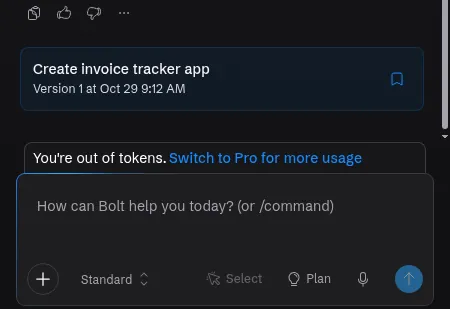
Want to know how far a free plan goes before this happens? See what we built for free on Bolt, and what Lovable and Base44 Free include.
9 and 10. When the AI says it fixed something, or gives up (Softr)
Softr’s AI told us it had re-enabled the portal’s Admin and Client user groups. After a reload they were still switched off, because Softr’s Basic plan doesn’t include them. Later, a long multi-part request timed out with “The request took too long to reason about.” Two lessons: check the setting yourself after every “fixed!”, and send one problem per message.
How to write a fix message that works
Use this shape:
What I did: [the click or step]
What I expected: [what should happen]
What happened: [what you saw, plus the exact error text]
Please: fix only this. Change nothing else.
Rules from our tests:
- One problem per message. Softr gave up on our longest request.
- Name the exact page and the exact text. “The /admin page says Admins only” worked first time in Lovable.
- Say what not to touch. On Bolt, every message reads the whole project, and Bolt says bigger projects use more tokens per message (Bolt token docs), so an unfocused fix is an expensive fix.
- Verify, don’t trust. Reload and test the thing yourself after the AI says it’s done.
More real fix messages and their results: fix messages we actually sent. The full method is in how to write prompts for AI app builders.
When a fix loop is eating your credits
Stop after two failed attempts at the same problem. Then:
- Roll back to the last working version (see above).
- Ask for a plan instead of a fix. In Lovable, Plan mode cost us 1 credit and changed no code. Bolt documents a Plan mode too; we haven’t measured its cost.
- Make the request smaller: one screen, one rule.
- If it’s a login or security-rule problem, read the error closely. Our one expensive fix was exactly that kind.
Errors from outside the builder
Sometimes it isn’t your app. Lovable’s status page reported an incident on Apr 28, 2026 in which some users saw “Exceeded quota” while signing in (status.lovable.dev), as covered in our Lovable quota guide. If nothing you changed explains the error, check the tool’s status page before you spend credits on fixes. We didn’t see any outage, “stuck on thinking” or published-app 500 errors during our tests, so we can’t add first-hand detail on those.
If an error only shows up after you publish, start with how to publish your AI-built app; for domain problems, see Lovable custom domain not working.
Prevention checklist
- Write the whole spec in the first prompt, including the admin and “use a real database.”
- Make one change per message.
- Test after every change: reload, and try it on a phone.
- Know where version history is before you need it.
- Test logins with a second, non-admin account.
- Use fake data until you’ve checked access and run a security scan.
Related tests: Lovable review · Bolt review · Base44 review
AI app builder errors FAQ
Why is Lovable not working?
In our test, Lovable’s problems were a missing first admin, a blank page after the email-confirmation link, and invoice data stored only in the browser. If you’re out of credits or Lovable has an incident, building stops too. Check Lovable’s status page and your credit balance first.
Does Lovable fix bugs by itself?
It has a “Try to fix” button for build errors. Lovable’s docs say every account gets 10 free fixes, each available again 24 hours after use, and later fixes use credits. In our test, one clear message from us fixed the admin problem the first time.
How do I undo a change in Lovable, Bolt or Base44?
All three have version history. Per their docs, Lovable’s revert restores code but not database data, Bolt says restoring a version uses no tokens and leaves your database as it is, and Base44 lets you revert from a chat message or from Version History. We didn’t use rollback in our tests.
Why does my AI-built app show a 500 error at login?
In our Bolt test, the cause was database security rules that referred to themselves. One fix message solved it by moving the admin check into a separate secure database function. It cost about 84K tokens. Never fix it by switching security rules off.
Why did my AI app builder stop and ask me a question?
Base44 paused at a “processing checkpoint” in our test to ask if it could delete a test record. Replying “continue” let it finish. It wasn’t a bug.
Why does my app show strange characters like \u2019?
Bolt’s landing page showed “\u2019” instead of an apostrophe in our test. It’s a cosmetic text-encoding bug. We didn’t send a fix, so we can’t confirm what it takes.
What should I do when I run out of tokens or credits?
Edit or roll back without the AI if your tool allows it, wait for the reset, or upgrade. On Bolt Free, our three apps used the whole 300K daily cap. On Lovable, daily credits reset at 00:00 UTC, according to its docs.
Update history
- October 29, 2026: First published. Errors from our Oct 29, 2026 test round (Bolt Free, Lovable Pro, Base44 Builder, Softr Basic). Vendor docs checked Oct 29, 2026.