By the PrototypeVerdict Test Team
Our Rork link is a referral link: if you sign up through it, Rork may reward us, at no extra cost to you. How we make money.
Short answer: all of them make apps that work on a phone, but only in a phone’s web browser by default. On Oct 29, 2026, we logged no layout problems at phone width in any of the test apps we built in Lovable, Bolt, Base44 and Softr. Getting an app onto the App Store or Google Play is a different story: Bolt documents a route through a tool called Expo, Base44 documents a store wrapper, and Lovable says it doesn’t make native apps. We haven’t tested any app-store route, because it needs paid Apple and Google developer accounts. Everything about stores below comes from each tool’s docs.
In short: these tools build web apps that work on phones; native app-store builds are limited and documented per tool, and we have not tested those routes. If you need a real app-store app rather than a phone-browser app, see Lovable vs Adalo.
New here? Start with our first-app walkthrough.
Quick verdict
Our verdict
| Works in a phone browser? | Yes, all four. We logged no layout problems at phone width in any test app (preview and browser widths, not real phones) |
| Closest to a native app | Bolt, through its Expo integration for iOS and Android (docs; untested) |
| Easiest home-screen app | Base44 and Lovable: add to home screen, or a progressive web app (docs; untested) |
| App Store or Google Play | Possible from Bolt (Expo) and Base44 (web-view wrapper); Lovable only with an outside tool. All need paid developer accounts (docs; untested) |
| Watch out for | Builder phone previews aren’t always phone width: Lovable’s toggle showed about 840px in our test |
Short answer, tool by tool
| Tool | Works in a phone browser? | Home screen | Native or app-store route | Tested by us? |
|---|---|---|---|---|
| Lovable | Yes (passed at 400px) | Make it a progressive web app (PWA) so people can “Add to Home Screen” (docs) | No native apps and no React Native. For the stores, wrap the published web address with Capacitor outside Lovable (docs) | Phone width: yes. PWA and stores: no |
| Bolt | Yes (no layout problems logged in its iPhone preview, 402 × 874) | Not covered in the docs we read | Expo for iOS and Android: test with the Expo Go app, publish to TestFlight, the App Store and Google Play (docs) | Phone width: yes. Expo: no |
| Base44 | Yes (no layout problems logged in its phone view, about 373px) | “Add to Home Screen” from the phone’s browser (docs) | Store files generated from the editor; the app runs your published Base44 app in a “secure web view”. Files need the Builder plan or higher (docs) | Phone width: yes. Stores: no |
| Softr | Yes (passed at 375px) | Not checked | A “Mobile app” setting is marked BUSINESS, a higher plan than the Basic plan we tested | Phone width: yes |
| Rork (not yet tested hands-on) | Not checked | Not checked | Native iPhone apps (SwiftUI) and Android apps (Kotlin with Compose), plus web apps, on Rork Pro at $20/mo; the free plan only designs (pricing page) | No, research-based |
Sources: Lovable FAQ, Lovable publish docs, Bolt Expo docs, Base44: using your app on mobile, Base44: submitting to app stores. Softr: Not scored yet: our tests need Softr Pro.
Web app, mobile-friendly app, native app: what’s the difference?
- Web app: runs in a browser at a web address. Everything the four tools built for us was a web app.
- Mobile-friendly (responsive): the same web app rearranges itself to fit a small screen. That’s what we tested.
- Progressive web app (PWA): a web app people can add to their home screen, where it opens full screen like an app. No app store involved.
- Wrapper: a small native app that just opens your web app inside it, so you can list it in an app store. Base44’s store route and Lovable’s Capacitor suggestion work this way.
- Native app (React Native / Expo): an app built with phone-app technology, which can use more of the phone. Bolt’s Expo route is the only one of these among the three tools.
How our test apps looked on a phone
We built the same three apps in every tool: a client portal with logins, an invoice tracker and a landing page. We logged no layout problems at phone width for any of them. Here’s how we checked and what we saw.
Lovable (Pro): passed on all three. Lovable’s own phone toggle showed about 840px, which is tablet width, so we retook the screenshots at 400px with the browser’s developer tools.
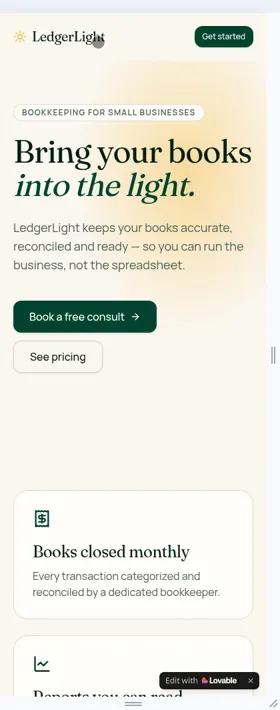
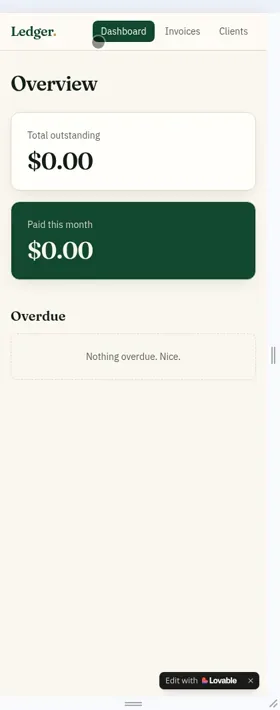
Bolt (Free): no layout problems logged on any of the three in Bolt’s iPhone preview (402 × 874). The landing page’s switch to a hamburger menu is the one phone check our Bolt log records as a pass.
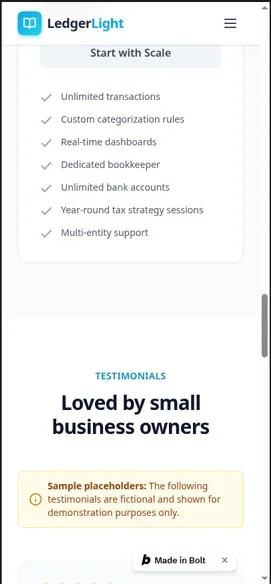
Base44 (Builder): no layout problems logged on any of the three in Base44’s phone view, about 373px wide. We also took 768px tablet shots of the portal and tracker.
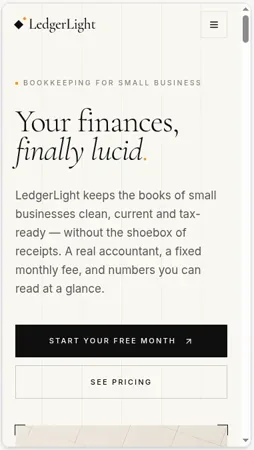
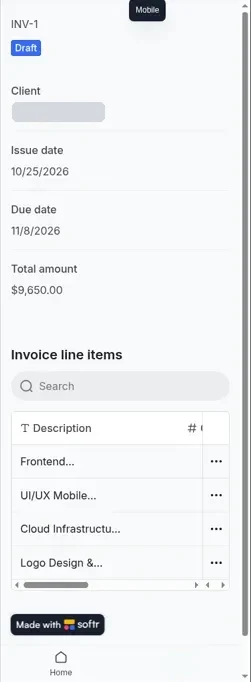
Softr (Basic): passed at 375px on all three, using Softr’s own phone preview, with a bottom navigation bar. On the invoice tracker, the line-items table scrolled sideways rather than fitting the screen. (Softr’s portal and tracker had other problems on Basic; see why Softr isn’t scored yet.)
Apps moved into Lovable: when we imported our Bolt and Base44 portals into Lovable, we only part-checked phone layout: the Bolt import’s login screen, and the Base44 import’s signed-in intake form at about 447px, which looked clean. See moving a Bolt or Base44 app into Lovable.
What these checks don’t prove: they were builder previews and browser widths, not real phones. We didn’t test touch, speed on a slow connection or an older phone.
How to check your own app on a phone (free)
- Use the builder’s phone preview, but check how wide it really is. Lovable’s was about 840px in our test, Bolt’s 402px and Base44’s about 373px.
- Use your browser’s device mode. In Chrome, open developer tools and switch on the device toolbar, then pick a phone or type a width such as 375 or 400. That’s how we retook the Lovable shots.
- Open the published address on a real phone. This is the only true test, and it needs a published app. We haven’t done this step. See how to publish your app.
- Check the parts that break most: wide tables, long forms, menus, buttons near the screen edge and pop-ups.
Prompts to fix a mobile layout
We didn’t need to send any mobile fix messages, so these are untested templates, not prompts we’ve proven:
- “On screens narrower than 400px, the [table “” not found /]
table runs off the screen. Make it readable on a phone without sideways scrolling, for example by showing each row as a card.” - “On phones, put the menu behind a menu button and make every button at least the full width of the screen.”
- “Check every page at 375px wide and fix anything that overflows or overlaps. Don’t change the desktop layout.”
One change per message works best. For the kinds of app that suit a beginner, see our examples guide.
Getting it onto a home screen or the app stores (docs-only)
We haven’t tested any of these steps. They come from each tool’s docs.
Lovable: publishing always goes to a web address. For a home-screen app, ask Lovable to make the app a progressive web app. For the stores, Lovable’s docs suggest wrapping your published web address in a native shell with Capacitor, outside Lovable, and submitting that yourself. Lovable doesn’t make React Native projects. The Lovable app for iOS and Android is for building your projects from a phone, not for turning them into phone apps (Lovable publish docs).
Bolt (Expo route, untested by us): Bolt’s docs say to put “mobile app” in your very first prompt, because web projects don’t easily switch to mobile. You can preview on your own phone with the free Expo Go app by scanning a QR code. To publish, the docs list an Expo account, a computer with Node.js and Git, the downloaded code, and paid Apple and Google developer accounts for the stores (Bolt Expo docs). That means terminal commands, so it’s the most technical route here. Bolt’s site: bolt.new.
Base44: your published app works in any phone browser, and people can add it to their home screen from the browser’s share menu. For the stores, Base44’s editor can scan your app against store guidelines and generate the iPhone and Android files you upload in your own Apple and Google developer accounts. Those files need the Builder plan or higher. The store app runs your published Base44 app in a “secure web view”, and Base44 lists full offline mode and HealthKit as not supported yet (Base44 app-store docs).
Rork (a builder made for phone apps, not yet tested hands-on): Rork builds mobile apps from a chat. We have not built anything in Rork, so there is no result or score for it here, and this paragraph comes from the Rork pricing page, read on the date in the update history. Its Free plan is design-only: 35 design credits a month, at most 5 a day, to explore app designs, without turning them into a working app. Building starts on Rork Pro at $20/month with 100 credits a month, which lists iPhone apps in SwiftUI, Android apps in Kotlin with Compose, and web apps. Rork Max adds iPad, Apple Watch and Vision Pro apps from $200/month (1,000 credits a month). Rork says you can ship to the App Store; how publishing works, and which developer accounts you need, is not verified by us. When NOT to use Rork: a phone-friendly web app is enough, or you want to build for $0, since its free plan does not build working apps. Free alternative: Bolt, whose free plan builds web apps and whose docs describe the Expo route above.
Costs to know about: Apple and Google charge for developer accounts. We haven’t paid for either, so we don’t quote their prices here.
Which tool if mobile matters most?
- You need a real app-store app: Bolt, through Expo, is the only documented native route of the three, but it’s technical, and we haven’t tried it. See Bolt vs Lovable for mobile and our Bolt test results.
- You want a store listing without code: Base44’s documented web-view wrapper is the least technical route, on Builder or higher. See our Base44 Builder results.
- A phone-friendly web app is enough: all of them did that in our test. Lovable and Base44 also document a home-screen option.
Pros and cons
Pros
- Pro: No phone-width layout problems logged for any test app, in any of the four tools
- Pro: Bolt documents a real native route (Expo) with a free on-phone preview (untested by us)
- Pro: Base44 documents home-screen and app-store routes from its editor
- Pro: No extra cost to make a web app phone-friendly
Cons
- Con: None of the three makes a native app in one click
- Con: App-store routes need paid Apple and Google developer accounts
- Con: Lovable’s phone preview wasn’t true phone width in our test
- Con: We didn’t test on a real phone, or try any PWA, wrapper, Expo build or store submission
Mobile apps FAQ
Can Lovable make mobile apps?
Not native ones. Lovable builds web apps that work on phones; its docs say you can make them installable as a progressive web app, or wrap the published web address with Capacitor outside Lovable for the app stores. Our Lovable test apps passed at phone width.
Can Lovable make apps in React Native?
No. Lovable’s docs say it doesn’t generate React Native projects. They suggest prototyping the screens in Lovable and rebuilding them in React Native outside Lovable if you need that.
Is there a Lovable mobile app?
Yes, for building: Lovable has an iOS and Android app for working on your projects from a phone, according to its docs. It doesn’t turn the apps you build into phone apps.
Can Base44 make mobile apps?
Its apps work in a phone browser and can be added to the home screen. Base44’s docs also describe generating App Store and Google Play files on the Builder plan or higher, where the app runs your published Base44 app in a secure web view. We tested phone width only.
Can Bolt.new build mobile apps?
Yes, according to Bolt’s docs: it uses Expo to build iOS and Android apps, which you can preview with the Expo Go app and publish to the stores with paid developer accounts. We haven’t tried it; our Bolt apps were web apps that worked at phone width.
Can I put my vibe-coded app in the App Store?
Possibly, but not in one click. Bolt documents Expo, Base44 documents a store wrapper, and Lovable suggests a Capacitor wrapper outside Lovable. All need paid Apple or Google developer accounts, and we haven’t tested any of them.
Why does my app look fine on desktop but broken on my phone?
Often because the preview you checked wasn’t phone width: Lovable’s phone toggle showed about 840px in our test. Check at 375 to 400px in your browser’s device mode, then on a real phone, and fix one problem per message.
Sources
- Our test logs, Oct 29, 2026: tests/log-lovable.md (mobile pass; ~840px toggle; 400px retakes; line 36 file-name note), tests/log-bolt.md (402 × 874 preview; hamburger menu), tests/log-base44.md (~373px phone view; 768px tablet shots), tests/log-softr.md (375px; table scrolls; “Mobile app” marked BUSINESS), tests/lovable-import/log-lovable-import.md (imported apps, partial mobile checks).
- Lovable FAQ, Lovable publish docs, Lovable mobile app docs.
- Bolt Expo docs.
- Base44: using your app on mobile and submitting to app stores.
- rork.com/pricing, read for the Rork notes (date in the update history).
Update history
- October 30, 2026: First published. Phone-width checks from our Oct 29, 2026 tests; native, PWA and app-store details from each tool’s docs, checked Oct 29, 2026.
- October 31, 2026: Added Rork (not yet tested hands-on) to the tool table and the app-store section, from rork.com/pricing, read that day.
Phone-width checks: Oct 29, 2026. Docs checked: Oct 29, 2026. Published: Oct 30, 2026. Updated: Nov 16, 2026.