By the PrototypeVerdict Test Team · Pricing checked: Oct 29, 2026 · Last tested: Oct 29, 2026 (Base44 Builder plan, $50/month billed monthly; Bolt Free plan)
Our Bolt links are referral links: if you sign up through one, Bolt may reward us, at no extra cost to you. How we make money.
Quick verdict
Our verdict
| If you… | Pick |
|---|---|
| Want a working app with the fewest fixes and no database steps | Base44 (0 bug-fix messages in our three builds; Bolt needed 1 fix and a hand edit in its database to create an admin) |
| Want to build a real database-backed app for $0 | Bolt (its Free plan built all three of our test apps with a real database, then ran out of daily tokens) |
| Want code you can take somewhere else | Bolt (ZIP download on Free; Base44’s own docs say its exported code still runs on Base44’s backend) |
| Need a client portal where clients can’t see each other’s data, checked by us | Base44 (passed our separate-client check; we haven’t run that check on Bolt) |
| Want the lowest paid entry price | Base44 (Starter $20/month billed monthly or $16 billed annually, vs Bolt Pro at $25 or $18) |
| Want iOS and Android apps | Bolt (documents an Expo integration; untested by us) |
Important: this is a Free-vs-paid comparison. We tested Base44 on its paid Builder plan ($50/month, billed monthly) and Bolt on its Free plan ($0). We used the same three prompts, word for word, in both. Where a result depends on the plan (allowances, export, the token wall), we say so. We haven’t tested Bolt’s paid plans or Base44’s Free plan.
Base44 vs Bolt, short version: Base44 was the easier build. All three test apps worked with no bug fixes, everything was saved in its built-in database, and a separate client account was kept out of the admin view. The catch is lock-in: by Base44’s own docs, exported code still relies on Base44 for data, logins and functions, and self-hosting isn’t supported. Bolt gave us more to take away for less: its free plan built all three apps on a real database and let us download the code as a ZIP. But its intake portal needed a login fix and a manual admin setup, and the three builds used Bolt’s entire 300K daily free token limit.
Try Base44 free → Try Bolt free →
Base44 vs Bolt side by side
| Base44 | Bolt.new | |
|---|---|---|
| Our score | 8.1/10 (tested on Builder) | 8.4/10 (tested on Free) |
| Plan we tested | Builder, $50/month billed monthly | Free, $0 (1M tokens a month, 300K a day) |
| Free plan | 25 message credits + 100 integration credits a month, up to 5 apps; auth, database and analytics included | 1M tokens a month with a 300K daily limit; public and private projects, unlimited databases, website hosting, Bolt branding |
| Entry paid plan (as of Oct 29, 2026) | Starter: $20/month billed monthly, $16/month billed annually (100 message credits) | Pro: $25/month billed monthly, $18/month billed annually (10M tokens a month, rollover) |
| Usage unit | Two credit pools: message credits (building) and integration credits (actions your app runs) | Tokens; Bolt says most usage comes from syncing your project’s files to the AI, so bigger projects use more per message |
| Built-in backend | Database, authentication and user management, cloud storage, analytics on every plan | Bolt Database with sign-in, file storage and server functions; connect your own Supabase on Pro or Teams |
| Code export | ZIP and two-way GitHub sync on Builder and higher; code still runs on Base44’s backend; no self-hosting | Project Download (ZIP) and GitHub sync; our ZIP downloaded on Free |
| Security tools | Free “Check Security” scan (we ran it) | Project security audit (paid plans) and database security check (all plans), per Bolt’s docs; we didn’t run either |
| Mobile apps | Not covered in the pages we checked | Expo integration for iOS, Android and app-store publishing (documented; untested by us) |
Sources (read Oct 29, 2026): https://base44.com/pricing · https://docs.base44.com/documentation/building-your-app/developer-tools · https://bolt.new/pricing · https://support.bolt.new/bolt-cloud/database/advanced.md · https://support.bolt.new/building/security.md · https://support.bolt.new/integrations/git · https://support.bolt.new/integrations/expo.md · https://support.bolt.new/managing-projects/projects-files.md
Our test: the same 3 apps in Base44 and Bolt
Tested Oct 29, 2026: Base44 on Builder (paid), Bolt on Free. Same three prompts, pasted word for word (see how we test), with fake data and test accounts only. Nothing was published.
| Base44 (Builder) | Bolt (Free) | |
|---|---|---|
| Client intake portal | First preview ~1.4 min, working ~4.5 min. 0 fix messages. ~1.65 message credits | First preview ~6 min, working ~9 min. 1 fix message (login stuck). ~185K tokens, of which the fix alone used ~84K |
| Making the first admin | No extra step: our owner account was the admin from the start, and roles can be changed under App Users | No built-in way; we set the admin role by hand in Bolt’s Database tab |
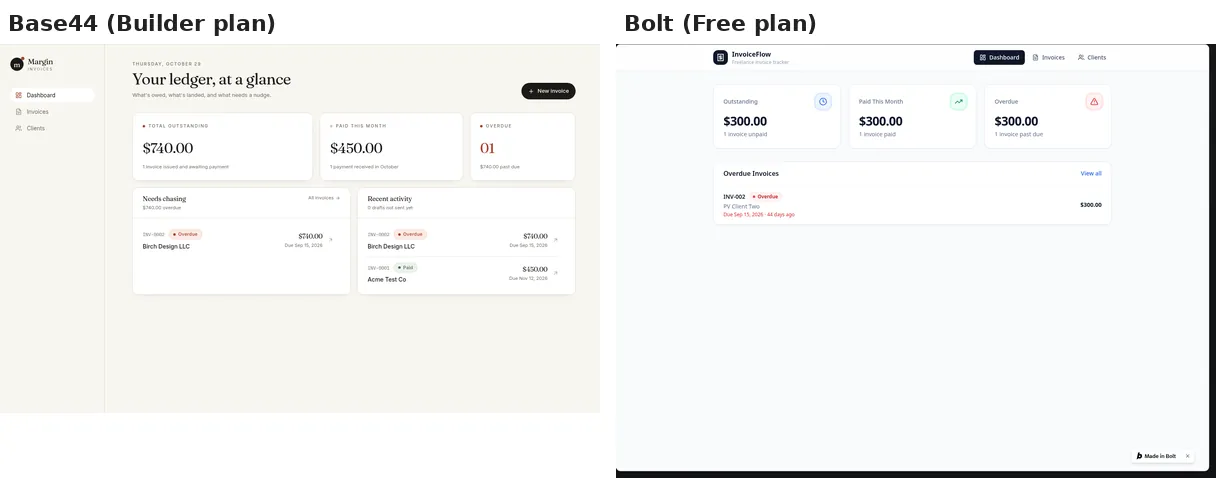
| Invoice tracker | First preview ~2.5 min, working ~12.5 min. One “continue” after a checkpoint pause (not a bug fix). ~5.45 message credits | First preview ~4 min, working ~9 min. 0 fix messages. ~100K tokens |
| Landing page | Working ~5 min. 0 fix messages. ~1.65 message credits | Working ~2–3 min. 0 fix messages. ~15K tokens |
| Total time to working | ~22 min | ~20–21 min |
| Allowance used | ~8.75 of 250 monthly message credits (about 3.5%), plus 4 of 10,000 integration credits | 300K tokens: the whole daily free limit, reached as the third build finished |
| Where data was saved | Base44’s built-in database in all three apps | Bolt Database (Supabase-backed) in all three apps |
| Separate non-admin client check | Passed: no Admin link, “Firm staff only” on the admin page, only its own intake | Not run (untested) |
| Visible bugs left | Overdue applied only to invoices marked Sent | A literal “\u2019” shown instead of an apostrophe on the landing page |
| CSV export of invoices | Passed after 1 message (1.81 credits): 2 rows, 9 labeled columns | Untested: the free plan was out of tokens (“You’re out of tokens. Switch to Pro”) |
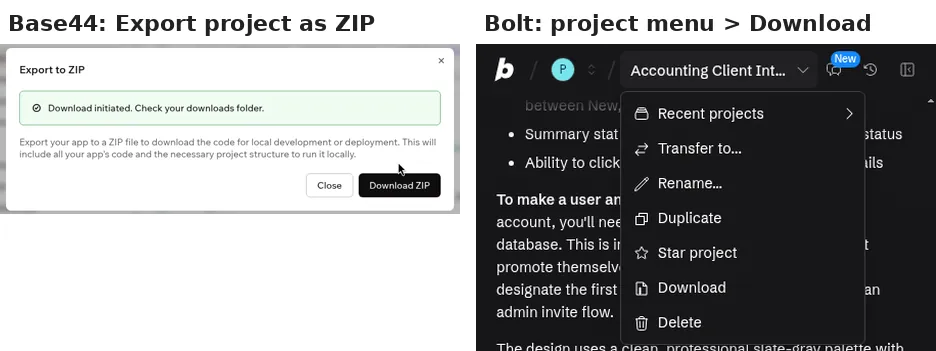
| Code download | “Export project as ZIP”: 108 files | Project menu > Download: 30 files (React/TypeScript source, Supabase migrations, Bolt config) |
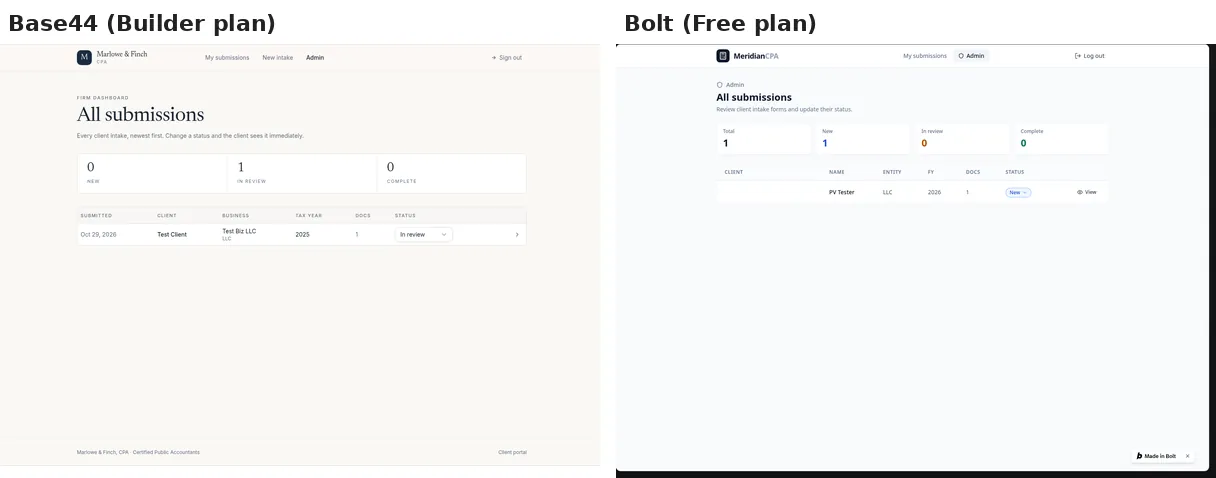
What this means: Base44 got the client portal working twice as fast with no fixes. Bolt’s portal got stuck on its login screen because of a database security-rule error, which Bolt fixed after one message. That fix used almost half of the build’s tokens. Bolt then had no way to make the first admin, so we edited the role by hand in its Database tab. Bolt’s own chat summary said this was deliberate, so clients can’t promote themselves, and it offered to add an admin flow. On the invoice tracker, Bolt was faster: about 9 minutes against Base44’s 12.5, which included a pause where Base44 waited for us to approve deleting its own test record.
Base44 vs Bolt pricing (as of Oct 29, 2026)
Base44
| Plan | Billed monthly | Billed annually (per month) | Message credits/mo | Integration credits/mo |
|---|---|---|---|---|
| Free | $0 | $0 | 25 | 100 |
| Starter | $20 | $16 | 100 | 2,000 |
| Builder (what we tested) | $50 | $40 | 250 | 10,000 |
| Pro | $100 | $80 | 500 | 20,000 |
| Elite | $200 | $160 | 1,200 | 50,000 |
| Enterprise | Custom | Custom | Custom | Custom |
Prices in USD, as of Oct 29, 2026, from the Monthly and Yearly views of https://base44.com/pricing. Base44 says annual billing saves 20%. ZIP export and GitHub sync start at Builder (https://docs.base44.com/documentation/building-your-app/developer-tools).
Bolt.new
| Plan | Billed monthly | Billed annually | Monthly AI tokens | Daily limit |
|---|---|---|---|---|
| Free (what we tested) | $0 | $0 | 1M | 300K |
| Pro | $25/mo | $18/mo ($216/yr) | Starts at 10M, unused tokens roll over | No limit |
| Teams | $30/member/mo | $27/member/mo ($324/yr) | Starts at 10M per member | No limit |
| Enterprise | Custom | Custom | Custom | No limit |
Prices in USD plus applicable taxes, as of Oct 29, 2026, from the Monthly and Yearly views of https://bolt.new/pricing.
Credits vs tokens: you can’t compare these units directly. Base44 says credit use “varies based on the action and the selected AI model,” and keeps a second pool for things your live app does through Base44 (AI calls, uploads, emails). Bolt says “the larger the project, the more tokens used per message.” Our numbers are the closest thing to a direct comparison: the three builds used about 3.5% of Base44 Builder’s monthly message credits, and all of Bolt Free’s daily tokens (30% of its monthly 1M).
What about Bolt Pro or Base44 Free? Untested. On paper, 300K tokens is 3% of Bolt Pro’s 10M monthly tokens, and our ~8.75 Base44 message credits are under Free’s 25 a month. But Base44’s Free plan can’t export code (ZIP and GitHub start at Builder), and we haven’t run either plan.
Ease of use for non-coders
Base44 made fewer demands. You don’t choose a database, a host or a login provider, and in our test we didn’t have to change any settings to get the three apps working. The only interruption was a “processing checkpoint” on the invoice tracker, where it waited for our approval before deleting a test record.
Bolt also sets up a database for you on the free plan with no card or outside account. But its first app showed the kind of step that can stop a non-coder: the login broke on a security-rule error, and after the fix you still had to open the Database tab and change a user’s role to “admin” by hand. Bolt’s agent explained how, but it’s still a database edit.
If you’ve never built an app, Base44 was the smoother start in our test. If you’re comfortable following instructions in a database table, Bolt’s free plan gets you a lot for $0.
Data, security and client portals
Both tools stored data in a real database in all three test apps. (By contrast, Lovable kept our invoice tracker’s data in the browser until asked.)
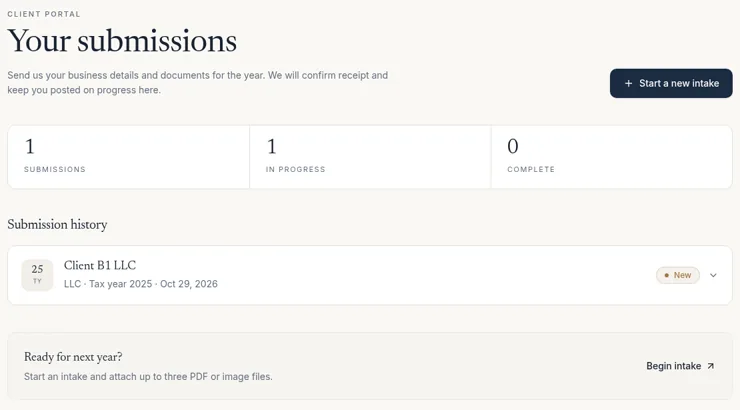
- Base44: a separate non-admin client we signed up saw only its own intake and got “Firm staff only” on the admin page. A signed-out guest was sent to the login page. Its sign-up rejected a disposable email and required a 6-digit email code. New apps defaulted to “Public” visibility. Its free security scan flagged 7 high-severity vulnerabilities in two third-party packages (zod and vite).
- Bolt: the portal used row-level security rules, which is the setting that broke login until Bolt fixed it (see how to fix it when the AI breaks your app). We haven’t run a separate-client check on Bolt, so whether one client is kept out of another’s data is untested. Bolt documents a project security audit (paid plans; Bolt says it doesn’t use tokens) and a database security check (all plans). We didn’t run either. Source: https://support.bolt.new/building/security.md
For anything with real client data, use fake data first and run the tool’s security checks before anyone signs in. Our client portal guide walks through the build step by step.
Code ownership and export
This is where the two differ most.
- Base44: “Export project as ZIP” downloaded 108 files in our test. Base44’s pricing page says two-way GitHub sync “exports the full source code” and that “Nothing is locked to the platform,” but its docs say the code “still relies on Base44 to run” through its SDK for data, logins, backend functions and integrations, and “Base44 doesn’t support self-hosting.” ZIP export and GitHub sync need Builder or higher. Sources (checked Oct 29, 2026): https://base44.com/pricing · https://docs.base44.com/documentation/building-your-app/developer-tools
- Bolt: the project menu’s Download gave us a 30-file ZIP on the free plan, including the database migrations. Bolt’s docs say you can run a downloaded project locally with
npm install && npm run dev, and that the code you create is yours to use commercially. Connecting your own Supabase database, or claiming the Bolt database into your own Supabase account, needs Pro or Teams. Sources: https://support.bolt.new/managing-projects/projects-files.md · https://support.bolt.new/account/corporate-commercial.md · https://support.bolt.new/bolt-cloud/database/advanced.md
We haven’t run either export outside its platform, and we didn’t connect GitHub in either tool. That’s untested.
Base44 or Bolt: who should pick which
Non-coders building an internal tool or client portal: Base44. It needed no fixes and no database edits, and it passed our client-vs-admin check. Accept that the app stays on Base44.
Anyone who wants to try for free: Bolt. Its free plan built three database-backed apps and let us download the code. Plan your session: our three builds used the whole 300K daily limit, and Bolt says free tokens reset on the 1st of each month (https://support.bolt.new/account/tokens.md).
Developers and freelancers handing code to clients: Bolt, because its download includes the source and database migrations. With Base44, the backend stays on Base44.
Accountants and other firms: either works for a prototype with fake data. For a portal holding real client files, Base44 is the one we’ve verified for client separation. Our vibe coding guide for accountants covers data guardrails.
If you’re still choosing, see our best AI app builders for beginners and Bolt vs Lovable.
Pros and cons
Base44
- Pro: 0 bug-fix messages across our three builds
- Pro: Passed our separate-client access check
- Pro: Light usage: about 8.75 of 250 monthly message credits on Builder
- Con: Exported code still runs on Base44’s backend; no self-hosting
- Con: ZIP export and GitHub sync need Builder ($40–50/month)
- Con: New apps default to “Public” visibility
Bolt.new
- Pro: Free plan built all three apps on a real database
- Pro: 30-file code download on the free plan
- Pro: Expo route to iOS and Android (documented)
- Con: Login fix and a hand-edited admin role on our client portal
- Con: Three builds used the full 300K daily free token limit
- Con: Separate-client check and CSV export still untested
Our verdict
Based on our Oct 29, 2026 test (Base44 on paid Builder, Bolt on Free) plus each company’s documentation: our scores are close (Bolt 8.4/10, Base44 8.1/10), and they weren’t earned on the same kind of plan. Bolt’s pricing score benefits from costing $0. Base44 lost the most points on code ownership. Pick Base44 if you want the easiest path to a working internal tool or client portal and don’t need to move it later. Pick Bolt if you want to start free, keep a portable copy of your code or build mobile apps, and you’re comfortable with a database edit or two.
Try Base44 free → Try Bolt free →
Read more: Base44 review · Bolt review · Base44 vs Lovable
Base44 vs Bolt FAQ
Is Base44 or Bolt better for beginners?
In our Oct 29, 2026 test, Base44 was easier: all three apps worked with no bug fixes. Bolt’s client portal needed a login fix and a hand edit in its database to create an admin. Note that we tested Base44 on its paid Builder plan and Bolt on its Free plan.
Which is cheaper, Base44 or Bolt?
As of Oct 29, 2026, Base44 Starter is $20/month billed monthly ($16 billed annually) and Bolt Pro is $25/month ($18 billed annually). Both have free plans. Usage units differ (Base44 credits, Bolt tokens), so compare what your app uses, not just the price.
Can I export my code from Base44 and Bolt?
Yes, both offer a ZIP download and GitHub sync. In our test Base44 exported 108 files and Bolt 30. Base44’s docs say its exported code still relies on Base44’s backend and self-hosting isn’t supported. Bolt’s download worked on the free plan. We haven’t run either outside its platform.
Do Base44 and Bolt include a database?
Yes. Both saved data in a real database in all three of our test apps, with no outside account needed. Bolt can also connect your own Supabase database on Pro or Teams.
Was Bolt’s free plan enough to build an app?
For our three small test apps, yes, but only just. They used about 300K tokens, Bolt Free’s entire daily limit, and our follow-up CSV request was blocked with “You’re out of tokens.”
Update history
- October 29, 2026: First published. Test results from our Oct 29, 2026 round (Base44 Builder, Bolt Free). Prices and docs checked Oct 29, 2026.