By the PrototypeVerdict Test Team
Our Bolt links are referral links: if you sign up through one, Bolt may reward us, at no extra cost to you. How we make money.
Bolt pricing in one minute
How much does Bolt cost? In our single test runs, Bolt’s three standard test builds used about 300K tokens on the Free plan (Oct 29, 2026), a full day’s 300K limit, and about 1.8M of paid Pro’s 10M monthly tokens (Nov 13, 2026, rounded to 0.1M). Bolt is $0 on Free (1M tokens a month, with a 300K daily limit), and Pro is $25/month billed monthly, or $18/month billed annually ($216/year). Teams is $30/month per member billed monthly, or $27/month per member billed annually ($324/year). Enterprise is custom. We tested the Free plan on Oct 29, 2026 and again on Nov 12–13, 2026, and tested paid Pro on Nov 13, 2026 (single run; results below). Teams and Enterprise are untested by us.
This page is the plan-and-tokens companion to our Bolt review (8.4/10 from our Oct 29, 2026 Free-plan test). It also reports our test of paid Bolt Pro on Nov 13, 2026: see our Pro test. For how the 300K daily limit resets, use our Bolt tokens and daily reset guide. Prices are USD list prices as shown on Bolt’s pricing page; we did not add tax. Since Nov 1, 2026, new Bolt subscriptions are billed through Link, which adds sales tax or VAT where required (per Bolt’s release notes).
| Plan | Billed monthly | Billed yearly | Monthly tokens | Daily limit | Hosting | Domains and branding | Tested by us? |
|---|---|---|---|---|---|---|---|
| Free | $0/month | $0/month | 1M tokens per month | 300K tokens daily limit | Website hosting; up to 333k web requests (docs: up to 10 GB bandwidth and 333,333 requests a month, hard stop) | Bolt branding on websites; no custom domains (per billing docs) | Yes, Oct 29, 2026 (Free plan, no card); again Nov 12–13, 2026 |
| Pro | $25/month, billed monthly | $18/month, billed annually ($216/year; the page also shows a struck-through $300/year) | Start at 10M tokens per month; unused tokens roll over to next month | No daily token limit | Website hosting; up to 1M web requests (docs: up to 30 GB bandwidth and 1 million requests, with optional pay-as-you-go) | Custom domain support; no Bolt branding on websites | Yes, paid plan, tested Nov 13, 2026 (single run) |
| Teams | $30/month per member, billed monthly | $27/month per member, billed annually ($324/year per member; the page also shows a struck-through $360/year) | Not printed as a separate number on the Teams card; the card says you get everything in Pro, plus the team features. Bolt’s pricing FAQ says paid members get a monthly token allowance based on your plan, and tokens aren’t shared between members. | Not printed on the Teams card (Pro lists no daily token limit) | Not printed on the Teams card (the card includes everything in Pro) | Not printed on the Teams card (the card includes everything in Pro) | Untested by us |
| Enterprise | Custom | Custom | Not listed on the card | Not listed on the card | Not listed on the card | Not listed on the card | Untested by us |
Prices in USD, read from the Monthly and Yearly views of Bolt’s pricing page. The Yearly prices load only after the Yearly control is clicked; we rendered that view in a signed-out browser. The page banner says “Save up to 28% with yearly billing.” That 28% figure matches Pro’s $216 vs $300 yearly totals; Teams’ listed yearly total is $324 vs $360. Hosting gigabyte figures and the Free-plan custom-domain rule come from Bolt’s billing and hosting docs, not from the plan cards. These list prices matched the figures on our Bolt review. Recheck both toggles before you buy.
Our verdict
| Free plan (tested) | $0, no card. 1M tokens a month, 300K a day. Our three standard test apps used about 300K tokens in total and hit that daily cap. |
| Listed self-serve paid plans | Pro: $25/month billed monthly, or $18/month billed annually ($216/year). Teams: $30/month per member, or $27/month per member billed annually ($324/year). We paid $25.00 for one month of Pro on Nov 13, 2026, and our three test builds used about 1.8M of its 10M monthly tokens (single run, rounded to 0.1M). Teams is untested by us. |
| Enterprise | Custom. Untested by us. |
| Watch out for | The Free plan’s daily cap stopped a follow-up after three small apps. Larger projects use more tokens per message, per Bolt’s docs. On paid Pro (tested Nov 13, 2026, single run), we saw no out-of-tokens or token-pack pop-up, and our three builds plus a follow-up ran the same day. Teams and Enterprise are untested by us. |
| Our Bolt score | 8.4/10 from our Oct 29, 2026 hands-on test on the Free plan (full Bolt review) |
Is Bolt free? What the Free plan actually built for us
Yes. Bolt lists a Free plan at $0 a month, “Free forever, no card required.” We used that plan on Oct 29, 2026, with no card and no outside account. All three backends used Bolt’s built-in Bolt Database (Supabase-backed). Details are in our test log and the Bolt review. The method is in how we test.
The three standard builds, and the tokens we recorded:
| Build | Time to first preview / working | Fix messages | Tokens we recorded | What worked, and what didn’t |
|---|---|---|---|---|
| Client intake portal | About 6 minutes / about 9 minutes | 1 | About 185K, including one login fix that alone used about 84K | Signup, login (after the fix), the intake form, a file upload, past submissions, and an admin table all worked. There was no built-in way to make an admin; we set the role by hand in the Database tab. A 3-document limit in the prompt was not tested. |
| Invoice tracker | About 4 minutes / about 9 minutes | 0 | About 100K | Clients, invoices with line items and auto totals, statuses, automatic Overdue, and dashboard totals persisted after a reload. This app had a real database and no sign-in. |
| Landing page | Not separately logged / about 2–3 minutes | 0 | About 15K | Hero, features, a price table, testimonials under a “Sample placeholders” banner, FAQs, and a contact form that saved to a database table. A literal “\u2019” showed instead of an apostrophe. |
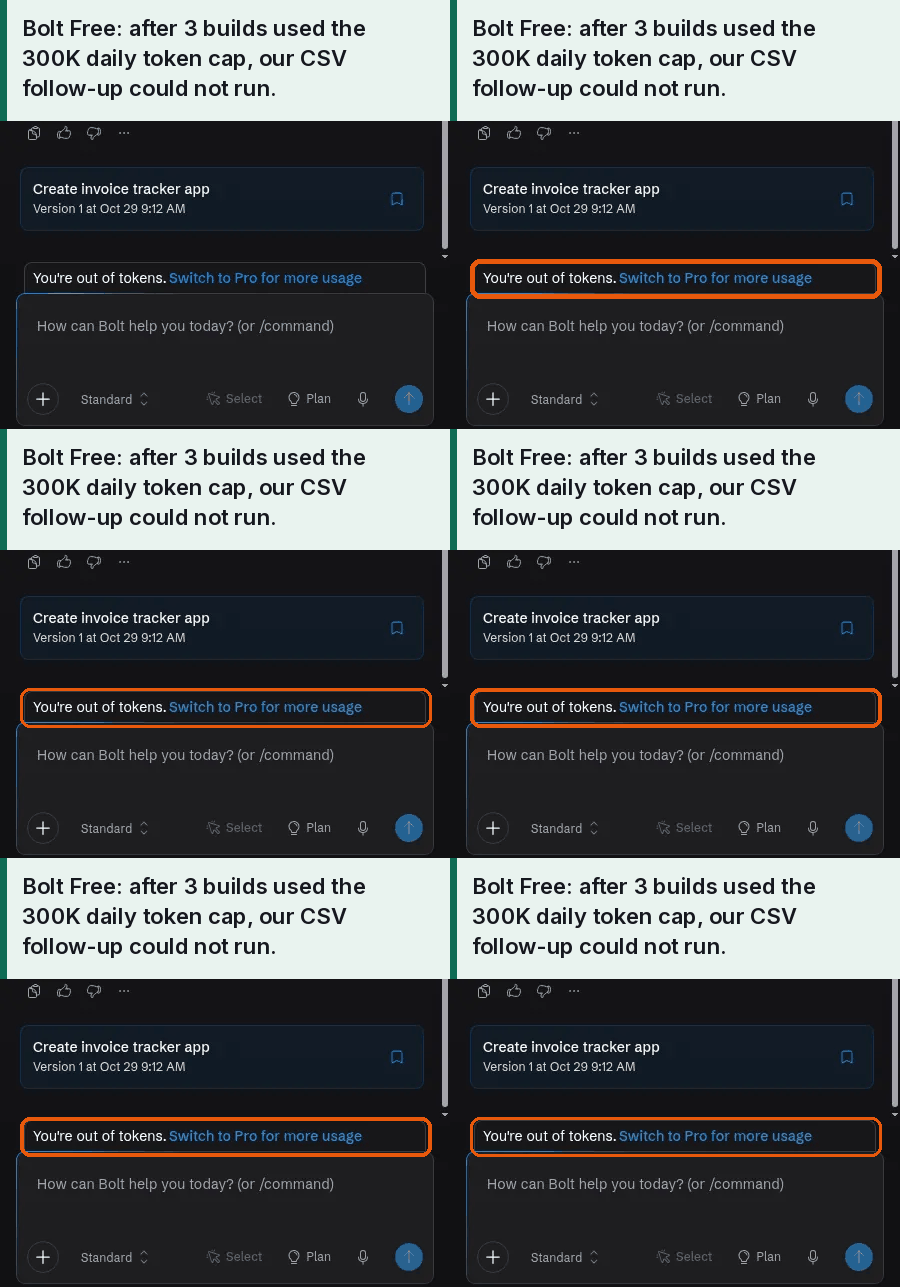
Those three builds used about 300K tokens in total, which is one Free-plan day. The daily cap was hit exactly as the landing page finished, and Bolt showed an “out of tokens” upgrade modal. A later follow-up, adding CSV export to the invoice tracker, was not run: the product said, “You’re out of tokens. Switch to Pro.” We did download the portal’s code from the project menu: a ZIP with 30 files (React/TypeScript source, Supabase migrations, and .bolt config).
The same 300K figure is on our Usage Index. For when the daily and monthly Free-plan allowances reset, use the tokens and daily reset guide rather than this page.
What paid Bolt Pro did in our test (Nov 13, 2026)
On Nov 13, 2026, we upgraded to Bolt Pro and ran our three standard test builds on it that same day. Every Pro figure in this section is from that single run on paid Bolt Pro, tested on one day (Nov 13, 2026), and Pro token balances are as Bolt’s billing page displayed them, rounded to 0.1M. The Free-plan figures in the comparison below come from our separate single Free-plan run (Nov 12–13, 2026).
Bolt Pro costs $25 a month billed monthly; we paid $25.00 for one month on Nov 13, 2026, with no tax added at checkout or on the receipt. After upgrading, Bolt’s billing page showed 10M of 10M monthly tokens, no daily limit, and Forge tokens at 0% used. Bolt’s billing page said our next refill of 10M tokens would occur on December 13, 2026 UTC, and that unused tokens would roll over and expire January 13, 2027. Bolt’s billing page also advertised a next tier at $50 a month for 26M tokens, as an in-app offer.
Our three test builds took Bolt’s displayed balance from 10M to 8.2M — about 1.8M tokens (rounded to 0.1M): roughly 0.6M for the client intake portal, 0.8M for the invoice tracker and 0.4M for the landing page. After Build 2, both Bolt’s billing page and its in-chat token bar showed 8.6M remaining. A separate CSV-export follow-up used about 0.3M more (8.2M → 7.9M), about 2.1M in total. We still had 7.9M of the 10M monthly allowance left after the follow-up. That leftover is what this one run left, not a promise for later months or other projects.
We saw no out-of-tokens or token-pack pop-up, and all three builds plus the follow-up ran on the same day. Each build needed 0 clarifying questions and 0 follow-up fix messages; the Oct 29 login fix did not recur. Manual step, disclosed: the client portal’s admin view still needed a manual database step (adding the admin account to an admin table) before we could use it. Our tester did that by hand; Bolt’s AI did not do it, and we do not count it as a fix message. Both of our Free-plan runs needed the same kind of manual admin step.
Build times, from send times our tester reported (single run): about 4 minutes from sending the prompt to a ready preview for the client intake portal (first-preview time not measured), about 5¾ minutes to a ready app for the invoice tracker, and about 3½ minutes to a preview for the landing page.
What worked, with the limits of our evidence: according to Bolt’s build summary, the landing page had pricing tiers, feature blocks, sample testimonials and a five-question FAQ. Our tester reported that the landing page’s form submission was stored in the database, that the intake form offered five entity types, and that the invoice list kept its data after a reload. The CSV export now exists and lists both invoices on screen; that the downloaded file contained both is what our tester reported. Mobile checks were display-only at Bolt’s 390 × 844 preset; the invoice tracker preview was at 80% zoom.
Rollover: per Bolt’s pricing page and help docs, paid-plan unused tokens stay for up to two months while subscribed. We did not observe a rollover (the refill comes after this test).
Free vs Pro in our runs (one single run each)
| What we saw | Free plan, run 2 (Nov 12–13, 2026) | Pro, paid plan (tested Nov 13, 2026) |
|---|---|---|
| Price | $0 | $25.00 for one month, billed monthly; no tax added |
| Billing page before the builds | 904K/1M monthly; daily limit 300k/300k | 10M of 10M monthly; no daily limit |
| Used by the three builds (billing page) | 300K monthly (904K → 604K) | About 1.8M (10M → 8.2M, rounded to 0.1M) |
| Left after the three builds | 604K/1M monthly; daily limit 100k/300k | 8.2M of 10M monthly |
| Out-of-tokens stop | Yes, during Build 1 on Nov 12 (details below) | None seen; all three builds plus a follow-up ran the same day |
| Clarifying questions / fix messages | 0 / 0 per build | 0 / 0 per build |
| Manual admin database step | Yes, done by hand by our tester | Yes, done by hand by our tester |
| Next refill shown | 1M on December 1, 2026 | 10M on December 13, 2026 UTC |
On Nov 12, 2026, Bolt’s Free plan stopped our first build after 6 minutes 15 seconds (1:20:16 to 1:26:31 PM CST) with a “You’re out of tokens” pop-up while showing 199K daily tokens remaining in the chat bar (billing showed 904K/1M monthly and 300k/300k daily before, and 804K monthly / 199k daily after). When we reopened the project that night, the chat transcript showed “You’ve hit the free plan’s token limit for this month,” even though 804K monthly tokens still showed and Builds 2 and 3 ran after the daily reset. The after-pop-up billing figures come from our Nov 12 log and verification; that Nov 12 billing screenshot was later overwritten at the end of the run, while the pop-up screenshot and a later 804K billing screenshot still survive.
How Bolt tokens work, briefly
Bolt’s pricing FAQ says tokens are how Bolt measures the work it does on your project: it uses them when it reads your prompts and project files, makes a plan, or writes code. Each plan includes a monthly token allowance.
Bolt’s token docs add two points that matter for cost:
- Most usage comes from Bolt reading, understanding, and syncing project files, so larger projects use more tokens per message.
- Rollover applies on paid plans, not on Free. If you keep a paid subscription, unused paid-plan tokens “roll over and stay valid for two months from the start of the billing cycle in which you received them.” Free plan tokens don’t roll over. The Free plan also has a separate 300K daily limit that resets every day and does not carry over.
Free-plan tokens reset on the 1st of each calendar month. Paid-plan tokens reset on the renewal date. Extra token purchases, per the same docs, need “the highest individual monthly Pro plan or … any annual Pro plan.” We have not bought extra tokens. We tested paid Pro on Nov 13, 2026 (our Pro test). The how-to for reading your balance and the daily reset is in our tokens guide, with the official pages at Tokens and Pricing.
Pro vs Free: what changes (per Bolt’s page)
This section is what the official pricing page and docs list, not a test of Pro. Our own paid Pro results (tested Nov 13, 2026) are in our Pro test above.
Compared with the Free card, the Pro card lists:
- No daily token limit, and a starting allowance of 10M tokens per month, with unused tokens rolling over to the next month.
- No Bolt branding on websites, custom domain support, private site sharing, SEO boosting, and image editing with AI.
- A 100MB file upload limit, instead of Free’s 10MB.
- Up to 1M web requests, instead of Free’s “Up to 333k.”
- Expanded database capacity and a choice of database provider.
Bolt’s billing docs say custom domains aren’t available on the Free plan, and that “Using a Supabase database requires a Pro or Teams plan.” That last point is about connecting a Supabase database, not about Bolt Database: we used Bolt Database on Free, with no card. We have not connected our own Supabase project.
The public Pro card shows one starting price and “Start at 10M tokens per month.” Bolt’s billing docs also describe a “Monthly tokens” dropdown on the pricing page for other Pro token tiers. We did not confirm prices for those higher tiers on the public plan cards, so we are not listing them here.
Bolt Lite ($9/month, sign-up deadline passed): researched, not tested
Researched, not tested. Bolt’s Lite page and its Forge help page, both read Nov 14, 2026, list Bolt Lite as a standalone plan at $9 a month that builds only with Bolt Forge, Bolt’s agent built on open-source AI models. Per the help page, Lite includes Bolt’s built-in database and publishing to a bolt.host address, but not the Standard or Max agents, AI image generation, security scans, a Supabase connection, a custom domain, extra usage purchases or removal of the “Made in Bolt” badge. Neither page gives a token number for Lite; the Lite page says the most efficient Forge model gives 50× more usage than Bolt’s Standard mode. Bolt says Oct 14, 2026 was the last day to sign up for Lite. When we checked again on Nov 16, 2026, Bolt’s Forge help page said “October 14 is the last day to sign up,” and both it and the Lite page’s FAQ said people already subscribed by then keep Lite at $9 a month. Bolt’s pricing page listed no Lite plan, only Free, Pro, Teams and Enterprise. The Lite page still showed “Join before Oct 14th” and a “Get access now” button, which we did not try. Sources: Bolt Lite page and Bolt Forge help page.
Teams and Enterprise (per Bolt’s page, untested by us)
We have not tested Teams or Enterprise.
The Teams card lists $30/month per member billed monthly, or $27/month per member billed annually ($324/year per member). It is described as everything in Pro, plus:
- Centralized billing
- Team-level access management
- Granular admin controls and user provisioning
- Share with your organization
- Private NPM registries support
- Design System knowledge with per-package prompts
Bolt’s pricing FAQ says you pay per team member, paid members get a monthly token allowance based on your plan, tokens aren’t shared between members, and free members can view team projects but can’t send prompts.
The Enterprise card is custom. It lists:
- Advanced security (SSO, audit logs, compliance support)
- Granular admin controls and user provisioning
- Dedicated account manager and 24/7 priority support
- Custom workflows, integrations, and SLAs
- Scalable for large teams and high-volume usage
- Flexible billing and procurement options
- Data governance and retention policies
- Hands-on onboarding and enterprise training
A Nov 7, 2026 freshness check found that Bolt had removed the old plan-comparison table. SSO and 24/7 priority support now appear under Enterprise on the pricing page, not on the Teams card. That was still true in our Nov 11, 2026 price check. We are not treating a missing line as proof that a feature was removed from the product, only that the public pricing page no longer lists it on Teams.
Bolt’s trust center lists SOC 2 Type 2 under certifications (read Nov 11, 2026, about 7:22 PM CST). The pricing page does not tie that listing to a plan. The same trust-center page still shows a Feb 25, 2026 update that a “SOC 2 Type II audit report will be available at the end of the 2nd quarter of 2026.” We are not saying that report is available, and we are not saying a Type II audit is complete. The only audit status shown on that page says Bolt “has completed the SOC 2 Type 1 audit by an independent third-party auditor.” The profile on that page was last updated Jul 8, 2026.
Hosting, domains and branding limits
These figures are from Bolt’s docs and pricing page, not from a live-traffic test of our apps. We did not publish the test apps or attach a custom domain.
- Hosting, per Bolt Cloud hosting plans: Free is up to 10 GB bandwidth and 333,333 requests a month, with a hard limit. Pro is up to 30 GB and 1 million requests, with optional pay-as-you-go above that. The limits apply to the Bolt account as a whole, not to each project. Free-plan sites stop serving once they hit the monthly limits, until usage resets. The same doc says the Free plan “typically supports around 10,000–15,000 monthly visits, depending on the size and complexity of your site,” and that Pro “can often support 100,000+ visits per month for most use cases.” Those visit ranges are Bolt’s, not measurements from our tests.
- Branding: On Free, a “Made in Bolt” badge appears on project previews and published sites. The hosting docs say upgrading to any paid plan removes the badge after you refresh or re-publish.
- Custom domains: Bolt’s billing docs say custom domains aren’t available on the Free plan. The Pro card lists “Custom domain support.”
- File uploads, per the pricing cards: 10MB on Free, 100MB on Pro.
What our 3 test apps would cost
On Free (Oct 29, 2026), the three standard apps used about 300K tokens, which equaled one Free-plan day, plus one login fix of about 84K tokens inside that total. On paid Pro (tested Nov 13, 2026, single run), we paid $25.00 for one month, and the same three builds took Bolt’s displayed balance from 10M to 8.2M, about 1.8M tokens (rounded to 0.1M). That is what this one run left, not a promise for later months or other projects, and we are not estimating what the same work would cost on Teams.
If you want a planning estimate from those measured burns, use the cost calculator and the app-builder cost simulator. Those tools label their outputs as estimates. The plan-fit calculator compares the same burns with plan allowances. None of them is a quote for your app.
When NOT to pay for Bolt
You do not need a paid plan just to try Bolt. The Free plan, with no card, built all three of our standard test apps on a real database and let us download the code. If you only need a short experiment that fits inside 300K tokens in a day, paying is not required for that kind of trial.
Skip paying, or at least wait, if any of these apply:
- You expect a lot of back-and-forth in one day. Our three small apps used the whole daily Free allowance, and a simple follow-up was blocked until the next reset or an upgrade.
- You need behavior we have only seen described on paid cards or in docs — a custom domain, no “Made in Bolt” badge, token rollover, or connecting your own Supabase database. We have not tested those on a paid plan, so we cannot say how they behave in practice. (On paid Pro, tested Nov 13, 2026, Bolt’s billing page showed no daily limit.)
- You need SSO, audit logs, or 24/7 priority support as listed on the Enterprise card. That card is custom, and we have not tested Enterprise.
Free alternatives we can point to, with the limits of our tests:
- Stay on Bolt Free if the daily and monthly caps are enough. Our evidence is one day’s work on three small apps.
- Replit, which we tested on its Free plan.
- Lovable and Base44 also list free tiers on their pricing pages; we did not hands-on test those free tiers. See Lovable pricing and Base44 pricing. Lovable’s credit accounting can disagree between the balance and the usage page; we walk through that in our AI app builder usage study.
Bolt vs Lovable vs Base44 on price
The figures below are copied from our live pricing pages, with those pages’ own check dates. Tokens and credits are different units, so this is a price list, not a claim that the allowances are equivalent. We tested Bolt on Free (plus paid Pro, tested Nov 13, 2026), Lovable on Pro, and Base44 on Builder — not the same plan tier, and not all on the same day as this Bolt price check.
| Tool | Free, as listed on our pricing page | Listed self-serve paid starting price | What we tested | Source and date |
|---|---|---|---|---|
| Bolt | $0; 1M tokens a month, 300K a day | Pro $25/month billed monthly, or $18/month billed annually ($216/year) | Free, Oct 29, 2026; Pro (paid), Nov 13, 2026 | This page; official prices checked Nov 11, 2026 |
| Lovable | $0; 5 build credits a day, up to 30 a month | Pro $25/month, or $21/month billed annually ($250/year), for 100 credits | Pro (100 credits, billed monthly), Oct 29, 2026 | Lovable pricing, figures as of Oct 29, 2026 |
| Base44 | $0; 25 message credits a month, capped at 5 a day, plus 100 integration credits | Starter $20/month billed monthly, or $16/month billed annually | Builder, Oct 29, 2026 | Base44 pricing, figures as of Nov 9, 2026 |
| Softr | $0; 5 AI credits a month | Basic $25/month billed monthly, or $19/month billed annually | Basic, Oct 29, 2026 | Softr pricing, figures as of Nov 10, 2026 |
For side-by-side product notes, not just list prices, see Bolt vs Lovable and Base44 vs Bolt.
Ways to keep Bolt costs down
These tips are from Bolt’s docs, not from a paid-plan test:
- Bolt’s token docs say larger projects use more tokens per message, and they point to Maximizing token efficiency for prompting and project-size advice.
- The same token docs, and the Code view docs, say that if you hit the Free-plan daily limit, you can still make direct edits to existing code in Code view, “which doesn’t use tokens.” We did not measure Code-view token use ourselves.
- The Code view docs also say that running a command in the project’s terminal doesn’t use tokens. We did not test that claim either.
- On Free, wait for the next daily or monthly reset rather than assuming leftover daily tokens will be there tomorrow. They will not, per the docs. The reset how-to is in our tokens guide.
A longer list of plan ceilings, including Bolt’s, is on free-plan limits. We track listed prices on the pricing tracker.
Related pages
- Bolt review — the Free-plan hands-on test and the 8.4/10 score
- Bolt tokens and the daily reset
- Bolt vs Lovable and Base44 vs Bolt
- Lovable pricing, Base44 pricing, and Softr pricing
- Usage Index, cost calculator, cost simulator, plan-fit calculator, and free-plan limits
- Pricing tracker and How we test
Bolt pricing FAQ
Is Bolt free?
Yes. Bolt lists a Free plan at $0 a month, with no credit card required. It includes 1M tokens per month and a 300K daily token limit. We tested the Free plan on Oct 29, 2026: our three standard test apps used about 300K tokens in total and hit that daily cap as the third app finished.
How much is Bolt Pro?
Bolt’s pricing page lists Pro at $25/month when billed monthly, or $18/month when billed annually (a total of $216/year; the page also shows a struck-through $300/year). Pro starts at 10M tokens per month and has no daily token limit. We paid $25.00 for one month of Pro on Nov 13, 2026, with no tax added at checkout or on the receipt. In that single run, Bolt’s billing page showed 10M of 10M monthly tokens and no daily limit, and our three test builds used about 1.8M tokens (rounded to 0.1M).
Do Bolt tokens roll over?
On paid plans, yes, according to Bolt’s pricing FAQ and token docs: unused tokens from your monthly allowance stay in your balance for up to two months, as long as your paid subscription is active. Free plan tokens don’t roll over. The Free plan’s 300K daily limit also doesn’t carry over to the next day. We tested paid Pro on Nov 13, 2026, but we have not observed a rollover: Bolt’s billing page said our next refill of 10M tokens would occur on December 13, 2026 UTC, and that unused tokens would roll over and expire January 13, 2027.
Does Bolt charge per seat?
Teams is priced per member. Bolt lists Teams at $30/month per member when billed monthly, or $27/month per member when billed annually (a total of $324/year per member; the page also shows a struck-through $360/year). Bolt’s pricing FAQ says paid members get a monthly token allowance based on your plan, tokens aren’t shared between members, and free members can view team projects but can’t send prompts. We have not tested Teams.
Can I use my own domain on Free?
No, according to Bolt’s billing docs and the Pro plan card. Custom domains aren’t available on the Free plan. The Pro card lists “Custom domain support.” We did not try to connect a custom domain.
Tested: Bolt on Oct 29, 2026 and Nov 12–13, 2026 (Free plan), and Nov 13, 2026 (paid Pro plan). Prices and official docs checked Nov 11, 2026, about 7:21–7:40 PM CST, on Bolt’s pricing page, help center, release notes and trust center; Pro list price re-read Nov 13, 2026; Bolt Lite page and Forge help page read Nov 14, 2026. Published: Nov 11, 2026. Updated: Nov 16, 2026.