By the PrototypeVerdict Test Team
Our Base44 and Make.com links are referral links: if you sign up through one, Base44 or Make.com may reward us, at no extra cost to you. How we make money.
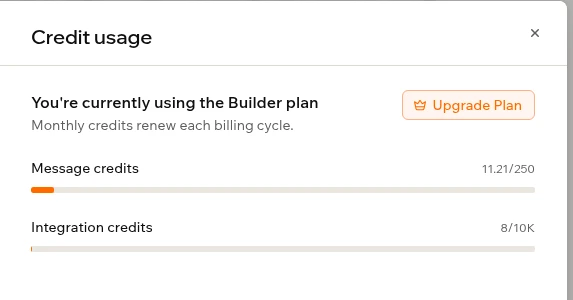
The Base44 Superagent is Base44’s chat assistant for scheduled jobs, tables and reports. We ran 5 real jobs on the Builder plan: all worked, using 0.65 of 250 monthly message credits and 4 integration credits.
Quick verdict
Worth trying if you already pay for Base44 and want a chat assistant for small scheduled jobs, simple tables and quick reports. All five of our everyday jobs worked on the first message, using 0.65 of our 250 monthly message credits and 4 of 10,000 integration credits. Don’t hand it your books unchecked: it called the total of all ten sample invoices “outstanding”, paid and cancelled ones included.
Our verdict
| Best for | Base44 users who want scheduled summaries, reminders, simple tables and quick reports from one chat |
| Not ideal for | Money figures you won’t double-check, or anyone who needs a job’s cost before it runs |
| What our 5 jobs used | 0.65 message credits and 4 integration credits on the Builder plan (250 and 10,000 a month) |
| Standout | It turned plain requests into working scheduled workflows in under 20 seconds each |
| Watch out for | A wrong “outstanding” invoice total, and no way to see a job’s cost before it runs |
| Our score | Not scored. Our scores come from three standard app builds (see how we test), and this was a different test: five everyday agent jobs |
What the Base44 Superagent is
Base44 is best known as an AI app builder (see our Base44 review, and how it compares in Base44 vs Lovable and Base44 vs Bolt). The Superagent is a separate part of it: “an AI agent that works for you across your tools,” in Base44’s words, built as “one assistant per person.” (Base44 docs) You chat with it, and it sets up scheduled or triggered workflows, researches the web, creates files and keeps its own Data tables.
The important bit for your wallet: it draws on the same monthly credits as Base44’s app builder. Our starting balance was exactly where our earlier app-builder test had left it.
How we tested
- Plan and setup: our existing Base44 Builder plan, billed monthly, in the web chat only. No extra spending.
- What we connected: nothing. No WhatsApp, phone, email or calendar account; we skipped the onboarding offer to connect Google or Microsoft.
- How we measured: we read both balances under Agent Settings > Credit usage before the first job and after each one. The panel counts in 0.05 steps and doesn’t show a renewal date.
- Starting balance: taken just after the agent was set up. It matched our previous closing balance, so creating the agent appears to have used about 0 credits.
- Limits: no credit cap, paywall or paid add-on prompt. We paused both workflows after testing so they wouldn’t keep spending credits.
Credits per job: what each task actually cost
| Job | What we asked for | Result | Message credits | Integration credits | Time |
|---|---|---|---|---|---|
| 1. Weekday news summary | Top 3 AI app-builder news items every weekday at 8 AM Central | Worked: a Mon–Fri 8:00 AM workflow; one test run posted 3 items with links | 0.30 (0.10 setup, 0.20 for one run) | 0 | ~19 s setup, 19.3 s run |
| 2. Research report | Lovable, Bolt and Replit pricing as a 1-page report with sources | Worked: a report file with a summary | 0.10 | 2 | ~55 s |
| 3. Invoice table | 10 sample invoices for a made-up bakery | Worked: a 10-row table, but a wrong “outstanding” total | Under 0.05, shown in job 4 | 0 | ~17 s |
| 4. Friday reminder | Every Friday at 3 PM, review unpaid invoices | Worked: a Friday workflow (not run) | 0.15 (includes job 3) | 0 | ~14 s |
| 5. PDF | Turn the job 2 report into a downloadable PDF | Worked: a one-page PDF with 8 sources | 0.10 | 2 | ~65 s |
| Total | 5 of 5 worked on the first message | 0.65 of 250 (0.26%) | 4 of 10,000 |
What that means in money (our rough math, not Base44’s): Builder’s $50 a month (billed monthly) buys 250 message credits, about $0.20 each, so our five jobs used about 13 cents of message credits. If every weekday run of job 1 cost what our test run did (0.20), about 22 runs would use about 4.4 credits a month: under 2% of Builder’s allowance, but close to a fifth of Free’s 25. Base44 says “there is no set credit amount used per message,” so treat these as one test’s numbers, not a price list. (Base44 Credits doc)
Message credits or integration credits? What we saw
Base44’s docs aren’t consistent on which pool a Superagent workflow uses.
- The workflows page: “Workflow runs use your message credits, the same as chatting with your Superagent.” (Base44 docs)
- The general Credits doc: workflow steps use integration credits, and Superagent workflows “run on the same system and are charged at the same rate.” (Base44 Credits doc)
What our account showed in this one test (an observation, not a rule):
- Message credits went to chat replies, workflow setups and the one workflow run (0.20 message, 0 integration).
- Integration credits went up only for the research report and the PDF, by 2 each. Job 1’s run also used the web but no integration credits, so the file output may be the difference.
The five jobs in detail
Job 1: a weekday 8 AM news summary
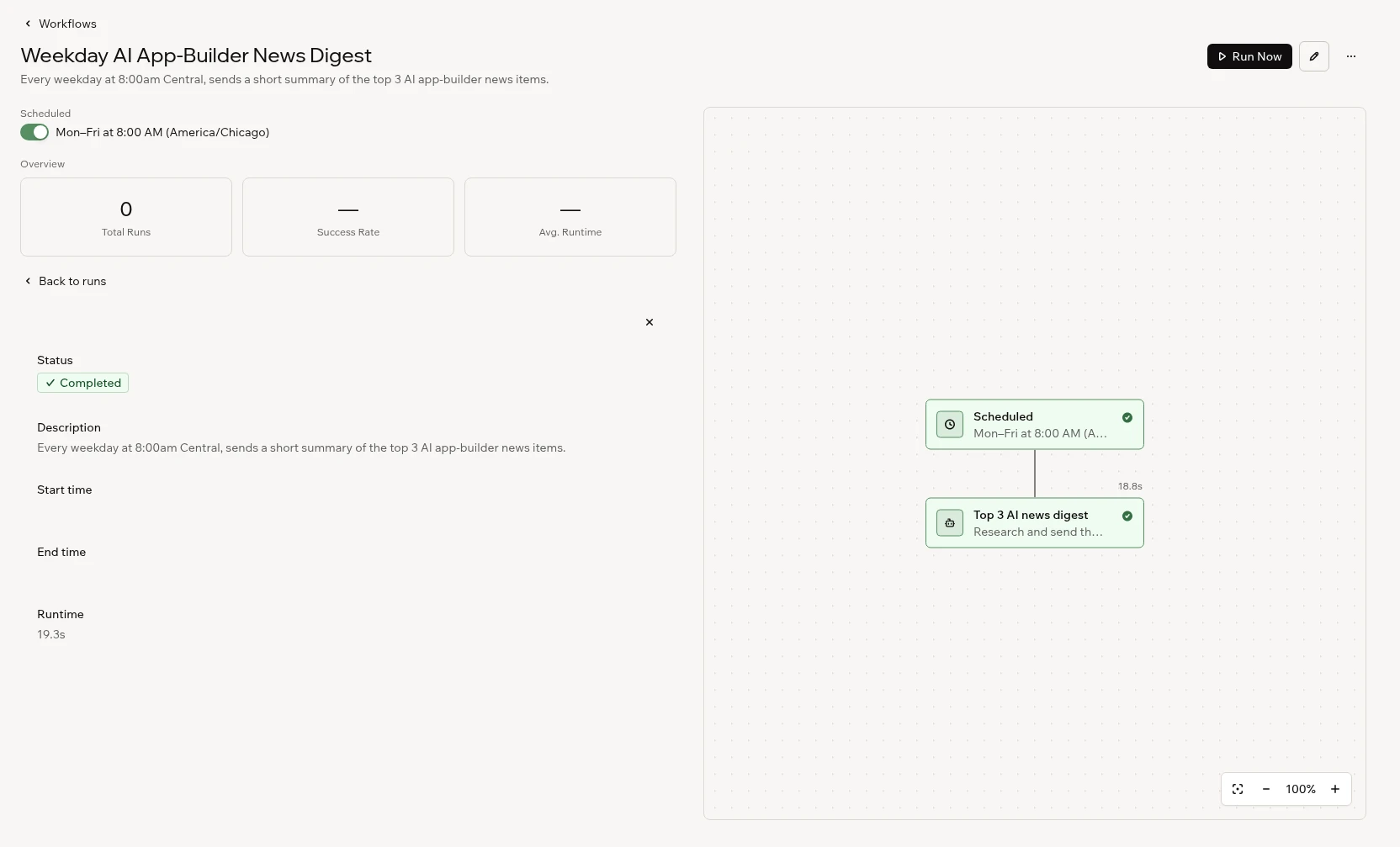
In about 19 seconds it built “Weekday AI App-Builder News Digest”, scheduled Monday to Friday at 8:00 AM (America/Chicago). Run Now asks you to confirm first (“Running this workflow will execute real actions”), a good safeguard for workflows that send email. The run took 19.3 seconds and posted three stories with source links (we didn’t fact-check them). It said the digest would start “Monday morning”, correct for a Saturday test.
Job 2: a pricing research report
In about 55 seconds it produced a report file with a preview and a summary. Its figures (Lovable Pro $25, Bolt Pro $25, Replit Core $20) are the agent’s numbers, and we didn’t re-check them here.
If you plan to compare credits across tools, note that Lovable’s own counts didn’t quite match in our Lovable test. Our balance fell 5.5 credits across three apps and that day’s 5 free daily build credits were used too, about 10.5 in all, while Lovable’s usage page showed about 10.2. The whole 0.3 gap is on one build, our Lovable invoice tracker (3 credits from the balance, 2.70 on the usage page), as our AI app builder usage study explains.
Job 3: a sample invoice table
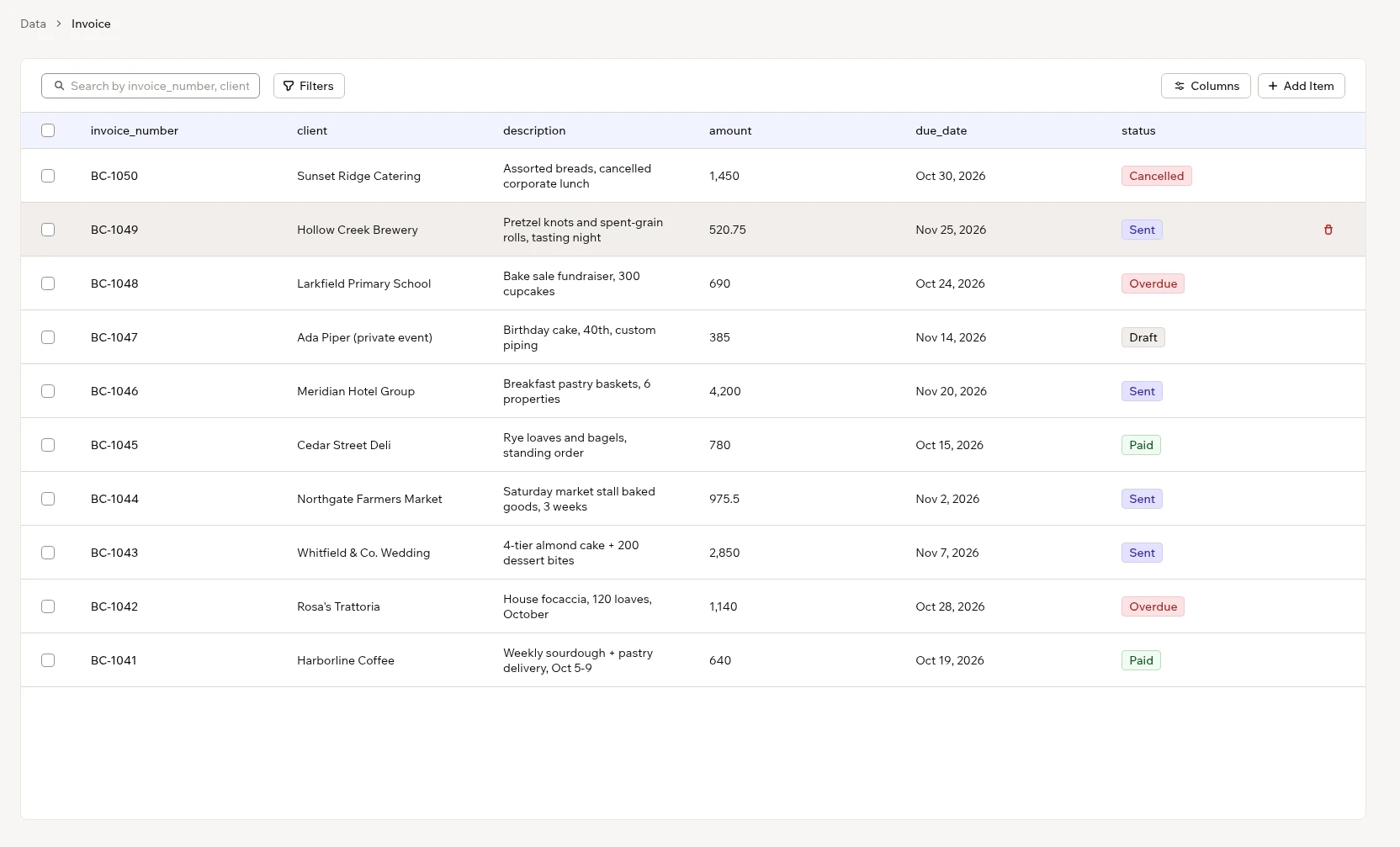
In about 17 seconds it built an “Invoice” table (BC-1041 to BC-1050) with client, amount, due date and status, plus a description field it added itself. You’ll find it under More > Data, with search, filters and column controls. Backup & Restore sits next to Tables with an upgrade icon; Base44’s docs say it needs Elite or higher. (Base44 docs)
The catch for anyone who does bookkeeping: the agent said “Total outstanding sits at $13,631.25, with $1,830 of it already overdue.” The overdue figure is right. The outstanding figure isn’t: $13,631.25 is all ten invoices, including two Paid ($1,420), one Cancelled ($1,450) and one Draft ($385). The Sent and Overdue invoices come to $10,376.25 ($10,761.25 with the draft). A confident wrong total is exactly what you don’t want in a client summary.
Job 4: a Friday reminder
In about 14 seconds it built “Friday Unpaid Invoice Review Reminder”. It said the reminder would list Sent and Overdue invoices with totals and days overdue, and flag anything more than 14 days late. Here its definition of unpaid was right. It picked Central time “to match your digest schedule.” We didn’t run it, so we haven’t seen a reminder arrive.
Job 5: a downloadable PDF
It worked out which report we meant. In about 65 seconds it made a one-page Letter-size PDF with a comparison table and eight sources. Preview and Download both worked.
Base44 pricing for the Superagent
The Superagent has no price of its own; its page shows none. You pay through your Base44 plan’s credits. Plan prices and those credit pools are in our Base44 pricing guide. We found no line saying it’s on every plan, but Base44’s FAQ says that after a paid plan ends, “Your Superagent keeps working” on the Free plan’s credits, until they run out. (Base44 docs)
| Plan | Billed annually (per month) | Billed monthly | Message credits/mo | Integration credits/mo |
|---|---|---|---|---|
| Free | $0 | $0 | 25 (max 5 a day) | 100 |
| Starter | $16 | $20 | 100 | 2,000 |
| Builder | $40 | $50 (what we pay) | 250 | 10,000 |
| Pro | $80 | $100 | 500 | 20,000 |
| Elite | from $160 | from $200 | from 1,200 | from 50,000 |
| Enterprise | Custom | Custom | Custom | Custom |
Prices in USD, as of Oct 31, 2026, read from both the yearly and monthly views of base44.com/pricing. Free’s 5-a-day limit and Elite’s larger credit sizes are from Base44’s plans doc.
Per Base44’s docs: a phone number and webhooks need Builder or higher, and data Backup & Restore needs Elite. Unused credits expire at each monthly reset. When credits run out, workflows stop, and “runs missed while you were out of credits don’t run later.”
WhatsApp, Telegram, phone and other channels (not tested)
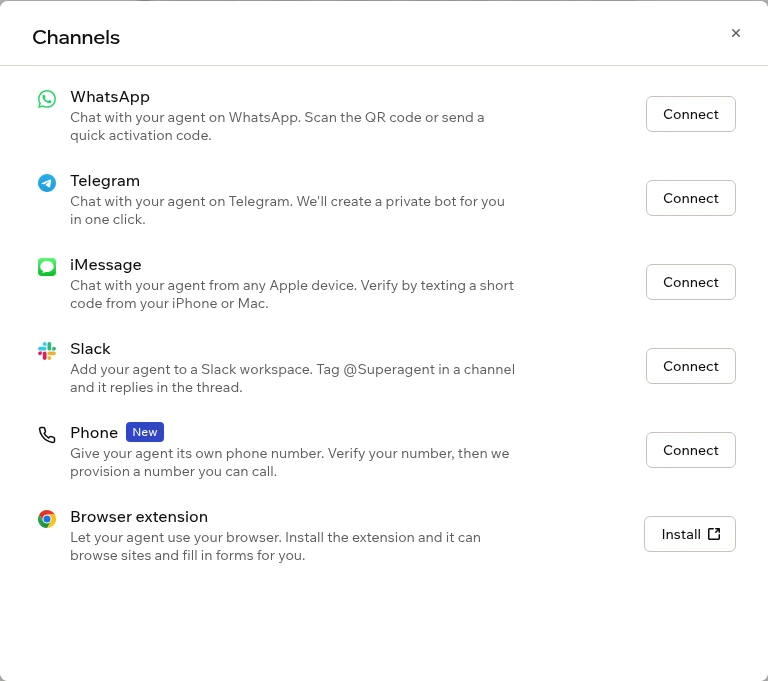
We didn’t connect any of these, since that means linking a personal account or phone number. This is from Base44’s docs. None of it is tested.
- WhatsApp and Telegram: connect with a QR code or link plus an activation code. On WhatsApp it can send PDFs it made, up to 10 MB. In groups, “AI usage from group activity is billed to your account,” and you must tell members that Base44 processes their messages.
- iMessage and Slack are listed too, and LINE in some regions.
- Phone: needs Builder or higher.
- You verify your own number, and Base44 gives the agent a US number. Up to 20 trusted callers.
- Base44 says “Phone calls use 0.2 credits per minute.” It doesn’t say which pool.
- If you disconnect, cancel or drop below Builder, the number “is released for good.”
- The agent offered to make calls for us during the test. We didn’t try it.
- Also visible but untested: a Chrome extension, Plugins (connectors such as Gmail and Google Calendar, plus Skills), Meetings, Memory, Notes and Files. The docs also describe a
/goalcommand for big jobs; we didn’t see a “Goals” label in the menus.
Base44 Superagent vs Claude
We have now tested Claude as an app builder, but the column below is still mostly from Claude’s official pages. A Free-plan sign-up attempt on Oct 29, 2026 was refused. On Nov 10, 2026 we ran our three standard app builds on Claude Pro as chat artifacts and again in Claude Code; those runs are not scored, and they were not Superagent-style scheduled jobs. See our Claude review.
| Base44 Superagent | Claude (docs; app builds tested Nov 10) | |
|---|---|---|
| Scheduled jobs | Yes: we built two in chat (tested) | Scheduled tasks on Pro and up, not Free (Claude help) |
| Research | Yes, with sources (tested) | Web search on Free. “Research” on paid plans (Claude help) |
| Files | A report and a PDF with preview and download (tested) | Artifacts and file creation on all plans, including Free (Claude pricing) |
| Data tables | Yes, in the Data tab (tested) | No equivalent found on the pages we checked |
| Cost model | Fixed monthly credit pools (0.65 message credits for our 5 jobs) | Usage limits that reset every 5 hours and weekly. Pro is $20 a month billed monthly (Claude pricing) |
| WhatsApp, Telegram, phone | Documented (not tested) | We found no official claude.ai WhatsApp, Telegram or phone-number feature |
| Connectors | Gmail, Calendar, Slack, Notion, HubSpot and more (not tested) | Connectors on all plans, including Free (Claude help) |
Our take: choose Claude if you mainly want research, writing and documents, free to start. Choose Base44 if you want WhatsApp or Telegram access, a phone number, or data tables next to your Base44 apps. A cost-per-job comparison isn’t possible: one uses rolling limits, the other fixed monthly credits.
Pros and cons
From our test
- Pro: All five jobs worked on the first message, using very few credits.
- Pro: Plain-English scheduling got the days, time and time zone right, and Run Now asks before real actions.
- Con: It overstated the invoice table’s “outstanding” total.
- Con: The credit panel shows no renewal date and counts in 0.05 steps, so small jobs blur together.
From Base44’s docs
- Pro: Many channels: WhatsApp, Telegram, iMessage, Slack and phone (not tested).
- Con: No cost preview, no catch-up for missed runs, and data backups need Elite.
When NOT to use the Base44 Superagent
- You need to know the cost first. Base44 says “there is no way to preview an integration credit cost before running an action.”
- Your numbers must be right without checking. Our invoice total was wrong. Use it to draft, then check the math.
- You need strict, step-by-step automations. Tools built for that, such as Zapier, Make and n8n, may suit you better.
- You’d add it to group chats whose members haven’t agreed to AI reading their messages.
- You work with sensitive client data. Base44 says it “may access relevant Superagent data when needed to provide support, investigate issues, maintain security, or operate the service.” Check that against your firm’s rules.
Free alternatives
From each vendor’s own pages; we haven’t tested these for this review.
- Base44 Free: 25 message credits a month (5 a day). That’s enough to try a few jobs like ours. (Base44 pricing)
- Claude Free: connectors, artifacts and web search, but no scheduled tasks or Research. (Claude pricing)
- Zapier Free: 100 tasks a month and two-step Zaps. (Zapier pricing)
- Make Free: 1,000 credits a month. (Make pricing) See our Lovable and Make guide.
- n8n Community Edition: free to self-host, but you run your own server. (n8n docs) See our Lovable and n8n guide.
Base44 Superagent FAQ
What is the Base44 Superagent?
The Superagent is a separate part of Base44: “an AI agent that works for you across your tools,” in Base44’s words, built as “one assistant per person.” You chat with it, and it sets up scheduled or triggered workflows, researches the web, creates files and keeps its own Data tables. It draws on the same monthly credits as Base44’s app builder. We tested it on the Builder plan: five jobs used 0.65 of 250 message credits (and 4 integration credits). For the app builder itself, see our Base44 review.
Is it Base44 Superagent or Super agent?
Base44 writes it as Superagent (one word). People also search “base44 super agent” with a space; that is the same feature. This review is our hands-on test of it. The Base44 app builder is covered separately in our Base44 review.
How many credits does a Base44 Superagent job use?
In our test on the Builder plan, five jobs used 0.65 message credits and 4 integration credits in total. A scheduled workflow took 0.10 to set up and 0.20 for one run. The report and the PDF each used 0.10 message and 2 integration credits. Base44 says usage varies.
Does the Base44 Superagent use message credits or integration credits?
Both. In our test, chat, workflow setup and the workflow run used message credits; integration credits went up only for the report and the PDF. Base44’s docs disagree on workflow runs, so check your own Credit usage panel.
Is the Base44 Superagent free?
There’s no separate price; it uses your plan’s credits. Base44’s FAQ says it keeps working on the Free plan’s credits (25 message credits a month, up to 5 a day) until they run out.
Can the Base44 Superagent send me messages on WhatsApp or call me?
Base44’s docs say it works in WhatsApp, Telegram, iMessage and Slack, and a phone number needs Builder or higher, with calls at 0.2 credits a minute. We didn’t test these.
Is the Base44 Superagent better than Claude?
It depends on the job — they do different things, and we have not scored Claude. The Superagent handled schedules, a data table and files in our Superagent test. On Nov 10, 2026 we ran our three standard app builds on Claude Pro, once as chat artifacts and once in Claude Code: chat artifacts were the fastest path to a preview, but the portal only simulated auth and kept data in memory; Claude Code wrote local projects we ran ourselves, including a real SQLite portal, with no one-click deploy. Full notes are in our Claude review and our Lovable vs Claude Code comparison.
Is the Base44 Superagent good for accountants?
For reminders and summaries, yes, with care. It built our sample invoice table and a Friday reminder that defines unpaid invoices correctly (we didn’t run it), but overstated the outstanding total by counting paid, cancelled and draft invoices. Start with made-up data and check every total.
Tested and prices checked: Oct 31, 2026. Claude Pro comparison runs: Nov 10, 2026. Published: Oct 31, 2026. Updated: Nov 16, 2026.