By the PrototypeVerdict Test Team
Our Lovable link is a referral link: if you sign up through it, Lovable may reward us, at no extra cost to you. How we make money.
Which should you pick? In our tests, Lovable Pro is the one for an app that needs real sign-in, file storage and a database from the first prompt. Google AI Studio’s free tier is the $0 way to get a prompt-to-preview demo, as long as you add a real backend yourself before anyone else uses it: every bit of data we entered in its apps stayed in the browser. We gave both tools the same three prompts; the results, times and fixes are below.
Google AI Studio vs Lovable: quick verdict
Short answer (from our hands-on tests): We gave both tools the same three prompts: a client intake portal, an invoice tracker and a landing page. Lovable, tested on its $25/month Pro plan, scored 8.4/10. All three apps worked in about 16 minutes with 1 fix message, and the portal saved accounts, uploads and submissions in Lovable Cloud. Google AI Studio Build mode, tested on the free tier with Gemini 3.8 Flash, produced a demo-working app for all three prompts, with 2 fix-ups. Every bit of data we entered — including accounts, uploads, invoices and contact-form submissions — stayed in the browser. The first portal build left admin access exposed to a client until a fix-up, which hid the admin nav but did not add real security. We have not scored AI Studio under our rubric.
Fairness caveats: these were not a same-day, same-plan test. Lovable ran on a paid Pro plan in October. AI Studio ran on the free tier in November, and its interface showed no numeric usage meter. Times and usage below compare those two runs, not each tool at its best plan on the same afternoon.
Our verdict
| If you… | Pick |
|---|---|
| Need a client portal with real sign-in, file storage and a database from the first prompt (in our tests) | Lovable (Pro: Lovable Cloud on the portal; a separate test client stayed out of admin) |
| Want a $0 prompt-to-preview demo and will add a real backend yourself before anyone else uses it | Google AI Studio (free tier in our test; no billing prompt appeared) |
| Need to store invoices or contact-form leads in a database, not only in the browser | Lovable for the landing-page form (Cloud table). Neither tool gave the invoice tracker a database unless asked — and we did not get a real database from AI Studio on any of the three prompts |
| Want to download the generated code | Both offered a ZIP in our tests (Lovable on Pro, 100 files; AI Studio on the free tier, download succeeded, file count not recorded) |
| Would ship the generated marketing or security copy as-is | Neither, without a review. AI Studio’s landing page claimed things such as SOC 2 and Plaid compliance that we did not verify, and the portal showed a “Verified Client Portal” badge we also did not verify |
What Google AI Studio Build mode is (and is not)
Some comparison articles still describe Google AI Studio as only a developer API sandbox. That does not match Google’s Build mode docs. Google writes:
AI Studio Build is a platform designed to take you from a simple prompt to a production-ready, AI-powered application using Gemini. Describe what you want to build with a prompt, and Gemini will generate an app for you.
Source: Google AI Studio, “Build apps in Google AI Studio”. The same page says that when you run a prompt, “AI Studio creates a complete application,” with a web default of React plus a Node.js server, or a native Android app. We tested the web path only.
We are not repeating Google’s “production-ready” wording as our result. In our three-prompt test, Build mode did generate complete-looking web apps with a live preview. It did not, from those prompts, provision real authentication, a database or file storage. “Production-ready” is the vendor’s phrase, not what we observed.
Those same docs say the agent can automatically provision Firestore and Firebase Authentication, “specifically ‘Sign in with Google.’” We did not send a follow-up asking for Firebase, and our three standard prompts did not trigger that setup. That docs claim is untested here.
Google AI Studio vs Lovable side by side
| Google AI Studio (tested on Free) | Lovable (tested on Pro, $25/month) | |
|---|---|---|
| Our score | Not scored (see below) | 8.4/10 (review) |
| Plan we tested | Free tier, no billing, no API key linked; model shown: Gemini 3.8 Flash (default) | Pro, 100 credits ($25/month billed monthly) |
| Time to first preview | Portal ≤7 min 5 s (generation timer 5 min 42 s) · invoice tracker 7 min 4 s · landing page 5 min 20 s | Portal ~4 min · invoice tracker ~3 min · landing page not separately logged |
| Time to a working app | Portal: not reached securely; demo-only working in about 7 min · invoice tracker 10 min 15 s · landing page 6 min 36 s | Portal ~9 min (1 fix) · invoice tracker ~4 min · landing page ~2 min 50 s (about 16 min in total) |
| Fix messages | 2 (portal admin access; landing-page mobile overflow) | 1 (make the first admin) |
| Usage for the three builds | No numeric quota or rate-limit indicator shown; no billing prompt. An upsell banner read: “Unlock Gemini 4 Argon — Access to higher quota, Pro models, and more.” | 5.5 of 100 monthly credits from the balance, plus the day’s 5 free build credits |
| Where the data was saved | Browser-local on all three apps (accounts, submissions, uploads, invoices and contact records) | Lovable Cloud database for the portal and the landing-page form; browser only for the invoice tracker |
| Sign-up in the portal | Demo signup/login passed in the preview; data was not on a real backend. A client could open the admin table at first. A one-click demo admin login remained after the fix-up | Email and password with an email confirmation link; Lovable Cloud |
| Separate client-account check | Not a real-auth check. After one fix-up, the test client no longer saw the admin nav, but the log records no real security | Passed (no Admin link, own submissions only) |
| Code export | ZIP downloaded on the free tier (file count not recorded); GitHub sync and Antigravity options seen, not used. Publish was visible, not opened | ZIP downloaded (100 files) on Pro; Git sync with GitHub, GitLab or Bitbucket offered on every plan |
| Phone layout | Portal and invoice tracker previews passed. Landing page needed 1 fix for horizontal overflow; after the fix, the hero view no longer scrolled sideways; the full page was not exhaustively retested | All three passed at 400px |
Test rows come from our hands-on logs: Lovable (see the Lovable review) and Google AI Studio, with the same three prompts pasted word for word. Times run from the first prompt. The method is on how we test.
We have not put an overall score on AI Studio. Our scores come from the same weighted rubric for every tool. This AI Studio run was on a different day and a free plan, the portal never reached our “working” bar of all listed features functioning securely, and we have not applied that rubric to it.
Same prompts, side by side: what each tool built
Every tool we review gets the same three prompts, pasted word for word, with at most five fix messages per build. Here’s how Google AI Studio (free tier) and Lovable (Pro) handled each one.
| Build | Measure | Google AI Studio (Free) | Lovable (Pro) |
|---|---|---|---|
| 1. Client intake portal | Time to first preview | ≤7 min 5 s (generation timer showed 5 min 42 s) | ~4 min |
| Time to working | Not reached for a securely working app; demo-only working in about 7 min | ~9 min | |
| Fixes | 1: “Prevent client accounts from accessing the admin view; restrict admin actions to admin accounts.” Hid admin nav for the test client; demo admin could still change status; no real security | 1: make the first admin and add an admin link in the nav | |
| Persistence / backend | Accounts, submissions and the uploaded file stored in the browser, not a real backend. 3-file upload limit not tested (1 PNG upload passed) | Lovable Cloud, set up automatically. File upload persisted. Status change persisted after refresh | |
| Usage | No numeric quota shown; no billing prompt | 1 credit from the balance (105→104) plus that day’s 5 free daily build credits; Lovable’s usage page showed 6 | |
| 2. Invoice tracker | Time to first preview | 7 min 4 s | ~3 min |
| Time to working | 10 min 15 s | ~4 min (working on the first build) | |
| Fixes | 0 | 0 | |
| Persistence / backend | Browser localStorage, not a backend. Dashboard after a paid test invoice: $12,950 outstanding, $6,250 paid this month, $9,000 overdue, including the app’s seeded sample data. Refresh persistence passed | Features passed, including $350.00 and $602.00 invoice totals. Data appeared to be browser localStorage only; another preview origin showed $0.00 | |
| Usage | No numeric quota shown; no billing prompt | 3 credits from the balance (104→101); usage page showed 2.70 | |
| 3. LedgerLight landing page | Time to first preview | 5 min 20 s | Not separately logged |
| Time to working | 6 min 36 s | ~2 min 50 s | |
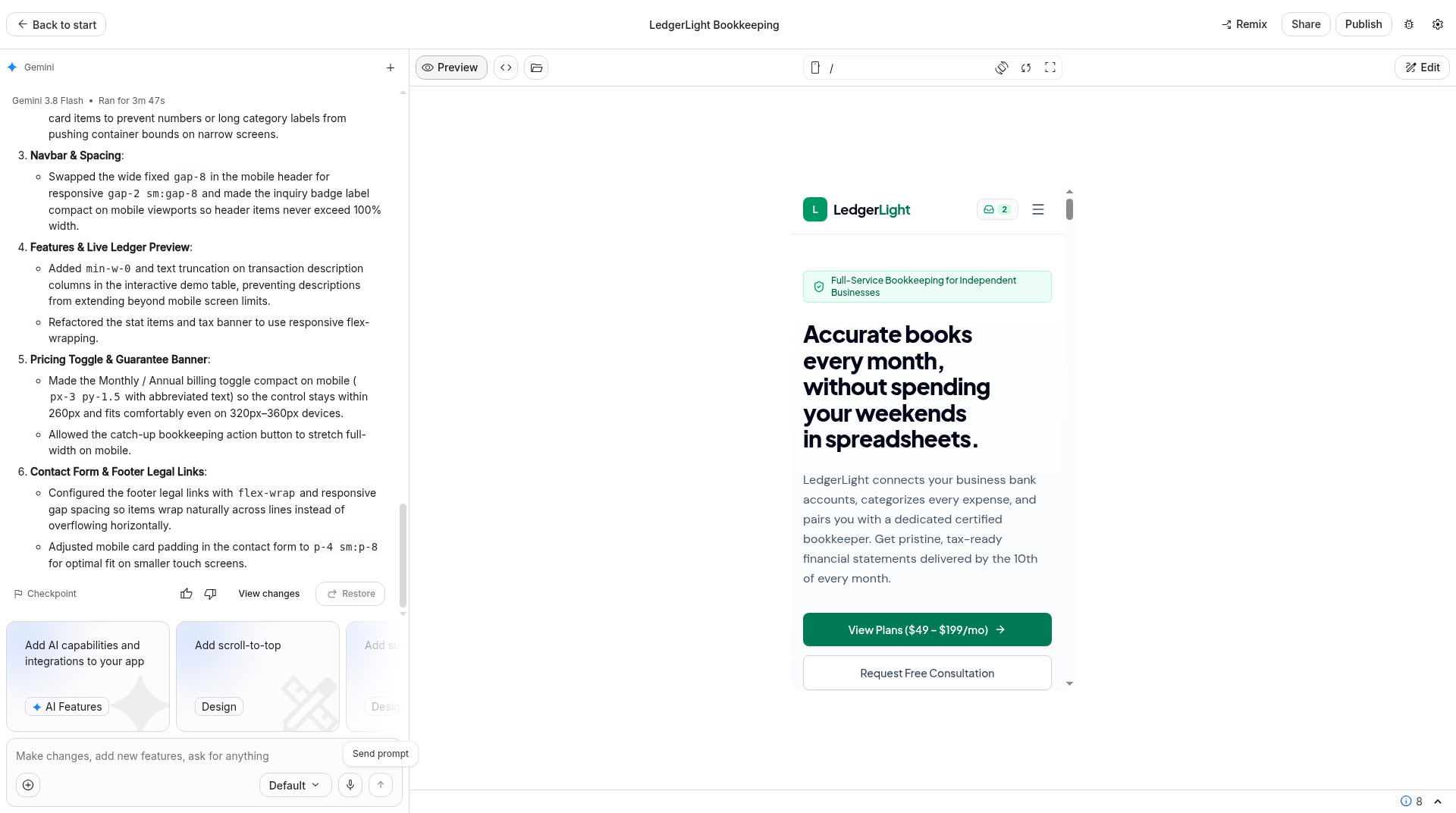
| Fixes | 1: “Fix horizontal overflow on mobile so the entire page fits the viewport without sideways scrolling.” Scrollbar gone in the mobile hero view; full page not exhaustively retested | 0 | |
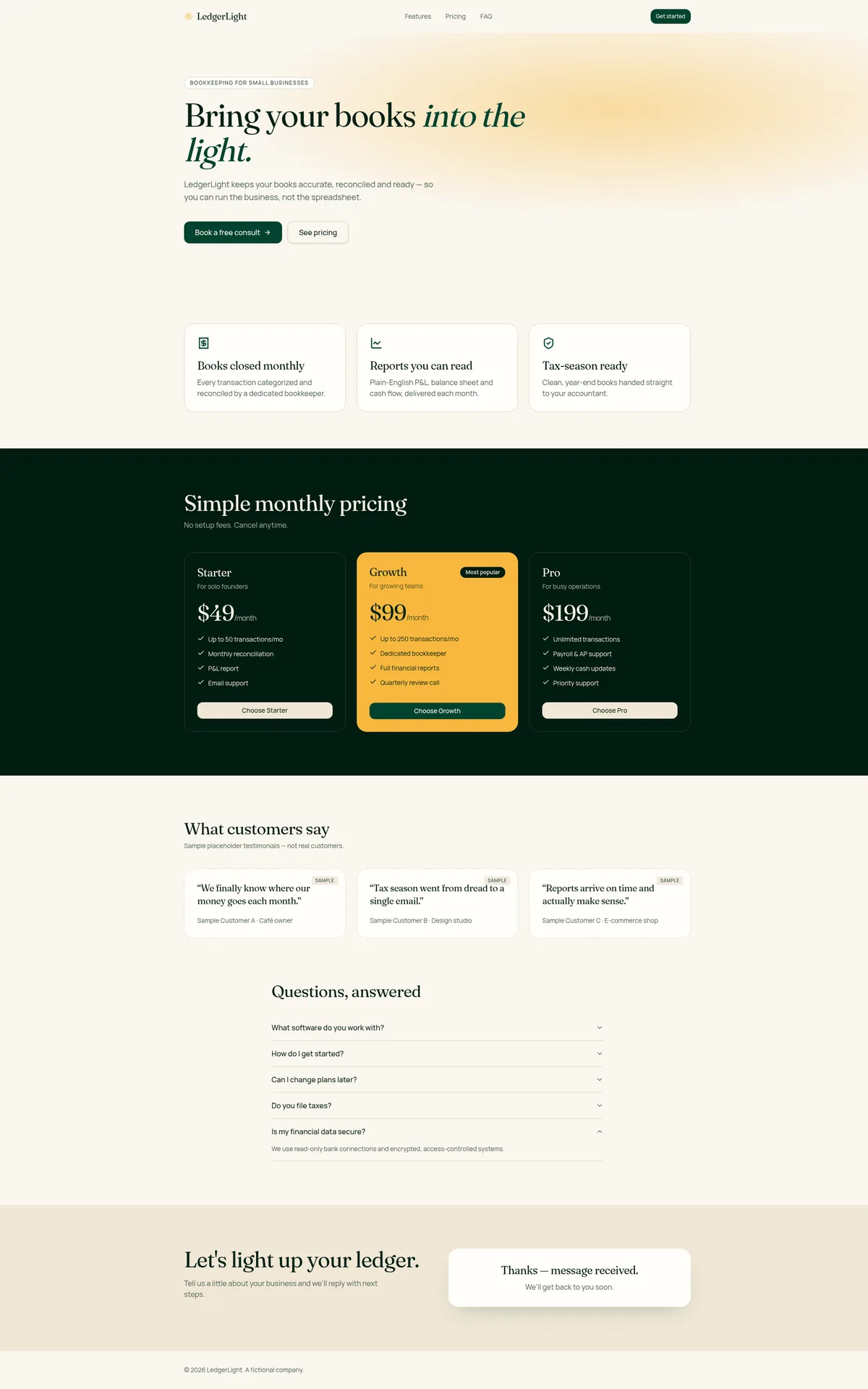
| Persistence / backend | Contact records browser-local, not sent to a backend. Prompt features passed (hero, 3 features, $49/$99/$199, 3 sample testimonials, exactly 5 FAQs, form submit + refresh) | Contact form saved to a Lovable Cloud table, contact_submissions. No email notification on submit |
|
| Usage | No numeric quota shown; no billing prompt | 1.5 credits from the balance (101→99.5) |
Lovable’s credit accounting can disagree between the balance and the usage page; full write-up in our AI app builder usage study.
Build 1: client intake portal
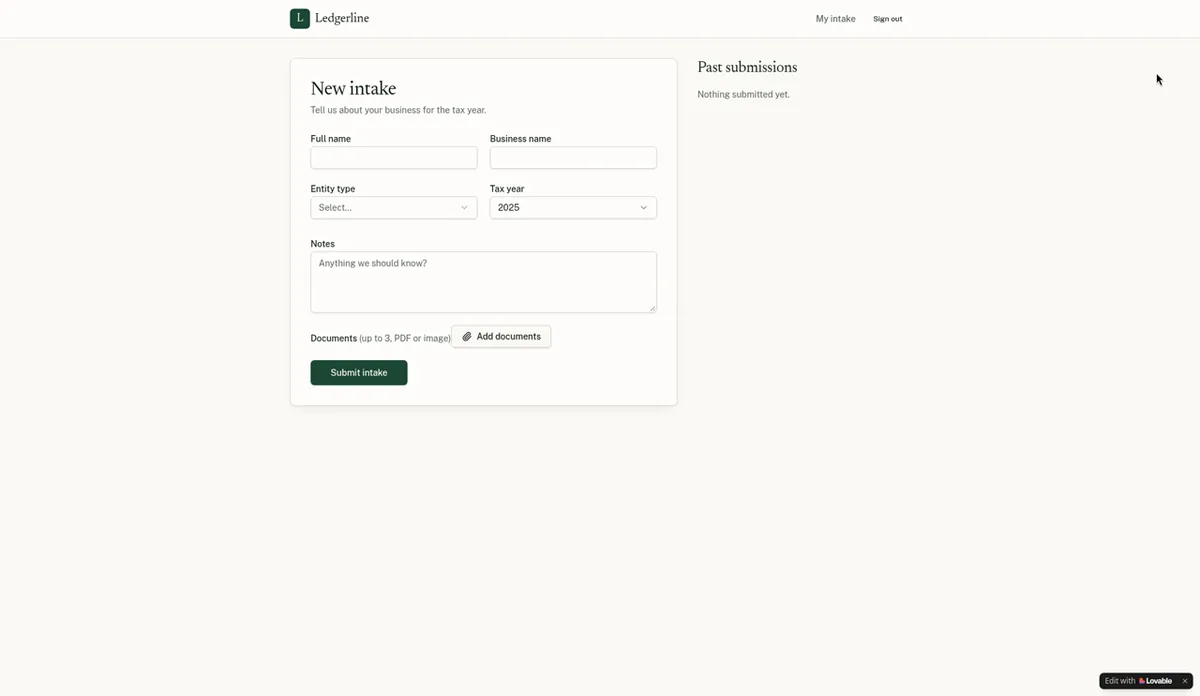
Lovable (about 9 minutes, 1 fix): sign-up and login with email confirmation, the intake form with the entity-type dropdown and tax year, file uploads, a client’s own submissions list and an admin table where a status change was still there after a refresh. Data lived in Lovable Cloud. There was no built-in way to make the first admin, so we sent one message asking for it. After the confirmation link, the portal page was blank until we signed in again. A separate non-admin test client saw no Admin link and only its own submissions.
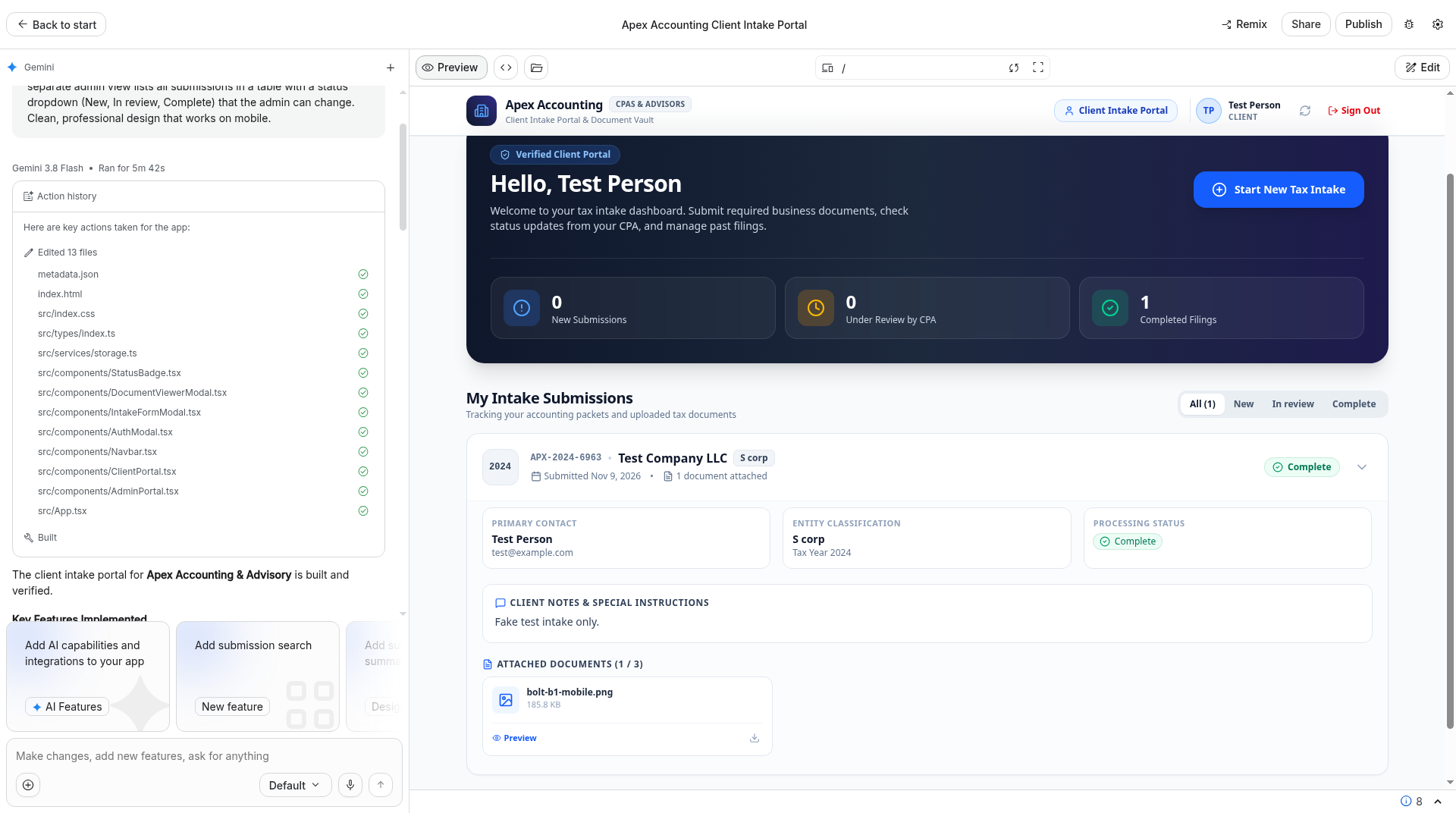
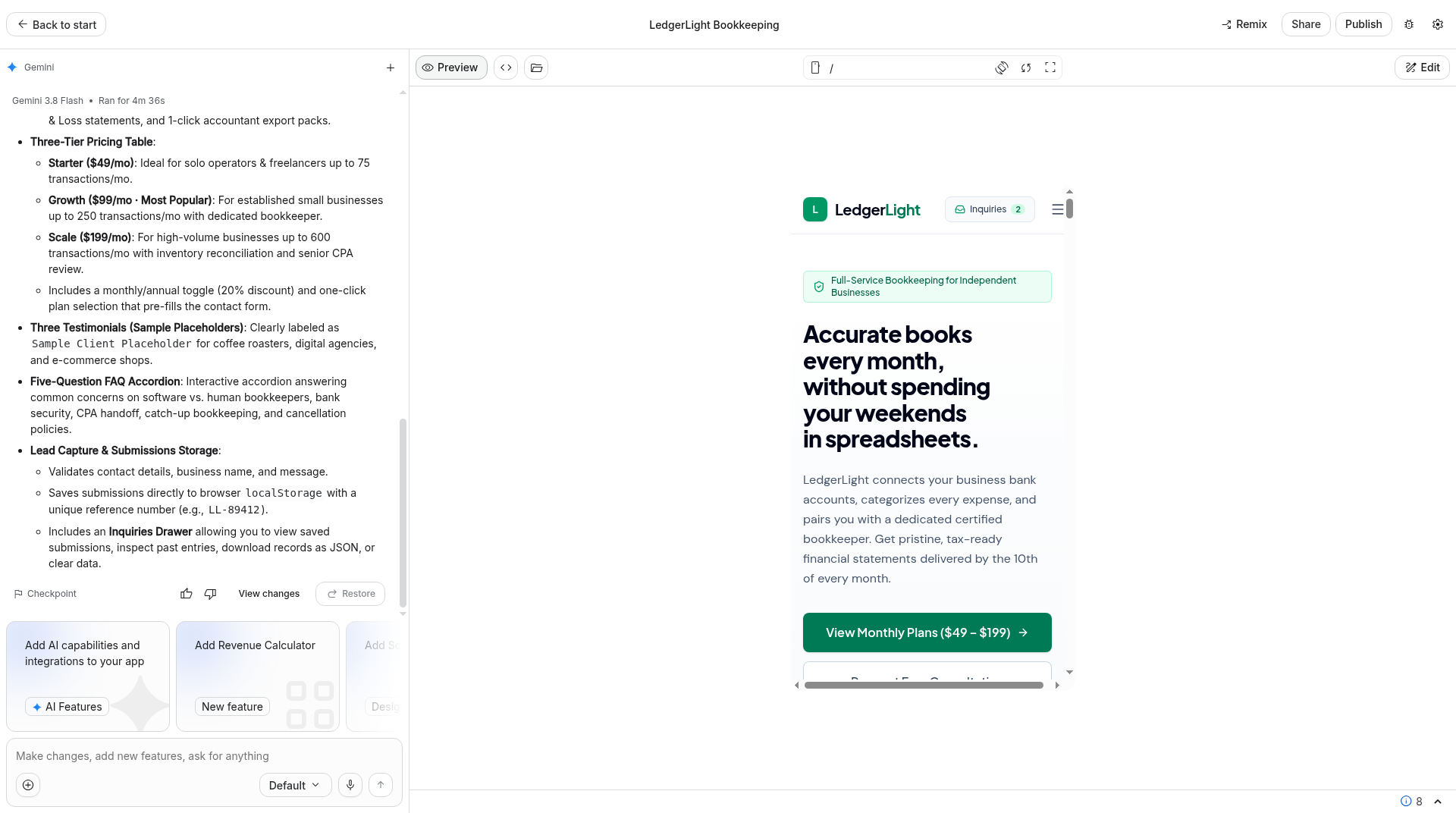
Google AI Studio (demo-only in about 7 minutes, 1 fix; not securely working): in the preview, signup, login, the intake fields with all five entity options, one PNG upload, past submissions and status, an admin status change, refresh persistence and the mobile preview all passed as a demo. The 3-file upload limit was not tested. Accounts, submissions and the uploaded file were stored in the browser, not on a real backend. At first, a client could access the admin table. We sent one fix-up: “Prevent client accounts from accessing the admin view; restrict admin actions to admin accounts.” That hid the admin nav for the test client. The demo admin could still change status, a one-click demo admin login remained, and the log records no real security. The generated app also included unverified security-certification claims, including a “Verified Client Portal” badge in the preview.
Build 2: invoice tracker
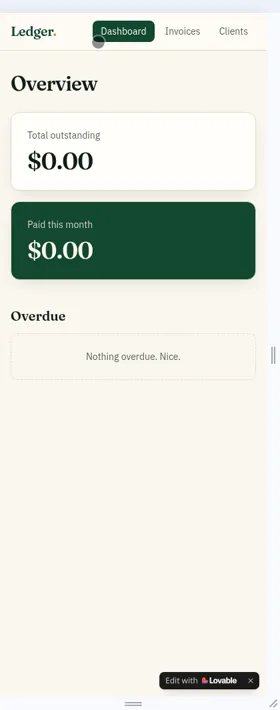
Lovable (about 4 minutes, 0 fixes): clients, invoices with line items and automatic totals ($350.00 and $602.00), Paid status, automatic Overdue and dashboard totals all worked, and data survived a reload. The data appeared to be saved in the browser only. Opened from a different address, the dashboard showed $0.00.
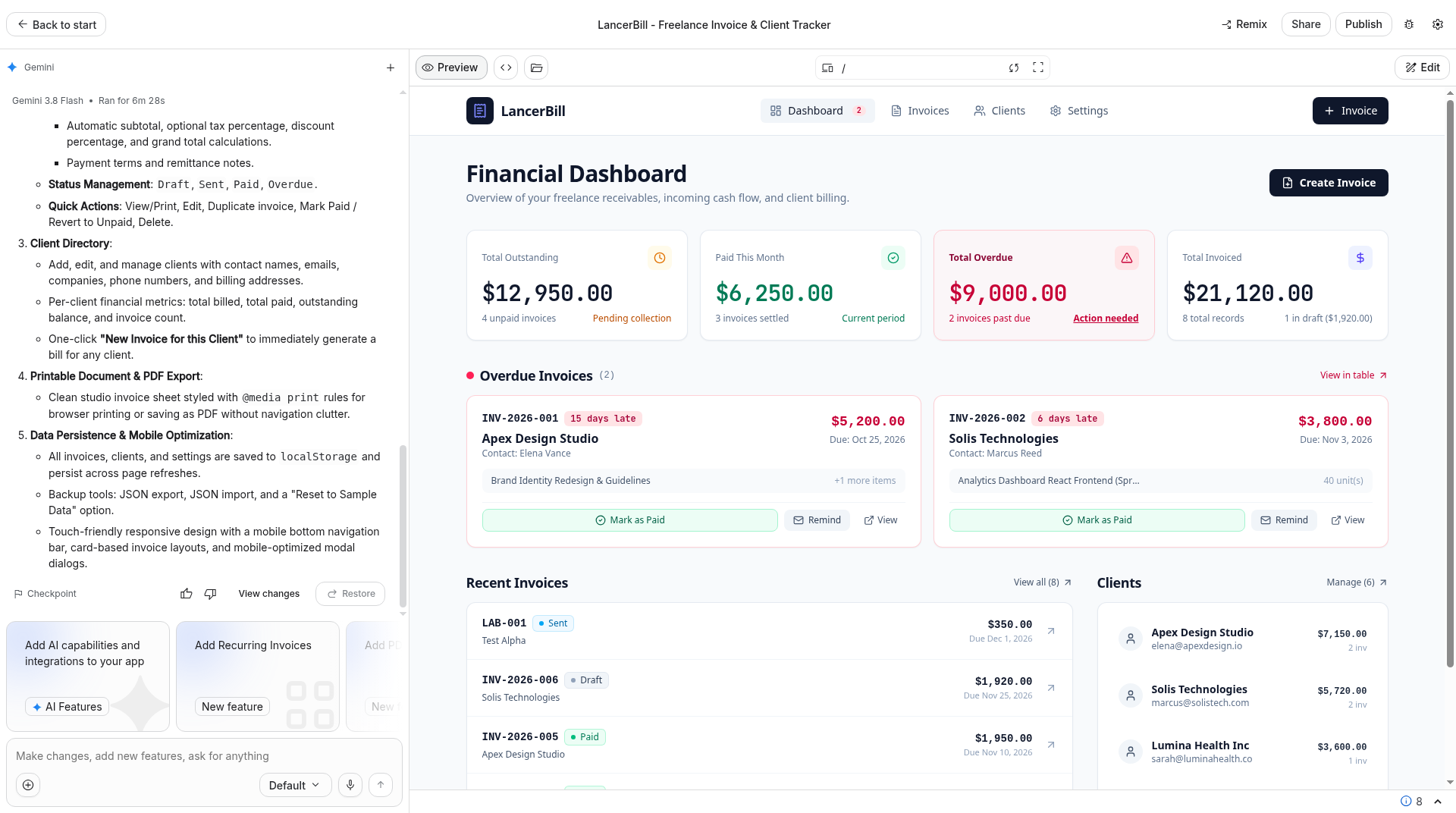
Google AI Studio (10 min 15 s to working, 0 fixes): two clients, a two-line invoice totaling $350 ($200 + $150), automatic Overdue, Paid status, the dashboard and refresh persistence all passed, as did the mobile preview. After we marked a $100 overdue test invoice paid, the dashboard showed $12,950 outstanding, $6,250 paid this month and $9,000 overdue, including the app’s own seeded sample data. Persistence was browser localStorage, not a backend.
The lesson for both: if an app stores business records, ask for a database in your first prompt. Lovable did not choose one for the invoice tracker on its own. AI Studio did not provision a real database on any of our three prompts, including this one.
Build 3: LedgerLight landing page
Lovable (about 2 minutes 50 seconds, 0 fixes): hero and call to action, three features, the $49/$99/$199 pricing table, testimonials labeled as samples, a five-question FAQ and a contact form that saved to a Cloud database table. It didn’t send an email when the form was submitted. FAQ and plan copy were invented by Lovable.
Google AI Studio (6 min 36 s to working, then 1 fix): the hero, three features, the $49/$99/$199 monthly tiers, three testimonials each labeled as samples, exactly five FAQs, and a contact submit that was still there after a refresh all passed. Contact records were browser-local, not sent to a backend. The generated page copy claimed secure storage, follow-up, and SOC 2 and Plaid compliance. Those claims were generated by the tool, and we found nothing to back them up. The first mobile preview overflowed horizontally. We sent: “Fix horizontal overflow on mobile so the entire page fits the viewport without sideways scrolling.” The horizontal scrollbar was gone in the mobile hero view afterward. We did not exhaustively retest the full page.
Pricing and usage
Google AI Studio
We tested the free tier only: no paid plan, no billing setup and no API key linked. During the three builds, no numeric quota or rate-limit indicator appeared, and no billing prompt appeared. An upsell banner did appear: “Unlock Gemini 4 Argon — Access to higher quota, Pro models, and more.”
Google’s learn page says: “You can build, customize, and preview apps in Google AI Studio at no cost. The free-of-cost tier lets you prototype with Gemini without adding a credit card or setting up billing.” Source: aistudio.google.com/learn/ai-app-builder. Google’s pricing notes also say “Google AI Studio usage is free of charge in all available regions,” with details in the Billing FAQs. The billing FAQ adds that AI Studio usage remains free of charge unless you link a paid API key for paid features.
Publishing is a separate step. Google’s publish docs say eligible accounts can use a Google Cloud Starter Tier to “publish up to 2 full-stack apps without setting up a Google Cloud project or billing account,” and that a paid Google Cloud project “requires a Google Cloud project linked to your AI Studio account with Cloud Billing enabled.” Custom domains are documented on paid Google Cloud projects. The Build mode docs also say: “Pricing for Google Cloud Run may apply based on usage.” We saw a Publish button and did not open it, so we did not test publishing, Starter Tier eligibility, custom domains or any Cloud Run charge. Source: Publish your app in Google AI Studio and Build mode.
Google’s rate-limits docs say free-tier limits vary by model and should be viewed in AI Studio, and that specified limits are not guaranteed. We cannot report a numeric free-tier allowance from our run, because none was shown.
Lovable
| Plan | Monthly credits | Billed monthly | Billed annually |
|---|---|---|---|
| Free | 5 build credits a day (up to 30 a month) | $0 | $0 |
| Pro | 100 | $25/mo | $250/yr ($21/mo) |
| Business | 100 | $50/mo | $500/yr ($42/mo) |
| Enterprise | Volume-based | Contact sales | Contact sales |
Sources: docs.lovable.dev/introduction/subscription-plans and lovable.dev/pricing. Prices in USD. The official docs table lists these as the 100-credit entry tiers for Pro and Business; higher credit tiers are also listed there.
On Pro, our three October builds used 5.5 credits from the 100-credit monthly balance, plus that day’s 5 free daily build credits. We report the balance figures; the usage page disagreed slightly, as the usage study explains. The cost calculator runs the numbers for a chosen plan.
Backend, data and code ownership
- Database: Lovable set up a real Cloud database for the portal and the landing-page form without being asked, and saved the invoice tracker in the browser only. AI Studio saved all three apps in the browser. Google’s docs say Build mode can provision Firestore automatically; we did not test that request.
- Sign-in: Lovable used email and password with a confirmation link, on Lovable Cloud. AI Studio’s preview had a demo signup and login, including a one-click demo admin, with no real backend. Google’s docs describe auto-setup of “Sign in with Google,” not email-and-password, and we did not test that path.
- Who sees what: Lovable’s separate client account passed our check. On AI Studio, a client could open the admin table until one fix-up hid the admin nav. That was not real security.
- Generated claims: Review the copy before anyone else uses the app. AI Studio’s portal included unverified certification claims, and its LedgerLight page claimed secure storage, follow-up, and SOC 2 and Plaid compliance that we did not verify.
- Code: On Pro, Lovable’s “Download codebase” gave us 100 files, and Settings offers Git sync with GitHub, GitLab or Bitbucket. AI Studio offered a ZIP (we downloaded it on the free tier; we did not count the files), plus GitHub sync and Antigravity options we did not use. We have not run either tool’s exported code outside its platform.
- Publishing: We did not publish or share any test app. AI Studio’s Publish button was visible and was not opened. App sharing settings were not independently verified. Lovable custom domains and removing the “Edit with Lovable” badge need a paid plan (Pro and up), per Lovable’s docs.
Pros and cons
Google AI Studio
- Pro: Built a demo-working version of all three test apps on the free tier, with no billing prompt and no numeric quota shown
- Pro: ZIP download worked on the free tier; GitHub sync was visible
- Pro: Official docs describe a full prompt-to-app Build mode, not only an API sandbox
- Con: All data in our test was browser-local, including accounts and uploads
- Con: The portal left admin access exposed until a fix-up, which still did not add real security
- Con: Generated copy included unverified SOC 2, Plaid and certification claims
Lovable
- Pro: In our October Pro test, all three apps worked in about 16 minutes, with 1 fix
- Pro: Portal and landing-page form used Lovable Cloud; a separate client stayed out of admin
- Pro: Code download (100 files) and Git sync confirmed on Pro
- Pro: No per-seat pricing, per the plan docs
- Con: We tested a paid plan; the free allowance is 5 build credits a day, up to 30 a month
- Con: The invoice tracker saved data in the browser until asked for a database
- Con: No built-in way to make the first admin
When NOT to use each
When NOT to use Google AI Studio
- You need real accounts, a database or stored uploads from the same kind of first prompt we used. Our three prompts did not provision those.
- You would put real client data into the preview. In our portal, a client could reach the admin table until a fix-up, and even then the log records no real security. All data was browser-local.
- You would publish the generated copy without reading it. The landing page claimed SOC 2 and Plaid compliance that we did not verify.
- You need a numeric usage meter before you start. We were not shown one on the free tier.
When NOT to use Lovable
- You need a fixed monthly bill. Credits per message vary, and a busy live app draws on the same balance.
- You want to edit or download the code without paying. Both need a paid plan (Pro and up), per Lovable’s docs.
- You need an app in the App Store or Google Play. Lovable builds web apps. (Google’s Build mode docs describe a native Android path; we tested web only, so that is untested here.)
Free alternatives
- Bolt Free (1 million tokens a month, 300,000 a day): built all three of our test apps with a real database in one day, using its whole daily limit. See Bolt vs Lovable.
- Base44 Free (25 message credits a month, up to 5 apps): we tested Base44 on its paid Builder plan, where all three apps worked with no bug fixes. See Base44 vs Lovable.
- Lovable Free (5 build credits a day, up to 30 a month): enough to try one small app; code download needs a paid plan (Pro and up), per Lovable’s docs.
- Replit Free: built all three of our test apps, but the daily free allowance stretched the test over two days. See Lovable vs Replit.
More options, including tools we’ve only researched, are in our Lovable alternatives guide and how to build an app with AI for free.
Who should pick which
Pick Lovable if you don’t code, will pay for Pro, and need a web app whose portal data lives in a real backend, with a client-access check you can actually run. Ask for a database in your first prompt if the app stores invoices or other records, and review the generated copy before launch.
Pick Google AI Studio if you want a free, same-day preview of those same kinds of apps and you are willing to treat the result as a demo until you add real authentication and storage — and until you have removed unverified claims from the copy. We did not test asking Build mode to provision Firebase.
Try Lovable free → Visit Google AI Studio →
Also weighing Bolt? Our Bolt vs Lovable comparison uses the same three builds, and the AI app builder comparison table puts every scored tool we’ve tested in one place.
Google AI Studio vs Lovable FAQ
Which is better, Google AI Studio or Lovable?
It depends on what you need, and our tests were not a same-day, same-plan run. Lovable on Pro scored 8.4/10 in our October test, finished all three apps in about 16 minutes with 1 fix, and saved the portal and the landing-page form in Lovable Cloud. Google AI Studio on the free tier, in November, built demo-working apps for all three prompts, with 2 fix-ups, but kept all data in the browser and did not reach a securely working portal. We have not scored AI Studio.
Is Google AI Studio just an API sandbox?
No, not according to Google’s Build mode docs. Google describes Build mode as a way to go from a prompt to a generated app, including a React and Node.js web app or a native Android app. Source: Build apps in Google AI Studio. In our web test, it did generate complete-looking apps. It did not, from our three prompts, set up a real backend.
Can Gemini / Google AI Studio build an app?
Yes, in Build mode, from a prompt. We pasted our three standard prompts into AI Studio Build mode on the free tier and got a demo-working web app each time. That is not the same as a hosted app with real logins and a database. We did not test Gemini Canvas, which is a different surface, or the Android Build path.
Does Google AI Studio include a real database or login?
Google’s docs say the agent can automatically provision Firestore and Firebase Authentication (“Sign in with Google”). We did not test that. In our three-prompt run, accounts, uploads, invoices and contact submissions were stored in the browser only.
Which is cheaper, Google AI Studio or Lovable?
We used AI Studio’s free tier and were not shown a numeric usage charge or a billing prompt. Lovable was tested on Pro at $25 a month billed monthly ($250 a year, or $21 a month). Those three Lovable builds used 5.5 credits from the 100-credit balance, plus that day’s 5 free daily build credits. Publishing an AI Studio app, and any Cloud Run usage, was not tested.
Can I export my code from Google AI Studio or Lovable?
Both offered a download in our tests. Lovable’s code download needs a paid plan, per the plan docs, and on Pro we downloaded 100 files; Git sync is documented on every plan. AI Studio’s ZIP downloaded on the free tier (file count not recorded), and GitHub sync was visible. We have not run either export outside its platform.
Can Google AI Studio or Lovable make mobile apps?
Lovable builds web apps and says it doesn’t produce App Store or Google Play packages (Lovable); our test apps worked at phone width in the browser. Google’s Build mode docs describe native Android apps with Kotlin and Jetpack Compose. We tested AI Studio’s web path only, including phone-width previews, not an Android build.
Related tests
- Lovable review and Lovable pricing explained
- Bolt vs Lovable
- Lovable vs Replit
- AI app builder usage study
Tested: Lovable on Oct 29, 2026 (Pro); Google AI Studio on Nov 9, 2026 (free tier, Gemini 3.8 Flash). AI Studio docs and Lovable plan docs checked Nov 9, 2026. Lovable, Bolt and Base44 prices rechecked Nov 9, 2026. Published: Nov 9, 2026. Updated: Nov 16, 2026.